Producte acabatview
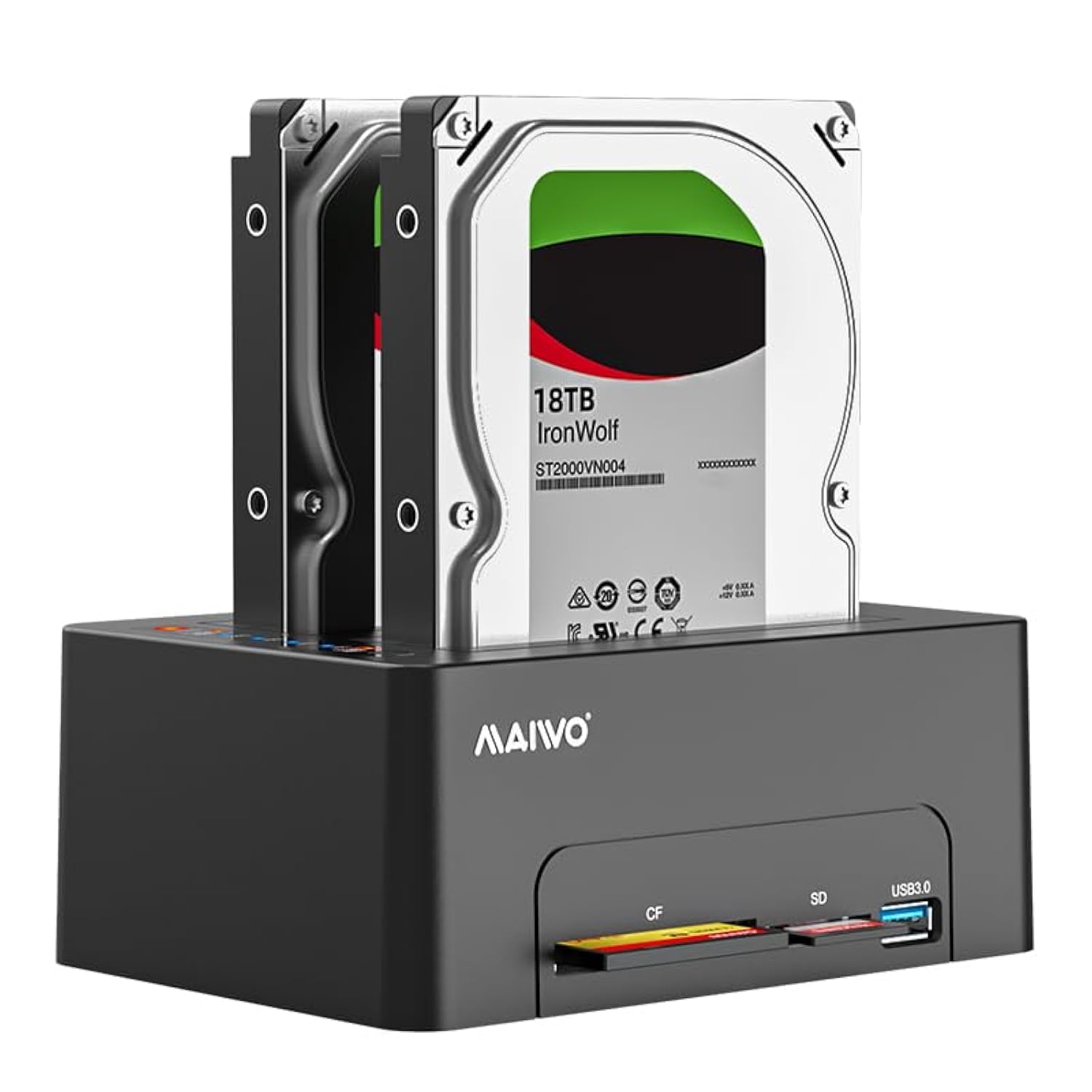
The MAIWO Dual Bay Hard Drive Docking Station is designed for convenient access, cloning, and data management of 2.5-inch and 3.5-inch SATA HDDs and SSDs. It features offline cloning capabilities, a USB 3.0 interface for high-speed data transfer, and integrated SD/CF card readers along with an additional USB 3.0 expansion port.
Característiques clau
- Dual Bay Compatibility: Supports both 2.5-inch and 3.5-inch SATA HDD/SSD, with each bay supporting up to 24TB, for a total capacity of 48TB.
- Funció de clonació fora de línia: Allows direct cloning of data from a source HDD to a target HDD without requiring a computer connection. Progress is indicated by LED lights.
- USB 3.0 de supervelocitat: Provides data transfer speeds up to 5Gbps, backward compatible with USB 2.0 and USB 1.1.
- Independent Power Supply: Equipped with a 12V 4A power adapter for stable and reliable operation.
- Lectors de targetes integrats: Features dedicated slots for SD and CF cards, enabling direct read and write capabilities.
- USB 3.0 Expansion Port: Includes an additional USB 3.0 Type-A port for connecting USB flash drives or charging devices at 2.4A.
Contingut del paquet
Si us plau, verifiqueu que tots els elements siguin presents al vostre paquet:
- 1x MAIWO 2.5/3.5 inch SATA Hard Drive Docking Station
- 1x Cable de dades USB-B a USB-A
- 1x adaptador de corrent de 12 V 4 A
- 1 x manual d'usuari
Instruccions de configuració
Connexió de l'estació d'acoblament
- Connecteu el subministrament USB-B to USB-A Data Cable from the docking station's USB 3.0 port to an available USB port on your computer.
- Connecteu el Adaptador d'alimentació 12V 4A to the DC 12V input port on the docking station, then plug the adapter into a power outlet.
- Gira el Interruptor ON/OFF on the rear of the docking station to the 'ON' position. The power indicator LED will illuminate.

Instal·lació de discs durs
- Ensure the docking station is powered off before inserting or removing drives.
- Gently insert your 2.5-inch or 3.5-inch SATA HDD/SSD into the appropriate drive bay (HDD1 for Source, HDD2 for Target). Ensure the SATA connectors align correctly.
- Press down firmly until the drive is securely seated. The elastic plate mechanism will help hold the drive in place.


Instruccions de funcionament
Data Transfer (Read & Write)
- Assegureu-vos que l'estació d'acoblament estigui connectada a l'ordinador i engegada.
- Insert your hard drives into the bays.
- Your computer should detect the new disk(s) automatically. For new drives, you may need to initialize and format them via Disk Management (Windows) or Disk Utility (macOS) before use.
- Accediu a les unitats a través de l'ordinador file explorer to read or write data.


Offline Clone Function
The offline clone function allows you to duplicate a source drive to a target drive without a computer connection. Ensure the target drive has equal or greater capacity than the source drive.
- Assegureu-vos que l'estació d'acoblament estigui apagada.
- Inseriu el source disk into the HDD1 slot and the target disk into the HDD2 slot.
- Do not connect the docking station to a computer during the cloning process.
- Connect the power adapter and switch the docking station to the 'ON' position.
- Once the HDD1 and HDD2 indicators light up, double-click the 'Clone' button. The cloning process will begin, and the LED progress indicators (25%-50%-75%-100%) will illuminate sequentially.
- The clone process is complete when all progress LEDs reach 100%.
Using the Card Reader and USB 3.0 Expansion Port
The docking station includes dedicated slots for SD and CF cards, and an additional USB 3.0 Type-A port.
- Insert your SD or CF card into the corresponding slot on the front of the docking station. The card will appear as a removable drive on your computer.
- Connect USB flash drives or other USB devices to the USB 3.0 Type-A expansion port. This port also supports 2.4A phone charging.
- Note: The docking station can read and write to SD/CF cards, but it does not support cloning HDD data to SD/CF cards. Only one card can be read at a time.

Manteniment
To ensure the longevity and optimal performance of your MAIWO Dual Bay Hard Drive Docking Station, follow these maintenance guidelines:
- Keep the device clean and free from dust. Use a soft, dry cloth for cleaning. Avoid liquid cleaners.
- Ensure proper ventilation around the docking station to prevent overheating, especially during extended use or cloning operations.
- Eviteu exposar el dispositiu a temperatures extremes, humitat o llum solar directa.
- Always power off the docking station before inserting or removing hard drives to prevent data corruption or damage to the drives/device.
Resolució de problemes
- Drives not detected by computer:
- Ensure the docking station is powered on and the USB cable is securely connected to both the docking station and the computer.
- Proveu un port USB diferent a l'ordinador.
- For new drives, ensure they are initialized and formatted via your operating system's disk management utility.
- Verify that the hard drives are properly seated in the bays. - Offline clone not starting or failing:
- Ensure the docking station is NOT connected to a computer during the clone process.
- Verify that the target drive (HDD2) has a capacity equal to or greater than the source drive (HDD1).
- Double-check that the source drive is in HDD1 and the target drive is in HDD2.
- Ensure the 'Clone' button is double-clicked to initiate the process after both drive LEDs are lit. - Velocitats de transferència de dades lentes:
- Ensure you are using a USB 3.0 port on your computer for optimal speeds. Connecting to a USB 2.0 port will result in lower speeds.
- Check the condition of the USB cable. Try a different USB 3.0 cable if available.
- Performance can also be affected by the speed of the hard drives themselves. - Card reader or USB expansion port not working:
- Ensure the docking station is powered on and connected to the computer.
- Try reinserting the SD/CF card or USB device.
- Remember that only one card can be read at a time.
Especificacions
| Número de model | 2 Bay - CF/SD Card (K3082A) |
| Tipus de unitat compatibles | Disc dur/SSD SATA I/II/III de 2.5 i 3.5 polzades |
| Max Capacity Per Bay | 24 TB |
| Capacitat màxima total | 48 TB |
| Interfície | USB 3.0 Type-B (Host), USB 3.0 Type-A (Expansion) |
| Velocitat de transferència de dades | Fins a 5 Gbps (USB 3.0) |
| Ranures per a lectors de targetes | SD Card, CF Card |
| Font d'alimentació | Adaptador d'alimentació DC 12V 4A |
| Material | High-Strength ABS Plastic |
| Dimensions del producte | 5.98 x 4.29 x 2.44 polzades (15.19 x 10.89 x 6.2 cm) |
| Pes de l'article | 2.16 lliures (0.98 kg) |
| Sistema operatiu compatible | Windows Vista/XP/7/8/10, Mac OS, Linux |
Garantia i Suport
MAIWO products are designed for reliability and performance. This product typically comes with a standard manufacturer's warranty. Please refer to the warranty card included in your package or visit the official MAIWO weblloc web per obtenir informació detallada sobre els termes i condicions de la garantia.
For technical support, troubleshooting assistance, or warranty claims, please contact MAIWO customer service through their official weblloc web o la informació de contacte que es proporciona a la documentació del producte.


