1. Introducció
The NZXT C650 PSU is a high-quality, fully modular power supply unit designed to provide stable and efficient power to your computer system. This manual provides essential information for the proper installation, operation, maintenance, and troubleshooting of your C650 power supply.
Característiques principals:
- More Efficient: At 50% load and high-line input voltage, power conversion efficiency reaches 2% higher than 80 Plus Gold Standard.
- Totalment modular: Use only the cables you need to keep your system clean and organized. Black sleeved cables and a matte black finish seamlessly fit any PC style.
- Compatible and Highly-Tested: C series is built and tested with strict standards for trouble-free installation. It fits most ATX cases and supports the latest NVIDIA and AMD GPUs up to 30 series and AMD 6000 Series.
- More Precise and Error-Free: Micro controller (MCU) enabled protection mechanism monitors current and voltage i sortida wattage.
- Optimized and Silent: Gold PSU includes low thermal dissipation optimization with upgraded components and optimized circuit design.
2. Producte acabatview
The NZXT C650 PSU is designed with a sleek, matte black finish and a compact form factor to integrate seamlessly into various PC builds. Its fully modular design allows for clean cable management.

Figura 2.1: Part frontal view of the NZXT C650 Power Supply Unit.
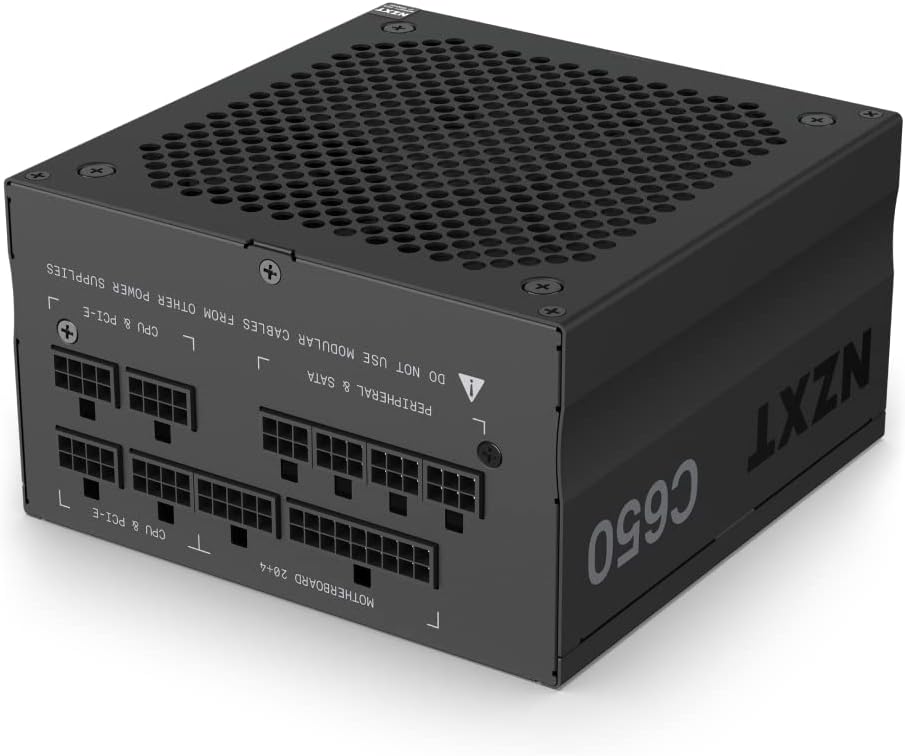
Figure 2.2: Modular cable connection ports on the NZXT C650 PSU. These ports allow you to connect only the necessary cables for your system.

Figura 2.3: posterior view of the NZXT C650 PSU, showing the AC power inlet and the main power switch.

Figura 2.4: superior view of the NZXT C650 PSU, highlighting the fan grill for optimal airflow and cooling.
3. Configuració i instal·lació
Before beginning installation, ensure your computer system is powered off and unplugged from the wall outlet. Always handle components with care and refer to your PC case and motherboard manuals for specific installation guidelines.
Passos d'instal·lació:
- Muntar la font d'alimentació: Secure the NZXT C650 PSU into the designated power supply bay of your PC case using the provided screws. Ensure the fan is oriented correctly for optimal airflow (typically facing downwards or upwards, depending on case design).
- Connecteu els cables modulars: Identify the necessary cables for your motherboard (24-pin ATX, 8-pin CPU), graphics card(s) (PCIe), and peripherals (SATA, Molex). Connect these cables to the corresponding modular ports on the PSU.
- Cables de ruta: Route the connected cables through your case's cable management channels to their respective components. This helps improve airflow and aesthetics.
- Connecta't als components: Plug the 24-pin ATX cable into your motherboard, the 8-pin CPU cable into the CPU power header, and PCIe cables into your graphics card(s). Connect SATA and Molex cables to your storage drives and other peripherals.
- Connexions segures: Ensure all cable connections are firmly seated to prevent power delivery issues.
- Encès: Once all connections are secure, plug the AC power cord into the PSU and a wall outlet. Flip the power switch on the back of the PSU to the 'ON' position. You can now power on your computer system.

Figure 3.1: The NZXT C650 PSU installed within a computer case, demonstrating its compact fit and modular cable connections.
4. Funcionament
The NZXT C650 PSU is designed for efficient and quiet operation. Its 80 Plus Gold certification ensures high power efficiency, reducing wasted energy and heat generation. The optimized circuit design and low thermal dissipation contribute to its silent performance, even under load.
The micro-controller (MCU) enabled protection mechanism continuously monitors current, voltage, i sortida wattage, providing stable and safe power delivery to your components. This intelligent monitoring helps prevent damage from power fluctuations.
5. Manteniment
Proper maintenance can extend the lifespan of your power supply and ensure optimal performance.
- Eliminació de pols: Netegeu periòdicament la pols del ventilador i de les reixetes de ventilació de la font d'alimentació amb aire comprimit. Assegureu-vos que el sistema estigui apagat i desendollat abans de netejar-lo.
- Flux d'aire: Ensure your PC case has adequate airflow to prevent heat buildup around the PSU. Avoid blocking the PSU's intake or exhaust vents.
- Gestió de cables: Maintain tidy cable management to prevent cables from obstructing airflow within the case.
6. Solució De Problemes
If you encounter issues with your NZXT C650 PSU, refer to the table below for common problems and solutions.
| Problema | Possible causa/solució |
|---|---|
| Power Supply Not Turning On |
|
| Inestabilitat o bloquejos del sistema |
|
| Soroll del ventilador excessiu |
|
If the issue persists after attempting these solutions, please contact NZXT customer support for further assistance.
7. Especificacions
Detailed specifications for the NZXT C650 PSU (Model: PA-6G1BB-US):
| Característica | Detall |
|---|---|
| Marca | NZXT |
| Nom del model | PA-6G1BB-US |
| Potència de sortidatage | 650 watts |
| Factor de forma | ATX |
| Classificació d'eficiència | Certificat 80 Plus Gold |
| Modularitat | Totalment Modular |
| Mètode de refrigeració | Aire |
| Pes de l'article | 4 lliures |
| Dimensions del producte (LxWxH) | 9 x 5 x 13 polzades |
| Dispositius compatibles | Personal Computer, Monitor |
8. Garantia i Suport
NZXT products are backed by a manufacturer's warranty. For specific warranty terms and conditions applicable to your C650 PSU, please refer to the warranty information included with your product packaging or visit the official NZXT weblloc.
For technical support, troubleshooting assistance beyond this manual, or warranty claims, please contact NZXT customer support through their official weblloc:
Please have your product model number (PA-6G1BB-US) and serial number ready when contacting support.


