Introducció
The Phomemo D35 is a compact and portable wireless Bluetooth label maker designed for efficient organization in various settings, including home, office, and school. This device utilizes thermal printing technology, eliminating the need for ink, toner, or ribbons, which contributes to lower operating costs. It connects seamlessly with smartphones via Bluetooth, allowing users to design and print custom labels using the dedicated PrintMaster Design&Print App.
Key features include a built-in rechargeable battery, Type-C fast charging, and a convenient integrated cutter for easy label separation. The D35 offers a wide array of customization options with multiple templates, symbols, frames, and fonts available through the app, supporting various label sizes from 0.24 to 0.47 inches.

Figure 1: Phomemo D35 Label Maker with included labels.
Configuració
1. Unboxing i Inspecció Inicial
Upon receiving your Phomemo D35 Label Maker, carefully open the packaging and verify that all components are present. The standard packing list includes:
- 1x Phomemo D35 Label Maker
- 1x Roll of 80-PCS Label Tape (12x40mm)
- 1x Cable USB (Tipus C)
- 1 x manual d'usuari

Figure 2: Contents of the Phomemo D35 Label Maker package.
2. Càrrega del dispositiu
Before first use, ensure the label maker is fully charged. Connect the provided Type-C USB cable to the charging port on the device and plug the other end into a compatible USB power adapter (not included). The charging indicator light will provide feedback on the charging status.

Figure 3: The Phomemo D35 features Type-C fast charging.
3. Installing Label Tape
To install the label tape:
- Obriu la tapa del compartiment d'etiquetes del dispositiu.
- Insert the label roll with the printing surface facing upwards, ensuring the leading edge of the label tape extends slightly out of the slot.
- Tanqueu la coberta de manera segura.
Video 1: Demonstration of label tape installation in the Phomemo D35. This video also addresses common user queries regarding app permissions.
4. Instal·lació de l'aplicació i connexió Bluetooth
Download the free "PrintMaster Design&Print" app from your smartphone's app store (iOS or Android). Once installed:
- Activa el Bluetooth al teu telèfon intel·ligent.
- Turn on the Phomemo D35 by pressing the power button.
- Open the PrintMaster app and follow the on-screen instructions to connect to your D35 device via Bluetooth. The app will typically auto-detect nearby Phomemo devices.
Instruccions de funcionament
1. Disseny d'etiquetes
The PrintMaster app provides extensive tools for label creation:
- Text: Enter custom text and choose from over 120 fonts.
- Icones i símbols: Access a library of over 2000 symbols and icons for various categories.
- Frames & Borders: Select from over 60 decorative borders.
- Plantilles: Utilize pre-designed templates for common labeling needs (e.g., price tags, cable identification, food date marking).
- ID Code & QR Code: Generate barcodes and QR codes directly within the app.
- Imatges: Integrate images into your label designs.
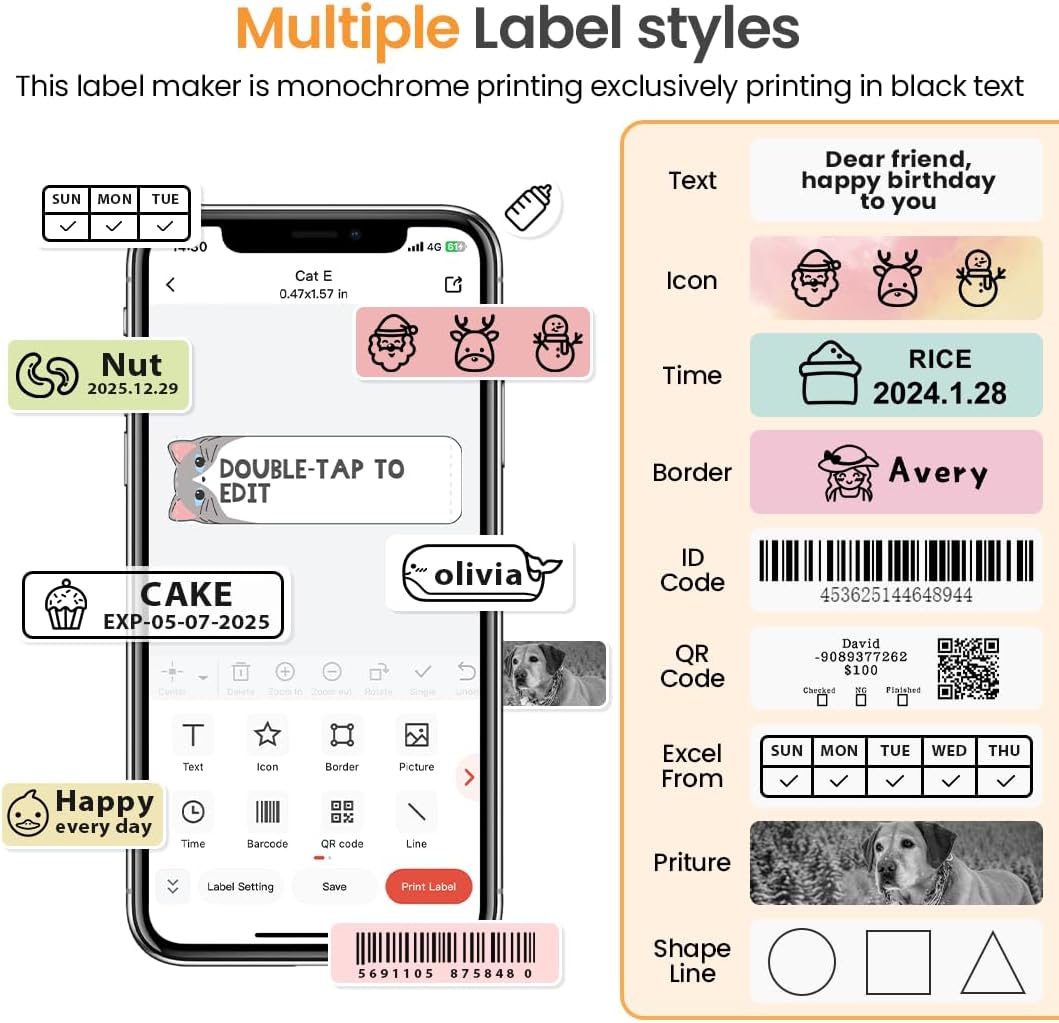
Figure 4: The PrintMaster app offers diverse design options including text, icons, and borders.

Figure 5: Explore over 1000 patterns and various fonts within the PrintMaster app for creative label designs.
2. Impressió d'etiquetes
Once your label design is complete in the app, tap the "Print" button. The D35 will quickly print your label with high clarity. Ensure the label maker is within Bluetooth range and has sufficient battery life.
3. Using the Built-in Cutter
The Phomemo D35 features a built-in cutter for easy and clean separation of printed labels. After printing, gently pull the label forward and use the integrated cutter to detach it from the roll.

Figure 6: The Phomemo D35 includes a built-in cutter for convenient label separation and a Type-C charging port.
4. Aplicacions d'etiquetes
The Phomemo D35 is versatile for various labeling needs:
- Organització de la llar: Labeling spice jars, storage bins, pantry items, and personal belongings.
- Ús d'oficina: Organitzant files, documents, cables, and office supplies.
- Projectes escolars: Labeling notebooks, school supplies, and craft items.
- Comerç minorista/petita empresa: Creating price tags, product identification, and inventory labels.

Figura 7: Examples of Phomemo D35 label applications in school, office, organization, and gifting contexts.
Vídeo 2: Un overview of the Phomemo D35 Label Maker's features and capabilities.
Manteniment
1. Neteja del capçal d'impressió
To maintain optimal print quality, periodically clean the print head. Use a soft, lint-free cloth lightly dampened with rubbing alcohol. Gently wipe the print head surface. Ensure the device is turned off and disconnected from power before cleaning.
2. Cura de la bateria
The D35 uses a built-in Lithium Polymer battery. To prolong battery life:
- Eviteu descarregar completament la bateria amb freqüència.
- Guardeu el dispositiu en un lloc fresc i sec quan no el feu servir durant períodes prolongats.
- Carregueu el dispositiu regularment, fins i tot si no l'utilitzeu amb freqüència, per evitar una descàrrega profunda.
3. Label Storage
Phomemo D35 uses thermal labels, which are sensitive to heat and direct sunlight. Store unused label rolls in a cool, dark place away from direct heat sources or prolonged exposure to light to prevent fading or discoloration.
Resolució de problemes
If you encounter issues with your Phomemo D35 Label Maker, refer to the following common problems and solutions:
| Problema | Causa possible | Solució |
|---|---|---|
| No hi ha alimentació/El dispositiu no s'encén | Bateria baixa; el botó d'engegada no s'ha premut correctament | Carregueu el dispositiu completament; manteniu premut el botó d'engegada durant uns segons. |
| No es pot connectar mitjançant Bluetooth | Bluetooth desactivat; Dispositiu fora de l'abast; Problema amb l'aplicació | Ensure Bluetooth is enabled on phone; Move device closer; Restart app and device. |
| Poor print quality (faint, blurry) | Print head dirty; Incorrect label installation; Low battery | Clean print head; Reinstall label roll correctly; Charge device. |
| Labels not feeding or jamming | Label roll improperly installed; Obstruction in paper path | Reinstall label roll, ensuring it's straight; Check for and remove any debris. |
| L'aplicació es bloqueja o es bloqueja | Software bug; Outdated app version | Restart the app; Check for app updates in your app store. |
For further assistance, please refer to the official Phomemo support resources or contact customer service.
Especificacions
| Característica | Detall |
|---|---|
| Nom del model | D35 |
| Número de model de l'article | 7YW0--CA-D35-WH-1 |
| Tecnologia d'impressió | Tèrmica directa |
| Tecnologia de connectivitat | Bluetooth, USB (Type-C for charging) |
| Resolució | 203 x 203 DPI |
| Velocitat màxima d'impressió (monocrom) | 40 mm/s |
| Compatible Label Width | 0.24 - 0.47 inches (6mm - 12mm) |
| Bateria | Polímer de liti de 1000 mAh (inclosa) |
| Pes de l'article | 5.6 unces (160 grams) |
| Dimensions del producte | 1.97 x 0.79 x 3.15 inches (5.2"H x 2.3"W x 1.2"D) |
| Mètode de control | App (PrintMaster Design&Print) |
Garantia i Suport
Phomemo products are designed for reliability and performance. For detailed warranty information, please refer to the warranty card included in your product packaging or visit the official Phomemo website. For technical support, troubleshooting assistance, or inquiries regarding replacement parts and accessories, please contact Phomemo customer service through their official channels.
Podeu descarregar una versió electrònica de la guia d'usuari: Phomemo D35 User Guide (PDF)


