1. Introducció
The Milesight MS-N5016-E is a 4K H.265+ Pro Network Video Recorder (NVR) from the 5000 Series, designed for advanced video surveillance systems. This NVR offers robust 4K decoding and display capabilities, supporting synchronous decoding of up to 3-channel 4K UHD or 12-channel 1080P video streams. It features 16-channel input and an 80Mbps bandwidth, making it suitable for comprehensive security solutions.
Key features include intelligent Video Content Analysis (VCA) management, AI VCA alarm settings, event search, real-time data and statistical reports for business intelligence, POS integration, and Automatic Network Replenishment (ANR) for data reliability.
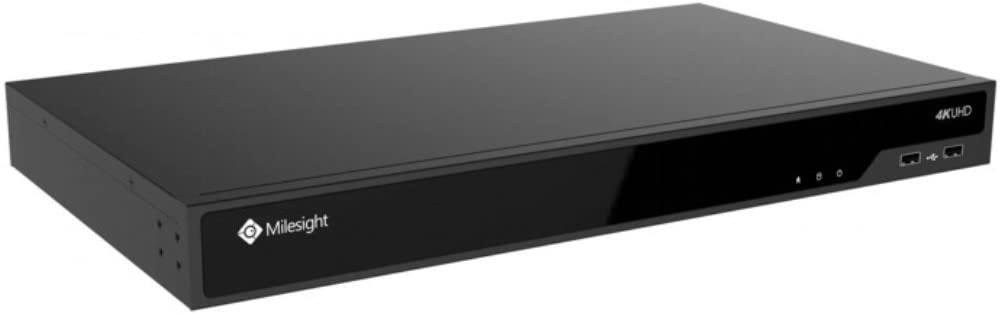
Figura 1: Frontal view of the Milesight MS-N5016-E NVR unit.
2. Guia de configuració
Follow these steps to set up your Milesight MS-N5016-E NVR:
- Desembalatge i inspecció: Carefully unpack the NVR and all accessories. Inspect for any signs of damage.
- Hard Drive Installation (if applicable): If hard drives are not pre-installed, refer to the separate hard drive installation guide. Ensure drives are securely mounted.
- Connectar l'alimentació: Connect the provided power adapter to the NVR and then to a power outlet.
- Connecta la pantalla: Connect a monitor to the NVR's VGA or HDMI output port.
- Connectar la xarxa: Connecteu un cable Ethernet des del port LAN de l'NVR al vostre encaminador o commutador de xarxa.
- Connectar càmeres IP: Connect your IP cameras to the NVR's PoE ports (if available) or to the same network as the NVR.
- Engegada inicial: Power on the NVR. Follow the on-screen wizard for initial configuration, including setting up administrator passwords and network settings.
- Camera Detection and Addition: Use the NVR interface to search for and add connected IP cameras.
3. Instruccions de funcionament
This section covers the basic operation of your NVR.
3.1 Viu View i Enregistrament
- Accedint en directe View: After logging in, the NVR will typically display the live view de càmeres connectades. Podeu canviar entre una sola càmera view i una graella multicàmera views.
- Modes d'enregistrament: Configure recording schedules (continuous, motion-triggered, alarm-triggered) for each camera via the NVR's menu.
- Dual Stream Recording: The NVR supports dual-stream recording, allowing for high-resolution recording and lower-resolution viewing for efficient bandwidth usage.
3.2 Playback and Event Search
- Reproducció: Navigate to the playback menu to review foo gravattage. Use the timeline to select specific times and dates.
- Event Search: Utilize the event search function to quickly find footage related to specific events, such as motion detection, alarm triggers, or VCA events.
3.3 Intelligent VCA and AI Features
The NVR supports advanced Video Content Analysis (VCA) and AI features:
- AI VCA Alarm Settings: Configure intelligent VCA rules (e.g., line crossing, intrusion detection, people counting) for your cameras. The NVR can trigger alarms and recordings based on these events.
- Smart People Counting Analysis: Access real-time data and statistical reports for people counting, useful for business operations and security management.
3.4 POS Integration
The NVR supports Point-of-Sale (POS) integration, allowing you to combine retail transaction data with surveillance video. This feature helps in easily identifying product checkout, miscalculations, or shortages in retail environments.
3.5 Automatic Network Replenishment (ANR)
ANR ensures video data integrity. When the network connection between an IPC (IP Camera) and the NVR is interrupted, the IPC stores video data on its local storage (e.g., SD card). Once the network connection is restored, the NVR automatically retrieves and transfers the recorded video from the IPC, preventing data loss.
4. Manteniment
Regular maintenance ensures the longevity and optimal performance of your NVR system.
- Actualitzacions de firmware: Periodically check the Milesight official weblloc web per a actualitzacions de firmware. L'actualització del firmware pot millorar el rendiment, afegir noves funcions i corregir errors.
- Hard Drive Health Check: Monitor the health status of your hard drives through the NVR's system settings. Replace failing drives promptly to avoid data loss.
- Registres del sistema: Regularment review system logs for any errors or warnings that may indicate potential issues.
- Neteja: Keep the NVR unit clean and free from dust to ensure proper ventilation and prevent overheating. Use a soft, dry cloth.
- Configuració de còpia de seguretat: Periodically back up your NVR's configuration settings to an external storage device.
5. Solució De Problemes
Aquesta secció ofereix solucions a problemes comuns que podeu trobar.
| Problema | Causa possible | Solució |
|---|---|---|
| No es mostra vídeo al monitor. | Loose cable connection, incorrect input source, NVR not powered on. | Check VGA/HDMI cable connections. Ensure monitor is on correct input. Verify NVR power. |
| Càmeres que no graven. | Hard drive full or faulty, recording schedule not set, camera disconnected. | Check hard drive status and capacity. Verify recording schedules. Ensure cameras are connected and online. |
| No es pot accedir a l'NVR de forma remota. | Problemes de configuració de xarxa, reenviament de ports no configurat, bloqueig del tallafocs. | Verify NVR network settings. Check router for port forwarding rules. Temporarily disable firewall for testing. |
| Poca qualitat de vídeo. | Camera resolution settings, network bandwidth issues, dirty camera lens. | Adjust camera resolution settings. Check network load. Clean camera lenses. |
6. Especificacions
Below are the technical specifications for the Milesight MS-N5016-E NVR:
| Característica | Detall |
|---|---|
| Número de model | MS-N5016-E |
| Marca | Quilès |
| Canals | 16 |
| Capacitat màxima d'emmagatzematge | 10 TB (per drive, actual capacity depends on number of drive bays) |
| Ports USB | 3 |
| Tecnologia de connectivitat | USB, VGA |
| Dispositius compatibles | Càmeres |
| Color | Multi-color (Standard NVR casing) |
7. Garantia i Suport
For detailed warranty information, please refer to the warranty card included with your product or visit the official Milesight weblloc. Els termes de la garantia solen cobrir els defectes de fabricació durant un període especificat a partir de la data de compra.
For technical support, product inquiries, or service requests, please contact Milesight customer support through their official channels. Ensure you have your product model number (MS-N5016-E) and purchase details ready when contacting support.
Official Milesight Weblloc: www.milesight.com
8. Vídeos de productes
No hi ha vídeos oficials de productes del venedor disponibles per incrustar en aquest manual.


