1. Introducció
This manual provides essential information for the safe and efficient use of your Black Shark 5 Pro gaming smartphone. Please read this guide thoroughly before operating the device to ensure optimal performance and longevity. Keep this manual for future reference.
2. Dispositiu acabatview
Familiarize yourself with the physical components of your Black Shark 5 Pro.
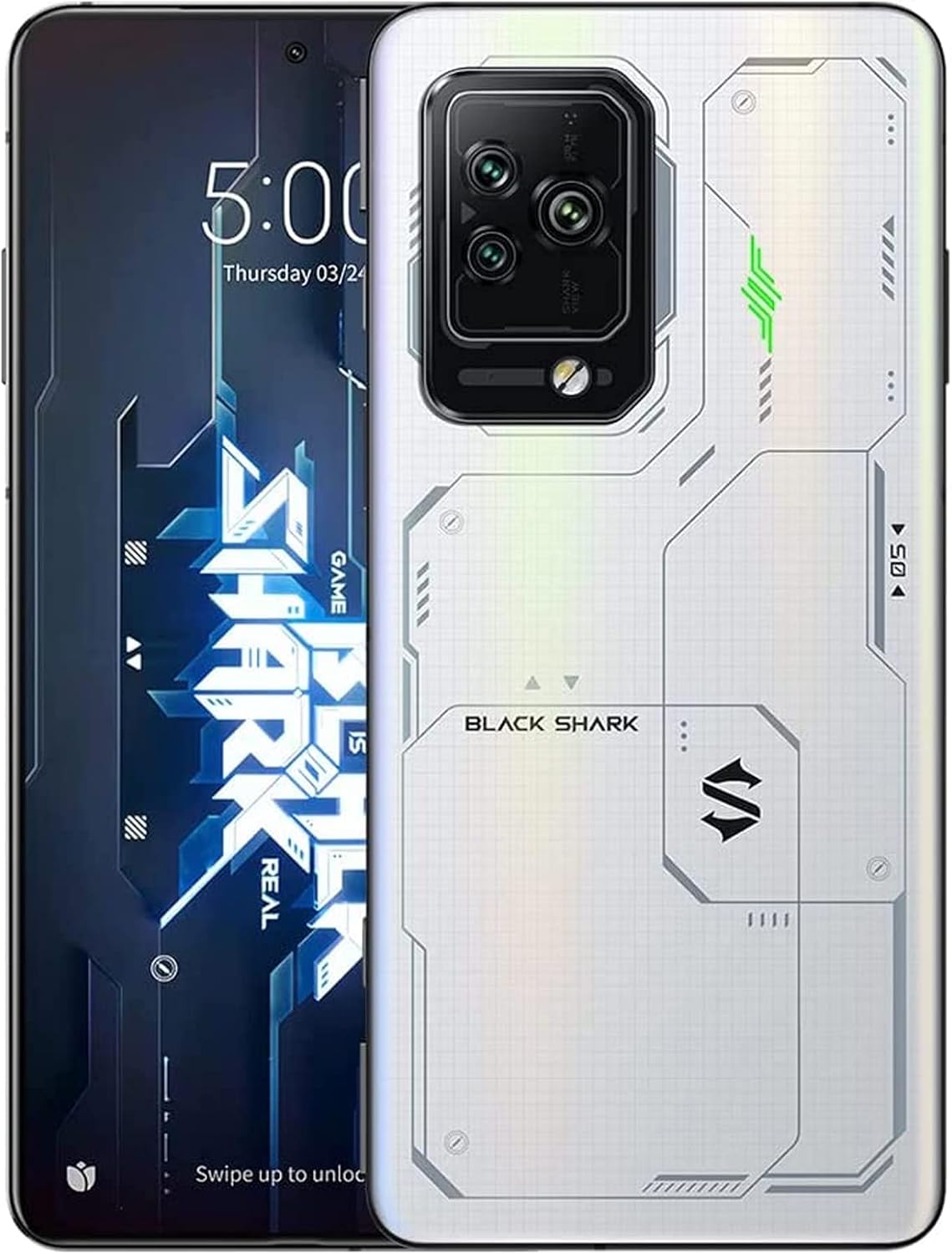
Figure 2.1: Black Shark 5 Pro Front and Rear View. This image displays the smartphone from both the front, highlighting its display, and the back, showcasing the camera array and the distinctive white design.
2.1 Components físics
- Visualització: Front screen for interaction and content viewing.
- Mòdul de càmera posterior: Located on the back, housing multiple camera lenses and flash.
- Botó d'encesa: Typically on the side, used to power on/off and lock/unlock the screen.
- Botons de volum: Located on the side, for adjusting audio levels.
- Magnetic Pop-Up Triggers: Retractable shoulder buttons for enhanced gaming control.
- Port USB-C: Per a càrrega i transferència de dades.
- Safata de la targeta SIM: Ranura per inserir targetes SIM.
3. Configuració
3.1 Desembalatge i inspecció inicial
Traieu amb cura tots els elements de l'embalatge. Verifiqueu que hi hagi els components següents:
- Black Shark 5 Pro Smartphone
- Cable USB-C
- Adaptador de corrent (120 W)
- Eina d'expulsió de SIM
- Guia d'inici ràpid (si s'inclou)
Inspect the device for any visible damage. If any components are missing or damaged, contact customer support.
3.2 Instal·lació de la targeta SIM
- Localitza la safata de la targeta SIM al lateral del dispositiu.
- Introduïu l'eina d'expulsió de la SIM al forat petit que hi ha al costat de la safata i premeu suaument fins que la safata surti.
- Col·loqueu la targeta o targetes nano-SIM a la safata amb els contactes daurats cap avall.
- Torneu a inserir la safata al dispositiu amb cura fins que encaixi al seu lloc.
3.3 Engegada i configuració inicials
- Press and hold the Power button until the Black Shark logo appears.
- Seguiu les instruccions que apareixen a la pantalla per completar la configuració inicial, inclosa la selecció d'idioma, la connexió Wi-Fi, la configuració del compte de Google i la configuració de seguretat.
3.4 Càrrega del dispositiu
The Black Shark 5 Pro supports 120W Hyper Charge technology for rapid charging.

Figure 3.1: 120W Hyper Charge. This image illustrates the rapid charging capability of the Black Shark 5 Pro, indicating a full charge can be achieved in approximately 15 minutes.
- Connect the USB-C cable to the phone's charging port and the other end to the 120W power adapter.
- Connecteu l'adaptador de corrent a una presa de corrent.
- The device can reach a full charge in approximately 15 minutes using Ultimate Mode or 24 minutes in Even Mode.
- Use only the official Black Shark 120W charger and cable for optimal charging speed and safety.
4. Instruccions de funcionament
4.1 Característiques de visualització
The Black Shark 5 Pro features a 6.67-inch OLED E4 display designed for gaming and multimedia.

Figure 4.1: 144Hz E-Sports Display. This image highlights the key features of the Black Shark 5 Pro's display, including its 144Hz refresh rate, 10-bit color depth, and HDR 10+ support.
- Freqüència d'actualització: Supports up to 144Hz for smooth visuals. Adjust in Display Settings.
- Toca SampTarifa de ling: 720Hz for highly responsive touch input, crucial for gaming.
- Precisió del color: 10-bit color depth, DCI-P3 color gamut, and HDR 10+ for vivid and accurate colors.
- Cura dels ulls: SGS eyecare protection is integrated to reduce eye strain.
4.2 Magnetic Pop-Up Triggers
The device includes physical shoulder triggers for enhanced gaming control.
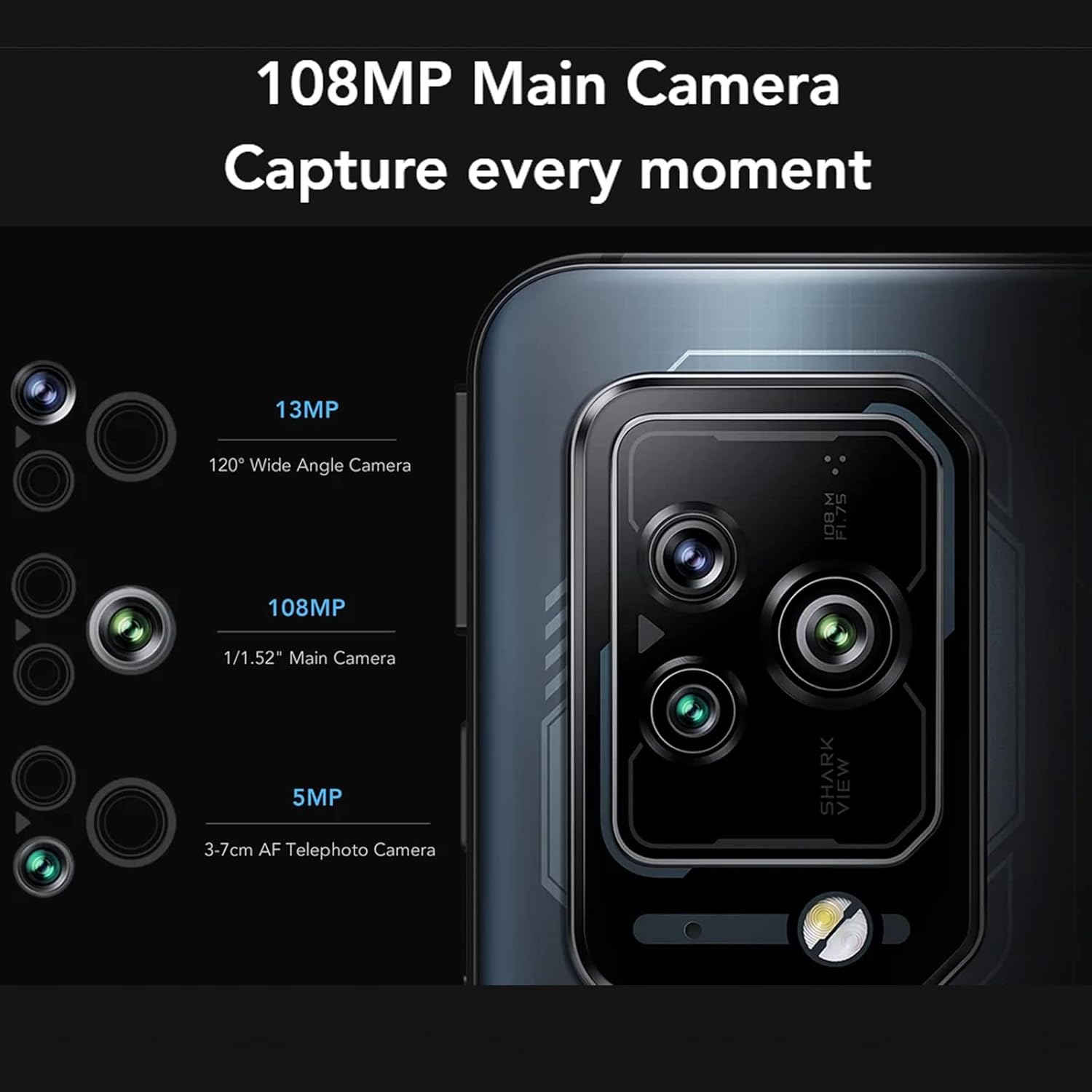
Figure 4.2: Magnetic Pop-Up Triggers. This image displays the side of the Black Shark 5 Pro, highlighting the physical switches used to activate the retractable shoulder triggers.
- Activació: Flick the side-mounted switches to extend or retract the triggers.
- Personalització: Triggers can be mapped to in-game actions or customized for other functions like flashlight activation or screenshots via the device settings.
4.3 Funcionament de la càmera
The Black Shark 5 Pro is equipped with a versatile camera system.
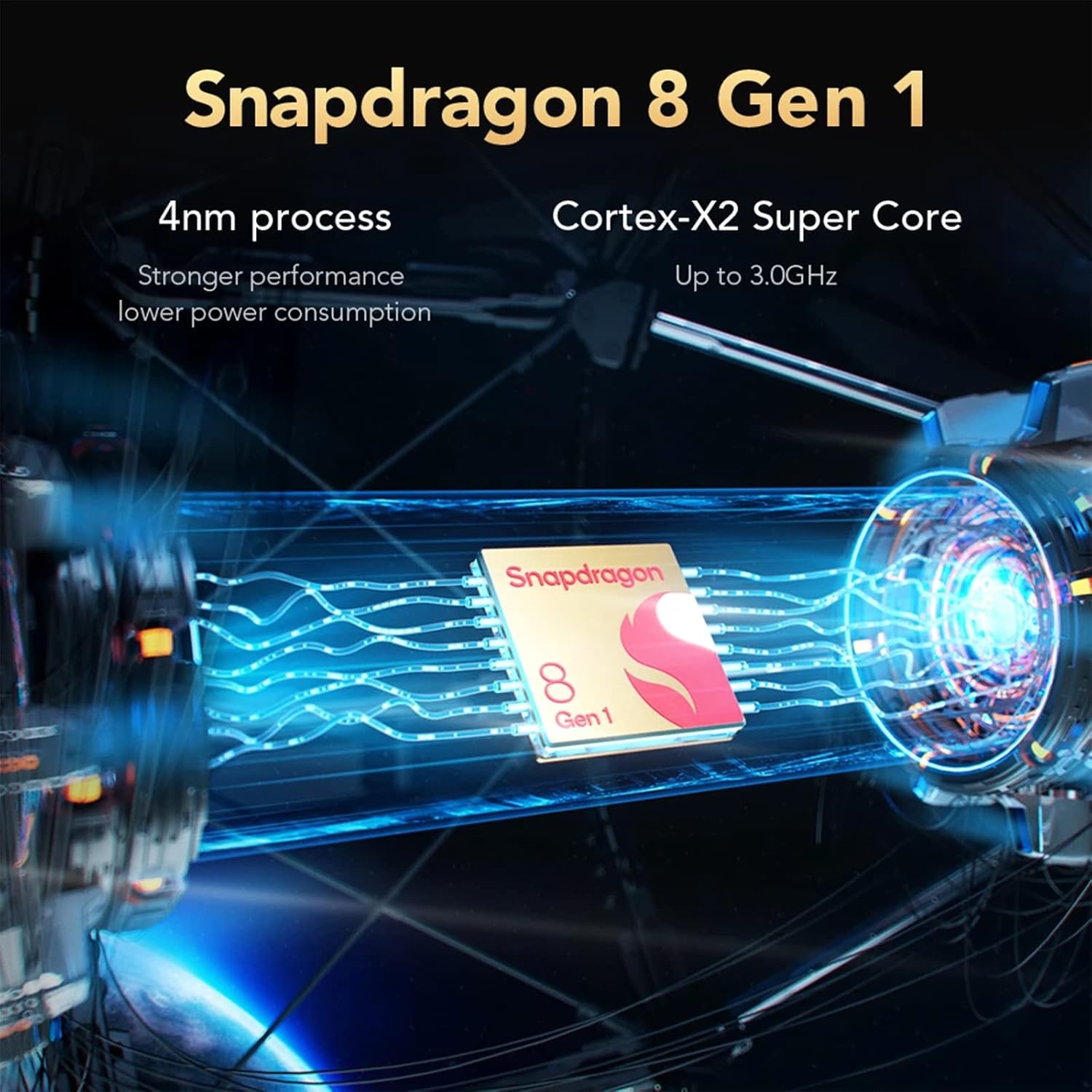
Figure 4.3: Camera Module. This image details the Black Shark 5 Pro's triple camera setup, including a 108MP main sensor, a 13MP 120° wide-angle lens, and a 5MP 3-7cm AF telephoto macro lens.
- Càmera principal: Sensor de 108MP per a fotos d'alta resolució.
- Càmera de gran angular: 13MP 120° lens for capturing broader scenes.
- Càmera de teleobjectiu: 5MP 3-7cm AF lens for close-up and detailed shots.
- Obre l'aplicació Càmera des de la pantalla d'inici o des del calaix d'aplicacions.
- Select desired modes (Photo, Video, Portrait, Pro, etc.) and tap the shutter button to capture.
4.4 Rendiment i refrigeració
The device is powered by a high-performance processor and advanced cooling system.

Figure 4.4: Snapdragon 8 Gen 1. This image illustrates the Snapdragon 8 Gen 1 processor, emphasizing its 4nm process technology and Cortex-X2 Super Core for powerful performance.
- Processador: Snapdragon 8 Gen 1 5G mobile platform for fast processing and graphics.
- Memòria i emmagatzematge: 12GB LPDDR5 RAM and 256GB UFS 3.1 storage ensure smooth multitasking and quick app loading.
- Sistema de refrigeració: Anti-gravity Dual VC Liquid Cooling with a combined area of 5320mm² helps maintain stable performance during intensive use by efficiently dissipating heat.
5. Manteniment
5.1 Neteja del dispositiu
- Feu servir un drap suau i sense borrissol per netejar la pantalla i la carcassa.
- Eviteu l'ús de productes químics agressius, materials abrasius o aerosols.
- No exposeu el dispositiu a una humitat excessiva.
5.2 Actualitzacions de programari
Comproveu i instal·leu regularment si hi ha actualitzacions de programari per garantir un rendiment òptim, seguretat i accés a noves funcions.
- Navega a Configuració > Quant al telèfon > Actualització del sistema per comprovar si hi ha actualitzacions disponibles.
- Assegureu-vos que el dispositiu tingui prou bateria i una connexió a Internet estable abans de començar una actualització.
5.3 Gestió d'emmagatzematge
To maintain device performance, periodically manage your storage.
- Elimineu-les innecessàries files, aplicacions i mitjans de comunicació.
- Utilitzeu serveis d'emmagatzematge al núvol per a còpies de seguretat.
- Check storage usage in Configuració > Emmagatzematge.
6. Solució De Problemes
This section addresses common issues you might encounter with your Black Shark 5 Pro.
6.1 El dispositiu no s'encén
- Assegureu-vos que la bateria estigui carregada. Connecteu el dispositiu al carregador durant almenys 15 minuts.
- Premeu i manteniu premut el botó d'engegada durant 10-15 segons per forçar un reinici.
6.2 Problemes de càrrega
- Verify that the charger and USB-C cable are securely connected to both the device and the power outlet.
- Use the original Black Shark 120W charger and cable.
- Proveu una presa de corrent diferent.
- Inspeccioneu el port de càrrega per veure si hi ha deixalles o danys.
6.3 Alentiment del rendiment
- Tanca les aplicacions en segon pla que no fas servir.
- Clear cache data from apps and system settings.
- Assegureu-vos que hi hagi prou espai d'emmagatzematge disponible.
- Restart the device periodically.
6.4 Problemes de connectivitat de xarxa
- Wi-Fi: Restart your router. Forget and reconnect to the Wi-Fi network on your phone.
- Dades mòbils: Ensure your SIM card is properly installed and your mobile data plan is active. Check network settings.
- Bluetooth: Assegureu-vos que tots dos dispositius estiguin en mode d'emparellament i dins de l'abast.
6.5 Restabliment de fàbrica (últim recurs)
Si els problemes persisteixen, un restabliment de fàbrica els pot resoldre. Avís: Això esborrarà totes les dades del dispositiu. Fes una còpia de seguretat de les dades importants abans de continuar.
- Vés a Configuració > Sistema > Opcions de restabliment > Esborra totes les dades (restabliment de fàbrica).
- Seguiu les indicacions de la pantalla per confirmar el restabliment.
7. Especificacions
Key technical specifications for the Black Shark 5 Pro smartphone.
| Característica | Detall |
|---|---|
| Nom del model | Black Shark 5 Pro (SHARK KTUS-H0) |
| Processador | Qualcomm Snapdragon 8 Gen 1 (4nm) |
| RAM | 12 GB LPDDR5 |
| Emmagatzematge intern | 256 GB UFS 3.1 |
| Mostra | 6.67" OLED E4, 144Hz Refresh Rate, 720Hz Touch Sampling Rate, 10-bit Color, HDR 10+ |
| Càmera posterior | 108MP Main, 13MP Ultra-Wide, 5MP Telephoto Macro |
| Capacitat de la bateria | 4650 mAh (liti-polímer) |
| Carregant | 120W Hyper Charge |
| Sistema operatiu | Android (la versió pot variar) |
| Connectivitat | 5G, Wi-Fi, Bluetooth |
| Dimensions | 19.3 x 15.2 x 6.2 cm (Package); 730 g (Package) |
| Característiques especials | Magnetic Pop-Up Triggers, Anti-gravity Dual VC Liquid Cooling |
8. Informació de seguretat
- Seguretat de la bateria: Do not attempt to replace the battery yourself. Use only authorized service centers. Avoid exposing the battery to extreme temperatures or direct sunlight.
- Resistència a l'aigua: Aquest dispositiu és no impermeable. Avoid exposure to liquids. Liquid damage is not covered under warranty.
- Temperatura de funcionament: Feu funcionar el dispositiu dins dels rangs de temperatura recomanats (normalment de 0 °C a 35 °C).
- Eliminació: Desfeu-vos del dispositiu i de la bateria de manera responsable d'acord amb la normativa local. No el llenceu a les escombraries domèstiques.
- Seguretat de conducció: No utilitzeu el telèfon mentre conduïu. Prioritzeu sempre la seguretat viària.
9. Garantia i Suport
For warranty information, please refer to the warranty card included with your product or visit the official Black Shark website. For technical support, troubleshooting assistance, or service inquiries, please contact Black Shark customer service through their official channels.
Nota: Els termes i condicions de la garantia poden variar segons la regió.


