1. Introducció
This manual provides comprehensive instructions for the VINABTY RM-C1221 Replacement Remote Control. This remote is designed as a direct replacement for original JVC TV/DVD Combo remote controls and requires no programming. Simply insert batteries, and it is ready for use.
Compatible JVC TV/DVD Combo Models include:
- LT-32D340
- LT-19DE61
- LT-22DE72
- LT-19D210
- LT-32D210
- LT-32DE73
- LT-32DM21
- LT-19D610
- LT-19DE62
- LT-19DM21
- LT-22DM21
- LT-32DM22
- LT-24DE73
2. Configuració
2.1 Instal·lació de la bateria
- Localitzeu la tapa del compartiment de la bateria a la part posterior del comandament a distància.
- Premeu la pestanya i feu lliscar la coberta cap avall.
- Insert two (2) AAA batteries (not included), ensuring the positive (+) and negative (-) terminals match the diagrams inside the compartment.
- Feu lliscar la tapa del compartiment de la bateria fins que faci clic de manera segura.
Nota: This remote control is a direct replacement and typically requires no programming. Once batteries are installed, it should function immediately with compatible JVC TV/DVD Combo models.
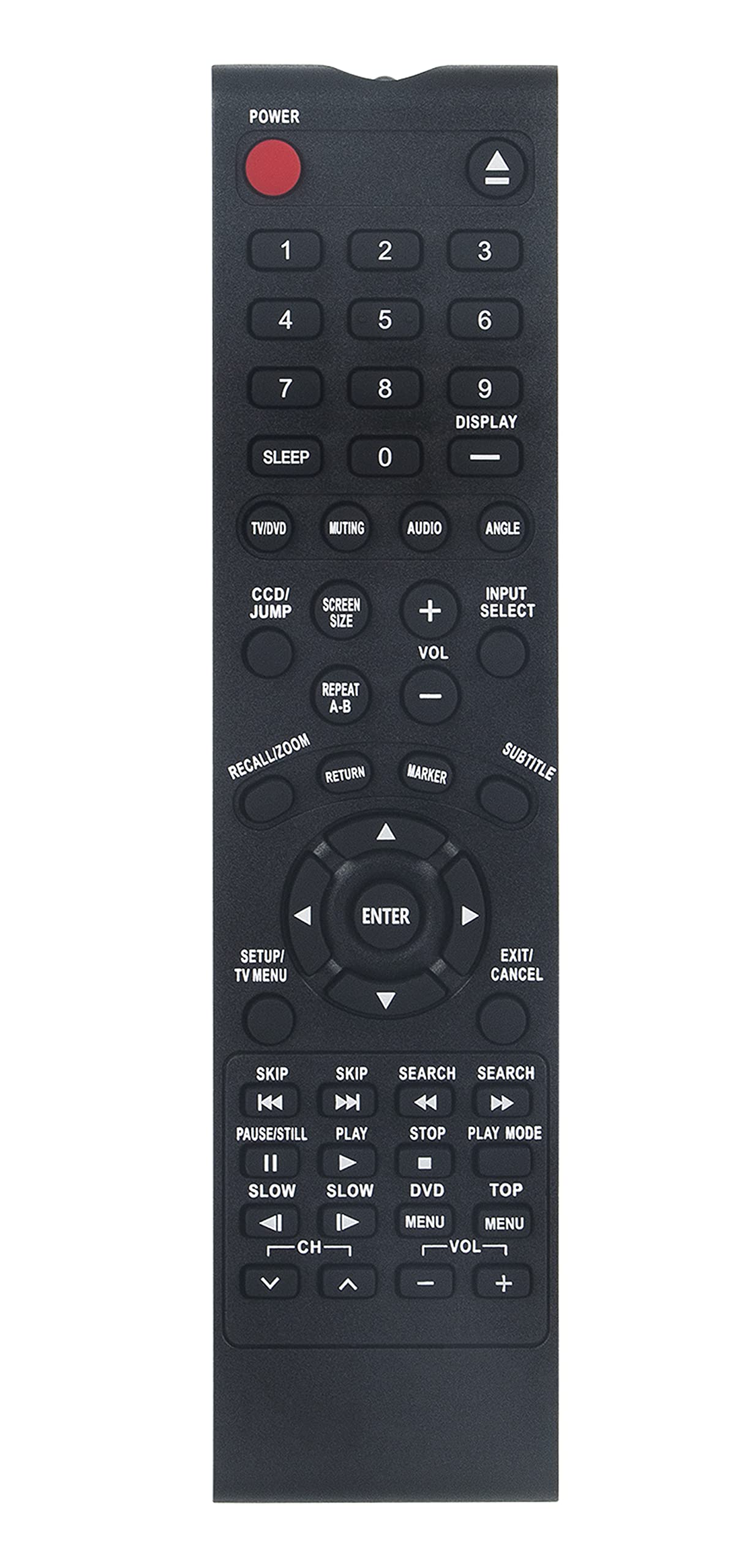
Figure 1: User holding the VINABTY RM-C1221 remote control. This image illustrates the remote in typical use, aimed at a television and soundbar setup.
3. Funcionament del comandament a distància
The VINABTY RM-C1221 remote control features standard buttons for controlling your JVC TV/DVD Combo. Point the remote directly at the infrared sensor on your television for optimal performance.
3.1 Funcions clau
- POTÈNCIA: Turns the TV/DVD Combo on or off.
- ENTRADA/FONT: Selects input sources (e.g., HDMI, AV, DVD).
- MENÚ: Accesses the main menu of the TV or DVD player.
- NAVIGATION (Up/Down/Left/Right) & OK/ENTER: Navega pels menús i confirma les seleccions.
- VOLUM (+/-): Augmenta o disminueix el nivell de volum.
- CHANNEL (CH +/-): Canvia els canals de televisió.
- MUT: Silencia o activa l'àudio.
- BOTONS NÚMEROS (0-9): Directly selects channels or enters numerical values.
- PLAYBACK CONTROLS (Play, Pause, Stop, Rewind, Fast Forward): Controls DVD playback functions.
- EXIT/BACK: Surt dels menús o torna a la pantalla anterior.
Note: Specific button labels and functions may vary slightly depending on your JVC TV/DVD Combo model. Refer to your TV/DVD Combo's original manual for detailed function descriptions.
4. Manteniment
4.1 Neteja
Per netejar el comandament a distància, netegeu-lo suaument amb un drap suau i sec. Per a la brutícia resistent, netegeu-lo lleugerament.ampen the cloth with water or a mild, non-abrasive cleaner. Avoid using harsh chemicals, solvents, or abrasive materials, as these can damage the remote's surface or internal components.
4.2 Cura de la bateria
- Canvieu les piles quan la resposta del comandament a distància esdevingui lenta o deixi de funcionar.
- Do not mix old and new batteries, or different types of batteries (e.g., alkaline and rechargeable).
- Traieu les piles si no heu d'utilitzar el comandament a distància durant un període prolongat per evitar fuites i danys.
- Eliminar les bateries usades d'acord amb la normativa local.
4.3 Emmagatzematge
Store the remote control in a cool, dry place, away from direct sunlight, extreme temperatures, and high humidity. Avoid dropping the remote or exposing it to strong impacts.
5. Solució De Problemes
| Problema | Causa possible | Solució |
|---|---|---|
| El comandament a distància no funciona gens. |
|
|
| El remot funciona de manera intermitent. |
|
|
| Alguns botons no responen. |
|
|
6. Especificacions
| Model: | RM-C1221 |
| Marca: | VINABITAT |
| Dispositius compatibles: | JVC Television / TV/DVD Combo (Specific models listed in Introduction) |
| Font d'alimentació: | 2 piles AAA (no incloses) |
| Color: | Negre |
| Característica especial: | Disseny ergonòmic |
| Dimensions del producte: | 7.5 x 2 x 0.7 polzades |
| Pes de l'article: | 3 unces |
7. Informació de la garantia
This product is covered by a standard manufacturer's warranty. Please refer to the seller's return policy or contact the manufacturer directly for specific warranty terms and conditions. Keep your purchase receipt as proof of purchase for any warranty claims.
8. Atenció al client
If you encounter any issues or have questions regarding your VINABTY RM-C1221 remote control that are not addressed in this manual, please contact the seller or VINABTY customer support for assistance. Provide your product model number (RM-C1221) and details of your issue for faster service.


