
Introducció
This manual provides essential information for the setup, operation, maintenance, and troubleshooting of your new RCA 75-inch webOS Series 4K UHD HDR Smart TV (Model: RWOSU7549). Please read this manual thoroughly before using the television to ensure proper functionality and safety.
The RCA webOS Smart TV offers a comprehensive entertainment experience with 4K UHD resolution, High Dynamic Range (HDR) technology, and a smart platform providing access to various streaming services and applications.
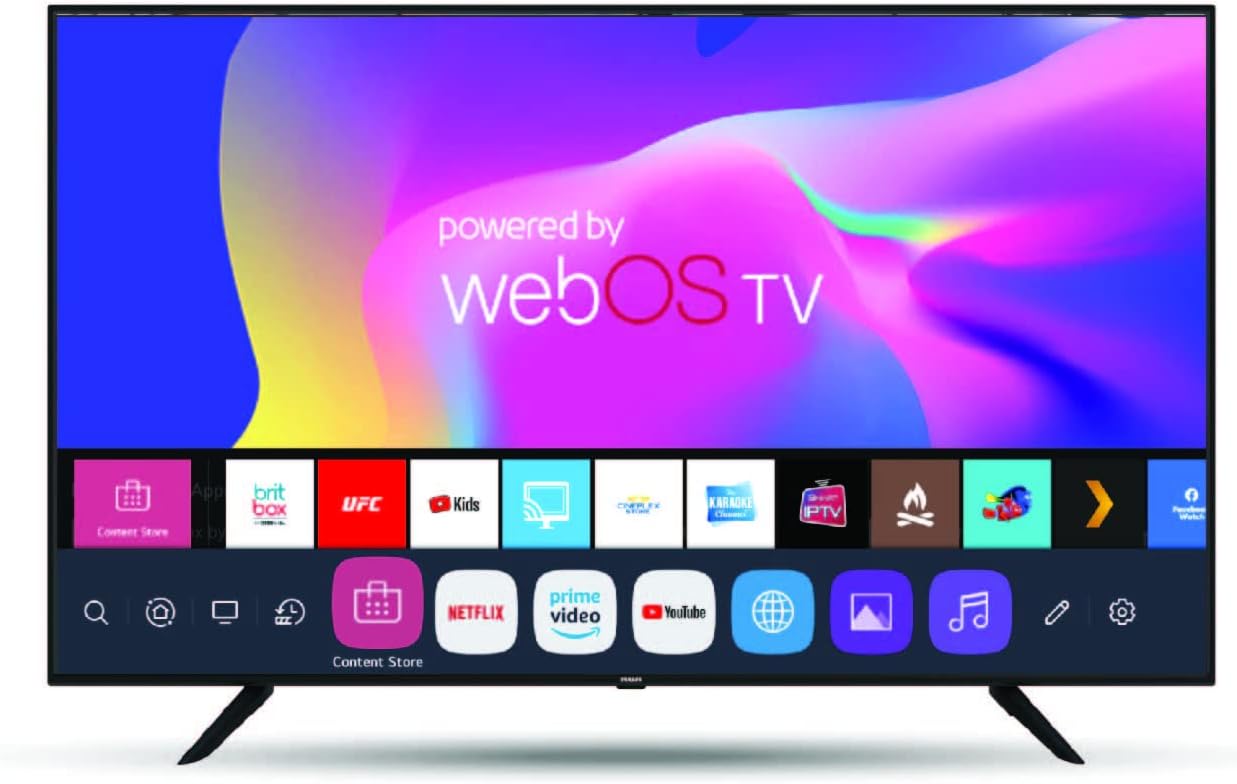
Imatge: Frontal view of the RCA 75-inch webOS Smart TV, showcasing its slim bezel and the webOS interface with various app icons like Netflix, Prime Video, and YouTube.
Informació de seguretat
Always observe the following safety precautions when operating your television:
- No exposeu el televisor a la pluja o la humitat.
- No bloquejar les obertures de ventilació.
- Assegureu-vos de posar a terra correctament el cable d'alimentació.
- Eviteu col·locar el televisor sota la llum solar directa o a prop de fonts de calor.
- Netegeu només amb un drap sec.
- Demaneu tot el servei a personal de servei qualificat.
Configuració
Desembalatge i inspecció inicial
Carefully remove the TV and all accessories from the packaging. Verify that all included components are present:
- RCA de 75 polzades webOS Smart TV
- Control remot
- Cable d'alimentació
- Suport per a TV (si escau)
- Manual d'usuari (aquest document)
Stand Installation or Wall Mounting
If using the included stand, attach it securely to the TV following the instructions provided in the separate quick start guide. If wall-mounting, ensure you use a compatible VESA mount (not included) and follow the mount manufacturer's instructions, paying attention to the TV's weight and dimensions.
Connecting Power and Network
- Connecteu el cable d'alimentació a l'entrada d'alimentació del televisor i després a una presa de corrent.
- For internet access, connect an Ethernet cable to the TV's LAN port for a wired connection, or proceed with Wi-Fi setup during the initial configuration.
Connexió de dispositius externs
Your TV features multiple connectivity options:
- Ports HDMI: Connect Blu-ray players, gaming consoles, cable boxes, etc.
- Ports USB: Connecteu unitats USB per a la reproducció de contingut multimèdia.
- Bluetooth: Connecteu dispositius d'àudio compatibles sense fil.
Assistent de configuració inicial
En engegar-lo per primera vegada, el televisor us guiarà a través d'un assistent de configuració inicial. Això inclou:
- Selecció de la llengua
- Connexió de xarxa (configuració Wi-Fi)
- Escaneig de canals (per a antena/cable)
- Configuració de la data i la zona horària
- Accepting terms and conditions for webOS services
Voice Control Setup (ThinQ AI, Alexa, Google Assistant)
The TV supports voice control via ThinQ AI (requires mobile app download), Amazon Alexa, and Google Assistant. Follow the on-screen prompts during initial setup or access the TV's settings menu to link your preferred voice assistant accounts.
En funcionament
Funcions bàsiques del televisor
- Encès/apagat: Premeu el botó d'engegada del comandament a distància o del televisor.
- Control de volum: Feu servir els botons de pujar/baixar el volum.
- Selecció de canals: Use Channel Up/Down or number buttons.
- Font d'entrada: Press the Input/Source button to switch between HDMI, USB, TV, etc.
Navegant webPlataforma intel·ligent OS
El webOS platform provides an intuitive interface for accessing smart features:
- Press the Home button on your remote to open the Launcher Bar, which displays your installed apps and recent content.
- Use the directional pad and OK button to navigate and select items.
- Access the Content Store to download additional applications like Facebook Watch, BritBox, etc.
Streaming Services and Apps
Your TV comes preloaded with popular streaming applications:
- Netflix
- Amazon Prime Video
- YouTube
- UFC.TV
- V Live
- And more available through the Content Store.
Log in with your existing accounts for these services to access content.
4K UHD and HDR Features
The TV automatically detects and optimizes content for 4K UHD resolution and High Dynamic Range (HDR). Ensure your source device (e.g., 4K Blu-ray player, streaming stick) is also 4K/HDR compatible and connected via an HDMI port that supports these features.
- Resolució 4K: Provides 4 times the detail of Full HD.
- HDR actiu: Enhances contrast and color accuracy for a more lifelike picture.
- Freqüència de refresc de 60 Hz: Minimizes motion blur for fast-paced content.
Voice Control Usage
Once configured, use voice commands to control your TV. For example, you can say "Turn off TV," "Change volume to 20," or "Open Netflix" if using a compatible voice-enabled remote or linked smart speaker.
Manteniment
Neteja del televisor
- Desendolla sempre el televisor abans de netejar-lo.
- Feu servir un drap suau i sec per netejar la pantalla i la carcassa.
- Per a marques difícils, esbandiu lleugeramentampNetegeu el drap amb aigua o un netejador de pantalles especialitzat (eviteu productes químics agressius).
- Do not spray liquid directly onto the TV.
Actualitzacions de programari
El teu webOS TV may receive periodic software updates to improve performance and add new features. Ensure your TV is connected to the internet. You can check for updates manually in the TV's settings menu (typically under "All Settings" > "General" > "About This TV" > "Check for Updates").
Resolució de problemes
Before contacting support, try the following solutions for common issues:
| Problema | Possible solució |
|---|---|
| Sense poder | Comproveu si el cable d'alimentació està ben connectat al televisor i a la presa de corrent. Proveu una altra presa de corrent. |
| Sense imatge / Pantalla negra | Ensure the correct input source is selected. Check cable connections to external devices. Restart the TV. |
| Sense so | Check volume level and mute status. Verify audio cables for external devices. Check TV audio output settings. |
| No es pot connectar a la Wi-Fi | Ensure Wi-Fi is enabled on the TV. Restart your router. Re-enter Wi-Fi password carefully. Move TV closer to router if signal is weak. |
| El control remot no funciona | Replace batteries. Ensure no obstructions between remote and TV. Re-pair the remote if it's a smart remote. |
| Les aplicacions no es carreguen / Rendiment lent | Check internet connection speed. Close unused apps. Restart the TV. Clear app cache (if option available in settings). |
Especificacions
| Característica | Detall |
|---|---|
| Marca | RCA |
| Número de model | RWOSU7549 |
| Mida de la pantalla | 75 polzades (191 cm en diagonal) |
| Tecnologia de visualització | LED |
| Resolució | 4K UHD (3840 x 2160) |
| Freqüència d'actualització | 60 Hz |
| Suport HDR | HDR actiu |
| Sistema operatiu | webOS |
| Connectivitat | Bluetooth, Ethernet, HDMI, USB, Wi-Fi |
| Serveis d'Internet compatibles | Amazon Instant Video, Browser, Netflix, Prime Video, YouTube, UFC.TV, V Live, Content Store |
| Control de veu | Works with ThinQ AI (via mobile app), Alexa, Google Assistant |
| Relació d'aspecte | 16:9 |
| Pes de l'article | 70 lliures |
| Dimensions del producte (L x A x A) | 73 x 9 x 44 polzades |
| Color | Negre |
| Components inclosos | TV, Remote |
Informació de la garantia
RCA products are covered by a limited warranty. For specific details regarding the warranty period, coverage, and terms for your RCA 75-inch webOS Series 4K UHD HDR Smart TV, please refer to the warranty card included with your product or visit the official RCA weblloc.
Conserveu el rebut de compra com a comprovant de compra per a reclamacions de garantia.
Atenció al client
If you encounter issues not covered in the troubleshooting section or require further assistance, please contact RCA customer support.
- Assistència en línia: Visita el suport oficial de RCA weblloc web per a preguntes freqüents, controladors i formularis de contacte.
- Suport telefònic: Consulteu l'embalatge del producte o la RCA. weblloc web per a números de telèfon d'atenció al client.
When contacting support, please have your TV's model number (RWOSU7549) and serial number ready.


