1. Introducció
This manual provides detailed instructions for setting up, operating, maintaining, and troubleshooting your MINISFORUM EliteMini TH50 Mini PC. Please read this manual thoroughly before using the product to ensure proper functionality and longevity.

Image 1.1: The MINISFORUM EliteMini TH50 Mini PC, a compact desktop computer.
2. Contingut del paquet
Verifiqueu que tots els elements que s'enumeren a continuació siguin presents al vostre paquet:
- 1x MINISFORUM TH50 Mini PC
- 1x cable HDMI
- 1 x suport de muntatge
- 1x adaptador de corrent dels EUA
- 1x Manual (this document)

Image 2.1: Contents included in the MINISFORUM TH50 Mini PC package.
3. Producte acabatview
The MINISFORUM EliteMini TH50 is a high-performance mini PC designed for various applications, from office work to multimedia consumption and light gaming. It features an 11th Gen Intel Core i5-11320H processor and Intel Iris Xe Graphics.
3.1 Front and Rear Ports
Familiarize yourself with the available ports on your Mini PC:

Image 3.1: Diagram illustrating the front and rear ports of the TH50 Mini PC.
- Ports frontals: Power Button, 3.5mm Audio Jack, USB 3.1 Port x2, USB 4 (Thunderbolt 4 compatible, 8K@60Hz)
- Ports posteriors: USB 2.0 Port x2, USB 3.1 Port x2, RJ45 2.5 Gigabit Ethernet Port x2, DisplayPort, HDMI Port, Kensington Lock, DC 19V Power Input
3.2 Components interns
The TH50 Mini PC features onboard LPDDR4 16GB RAM and a 512GB PCIe SSD. It also supports additional storage expansion.

Imatge 3.2: Desplegada view showing the internal components, including RAM, SSD, and HDD slots.
4. Guia de configuració
Follow these steps to set up your MINISFORUM EliteMini TH50 Mini PC:
- Connect to a Display: Connect your monitor(s) to the Mini PC using an HDMI, DisplayPort, or USB-C cable. The TH50 supports up to three displays simultaneously.
- Connecteu els perifèrics: Connecteu el teclat, el ratolí i qualsevol altre dispositiu USB als ports USB disponibles.
- Connecteu-vos a la xarxa: For wired internet, connect an Ethernet cable to one of the 2.5G RJ45 ports. For wireless internet, ensure your Wi-Fi network is available.
- Connectar l'alimentació: Plug the US Power Adapter into the DC 19V input port on the Mini PC, then plug the adapter into a power outlet.
- Encès: Premeu el botó d'engegada a la part frontal del Mini PC.

Image 4.1: A typical desktop setup showing the Mini PC connected to a monitor and peripherals.
4.1 Mounting the Mini PC
The included mounting bracket allows you to attach the Mini PC to the back of a VESA-compatible monitor or to a wall.
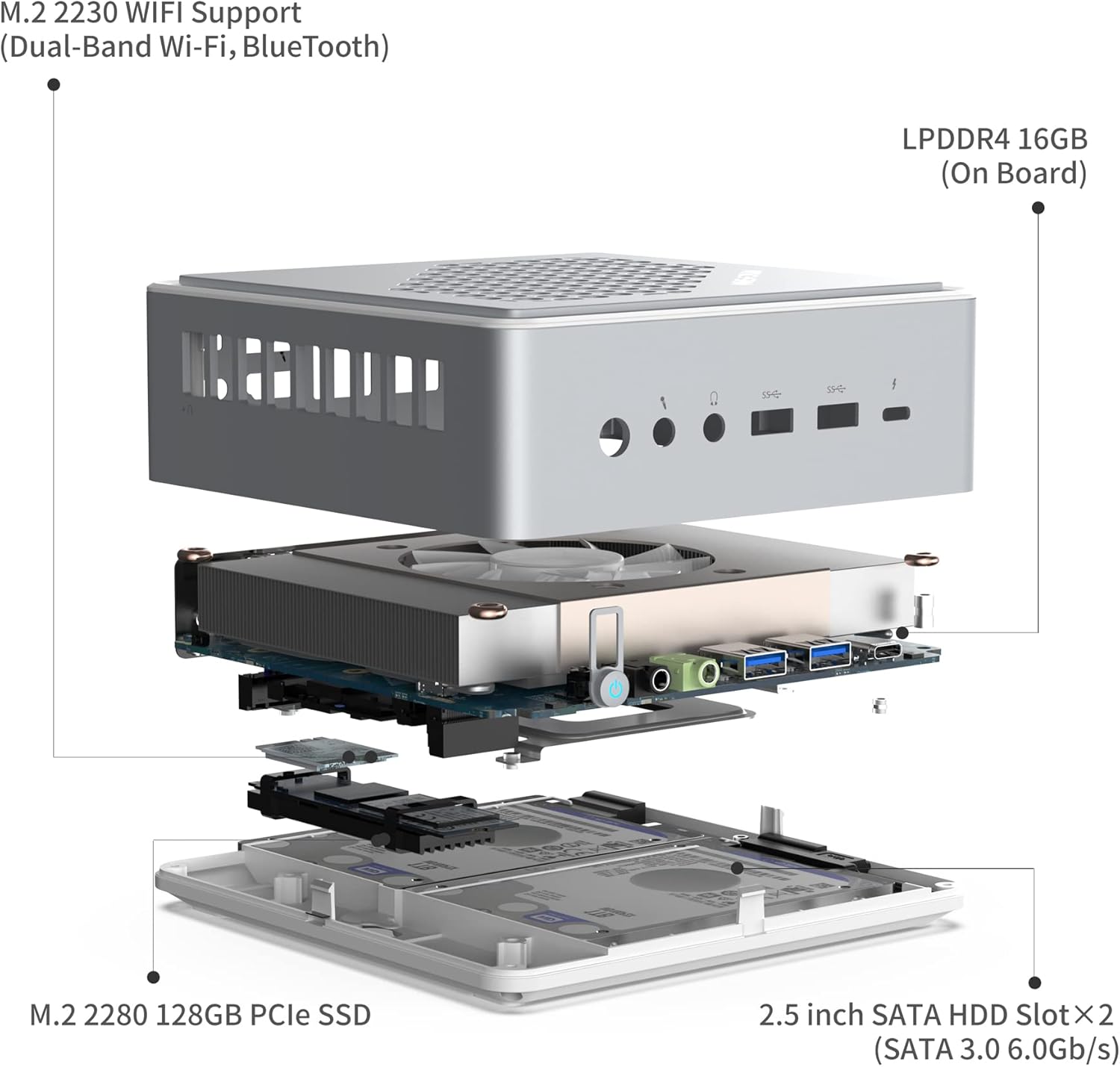
Image 4.2: The MINISFORUM TH50 Mini PC mounted on the back of a television using the provided bracket.
Per muntar el dispositiu:
- Attach the mounting bracket to the Mini PC using the provided screws.
- Secure the bracket to the VESA holes on your monitor or to a suitable wall surface.
- Slide the Mini PC onto the mounted bracket.
5. Instruccions de funcionament
5.1 Initial Boot and Windows 11
Upon first power-on, the system will guide you through the Windows 11 setup process. Follow the on-screen prompts to configure your language, region, network, and user account.
Ensure your internet connection is active during setup to download necessary updates and drivers.
5.2 Connexió a Wi-Fi
If not using a wired connection, connect to Wi-Fi:
- Click the Wi-Fi icon in the system tray.
- Seleccioneu la xarxa desitjada de la llista.
- Enter the network password and click "Connect".
5.3 Configuració de múltiples pantalles
The Mini PC supports up to three displays via HDMI, DisplayPort, and the USB-C (Thunderbolt 4) port. To configure multiple displays:
- Connect all desired monitors to the respective ports.
- Feu clic amb el botó dret a l'escriptori i seleccioneu "Configuració de la pantalla".
- Arrange your displays and choose your preferred display mode (e.g., Extend, Duplicate).

Imatge 5.1: Ex.ample of a multi-display setup, demonstrating enhanced work efficiency.
6. Manteniment
6.1 Neteja
- Feu servir un drap suau i sec per netejar l'exterior del Mini PC.
- For dust accumulation in vents, use compressed air. Ensure the device is powered off before cleaning.
- Eviteu utilitzar netejadors líquids directament sobre el dispositiu.
6.2 Actualitzacions de programari
Actualitzeu regularment el sistema operatiu i els controladors de Windows per garantir un rendiment i una seguretat òptims.
- Actualitzacions de Windows: Vés a Configuració > Actualització de Windows i comprovar si hi ha actualitzacions.
- Actualitzacions de controladors: Visit the MINISFORUM official website for the latest drivers for your TH50 model.
6.3 Expansió d'emmagatzematge
The TH50 Mini PC supports additional storage:
- M.2 2280 PCIe SSD: Up to 2TB (512GB pre-installed).
- 2x 2.5 inch SATA HDD Slot: Up to 2TB each (SATA 3.0 6.0Gb/s).
Refer to the detailed instructions on the MINISFORUM support website for guidance on installing additional storage devices.
7. Solució De Problemes
| Problema | Causa possible | Solució |
|---|---|---|
| No power/Does not turn on | Power adapter not connected, faulty power outlet, power button issue. |
|
| No es mostra al monitor | Incorrect cable connection, monitor input not selected, display driver issue. |
|
| Problemes de connexió Wi-Fi | Outdated Wi-Fi drivers, router issues, interference. |
|
| Rendiment lent | Too many background applications, insufficient RAM/storage, overheating. |
|
8. Especificacions
| Característica | Detall |
|---|---|
| Model | TH50 |
| Processador | Intel Core i5-11320H de 11a generació (fins a 4.5 GHz) |
| Gràfics | Intel Iris Xe Graphics Eligible (up to 1.35GHz) |
| RAM | 16GB LPDDR4 (onboard) |
| Emmagatzematge intern | 512GB PCIe SSD (M.2 2280) |
| Ampliació d'emmagatzematge | 2x 2.5 inch SATA HDD slot (up to 2TB each) |
| Sistema operatiu | Windows 11 |
| Sortida de vídeo | HDMI (4K@60Hz), DisplayPort (8K@60Hz), USB-C (8K@60Hz) |
| Treball en xarxa | 2x 2.5G RJ45 Ethernet, Dual-Band Wi-Fi (802.11ac), Bluetooth 5 |
| Ports USB | 2x USB 3.1 (front), 2x USB 3.1 (rear), 2x USB 2.0 (rear), 1x USB-C (Thunderbolt 4 compatible) |
| Àudio | 3.5mm Àudio Jack |
| Dimensions | 5.87 x 5.91 x 2.2 polzades |
9. Demostració en vídeo
Mireu el vídeo oficial del producte per obtenir una visualització més detalladaview of the MINISFORUM EliteMini TH50 Mini PC's features and capabilities.
Video 9.1: Official MINISFORUM EliteMini TH50 Windows 11 Pro Mini PC overview.
10. Garantia i Suport
10.1 Informació de la garantia
MINISFORUM products typically come with a standard manufacturer's warranty. Please refer to the warranty card included in your package or visit the official MINISFORUM weblloc web per obtenir informació detallada sobre els termes i condicions de garantia específics de la vostra regió.
10.2 Suport tècnic
If you encounter any issues that cannot be resolved using the troubleshooting guide, or require further assistance, please contact MINISFORUM technical support.
- Oficial Weblloc: www.minisforum.com (Check for support section or contact page)
- Suport per correu electrònic: Consulteu l'embalatge del producte o la fitxa oficial weblloc web per a adreces de correu electrònic d'assistència específiques.
When contacting support, please have your product model (TH50) and purchase information ready.


