Introducció
Thank you for choosing the Chesto Full HD Beamer. This projector is designed to transform your living space into a cinematic experience with its 9500 lumen brightness and native 1920x1080P resolution, supporting 4K signal input. It features an eye-friendly optical system, built-in speakers, and wireless smartphone connectivity for seamless streaming.
This manual provides detailed instructions for setting up, operating, and maintaining your Chesto Full HD Beamer to ensure optimal performance and longevity.
Contingut del paquet
Marqueu la casella per als elements següents:
- 1x Chesto Full HD Beamer
- 1x comandament a distància
- 1x Manual d'instruccions (aquest document)
- 1x cable HDMI
- 1x cable d'alimentació
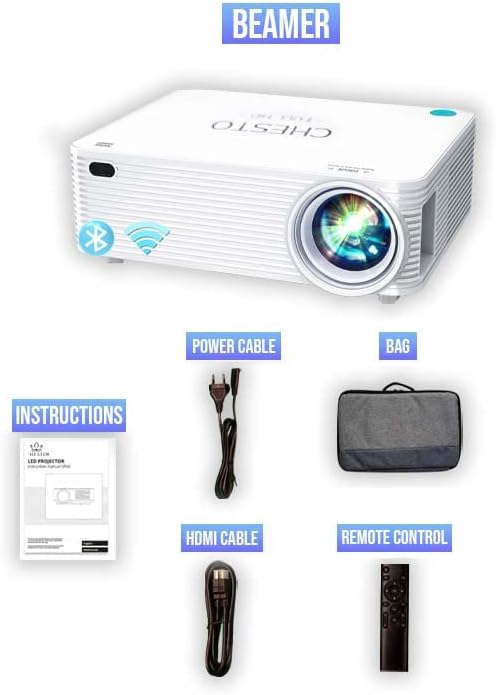
Figure 1: Included accessories with the Chesto Beamer. The image displays the projector, power cable, HDMI cable, remote control, and the instruction manual.
Configuració
- Col·locació: Position the projector on a stable, flat surface or mount it to the ceiling. Ensure there is adequate ventilation around the projector.
- Connexió d'alimentació: Connect the power cable to the projector's power input and then plug it into a power outlet.
- Encesa inicial: Premeu el botó d'encesa del projector o del comandament a distància per encendre el dispositiu.
- Ajust del focus: Gireu l'anell d'enfocament de la lent del projector fins que la imatge projectada sigui clara i nítida.
- Correcció Keystone: If the image appears trapezoidal, use the 4-point correction function (refer to the 'Image Adjustment' section) to square the image.
Instruccions de funcionament
Encès/Apagat
- Per engegar el projector, premeu el botó d'engegada del comandament a distància o del comandament a distància.
- Per apagar l'aparell, premeu el botó d'engegada de nou. Confirmeu l'apagada si se us demana.
Navegació pel menú
Use the arrow keys on the remote control or the projector's control panel to navigate through the on-screen menu. Press the 'OK' button to select an option.
Connectivitat
Wireless Smartphone Streaming
The Chesto Beamer supports wireless streaming from your smartphone (both Android and iOS devices). Ensure your smartphone and the projector are connected to the same Wi-Fi network.
- Select the 'Screen Mirroring' or 'Wireless Display' option from the projector's main menu.
- On your smartphone, enable screen mirroring (e.g., 'Smart View' a Android, 'Diflecteix la pantalla' a iOS).
- Select the projector's name from the list of available devices on your smartphone.
- The smartphone screen will now be projected wirelessly.
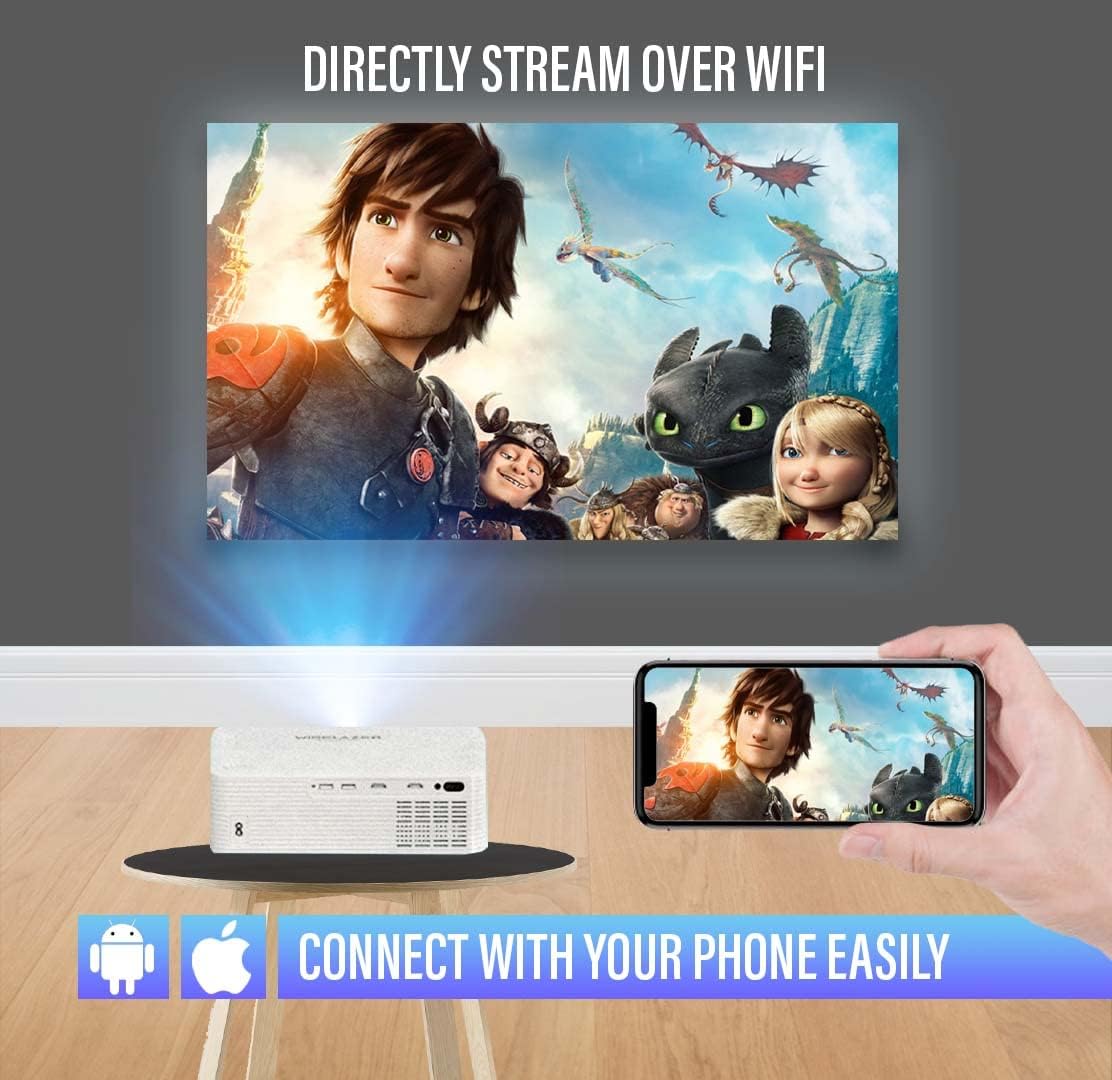
Figure 2: Wireless streaming from a smartphone to the projector. The image illustrates a phone connected to the projector via Wi-Fi, displaying a movie on a large screen.
Connexions per cable
The projector offers multiple input ports for various devices:
- HDMI (2 ports): Connect Blu-ray players, gaming consoles, laptops, TV sticks, and other HDMI-enabled devices.
- USB (2 ports): Connect USB drives for media playback or external devices.
- 3.5mm Audio Jack (1 port): Connecteu altaveus externs o auriculars.
- AV Audio: Connecteu dispositius més antics amb un cable AV.
- VGA: Connect computers or laptops with a VGA output.

Figure 3: Connectivity options for the Chesto Beamer. The image displays the projector and icons representing various compatible devices and input ports.
Funció Bluetooth
Connect your Chesto Beamer wirelessly to Bluetooth audio devices such as headphones or external speakers for an enhanced audio experience.
- Assegureu-vos que el dispositiu d'àudio Bluetooth estigui en mode d'emparellament.
- On the projector, navigate to the Bluetooth settings in the menu.
- Select 'Scan for devices' and choose your audio device from the list to pair.

Figure 4: Bluetooth connectivity for audio devices. The image shows the projector wirelessly connected to headphones and earbuds via Bluetooth.
Ajust de la imatge
Focus
Adjust the focus ring on the projector lens to achieve a sharp image. The Chesto Beamer features a precise focus lens system ensuring 100% sharp focus from the center to the edges, which is also eye-friendly for prolonged viewing.
Correcció Keystone de 4 punts
If the projected image is distorted (e.g., wider at the top or bottom), use the 4-point keystone correction feature to manually adjust each corner of the image until it forms a perfect rectangle.

Figure 5: Adjusting the screen with 4-point correction. The image shows a projected movie scene being adjusted at its corners to achieve a rectangular shape, with a remote control highlighting the adjustment buttons.
Qualitat d'imatge
The Chesto Beamer provides a true native resolution of 1920x1080P, offering significantly more detail than 1080x720P projectors and supporting 4K signal input for unparalleled visual performance.

Figure 6: Resolution comparison. The image visually compares the superior clarity of Chesto's 1920x1080 resolution with 4K Ultra HD support against a lower 1080x720 resolution.

Figure 7: Clear and sharp image projection. The image displays a high-quality, sharp movie projection on a large screen in a living room environment.
Manteniment
Neteja de la lent
Use a soft, lint-free cloth specifically designed for optical lenses to gently wipe the projector lens. Do not use abrasive cleaners or excessive force, as this may scratch the lens.
Cleaning the Projector Body
Wipe the exterior of the projector with a soft, dry cloth. For stubborn dirt, slightly dampen the cloth with water, then wipe dry immediately. Avoid using chemical cleaners.
Ventilació
Ensure the projector's ventilation openings are clear of dust and obstructions to prevent overheating. The Chesto Beamer is designed to be dustproof, but regular checks are recommended.
Resolució de problemes
No es mostra cap imatge
- Comproveu si el projector està encès.
- Ensure the input source is correctly selected (e.g., HDMI1, USB, Screen Mirroring).
- Verify that the video cable (HDMI, VGA) is securely connected to both the projector and the source device.
- If using wireless streaming, ensure both devices are on the same Wi-Fi network and mirroring is active.
Imatge borrosa
- Ajusteu l'anell de focus de la lent del projector.
- Use the 4-point keystone correction to square the image if it's distorted.
- Assegureu-vos que la distància de projecció estigui dins del rang recomanat.
Sense so
- Comproveu la configuració de volum tant al projector com al dispositiu font.
- Si feu servir altaveus externs, assegureu-vos que estiguin connectats i encesos correctament.
- If using Bluetooth audio, ensure the device is paired and connected.
- Verify that the audio output setting on the source device is correct.
El control remot no funciona
- Substituïu les piles del comandament a distància.
- Assegureu-vos que no hi hagi obstacles entre el comandament a distància i el receptor d'infrarojos del projector.
Especificacions
| Marca | Chesto |
| Model | B09ZYGJTGD |
| Resolució nativa | 1920 x 1080 (Full HD) |
| Resolució màxima de pantalla | Full HD (4K signal input supported) |
| Brillantor | 9500 lúmens |
| Relació de contrast | 13,000:1 |
| Lamp La vida | 32,000 hores |
| Tecnologia de connectivitat | HDMI (x2), USB (x2), 3.5mm Audio Jack (x1), AV, VGA, Wi-Fi, Bluetooth |
| Altaveu incorporat | 5W |
| Factor de forma | Portàtil |
| Aplicacions recomanades | Home Cinema |
| Característiques especials | Built-in Wi-Fi, Bluetooth, 4-point keystone correction, Eye-friendly optical system |
Garantia i Suport
Specific warranty information is not provided in the product details. Please refer to the retailer's return policy or contact Chesto customer support for warranty details and technical assistance.
For further support, please visit the official Chesto weblloc web o poseu-vos en contacte amb el vostre punt de venda.


