Introducció
This manual provides detailed instructions for the setup, operation, maintenance, and troubleshooting of your Xtrfy MZ1 Wireless Gaming Mouse. Please read this manual thoroughly before using the product to ensure optimal performance and longevity.
Contingut del paquet
Verifiqueu que tots els elements siguin presents al paquet:
- Xtrfy MZ1 Wireless Gaming Mouse
- 1.8 m Xtrfy EZcord Pro cable
- Cable USB-A a USB-C
- Adaptador USB
- Dongle USB
- 500 mA battery (pre-installed or included separately)
- Second back shell (for adjustable shape)
Producte acabatview
The Xtrfy MZ1 Wireless Gaming Mouse is designed for high-performance gaming, featuring a lightweight design, adjustable shape, and customizable settings without the need for software.
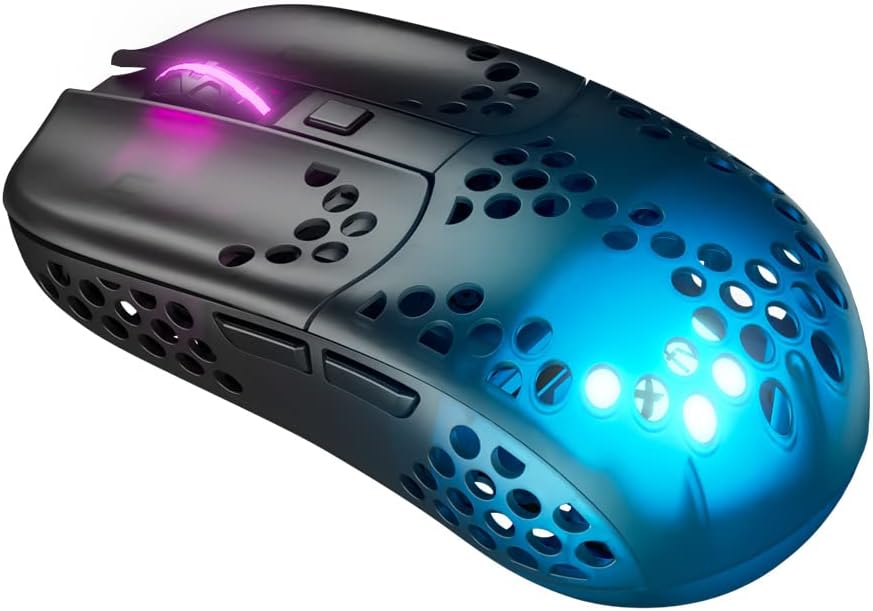
Figure 1: Xtrfy MZ1 Wireless Gaming Mouse, angled view with RGB lighting.
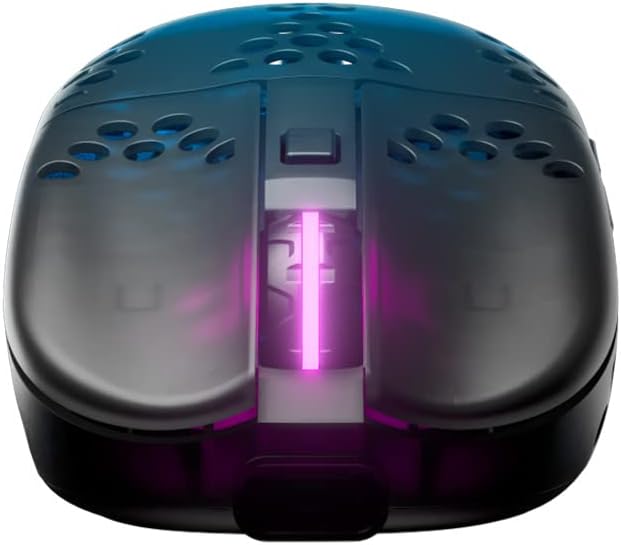
Figura 2: superior view of the Xtrfy MZ1 Wireless Gaming Mouse, highlighting the scroll wheel and main buttons.

Figure 3: The Xtrfy MZ1 Wireless Gaming Mouse shown with its two interchangeable back shells, allowing for shape adjustment.
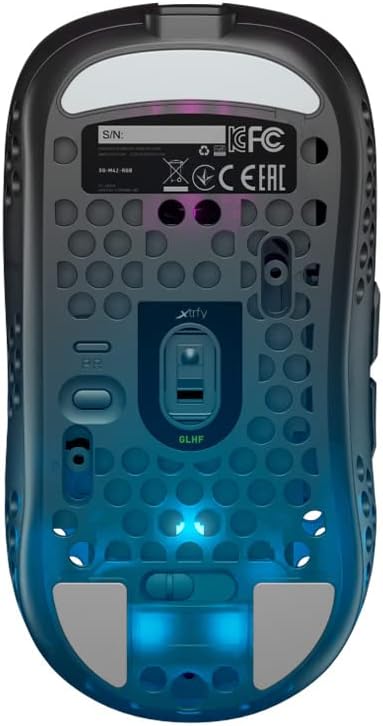
Figura 4: A baix view of the Xtrfy MZ1 Wireless Gaming Mouse, displaying the sensor, power switch, and configuration buttons.
Configuració
1. Connectar el ratolí
- Connect the USB dongle to your computer using the provided USB-A to USB-C cable and adapter.
- Engegueu el ratolí amb l'interruptor d'engegada que es troba a la part inferior del ratolí.
- The mouse should automatically connect to the dongle. If not, ensure the dongle is properly connected and the mouse is powered on.
2. Càrrega inicial
For first use, it is recommended to fully charge the mouse. Connect the Xtrfy EZcord Pro cable to the front of the mouse and to a USB power source. The mouse can be used while charging.
3. Adjusting the Back Shell
The MZ1 Wireless comes with two interchangeable back shells to customize the mouse shape to your preference. To change the back shell:
- Gently remove the currently installed back shell by lifting it from the rear.
- Align the desired back shell with the mouse body and press down until it clicks into place.
4. Adjusting Weight Balance
The battery position can be adjusted to fine-tune the mouse's weight balance. To do this:
- Traieu la carcassa posterior.
- Carefully slide the battery forward or backward within its compartment to achieve your preferred balance.
- Replace the back shell.
Instruccions de funcionament
The Xtrfy MZ1 Wireless Mouse allows for on-the-fly adjustments without software.
1. CPI (Counts Per Inch) Adjustment
The CPI setting controls the mouse sensitivity. Use the dedicated CPI button on the bottom of the mouse to cycle through preset CPI levels. The LED indicator will change color to show the current CPI setting.
2. Ajust de la taxa de sondeig
The polling rate determines how often the mouse reports its position to the computer. A higher polling rate results in smoother tracking. Adjust the polling rate using the switch on the bottom of the mouse, typically labeled 'PR' or similar.
3. Lift-Off Distance (LOD) Adjustment
LOD is the height at which the mouse sensor stops tracking when lifted from the surface. Adjust this setting using the switch on the bottom of the mouse, typically labeled 'LOD'.
4. Debounce Time Adjustment
Debounce time is the delay before a second click can be registered after the first, preventing accidental double-clicks. Adjust this setting using the switch on the bottom of the mouse, typically labeled 'DT'.
5. Durada i càrrega de la bateria
The mouse provides up to 75 hours of playtime on a single charge. When the battery is low, connect the EZcord Pro cable to the mouse and a USB power source to charge. The mouse can be used normally during charging.
6. Programmable Button ('PGDN')
The top button, after adjusting other settings, can be set to 'PGDN'. This allows you to bind it to any desired function within your games or applications.
Manteniment
- Neteja: Feu servir un drap suau i sec per netejar el ratolí. Eviteu utilitzar productes químics agressius o materials abrasius.
- Cura del sensor: Mantingueu el sensor òptic de la part inferior del ratolí net i lliure de pols o deixalles per garantir un seguiment precís.
- Emmagatzematge: Quan no l'utilitzeu durant períodes prolongats, guardeu el ratolí en un lloc sec i fresc.
Resolució de problemes
| Problema | Possible solució |
|---|---|
| El ratolí no respon |
|
| Connexió intermitent |
|
| Problemes de seguiment |
|
| Buttons not responding correctly |
|
Especificacions
| Característica | Detall |
|---|---|
| Número de model | MZ1W |
| Dimensions del producte | 4.37 x 2.3 x 1.33 polzades |
| Pes de l'article | 2.15 unces (aproximadament 61 grams) |
| Tecnologia de connectivitat | Sense fil (2.4 GHz) |
| Detecció de moviment | Optical (Pixart 3370 sensor) |
| Interruptors | Kailh GM 8.0 (80 milions de clics) |
| Microcontrolador | ARM de 32 bits |
| Bateria | 1 Lithium Ion battery (500 mA, up to 75 hours playtime) |
| Característiques especials | Lightweight, Rechargeable, Adjustable Shape (interchangeable back shells), Adjustable Weight Balance, No Software Needed |
| Color | Negre |
Garantia i Suport
For warranty information, technical support, or further assistance, please visit the official Xtrfy weblloc web o contacteu directament amb el seu servei d'atenció al client. Conserveu el comprovant de compra per a reclamacions de garantia.


