Producte acabatview
Experience everything that TV has to offer with this 42-inch LED smart TV from RCA. The built-in Roku app lets you control the TV directly through your smartphone for great control and ease of use. You can also cast photos, videos, music and more directly from your compatible mobile device right onto the television, letting you share the best of entertainment with everyone in the room.
Característiques clau
- Plataforma intel·ligent: Roku TV
- Resolució: 1080p Full HD
- Freqüència d'actualització: 60 Hz
- Relació d'aspecte: 16:9
- Temps de resposta: 8 ms
- Connectivitat: 2x HDMI, VGA, RF, YPbPr, AV Audio/Video, Coaxial, PC Audio
Què s'inclou
- RCA 42" Smart LED TV
- Moble per a TV (2 peces)
Guia de configuració
1. Fixació del suport
Carefully place the TV screen-down on a soft, clean surface to prevent scratches. Align the stand pieces with the screw holes on the bottom of the TV. Secure the stands using the provided screws. Ensure the stand is firmly attached before placing the TV upright.
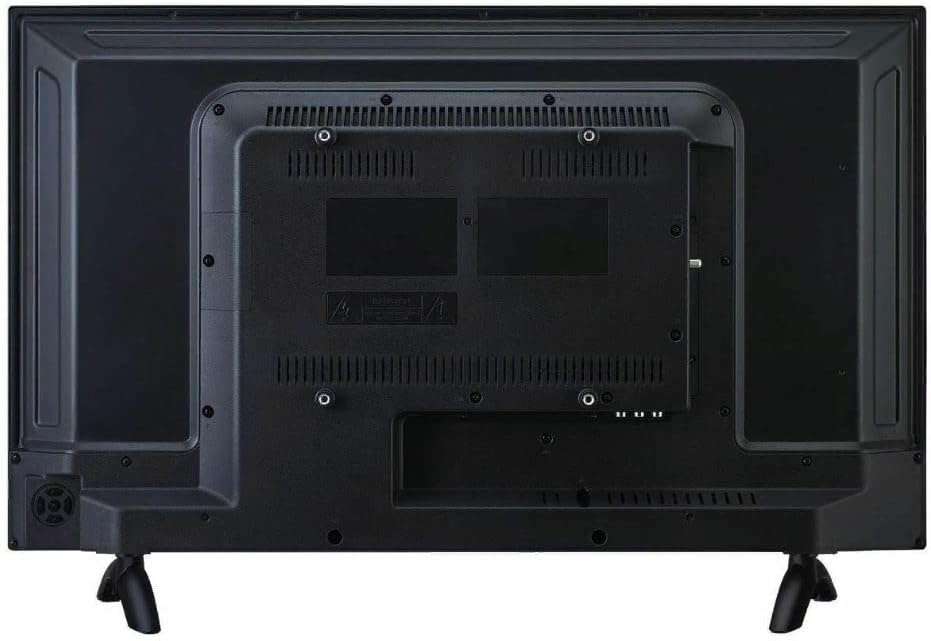
Figura 1: posterior view of the TV, illustrating the stand attachment points and various input ports.
2. Connexió de perifèrics
Connect your external devices such as cable boxes, Blu-ray players, or gaming consoles to the appropriate input ports on the back of the TV. The TV features 2 HDMI ports, VGA, RF, YPbPr, AV Audio/Video, Coaxial, and PC Audio inputs.
3. Engegada i configuració inicial
Plug the power cord into the TV and then into a wall outlet. Press the power button on the TV or the remote control. Follow the on-screen instructions to complete the initial setup, including network connection for Smart TV features and channel scanning.
Instruccions de funcionament
Navigating the Roku TV Interface
The RCA Smart LED TV uses the Roku TV platform for easy access to streaming services and inputs. Use the remote control's directional pad to navigate through the home screen menu. Select options by pressing the OK button.

Figura 2: The Roku TV home screen, showing navigation options and streaming channel icons.
Using Streaming Channels
From the home screen, select your desired streaming channel (e.g., Netflix, Hulu). Ensure your TV is connected to the internet. You may need to log in to your accounts for each service.
Contingut de càsting
The built-in Roku app allows casting of photos, videos, and music from compatible mobile devices directly to the TV. Ensure your mobile device and TV are on the same Wi-Fi network. Use the casting feature within your mobile app to select the RCA Roku TV as the playback device.
Manteniment i cura
Neteja de la pantalla
To clean the TV screen, gently wipe it with a soft, dry, lint-free cloth. For stubborn marks, lightly dampen the cloth with water or a screen-cleaning solution specifically designed for electronics. Avoid using harsh chemicals, abrasive cleaners, or direct spraying onto the screen.
Atenció General
- Mantingueu el televisor allunyat de la llum solar directa i de fonts de calor.
- Assegureu-vos d'una ventilació adequada al voltant del televisor per evitar el sobreescalfament.
- No bloquegeu les obertures de ventilació de la part posterior del televisor.
- Desendolleu el televisor de la presa de corrent durant tempestes o quan no el fareu servir durant períodes prolongats.
Resolució de problemes
Sense poder
- Comproveu si el cable d'alimentació està ben connectat tant al televisor com a la presa de corrent.
- Verifiqueu que la presa de corrent funciona connectant-hi un altre dispositiu.
- Prova de prémer el botó d'engegada del televisor, no només el comandament a distància.
Sense imatge / Mala qualitat d'imatge
- Assegureu-vos que heu seleccionat la font d'entrada correcta (per exemple, HDMI 1, AV).
- Comproveu totes les connexions de cable entre el televisor i els dispositius externs.
- Ajusteu la configuració de la imatge (brillantor, contrast, color) al menú del televisor.
- If using an antenna, check antenna connection and try rescanning channels.
Sense so / Mala qualitat de so
- Augmenta el volum tant del televisor com de qualsevol dispositiu d'àudio extern connectat.
- Comproveu les connexions del cable d'àudio.
- Assegureu-vos que el televisor no estigui silenciat.
- If using external speakers, ensure they are powered on and correctly connected.
El control remot no funciona
- Substituïu les piles del comandament a distància.
- Assegureu-vos que no hi hagi obstacles entre el comandament a distància i el sensor d'infrarojos del televisor.
- Apunta el comandament a distància directament al televisor.
Especificacions tècniques
| Característica | Especificació |
|---|---|
| Número de model | RTR4262-CA |
| Mida de la pantalla | 42 polzades (107 cm en diagonal) |
| Tecnologia de visualització | LED |
| Resolució | 1080p Full HD |
| Freqüència d'actualització | 60 Hz |
| Relació d'aspecte | 16:9 |
| Temps de resposta | 8 ms |
| Plataforma intel·ligent | Roku TV |
| Connectivitat | 2x HDMI, VGA, RF, YPbPr, AV Audio/Video, Coaxial, PC Audio |
| Dimensions del producte (W x D x H) | 37.64 x 7.2 x 23.23 polzades |
| Pes de l'article | 13.7 lliures |
| Tipus d'altaveu | Integrat |
| Primera data disponible | 11 de maig de 2022 |
Garantia i Suport
Per obtenir informació sobre la garantia i assistència tècnica, consulteu la documentació inclosa amb la compra o visiteu el lloc web oficial d'assistència de RCA. weblloc web. Conserveu el comprovant de compra per a reclamacions de garantia.
Assistència en línia: Visita la botiga RCA a Amazon


