1. Instruccions de seguretat importants
Please read all instructions carefully before operating this product. Retain this manual for future reference.
- No exposeu aquest aparell a la pluja o la humitat.
- No utilitzeu aquest aparell prop de l'aigua.
- Netegeu només amb un drap sec.
- No bloquegeu cap obertura de ventilació. Instal·leu-ho d'acord amb les instruccions del fabricant.
- No instal·leu a prop de cap font de calor com ara radiadors, registres de calor, estufes o altres aparells (inclosos amplificadors) que produeixen calor.
- Eviteu que el cable d'alimentació sigui trepitjat o pessigat, especialment als endolls, els endolls i el punt on surten de l'aparell.
- Utilitzeu només accessoris/accessoris especificats pel fabricant.
- Desendolleu aquest aparell durant les tempestes amb llamps o quan no l'utilitzeu durant llargs períodes de temps.
- Demaneu tot el servei a personal de servei qualificat. El manteniment és necessari quan l'aparell s'ha fet malbé d'alguna manera, com ara el cable d'alimentació o l'endoll està danyat, s'ha vessat líquid o han caigut objectes a l'aparell, l'aparell ha estat exposat a la pluja o la humitat, no funciona amb normalitat. , o s'ha deixat caure.
2. Contingut del paquet
Verifiqueu que tots els elements siguin presents al vostre paquet:
- Technical Pro TPPLIT8 Loudspeaker
- Control remot
- Cable de càrrega USB
- Manual d'usuari

Image: Included accessories and user manual cover.
3. Producte acabatview
3.1 Tauler frontal
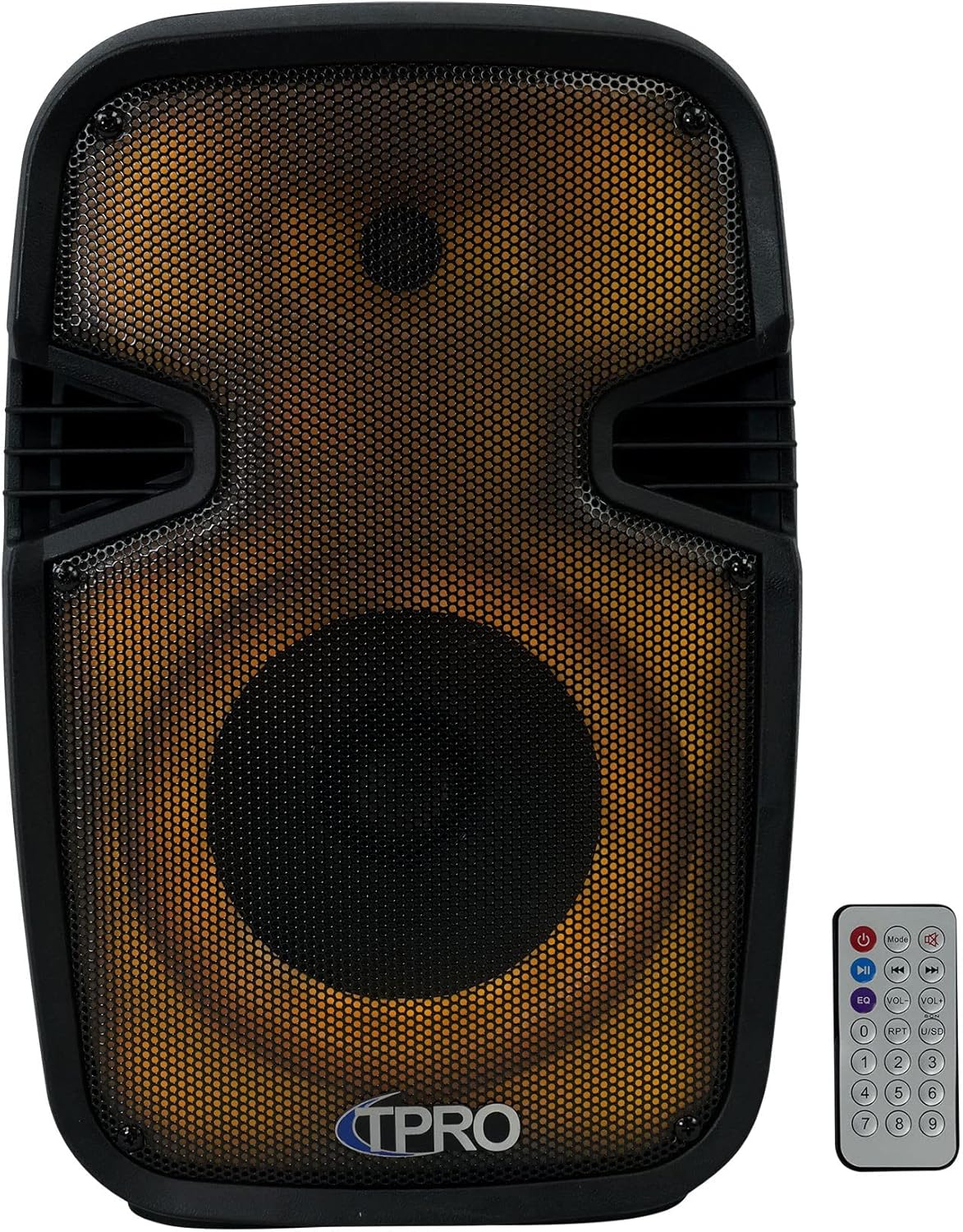
Imatge: Frontal view of the loudspeaker, showcasing the speaker grille and integrated LED lighting. The remote control is also visible.
3.2 Rear Control Panel

Imatge: Part posterior view of the loudspeaker, detailing the control panel. This includes volume controls, input selectors, USB and SD card slots, microphone input, AUX input, and power switch.
3.3 lateral View and Portability

Imatge: Lateral view of the loudspeaker, illustrating the robust carry handle designed for easy transport.
3.4 Key Features Diagram

Image: A visual diagram highlighting the main functionalities of the loudspeaker, including various connectivity options and lighting effects.
3.5 Dimensions

Image: A diagram providing the physical measurements of the loudspeaker for placement and transport planning.
4. Configuració
4.1 Càrrega inicial
Before first use, fully charge the loudspeaker's built-in rechargeable battery. Connect the provided USB charging cable to the speaker's charging port and a compatible USB power adapter (not included). The charging indicator light will typically show red while charging and turn off or change color when fully charged.
4.2 Encès/Apagat
Locate the power switch on the rear control panel. Flip the switch to the 'ON' position to power on the loudspeaker. Flip it to 'OFF' to power off the unit.
5. Instruccions de funcionament
5.1 Vinculació Bluetooth
- Power on the loudspeaker. It will automatically enter Bluetooth pairing mode, indicated by an audible prompt or flashing LED.
- Al dispositiu mòbil (telèfon intel·ligent, tauleta, etc.), activeu el Bluetooth i cerqueu els dispositius disponibles.
- Select 'TPRO PLIT8' from the list of devices.
- Once paired, the loudspeaker will confirm with an audible sound. You can now stream audio wirelessly.
5.2 Reproducció des de targeta USB/SD
- Inseriu una unitat flash USB o una targeta SD (amb fitxers d'àudio MP3 precarregats) files) into the respective slot on the rear control panel.
- The loudspeaker should automatically detect the media and begin playback. If not, press the 'Mode' button to switch to USB/SD mode.
- Use the playback controls (Play/Pause, Next, Previous) on the loudspeaker or remote control to manage your music.
5.3 Entrada de micròfon
- Connect a wired microphone (not included) to the 'MIC IN' jack on the rear control panel.
- Adjust the 'MIC VOL' knob to control the microphone's volume.
- Use the 'ECHO' knob to add an echo effect to the microphone audio.
5.4 Entrada AUX
- Connect an external audio source (e.g., MP3 player, laptop) to the 'AUX IN' jack on the rear control panel using a 3.5mm audio cable (not included).
- Press the 'Mode' button to switch the loudspeaker to AUX input mode.
- Control the volume from both the external device and the loudspeaker's master volume knob.
5.5 TWS (True Wireless Stereo) Emparellament
To achieve true wireless stereo sound, you can pair two TPPLIT8 loudspeakers together:
- Ensure both loudspeakers are powered on and in Bluetooth mode, but not yet paired to any device.
- On one of the loudspeakers, press and hold the 'TWS' button (or a designated TWS pairing button, refer to the remote control section).
- The two speakers will attempt to connect to each other. Once connected, an audible prompt will confirm the TWS pairing.
- Now, connect your mobile device to the primary loudspeaker via Bluetooth (as described in section 5.1). Audio will play through both speakers in stereo.

Image: Two loudspeakers demonstrating a True Wireless Stereo setup for enhanced audio experience.
5.6 Ràdio FM
- Press the 'Mode' button to switch to FM Radio mode.
- Press the 'Play/Pause' button to initiate an automatic scan for available FM stations. The speaker will save detected stations.
- Use the 'Next' and 'Previous' buttons to navigate through the saved stations.
5.7 Control de llums LED
The loudspeaker features multi-color flashing disco LED party lights. Use the dedicated LED control button on the remote or the unit (if available) to cycle through different lighting modes or turn them off.
5.8 Funcions de control remot
El comandament a distància inclòs proporciona un accés còmode a diverses funcions:

Image: The remote control unit, showing buttons for power, mode selection, playback, volume adjustment, equalizer presets, and a numeric keypad.
- Botó d'encesa: Encén/apaga la unitat.
- Botó de mode: Cycles through input modes (Bluetooth, USB, SD, FM, AUX).
- Reproduir/pausa: Reprodueix o posa en pausa l'àudio actual.
- Anterior/Següent: Salta a la pista/emissora anterior o següent.
- Pujar/baixar el volum: Ajusta el volum mestre.
- EQ: Passa ciclísticament pels preajustos de l'equalitzador.
- RPT (Repeat): Repeteix la pista actual o totes les pistes.
- USB/SD: Directly selects USB or SD card mode.
- Tecla numèrica (0-9): For direct track selection in USB/SD mode or FM station input.
6. Manteniment
6.1 Neteja
Wipe the exterior of the loudspeaker with a soft, dry cloth. Do not use abrasive cleaners, waxes, or solvents as they may damage the finish. Ensure no liquids enter the unit.
6.2 Emmagatzematge
When not in use for extended periods, store the loudspeaker in a cool, dry place, away from direct sunlight and extreme temperatures. It is recommended to charge the battery periodically to maintain its lifespan.
7. Solució De Problemes
| Problema | Causa possible | Solució |
|---|---|---|
| Sense poder | Battery discharged; Power switch off | Charge the battery; Turn the power switch to 'ON' |
| Sense so | Volum massa baix; Mode d'entrada incorrecte; Dispositiu no connectat | Increase volume; Select correct input mode; Ensure device is properly connected/paired |
| Bluetooth no connectat | Speaker not in pairing mode; Device Bluetooth off; Too far from speaker | Ensure speaker is in Bluetooth pairing mode; Enable Bluetooth on device; Move device closer to speaker (within 30 feet) |
| L'aparellament de TWS ha fallat | Altaveus ja emparellats amb un dispositiu; Procediment d'emparellament incorrecte | Ensure both speakers are unpaired from other devices; Follow TWS pairing steps carefully |
8. Especificacions
| Característica | Especificació |
|---|---|
| Nom del model | PLIT8 |
| Tipus d'altaveu | Sistemes d'altaveus |
| Mida de l'altaveu | 8 polzades |
| Diàmetre del woofer | 8 polzades |
| Potència de sortida màxima dels altaveus | 1200 watts (pic) |
| Tecnologia de connectivitat | Bluetooth |
| Tecnologia de comunicació sense fils | Bluetooth |
| Interval Bluetooth | 30 peus |
| Font d'alimentació | Funciona amb bateria |
| Impedància | 3 ohms |
| Resposta de freqüència | 18 kHz |
| Mode de sortida d'àudio | estèreo |
| Dimensions del producte | 8 "P x 9" W x 16" H |
| Pes de l'article | 6 lliures |
| Material | Plàstic |
| Característica especial | LED Power Switch, Dazzling LED Glow Wall |
| Components inclosos | PA System, Remote Control, USB Cable, User Manual |
| UPC | 817802018269 |
9. Garantia i Suport
This product comes with a Limited Warranty. For specific warranty details, please refer to the documentation included with your purchase or contact Technical Pro customer support.
For questions, comments, or technical support, please contact:
- Telèfon: 888-842-6277
- Correu electrònic: info@tpro.com


