1. Introducció
Thank you for choosing the HTC Bluetooth Wireless Earbuds 2 Plus. These earbuds are designed to provide a high-quality audio experience with convenient features for daily use. This manual will guide you through the setup, operation, and maintenance of your new earbuds.

Image: HTC Bluetooth Wireless Earbuds 2 Plus in their open charging case, showcasing the pink earbuds and white case with blue indicator lights.
Vídeo: Un overview of the HTC Bluetooth Wireless Earbuds 2 Plus, highlighting key features such as touch control, fast charging, and design. The video demonstrates the product's appearance and functionality.
2. Què hi ha a la caixa
- HTC Bluetooth Wireless Earbuds 2 Plus (Left and Right)
- Estoig de càrrega
- Cable de càrrega USB-C
- Manual d'usuari
3. Configuració
3.1 Càrrega dels auriculars i l'estoig
Before first use, fully charge the earbuds and the charging case. Connect the provided USB-C cable to the charging port on the case and a power source. The indicator lights on the case will show the charging status.
- Full charge time: Approximately 45 minutes.
- Earbuds playtime per charge: Up to 6.5 hours.
- Additional playtime with charging case: Up to 20 hours.

Image: A visual representation of the fast charging capabilities and extended playtime provided by the earbuds and their charging case.
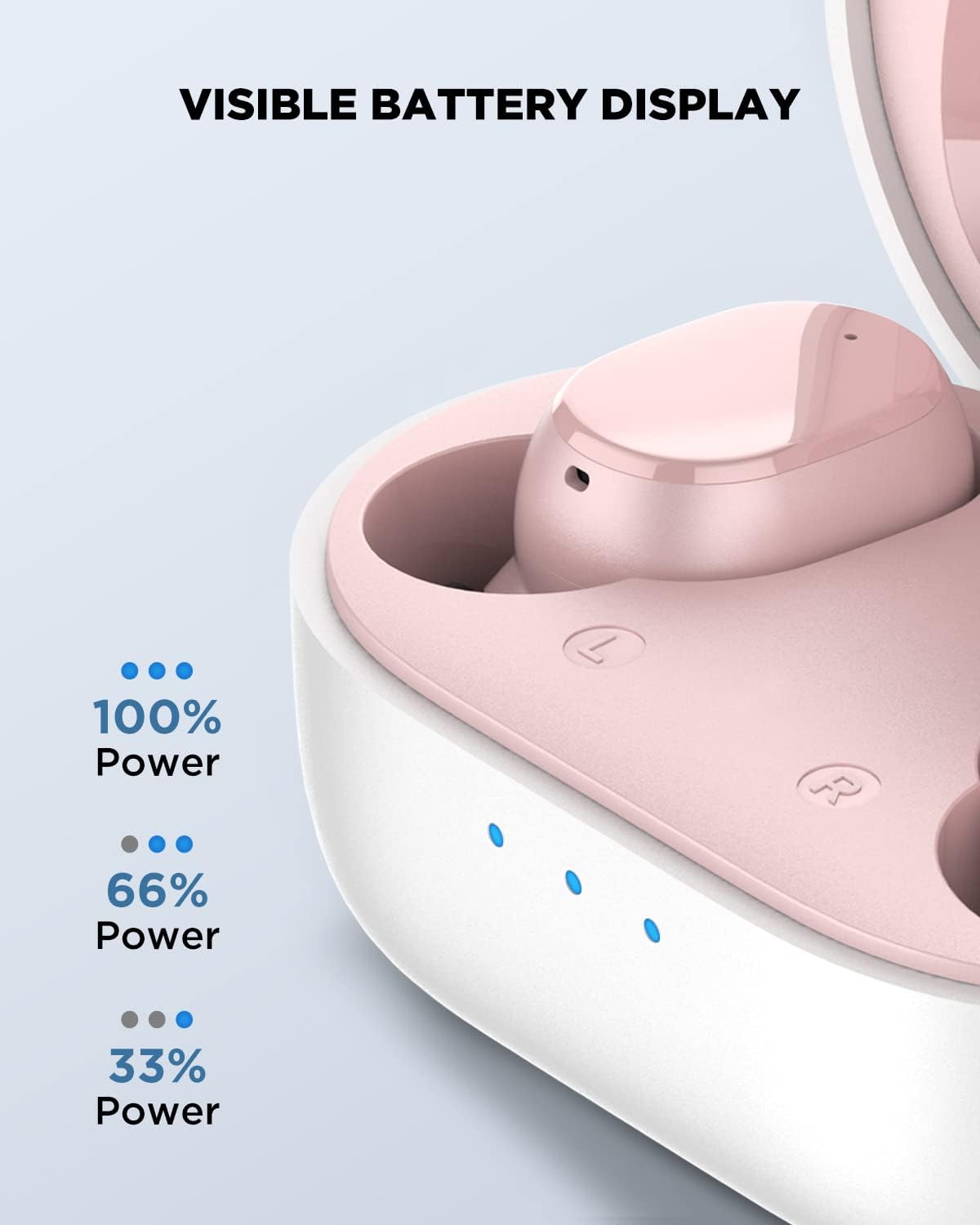
Image: Close-up of the charging case showing the LED indicators for battery level: three lights for 100% power, two for 66%, and one for 33%.
3.2 Emparellament amb el dispositiu
- Assegureu-vos que els auriculars estiguin carregats.
- Obre l'estoig de càrrega. Els auriculars entraran automàticament en mode d'emparellament.
- Al dispositiu (telèfon intel·ligent, tauleta, ordinador portàtil), activeu el Bluetooth.
- Cerca "HTC TWS5" in the list of available Bluetooth devices and select it to connect.
- Un cop connectat, sentiràs un to de confirmació.
The earbuds feature advanced Bluetooth 5.3 technology for a smooth and stable connection with a wireless range of up to 10 meters.

Image: A diagram illustrating the Bluetooth 5.3 chip, emphasizing quicker pairing, faster transmission, and wide compatibility.
4. Instruccions de funcionament
4.1 Controls tàctils intel·ligents
The HTC Wireless Earbuds 2 Plus feature intuitive touch controls on each earbud. Simply tap the surface to manage your audio and calls.
| Acció | Control |
|---|---|
| Respondre / Finalitzar la trucada | Toqueu qualsevol dels auriculars |
| Reproduir / Pausa | Toqueu qualsevol dels auriculars |
| Juga Següent | Mantén premut l'auricular dret durant 2 segons |
| Juga a l'anterior | Toca i mantén premut l'auricular esquerre durant 2 segons |
| Rebutja la trucada | Tap and hold either earbud for 2 seconds |
| Assistent de veu | Toqueu tres vegades qualsevol dels auriculars |
| Volum + | Fes doble toc a l'auricular esquerre |
| Volum - | Fes doble toc a l'auricular dret |
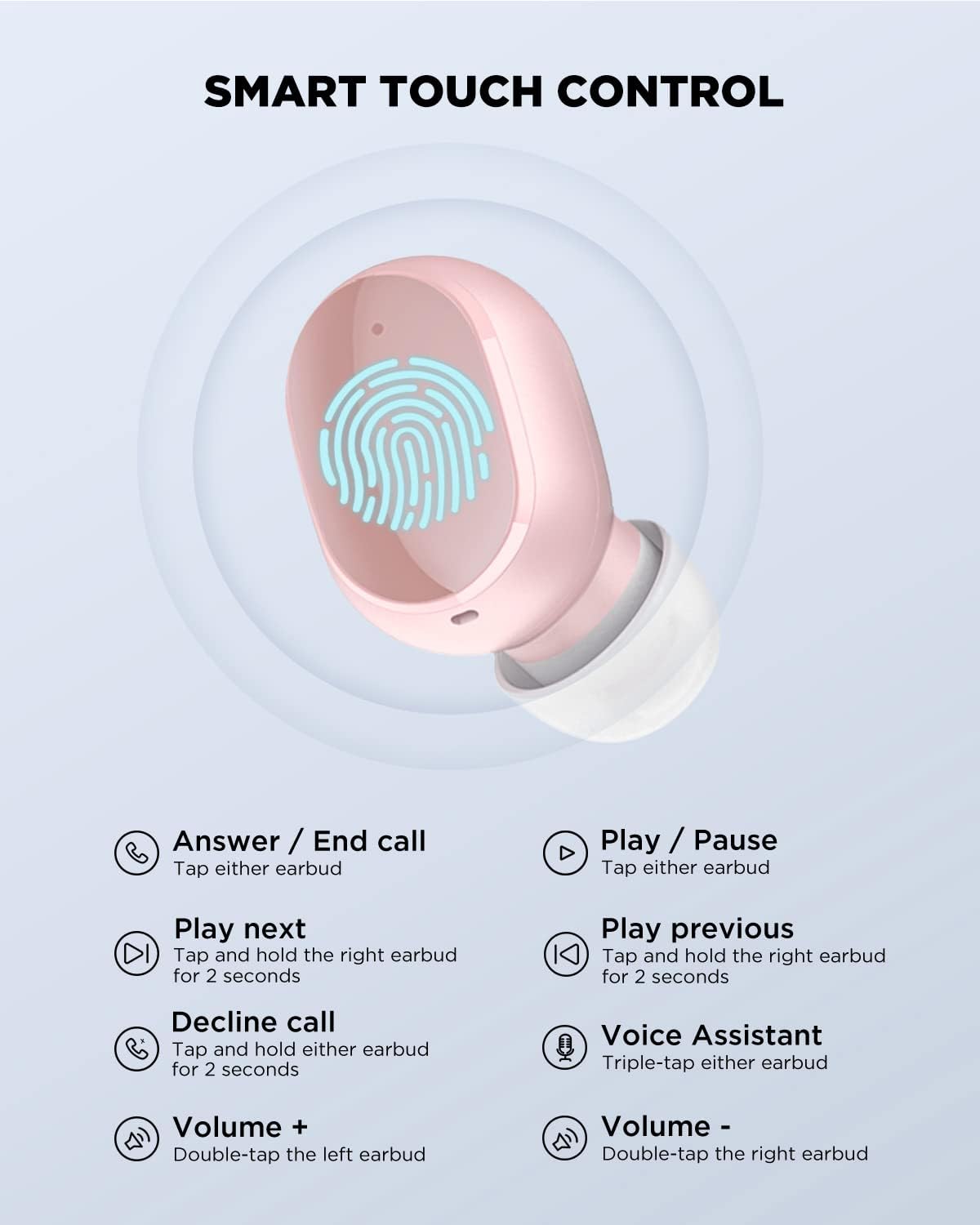
Image: A detailed diagram illustrating the various touch control gestures and their corresponding functions on the earbud surface.
4.2 Com posar-se els auriculars
The earbuds are ergonomically designed for a universal and comfortable fit. Insert each earbud gently into your ear canal and rotate slightly to ensure a secure and comfortable seal. This also helps optimize sound quality and passive noise isolation.

Image: A person wearing the HTC earbuds, demonstrating their comfortable and ergonomic design for extended use.
5. Característiques
- So estèreo immersiu: Experience powerful bass and dynamic treble for a rich audio experience.
- Micròfons integrats: For clear communication during calls.
- Resistent a esquitxades IPX4: Dissenyats per resistir esquitxades i suor, cosa que els fa adequats per a entrenaments i activitats a l'aire lliure.
- Àmplia compatibilitat: Compatible with various devices including cellphones, gaming consoles, laptops, desktops, and iPhones.

Imatge: Una explosió view diagram of the earbud's internal components, highlighting the thickened composite diaphragm responsible for powerful and wide sound range.

Image: Various devices (smartphones, tablets, laptops, smartwatches) illustrating the wide compatibility of the HTC earbuds with iOS, Android, and Windows operating systems.
6. Manteniment
- Neteja: Netegeu regularment els auriculars i l'estoig de càrrega amb un drap suau, sec i sense borrissol. No utilitzeu productes químics agressius ni materials abrasius.
- Emmagatzematge: Quan no els utilitzeu, guardeu els auriculars a la seva funda de càrrega per protegir-los i mantenir-los carregats.
- Eviteu condicions extremes: Do not expose the earbuds to extreme temperatures, humidity, or direct sunlight for prolonged periods.
7. Solució De Problemes
Problemes comuns i solucions:
- Auriculars que no s'emparellan:
- Assegureu-vos que els dos auriculars estiguin carregats.
- Desactiva el Bluetooth del dispositiu i torna'l a activar.
- Forget "HTC TWS5" from your device's Bluetooth settings and try pairing again.
- Torneu a col·locar els auriculars a la funda, tanqueu la tapa, espereu uns segons i, a continuació, obriu-la per tornar a entrar al mode d'emparellament.
- No se sent cap so d'un auricular:
- Assegureu-vos que els dos auriculars estiguin carregats.
- Try placing both earbuds back in the charging case and taking them out again.
- Reset the earbuds (refer to specific reset instructions if available, otherwise try forgetting and re-pairing).
- Auriculars que no es carreguen:
- Comproveu si el cable de càrrega està connectat correctament tant a la carcassa com a la font d'alimentació.
- Assegura't que els contactes de càrrega dels auriculars i de l'interior de la funda estiguin nets i lliures de residus.
- Proveu un cable USB-C o un adaptador d'alimentació diferent.
8. Especificacions
| Característica | Detall |
|---|---|
| Número de model | TWS5 |
| Marca | HTC |
| Connectivitat | Bluetooth 5.3 |
| abast sense fils | Fins a 10 metres |
| Durada de la bateria dels auriculars | Fins a 6.5 hores |
| Temps de reproducció total (amb estoig) | Fins a 26 hores |
| Temps de càrrega | Aprox. 45 minuts (càrrega completa) |
| Tipus de control | Control tàctil |
| Resistència a l'aigua | IPX4 a prova d'esquitxades |
| Pes de l'article | 1.41 unces (total) |
| Dimensions del producte | 2.17 x 1.57 x 1.18 polzades |
| Col·locació de l'orella | A l'orella |
| Control de soroll | Aïllament acústic |
9. Garantia i Suport
For warranty information and customer support, please refer to the warranty card included with your product or visit the official HTC support weblloc web. Conserveu el comprovant de compra per a qualsevol reclamació de garantia.
Per a més ajuda, també podeu visitar el HTC Store on Amazon.


