1. Introducció
Welcome to the user manual for your SSK Dual Bay Hard Drive Docking Station. This manual provides detailed instructions on how to set up, operate, and maintain your device. Please read this manual thoroughly before using the product to ensure proper functionality and to prevent any damage.
The SSK DK108 is an external dual-bay docking station designed for 2.5-inch and 3.5-inch SATA I/II/III HDDs and SSDs. It features USB 3.0 connectivity with UASP support for fast data transfers and includes two additional USB 3.0 expansion ports.
2. Producte acabatview & Característiques

Figura 2.1: Frontal view of the SSK Dual Bay Hard Drive Docking Station, showcasing its two drive bays and two front-facing USB 3.0 ports.
Característiques principals:
- Disseny de doble badia: Supports two 2.5-inch or 3.5-inch SATA I/II/III HDDs/SSDs simultaneously, with a maximum capacity of 16TB per bay (total 32TB).
- USB 3.0 d'alta velocitat: Achieves data transfer rates of up to 5Gbps, backward compatible with USB 2.0 and 1.1.
- Suport UASP: Utilizes the USB Attached SCSI Protocol for up to 20% faster transfer speeds compared to traditional USB 3.0 when used with UASP-enabled systems.
- Multi-Function USB 3.0 Ports: Includes two additional USB 3.0 expansion ports for connecting other USB devices or charging.
- Instal·lació sense eines: Easy plug-and-play setup without the need for tools or drivers.
- Àmplia compatibilitat: Compatible with Windows XP/Vista/7/8/8.1/10, Mac OS 10.4 to 10.11, and Linux Kernel 2.4.2 or higher.
- Font d'alimentació robusta: Comes with a 12V/3A power adapter to ensure stable operation even with multiple high-capacity drives and connected USB devices.
- Carcassa d'alumini: Durable, shockproof, and vibration-resistant aluminum casing with efficient heatsink for reliable data transfers and low power consumption.
- Proteccions de seguretat: Sobreintensitat integrada, sobrevoltage, short-circuit, and leakage protection.
- No Offline Clone Function: This model does not support offline cloning.
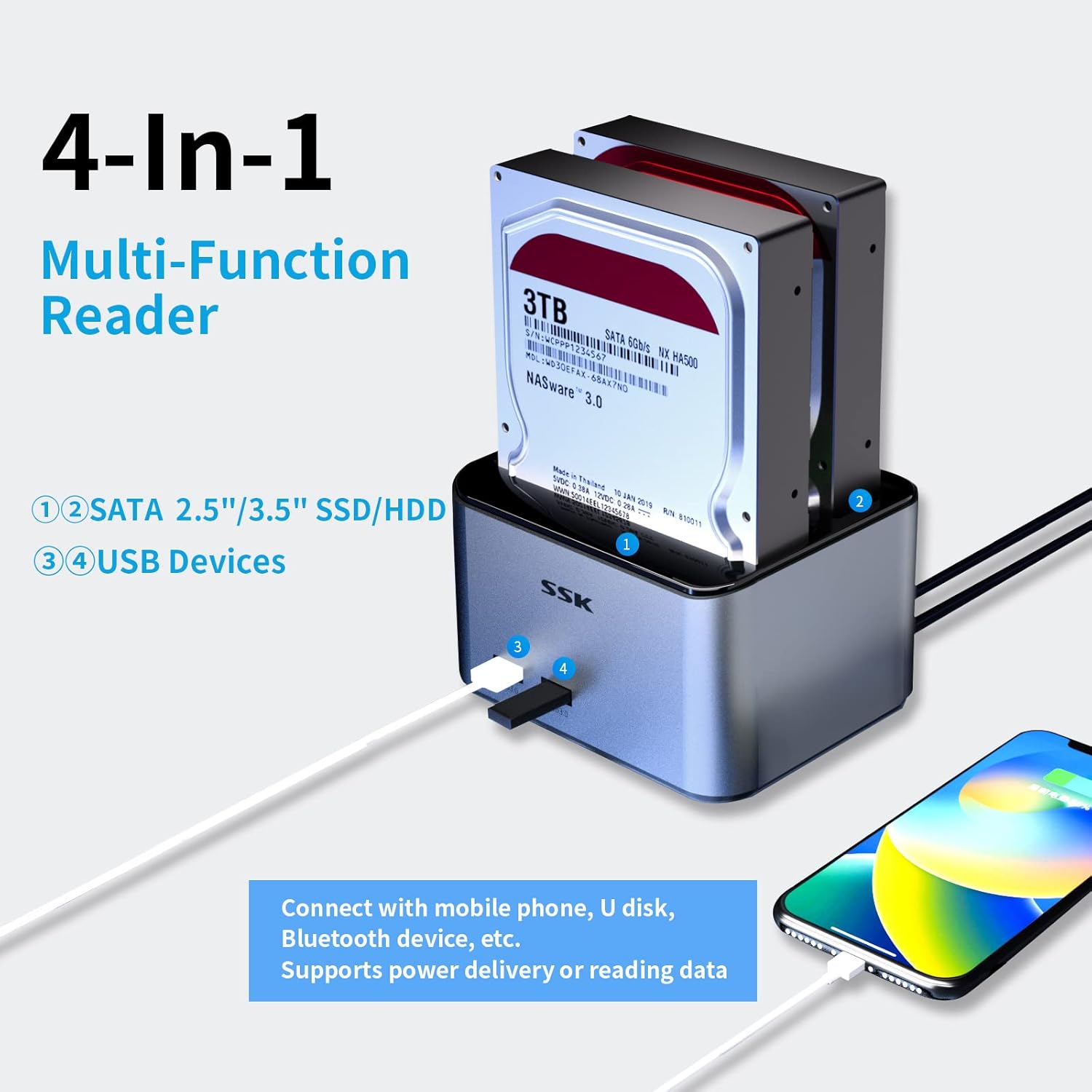
Figure 2.2: Illustration of the docking station's 4-in-1 multi-functionality, showing two SATA drive bays and two USB 3.0 ports for connecting USB devices like U disks or mobile phones.

Figure 2.3: Diagram illustrating the speed benefits of UASP protocol, showing 20% faster transfer speeds and lower CPU usage compared to traditional USB 3.0.
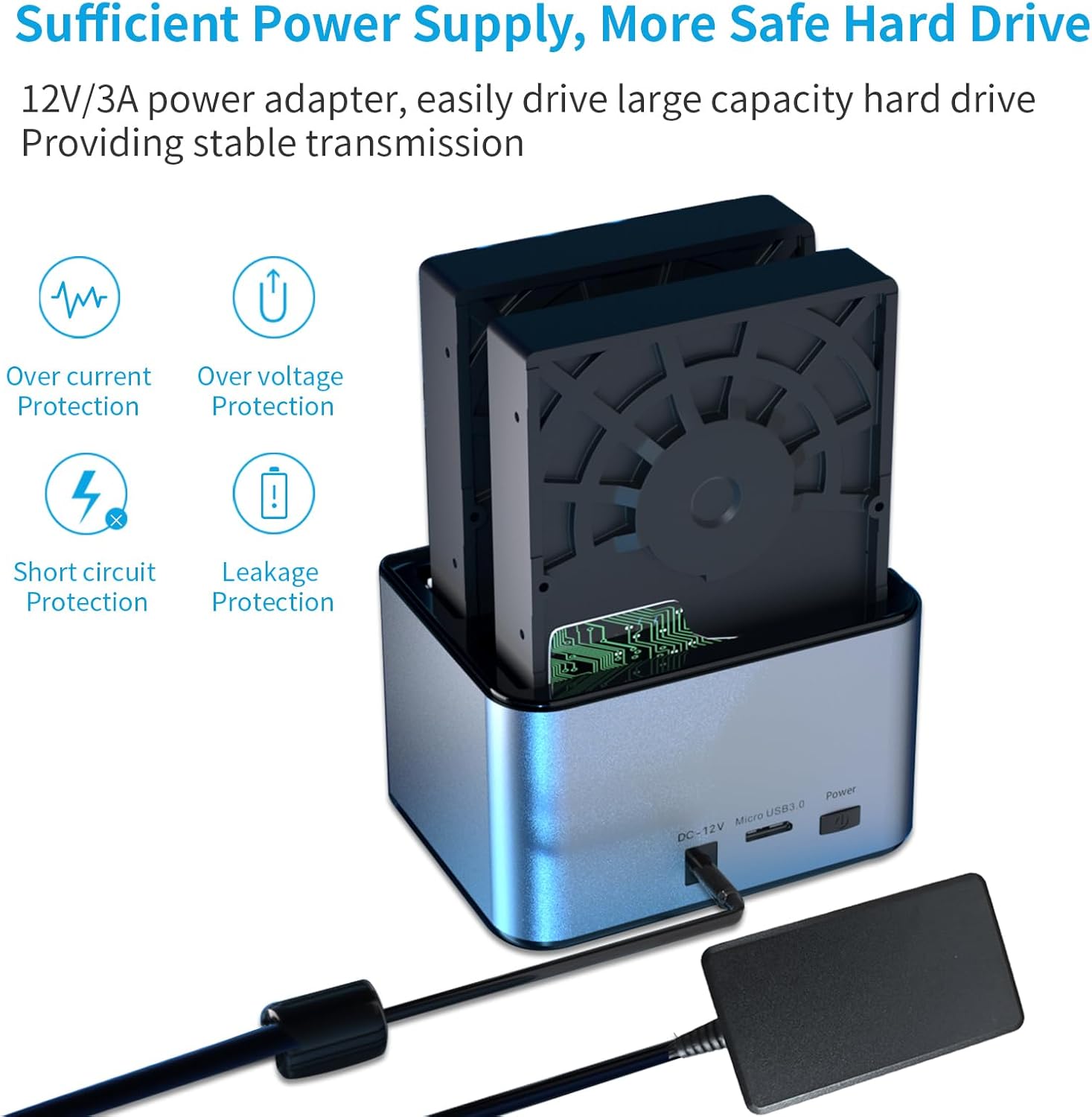
Figure 2.4: Image highlighting the 12V/3A power adapter and the various protection features (over-current, over-voltage, short-circuit, leakage protection) ensuring safe and stable operation.

Figure 2.5: Visual representation of the docking station's compatibility with various drive sizes (2.5" and 3.5" SATA HDD/SSD) and operating systems (Windows, Mac OS, Linux, Android). It also explicitly states "No Offline Clone Function".

Figura 2.6: Primer pla viewespectacleasing the premium features of the docking station, including its aluminum alloy shell, operating status indicators (A, B, Power), dust-proof design for the bays, and anti-skid footpads for stability.
3. Què hi ha a la caixa
The package for your SSK Dual Bay Hard Drive Docking Station should contain the following items:
- SSK Dual Bay Hard Drive Docking Station (Model DK108)
- Adaptador de corrent de 12 V/3 A
- Cable de dades USB 3.0
Note: Hard drives (HDD/SSD) are not included and must be purchased separately.
4. Guia de configuració
4.1 Identificació de components

Figura 4.1: Davant i darrere views of the docking station with labels for HDD-A status indicator, HDD-B status indicator, Power indicator, USB 3.0 ports, DC 12V Input, Micro USB 3.0 port, and Power Button, along with product dimensions.
4.2 Compatibilitat de la unitat
This docking station is compatible with 2.5-inch and 3.5-inch SATA I/II/III HDDs and SSDs. Ensure your drive has a SATA interface before insertion.

Figure 4.2: Comparison image showing the distinct connectors for SATA (compatible) and IDE (not compatible) hard drives. Ensure your drive matches the SATA connector.
4.3 Passos d'instal·lació
- Inserir discs durs: Gently slide your 2.5-inch or 3.5-inch SATA HDD/SSD into the drive bay(s) until it is firmly seated. The tool-free design allows for easy insertion.
- Connecteu l'adaptador d'alimentació: Plug the 12V/3A power adapter into the DC 12V input port on the back of the docking station, then plug the adapter into a power outlet.
- Connexió a l'ordinador: Connect one end of the provided USB 3.0 data cable to the Micro USB 3.0 port on the back of the docking station and the other end to an available USB 3.0 port on your computer.
- Encès: Press the Power button on the back of the docking station. The Power indicator light will illuminate.
- Reconeixement d'accionament: Your operating system should automatically detect the connected drives. If the drives are new, you may need to initialize and format them through your computer's disk management utility before use.
5. Instruccions de funcionament
5.1 Accés a les unitats
Once connected and recognized by your computer, the inserted hard drives will appear as removable storage devices. You can access, read, and write data to them just like any other external drive.
Figure 5.1: The docking station connected to a laptop, demonstrating file transfer operations.

Figure 5.2: The docking station in use with a desktop computer setup.
5.2 Using the USB 3.0 Expansion Ports
The two front-facing USB 3.0 ports can be used to connect additional USB devices such as USB flash drives, card readers, or to charge compatible devices.

Figure 5.3: The docking station's front USB 3.0 ports being used to charge mobile devices.
5.3 Safely Removing Drives
Before physically removing a hard drive from the docking station, always safely eject it from your operating system to prevent data corruption. The two inserted hard disks can operate independently, allowing you to safely eject one without affecting the use of the other.
- Windows: Click the "Safely Remove Hardware and Eject Media" icon in the system tray, then select the drive you wish to eject.
- macOS: Drag the drive icon to the Trash, or right-click (Ctrl-click) the drive icon and select "Eject".
- Once the operating system confirms it is safe to remove, gently pull the hard drive out of the bay.
6. Especificacions
Especificacions tècniques:
| Característica | Especificació |
|---|---|
| Número de model | DK108 |
| Material | Aliatge d'alumini |
| Color | Plata |
| Unitats compatibles | HDD/SSD SATA I/II/III de 2.5"/3.5". |
| Capacitat màxima compatible | 16TB per bay (32TB total) |
| Interfície | USB 3.0 (compatible amb versions anteriors d'USB 2.0/1.1) |
| Velocitat de transferència de dades | Fins a 5 Gbps (USB 3.0) |
| Suport UASP | Sí |
| Adaptador d'alimentació | 12V/3A |
| Compatibilitat de sistemes operatius | Windows XP/Vista/7/8/8.1/10, Mac OS 10.4-10.11, Linux Kernel 2.4.2+ |
| Dimensions del producte (L x A x A) | 4.76 x 3.94 x 2.91 polzades (12.1 x 10.0 x 7.4 cm) |
| Pes de l'article | 1.32 lliures (0.6 kg) |
7. Solució De Problemes
Problemes comuns i solucions:
- Unitat no detectada:
- Assegureu-vos que l'adaptador de corrent estigui connectat correctament i que la base de càrrega estigui engegada.
- Verify the USB 3.0 data cable is properly connected to both the docking station and your computer.
- Comproveu si el disc dur està correctament col·locat a la badia.
- Confirm the hard drive is a SATA drive (not IDE). Refer to Figure 4.2.
- For new drives, ensure they are initialized and formatted in your computer's Disk Management (Windows) or Disk Utility (macOS).
- Proveu de connectar-vos a un altre port USB de l'ordinador.
- Velocitats de transferència lentes:
- Assegureu-vos que esteu connectat a un port USB 3.0 de l'ordinador. Els ports USB 2.0 tindran velocitats més lentes.
- Verify your operating system and motherboard support UASP for optimal performance.
- Check the health of your hard drive. A failing drive can cause slow transfers.
- Eviteu transferir moltes petites files simultàniament, ja que això pot ser més lent que transferir uns quants grans files.
- Docking Station Not Powering On:
- Ensure the power adapter is securely plugged into both the docking station and a working power outlet.
- Premeu el botó d'encesa amb fermesa.
- Proveu una presa de corrent diferent.
8. Manteniment
To ensure the longevity and optimal performance of your SSK Dual Bay Hard Drive Docking Station, follow these maintenance guidelines:
- Mantenir net: Regularly wipe the exterior with a soft, dry cloth. Avoid using liquid cleaners or aerosols.
- Prevenció de pols: The docking station features a dust-proof design for the bays, but it's still advisable to keep it in a clean environment to prevent dust accumulation in ports and vents.
- Emmagatzematge adequat: When not in use for extended periods, disconnect the power and USB cables and store the device in a cool, dry place.
- Manejar amb cura: Eviteu deixar caure el dispositiu ni sotmetre'l a impactes forts, ja que això pot danyar els components interns.
- Ventilació: Ensure the docking station is placed in an area with adequate airflow to prevent overheating, especially during prolonged use.
9. Garantia i Suport
9.1 Informació de la garantia
SSK products typically come with a limited warranty. Please refer to the warranty card included with your product or visit the official SSK weblloc web per obtenir informació detallada sobre els termes i condicions de garantia específics de la vostra regió.
9.2 Atenció al client
If you encounter any issues or have questions not covered in this manual, please contact SSK customer support. You can find contact information and additional resources on the official SSK weblloc web o a través de la seva pàgina de la botiga d'Amazon:
- SSK Amazon Store: Visit the SSK Store
- Manual d'usuari (PDF): Descarrega el manual en PDF


