1. Introducció
Thank you for choosing the OSAKI iPLAYr Side-Firing Sound Table Top Home Audio System. This device is designed to provide continuous background music for homes and offices, featuring Bluetooth connectivity, FM radio, and a unique side-firing sound experience. Please read this manual carefully before using the product to ensure proper operation and to maximize your listening enjoyment.
2. Informació de seguretat
- Font d'alimentació: Feu servir només l'adaptador de corrent proporcionat. Assegureu-vos que el volumtage coincideix amb els requisits especificats a l'adaptador.
- Col·locació: Place the unit on a stable, flat surface. Avoid placing it in direct sunlight, near heat sources, or in areas with high humidity or dust. Ensure adequate ventilation around the unit.
- Aigua i humitat: No exposeu la unitat a la pluja, la humitat ni a líquids que gotegen o esquitxen. No col·loqueu objectes plens de líquids, com ara gerros, a sobre de la unitat.
- Neteja: Disconnect the power before cleaning. Use a soft, dry cloth. Do not use liquid cleaners or aerosol sprays.
- Manteniment: No intenteu fer el manteniment de la unitat vosaltres mateixos. Envieu totes les tasques de manteniment a personal de servei qualificat.
- Nens: Mantingueu la unitat i els seus accessoris fora de l'abast dels nens.
3. Contingut del paquet
Si us plau, comproveu que tots els elements que s'enumeren a continuació estiguin inclosos al vostre paquet:
- OSAKI iPLAYr Main Unit
- Adaptador d'alimentació
- Control remot
- Bluetooth Adaptor (if included as a separate accessory)
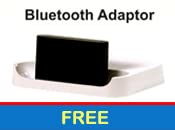
Imatge 3.1: Included Bluetooth Adaptor, if provided as a separate component.
4. Característiques del producte
The OSAKI iPLAYr is equipped with several features designed to enhance your audio experience:
- Side-Firing Sound Technology: This unique design projects sound sideways, allowing it to reflect off walls and surfaces, creating a natural, immersive sound field similar to how sound is perceived in a live environment.
- Connectivitat Bluetooth: Wirelessly connect your smartphone or other Bluetooth-enabled devices for audio streaming.
- Ràdio FM integrada: Enjoy your favorite radio stations directly from the unit.
- Entrada auxiliar: Connect non-Bluetooth devices via a standard 3.5mm audio cable.
- Comandament a distància: Conveniently manage playback, volume, and modes from a distance.
- 10 Watts Audio Output: Delivers clear and consistent sound for continuous background music.

Imatge 4.1: Diagram illustrating how side-firing sound reflects off surfaces to create a natural sound experience.
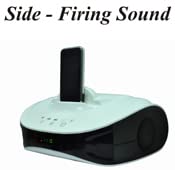
Imatge 4.2: The OSAKI iPLAYr unit with a smartphone docked, highlighting its side-firing speaker design.

Imatge 4.3: Part superior frontal view of the OSAKI iPLAYr, displaying the integrated control buttons for power, playback, and volume.
5. Instruccions de configuració
5.1 Desembalatge i col·locació
- Carefully remove the OSAKI iPLAYr unit and all accessories from the packaging.
- Place the unit on a stable, flat surface, such as a table or bedside cabinet. For optimal side-firing sound, ensure there are clear surfaces (like walls) nearby for sound reflection.
5.2 Connexió de potència
- Locate the DC 12V IN port on the back of the unit.
- Connecteu l'adaptador de corrent proporcionat a aquest port.
- Connecteu l'adaptador d'alimentació a una presa de corrent estàndard.
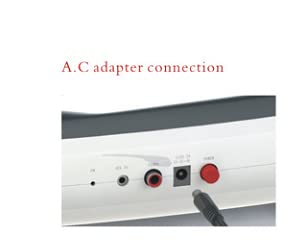
Imatge 5.1: Primer pla view of the AC adapter connection port on the rear panel of the OSAKI iPLAYr.
5.3 Connexió de fonts d'àudio
The back panel of the OSAKI iPLAYr features various input ports:
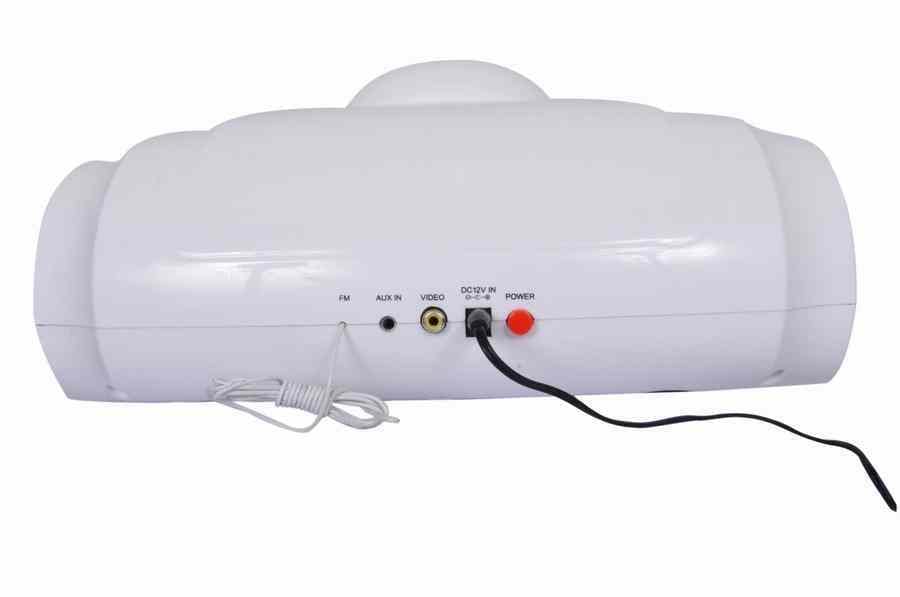
Imatge 5.2: Rear panel connections including FM antenna, Aux In, Video Out, DC 12V In, and Power button.
- Entrada auxiliar: Connect external audio devices (e.g., MP3 players, computers) using a 3.5mm audio cable to the 'AUX IN' port.
- Antena FM: Connect the provided FM antenna (if applicable) to the 'FM' port for improved radio reception.
- Sortida de vídeo: The 'VIDEO' port allows connection to a display for video playback from a docked device (if supported by the docked device and cable).
6. Instruccions de funcionament
6.1 Encès/Apagat
Premeu el botó Poder button on the unit or the remote control to turn the device on or off.
6.2 Selecció del mode
Premeu el botó Mode button on the unit or remote to cycle through available input sources: Bluetooth, AUX, and FM Radio.
6.3 Vinculació Bluetooth
- Switch the unit to Bluetooth mode. The Bluetooth indicator light will flash, indicating it is ready for pairing.
- On your smartphone or Bluetooth-enabled device, search for available Bluetooth devices.
- Select "OSAKI iPLAYr" from the list. Once connected, the indicator light will become solid.
- Ara pots reproduir àudio en streaming sense fil des del teu dispositiu.
6.4 Funcionament de la ràdio FM
- Canvieu la unitat al mode de ràdio FM.
- Utilitza el Pista anterior / següent buttons on the unit or remote to scan for radio stations.
- Per a una millor recepció, ajusteu la posició de l'antena FM.
6.5 Control de volum
Ajusteu el volum amb el botó Puja el volum (+) i Baixar el volum (-) buttons on the unit or the remote control.
6.6 Using as a Home Cinema System
The side-firing sound design of the OSAKI iPLAYr can enhance your home cinema experience. Place the unit in front of your television or display, ensuring its side speakers are not obstructed. Connect your TV's audio output to the iPLAYr's AUX IN port. The reflected sound will create a wider soundstage, making movies and shows more immersive.

Imatge 6.1: The OSAKI iPLAYr positioned below a television, demonstrating its use as a compact home cinema audio solution.

Imatge 6.2: A user enjoying music from the OSAKI iPLAYr, illustrating its suitability for continuous background music.
7. Manteniment
7.1 Neteja
To clean the unit, first disconnect it from the power source. Use a soft, dry, lint-free cloth to wipe the exterior surfaces. Do not use abrasive cleaners, waxes, or solvents as they may damage the finish.
7.2 Emmagatzematge
Si guardeu la unitat durant un període prolongat, desconnecteu-la de l'alimentació i guardeu-la en un lloc fresc i sec, allunyat de la llum solar directa i de temperatures extremes.
8. Solució De Problemes
| Problema | Causa possible | Solució |
|---|---|---|
| Sense poder | L'adaptador de corrent no està connectat o la presa de corrent està defectuosa. | Assegureu-vos que l'adaptador de corrent estigui ben connectat a la unitat i a una presa de corrent que funcioni. |
| Sense so | Volum massa baix; mode d'entrada incorrecte; cable d'àudio no connectat correctament. | Increase volume. Select the correct input mode (Bluetooth, AUX, FM). Check audio cable connections. |
| Bluetooth no emparellat | Unit not in pairing mode; device too far; previously paired device connected. | Ensure unit is in Bluetooth pairing mode. Move device closer. Disconnect from other Bluetooth devices. |
| Mala recepció FM | Antena no connectada o mal posicionada. | Connect the FM antenna. Adjust its position for better signal. |
9. Especificacions
| Característica | Especificació |
|---|---|
| Número de model | iPLAYR (BT) |
| Tipus d'altaveu | Surround Sound (Side-Firing) |
| Potència de sortida màxima dels altaveus | 10 watts |
| Tecnologia de connectivitat | Auxiliar, Bluetooth |
| Característiques especials | Radio, Remote Control |
| Dispositius compatibles | Smartphone |
| Mètode de control | Remot |
| Font d'alimentació | Elèctric amb cable (DC 12V) |
| Material | Plàstic |
| Dimensions del producte (LxWxH) | 22.7 x 30.6 x 12.5 cm |
| Pes de l'article | 1 kg |
| País d'origen | Xina |
10. Garantia i Suport
OSAKI mini Audio products are designed for reliability. In the event that your product requires service, please note the following:
- Customers should send the product to the centralized service center located in Mumbai or to the nearest available associate service center.
- After repair, the product will be sent back to the customer.
For further assistance or to locate a service center, please refer to the official OSAKI mini Audio weblloc o contacteu amb el servei d'atenció al client.
També podeu visitar el OSAKI Store on Amazon per a més informació.


