1. Introducció
Thank you for choosing the RadioShack Pocket AM/FM Digital Alarm Clock Radio. This compact and versatile device is perfect for on-the-go listening, offering clear reception and convenient alarm features. Please read this manual carefully to ensure proper use and to get the most out of your new radio.

Figura 1: Frontal view of the RadioShack Pocket AM/FM Digital Alarm Clock Radio, showing the digital display, control buttons, speaker grille, and extended antenna.
2. Característiques clau
- Disseny compacte i portàtil: Easily fits in your pocket, backpack, or bag for travel and daily use.
- Antena retràctil: Ensures optimal signal reception.
- Processament del senyal digital: Provides clear, crisp audio without static or interruptions.
- Presa d'auriculars de 3.5 mm: For private and efficient listening.
- Funció d'alarma: Set alarms to keep track of your schedule.
- Memòria de 20 estacions: Store your favorite AM and FM radio stations for quick access.
- Pantalla digital: Clear display for frequency and time.

Figure 2: The radio shown alongside a pair of headphones, highlighting its 3.5mm audio output.
3. Configuració
3.1 Instal·lació de la bateria
- Localitzeu la tapa del compartiment de la bateria a la part posterior de la ràdio.
- Feu lliscar o aixequeu la tapa per obrir el compartiment.
- Insert two (2) AAA batteries (not included), ensuring the correct polarity (+/-) as indicated inside the compartment.
- Tanqueu bé la tapa del compartiment de la bateria.
3.2 Encès inicial
Once batteries are installed, press the Poder button to turn on the radio. The digital display will illuminate.
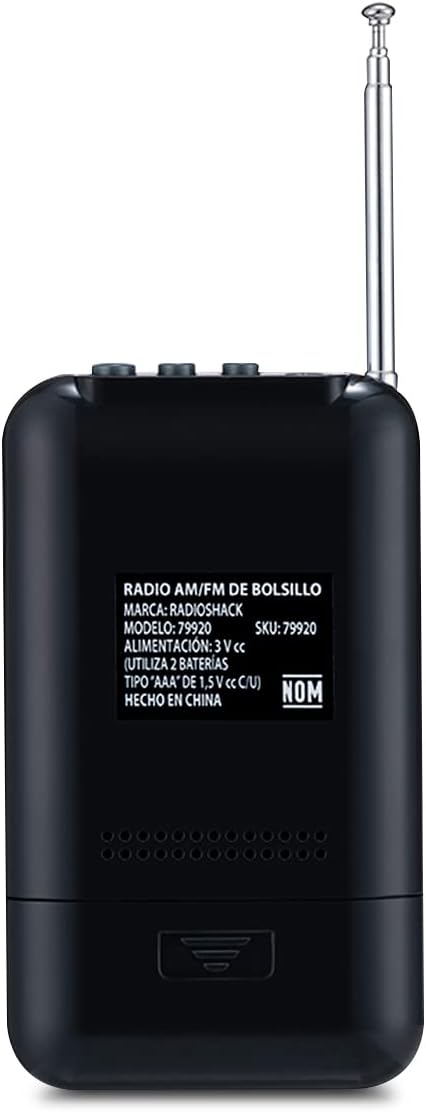
Figura 3: Esquena view of the radio, showing the battery compartment and product information label.
4. Instruccions de funcionament
4.1 Sintonització d'emissores de ràdio
- Premeu el botó Banda botó per canviar entre les bandes AM i FM.
- Utilitza el Afinació (▲) o Sintonitzant cap avall (▼) buttons to manually tune to your desired frequency.
- Per a l'escaneig automàtic, manteniu premut el botó Afinació or Sintonitzant cap avall button until the radio finds the next clear station.
4.2 Storing and Recalling Stations
- Sintonitza l'emissora desitjada.
- Premeu el botó Set button to enter memory mode. The display will show a flashing preset number.
- Utilitza el Afinació or Sintonitzant cap avall buttons to select the desired preset number (1-20).
- Premeu Set de nou per confirmar i desar l'emissora.
- Per recuperar una emissora emmagatzemada, premeu el botó Func repetidament per anar passant pels preajustos desats.
4.3 Configuració de l'alarma
- Amb la ràdio apagada, manteniu premut el botó Set botó fins que la pantalla de l'hora parpellegi.
- Utilitza el Afinació or Sintonitzant cap avall botons per ajustar l'hora i, a continuació, premeu Set per confirmar.
- Repeat the process for minutes.
- After setting the time, the alarm time will flash. Adjust the alarm hour and minutes similarly.
- Premeu Set to activate the alarm. An alarm icon will appear on the display.
- Per desactivar l'alarma, premeu la tecla Set button when the radio is off until the alarm icon disappears.
4.4 Ús d'auriculars
Insert a 3.5mm audio jack from your headphones into the headphone port located on the top of the radio. The internal speaker will automatically mute, and audio will be routed to your headphones.
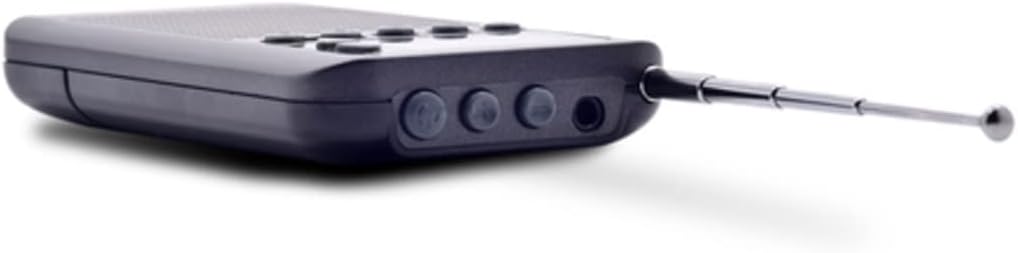
Figura 4: superior view of the radio, illustrating the headphone jack and other top-mounted controls.
5. Manteniment
- Neteja: Netegeu la ràdio amb un drap suau i sec. No utilitzeu netejadors líquids ni materials abrasius.
- Cura de la bateria: Traieu les piles si no heu d'utilitzar la ràdio durant un període prolongat per evitar fuites.
- Emmagatzematge: Guardeu la ràdio en un lloc fresc i sec, allunyat de la llum solar directa i de temperatures extremes.
- Exposició a l'aigua: Aquesta ràdio no és impermeable. Eviteu l'exposició a l'aigua o a una humitat elevada.
6. Solució De Problemes
| Problema | Causa possible | Solució |
|---|---|---|
| La ràdio no s'encén. | Les bateries estan esgotades o instal·lades incorrectament. | Canvieu les piles per piles AAA noves, assegurant-vos de la polaritat correcta. |
| Mala recepció de ràdio. | Antena no estesa; zona de senyal feble; interferències. | Fully extend the antenna. Try moving to a different location. Avoid strong electromagnetic fields. |
| No hi ha so de l'altaveu. | Headphones are plugged in; volume is too low. | Unplug headphones. Increase volume using the volume buttons. |
| L'alarma no sona. | Alarm not activated; alarm volume too low. | Ensure alarm icon is visible on display. Check volume settings. |
7. Especificacions
| Característica | Especificació |
|---|---|
| Marca | RadioShack |
| Model | R-9388 |
| Tecnologia del sintonitzador | AM i FM |
| Bandes de ràdio compatibles | AM, FM |
| Tipus de visualització | Digital |
| Font d'alimentació | Alimentat per piles (2 x AAA, no incloses) |
| Característiques especials | Alarma |
| Dispositius compatibles | Auriculars |
| Tecnologia de connectivitat | Auxiliar (connector de 3.5 mm) |
| Dimensions del producte | 8 x 3.81 x 11.5 cm (3.15 x 1.5 x 4.53 polzades) |
| Pes | 80 g (2.82 unces) |
| Color | Negre |

Figure 5: Product dimensions of the RadioShack Pocket AM/FM Digital Alarm Clock Radio.
8. Garantia i Suport
RadioShack products are designed for reliability and performance. For warranty information or technical support, please refer to the warranty card included with your purchase or visit the official RadioShack weblloc per obtenir dades de contacte.
Assistència en línia: www.radioshack.com


