Introducció
This manual provides a step-by-step guide to programming OMRON PLCs using Ladder Logic and Function Blocks with the CX-Programmer Software. It aims to impart comprehensive knowledge of PLC applications and operations within factory automation systems, focusing on window-based ladder programming.
Each exercise detailed within this guide is designed to ensure a complete understanding of the product's operations and settings, enabling users to effectively apply OMRON technology in real-world scenarios.
Key Concepts and Learning Objectives
The guide covers fundamental aspects essential for OMRON PLC programming:
- Introduction to PLC: Understanding the basics of Programmable Logic Controllers.
- I/O Connection & Wiring: Guidelines for connecting input/output devices to the PLC.
- System Configuration of CP Series: Details on configuring OMRON CP Series PLCs.
- Function, Characteristics, & Features of CP Series: In-depth look at the capabilities of CP Series PLCs.
- Addressing & I/O Allocation of CP Series: How to assign addresses to inputs and outputs.
- Basic Instruction: LD, AND, OR: Core ladder logic instructions.
- Introduction to Programming Tools CX-One: Acabatview of the CX-One software suite.
Setup: CX-Programmer Software and PLC Connection
To begin programming, ensure the CX-Programmer software is correctly installed and configured. This section outlines the initial setup steps:
- Setup PLC: Configure the specific OMRON PLC model within the CX-Programmer environment.
- Create New Project: Initiate a new programming project.
- Saving New Project: Deseu el vostre projecte files per evitar la pèrdua de dades.
- Upload/Download: Procedures for transferring programs between the PC and the PLC.
- Monitoring Program: How to observe the PLC's operation and program execution in real-time.
For detailed installation instructions for CX-Programmer, refer to the software's official documentation or OMRON's support resources.
Operating: Basic Programming and Application Examples
This section delves into practical programming techniques and provides application examples to solidify understanding.
Basic Programming Instructions:
- Temporitzador: Implementing time-based operations.
- counter: Counting events or pulses.
- Set/Reset: Latching and unlatching outputs.
- Mantenir: Maintaining a state.
- Differentiate: Detecting rising or falling edges of signals.
Aplicació Examples:
Through interactive build Function Blocks, ladders, and simulations, you will learn about factory automation using OMRON technology. Specific examples will guide you through creating programs for common industrial tasks.
Maintenance: Program Management and Best Practices
Effective program maintenance ensures long-term reliability and ease of modification. Consider the following best practices:
- Documentació: Thoroughly comment your ladder logic and function blocks to explain their purpose and functionality.
- Version Control: Maintain different versions of your programs, especially before making significant changes.
- Còpies de seguretat periòdiques: Periodically back up your PLC programs to external storage.
- Modular Programming: Break down complex tasks into smaller, manageable subroutines or function blocks.
- Prova: Rigorously test all program modifications in a simulated environment before deploying to live systems.
Troubleshooting Common Programming Issues
Encountering issues during PLC programming is common. Here are some general troubleshooting tips:
- Problemes de connectivitat: Ensure the communication cable is correctly connected and the communication settings in CX-Programmer match the PLC.
- Syntax Errors: Check for incorrect instruction usage or addressing errors in your ladder logic. The CX-Programmer often highlights these.
- Logic Errors: If the program compiles but doesn't behave as expected, review the logic flow. Use monitoring tools to observe variable states.
- I/O Mismatch: Verify that the physical I/O wiring matches the I/O allocation in your program.
- PLC Mode: Ensure the PLC is in RUN mode for execution and PROGRAM mode for downloading new programs.
For specific error codes or advanced diagnostics, consult the OMRON PLC and CX-Programmer manuals.
Imatges del producte

Figura 1: Front cover of the "Learn Basic OMRON PLC Programming" book. The cover features a dark industrial control panel with a laptop displaying programming software, and the title text "Learn Basic Omron Plc Programming" along with the author's name, Robert Oliver.
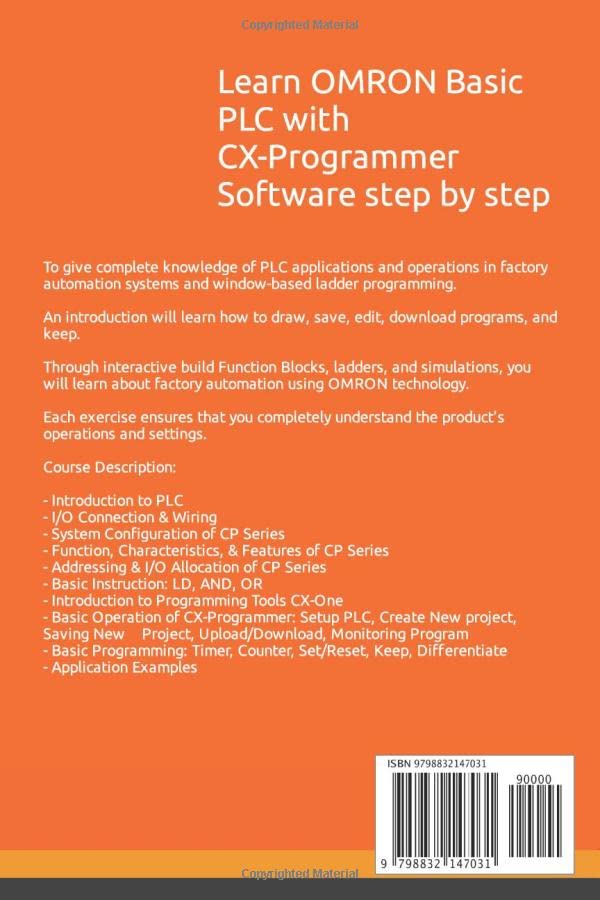
Figura 2: Back cover of the "Learn Basic OMRON PLC Programming" book. The back cover provides a summary of the book's content, including key learning objectives and a course description, against a light orange background. It also shows the ISBN barcode.
Especificacions
| Atribut | Valor |
|---|---|
| ASIN | B0B2HG8BQL |
| Editor | Publicat independentment |
| Data de publicació | 26 de maig de 2022 |
| Llengua | Anglès |
| Longitud d'impressió | 270 pàgines |
| ISBN-13 | 979-8832147031 |
| Pes de l'article | 1.04 lliures |
| Dimensions | 6 x 0.61 x 9 polzades |
Garantia i Suport
As this product is a published book, standard product warranties typically do not apply. For any issues related to the content, errata, or general inquiries, please refer to the publisher's contact information or the author's publicly available resources, if any.
For support regarding OMRON PLC hardware or CX-Programmer software, please consult the official OMRON documentation and their customer support channels.


