1. Introducció
Thank you for choosing the Rockstar PAD20 PRO ADVANCED Electronic Drum Pad. This manual provides essential information for the safe and effective use of your new instrument. Please read it thoroughly before operation and retain it for future reference. The PAD20 PRO ADVANCED is designed to offer advanced percussion performance with versatile drum kits, enhanced connectivity, and durable construction.
2. Informació de seguretat
- Font d'alimentació: Feu servir només l'adaptador de corrent especificat. Assegureu-vos que el volumtage coincideix amb els requisits del dispositiu.
- Aigua i humitat: Do not expose the unit to rain, moisture, or excessive humidity. Avoid placing liquid containers near the device.
- Ventilació: Assegureu-vos que hi hagi una ventilació adequada al voltant de la unitat. No bloquegeu les obertures de ventilació.
- Fonts de calor: Mantingueu la unitat allunyada de fonts de calor com ara radiadors, registres de calor, estufes o altres aparells que produeixin calor.
- Neteja: Desconnecteu l'alimentació abans de netejar. Feu servir un drap suau i sec. No utilitzeu netejadors líquids ni netejadors en aerosol.
- Manteniment: No intenteu atendre aquest producte vosaltres mateixos. Consulteu tots els serveis a personal de servei qualificat.
3. Contingut del paquet
Verifiqueu que tots els elements siguin presents al paquet:
- Rockstar PAD20 PRO ADVANCED Electronic Drum Pad
- Adaptador d'alimentació
- Manual d'usuari (aquest document)
4. Producte acabatview
4.1 Panell frontal i controls
The front panel features eight velocity-sensitive pads, a large LCD screen, and various control buttons and knobs for navigation and sound manipulation.
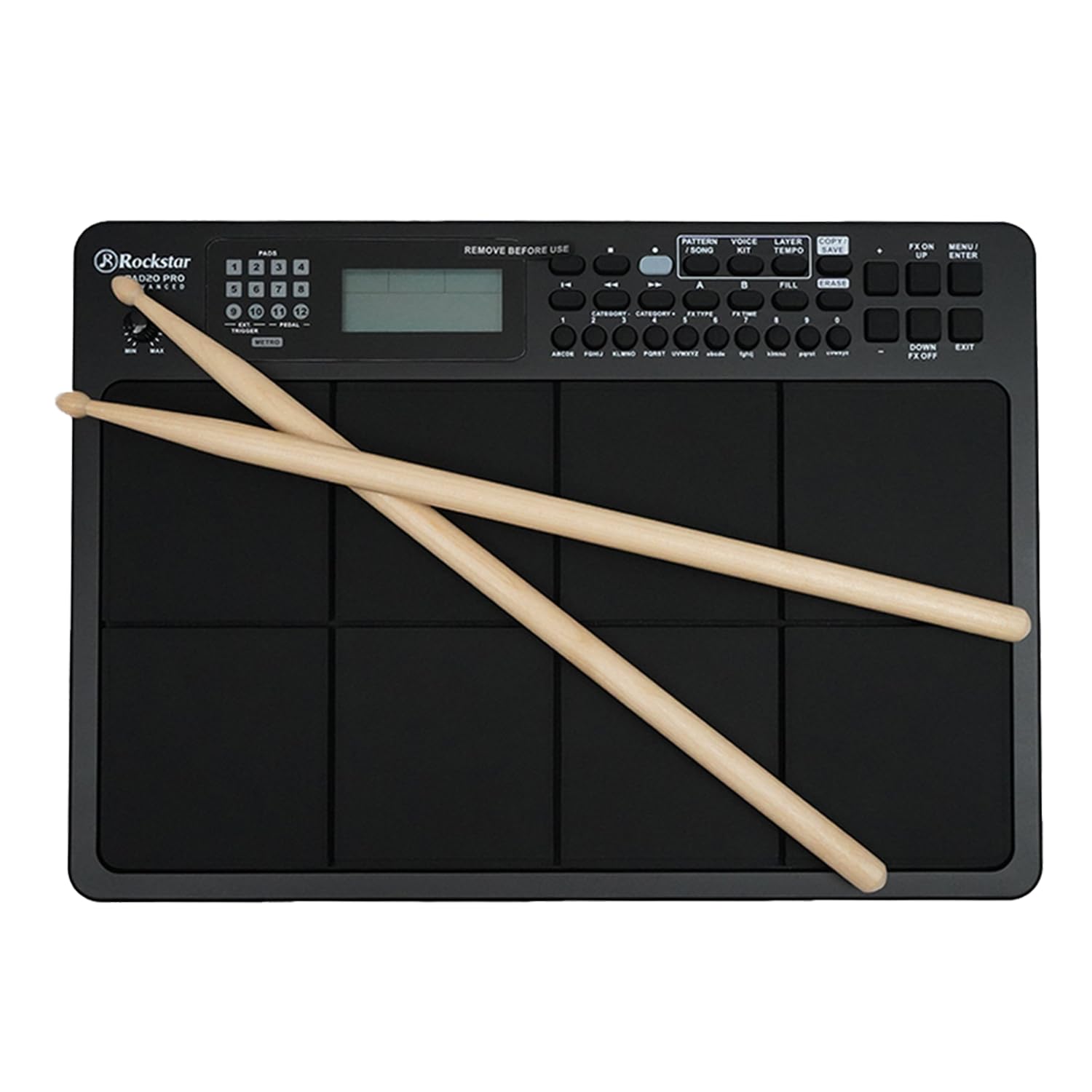
Figura 1: Davant view of the Rockstar PAD20 PRO ADVANCED with drumsticks, showing the pads, display, and control buttons.
- Pads (1-8): Velocity-sensitive pads for triggering sounds.
- Pantalla LCD: Large backlight display for navigating menus, selecting kits, and viewparàmetres.
- Botons de navegació: Buttons for moving through menus and adjusting settings.
- Pom de volum: Ajusta el volum de sortida general.
- Botons de funció: Dedicated buttons for Pattern, Voice, Layer, Kit, Song, Tempo, Copy, Save, FX On/Off, Menu, Up/Down, Enter, Exit.
4.2 Connexions del panell posterior
The rear panel provides various input and output ports for connecting to external devices.

Figura 2: Rear panel connections diagram, illustrating ports for USB, MIDI In/Out, audio outputs, and power input.
- USB 2.0 MIDI Port: For connecting to a computer for MIDI data transfer.
- MIDI IN/OUT Ports: For connecting to other MIDI devices.
- Audio Outputs (L/MONO, R): Per connectar-se a un amplifier, mesclador o interfície d'àudio.
- Sortida d'auriculars: Per a monitorització privada.
- Entrada auxiliar: For connecting external audio players.
- External Trigger/Pedal Inputs: For connecting additional pads or footswitches.
- Entrada d'alimentació: Per connectar l'adaptador de corrent continu.
5. Configuració
- Col·locació: Place the PAD20 PRO ADVANCED on a stable, flat surface.
- Connexió d'alimentació: Connect the provided power adapter to the DC IN port on the rear panel, then plug the adapter into a power outlet.
- Connexió d'àudio:
- Per a exteriors amplification, connect the L/MONO and R audio outputs to your amplifier or mixer using appropriate cables.
- For private practice, connect headphones to the Headphone Output.
- Connexió MIDI/USB (opcional): To use the PAD20 PRO ADVANCED as a MIDI controller or to connect to a computer, use a USB cable to connect the USB 2.0 MIDI port to your computer.
- Encès: Press the power button to turn on the unit. The LCD display will illuminate.
6. Instruccions de funcionament
6.1 Funcionament bàsic
Upon powering on, the unit will typically load the last used drum kit. Strike the pads with drumsticks or your hands to produce sounds.
6.2 Navegació per la pantalla

Figura 3: Close-up of the LCD screen, showing kit selection and voice information. The display is bright and clear.
Use the navigation buttons (Up/Down, Left/Right, Enter, Exit) to move through menus and adjust parameters shown on the large backlight LCD display.
6.3 Drum Kit Selection
The PAD20 PRO ADVANCED features 100 professionally curated drum kits. To select a kit:
- Premeu el botó KIT botó.
- Use the navigation buttons to scroll through the available kits.
- Premeu ENTRAR per confirmar la vostra selecció.
6.4 Funcions d'enregistrament
The unit supports real-time record and step record edit functions. Refer to the on-screen menu for detailed instructions on how to initiate, stop, and edit recordings.
6.5 Connectivity and MIDI
The USB 2.0 MIDI port allows seamless integration with your computer. You can use the PAD20 PRO ADVANCED as a MIDI controller for software instruments or to send MIDI data to a Digital Audio Workstation (DAW).
7. Manteniment
- Neteja: Wipe the unit with a soft, dry cloth. For stubborn dirt, a slightly damp cloth can be used, followed by a dry cloth. Avoid abrasive cleaners.
- Emmagatzematge: Quan no l'utilitzeu durant períodes prolongats, guardeu la unitat en un lloc fresc i sec, allunyat de la llum solar directa i de temperatures extremes.
- Cura de les coixinetes: Avoid striking the pads with excessive force or sharp objects, as this can damage the sensors.
8. Solució De Problemes
| Problema | Causa possible | Solució |
|---|---|---|
| No sound from pads | Volume too low; incorrect audio connection; headphones not connected properly. | Increase master volume. Check audio cables and connections. Ensure headphones are fully inserted. |
| La unitat no s'encén | Power adapter not connected; faulty power outlet. | Ensure power adapter is securely connected to the unit and a working power outlet. Try a different outlet. |
| Pads are unresponsive or trigger inconsistently | Sensitivity settings; physical damage to pads. | Check pad sensitivity settings in the menu. If problem persists, contact support. |
| MIDI connection issues | Incorrect USB cable; driver issues; software settings. | Ensure a proper USB 2.0 cable is used. Check computer's device manager for driver status. Verify MIDI input settings in your software. |
9. Especificacions
| Característica | Descripció |
|---|---|
| Model | PAD20 PRO |
| Coixinets | 8 Velocity-sensitive pads |
| Kits de bateria | 100 (Pre-programmed) |
| Mostra | Large Backlight LCD |
| Connectivitat | USB 2.0 MIDI, MIDI IN/OUT, Audio Outputs (L/MONO, R), Headphone Output, Aux Input, External Trigger/Pedal Inputs |
| Funcions de gravació | Real-time Record, Step Record Edit |
| Material del cos | Plàstic |
| Tipus d'acabat | Acabat negre |
| Dimensions del producte | 30.5 x 30.5 x 50.8 cm (L x A x A) |
| Pes de l'article | 2 kg |
| País d'origen | Xina |
10. Garantia i Suport
The Rockstar PAD20 PRO ADVANCED comes with a 2 Years Hassle Free Warranty from the date of purchase. This warranty covers manufacturing defects under normal use. For warranty claims or technical support, please contact Rockstar customer service.
Informació de contacte del fabricant:
Número de telèfon: +91 8885241706
Email: care@justshop24x7.com


