Welcome to your MuveAcoustics Link True Wireless Earbuds. This manual provides detailed instructions for setting up, operating, maintaining, and troubleshooting your earbuds to ensure optimal performance and longevity.
1. Contingut del paquet
Abans de començar, assegureu-vos que tots els elements estiguin presents al paquet:
- MuveAcoustics Link True Wireless Earbuds (Left and Right)
- Estoig de càrrega
- Cable de càrrega USB-C
- Múltiples mides de puntes per a les orelles per a un ajust còmode

Image: MuveAcoustics Link Earbuds packaging and accessories.
2. Configuració
2.1 Càrrega dels auriculars i l'estoig
For first-time use, fully charge the earbuds and charging case. The charging case features a digital power display to show the battery level.
- Càrrega USB-C: Connecteu el cable USB-C proporcionat al port de càrrega de la funda i a una font d'alimentació.
- Càrrega sense fils: Place the charging case on a Qi-standard wireless charging pad. Ensure the center of the charging case aligns with the center of the charging pad for optimal charging.
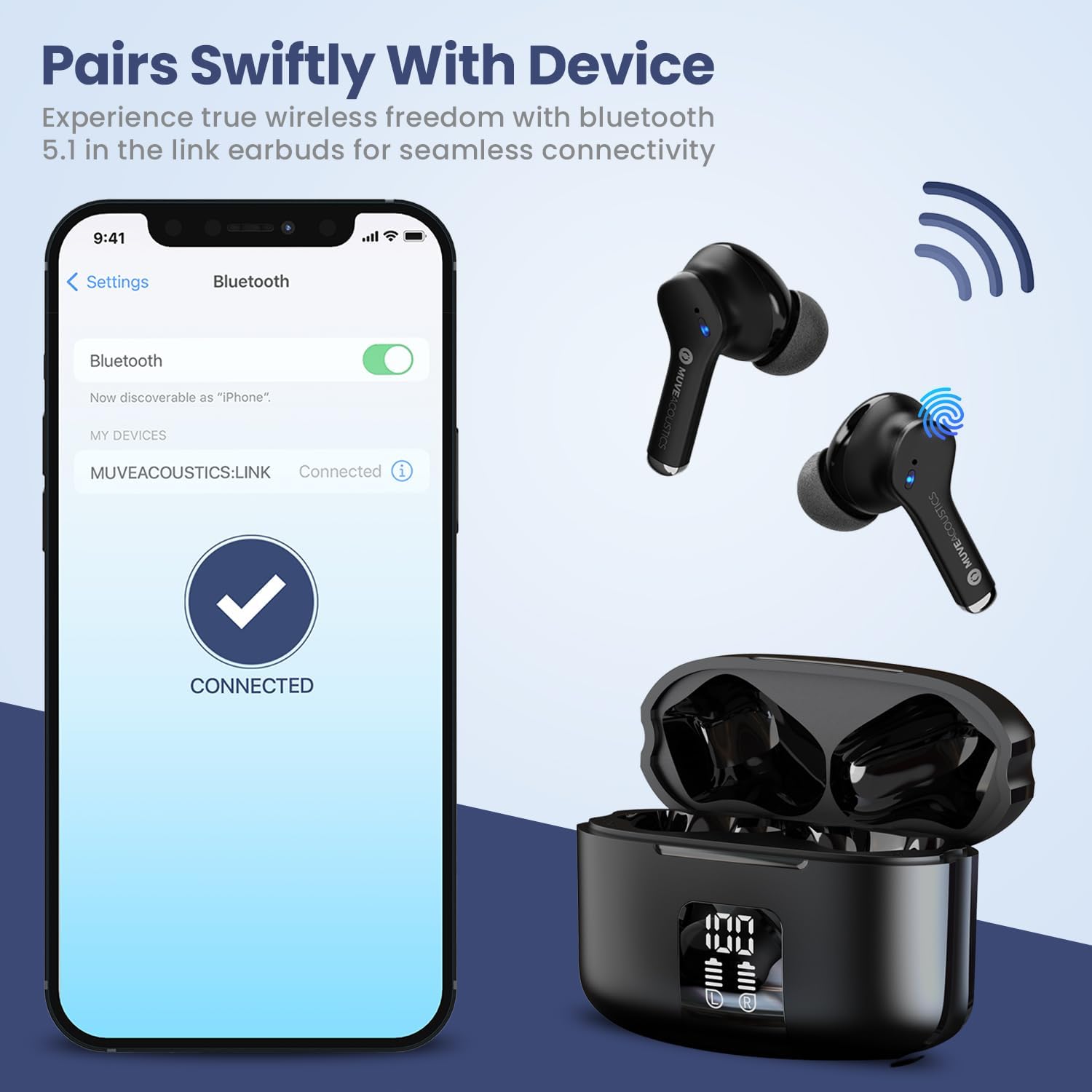
Image: Charging case with digital battery display.

Image: Diagram illustrating charging and controls.
2.2 Encès/Apagat
- Encès: Els auriculars s'encenen automàticament quan es treuen de l'estoig de càrrega.
- Apagar: Torneu a col·locar els auriculars a l'estoig de càrrega i tanqueu la tapa. S'apagaran automàticament i començaran a carregar-se.
2.3 Vinculació Bluetooth
Segueix aquests passos per emparellar els auriculars amb un dispositiu amb Bluetooth:
- Ensure Bluetooth is enabled on your audio source device (e.g., smartphone, tablet).
- Take the MuveAcoustics Link True Wireless Earbuds out of the charging box. They will automatically enter pairing mode.
- On your device, search for Bluetooth devices and select "MUVEACOUSTICS:LINK" from the list of available connections.
- Un cop connectats, sentireu un missatge d'àudio i els auriculars estaran llestos per al seu ús.

Image: Bluetooth pairing process.
3. Funcionament dels auriculars
3.1 Controls tàctils
The MuveAcoustics Link earbuds feature intuitive touch controls on each earbud. Tap the touch control area to perform various functions:
| Funció | Acció |
|---|---|
| Reproducció/pausa de música | Toqueu qualsevol dels auriculars una vegada |
| Puja el volum | Toca l'auricular esquerre dues vegades |
| Baixa el volum | Toca l'auricular dret dues vegades |
| Pista següent | Toqueu l'auricular dret tres vegades |
| Pista anterior | Toqueu l'auricular esquerre tres vegades |
| Respondre/Finalitzar la trucada | Toca qualsevol dels auriculars dues vegades |
| Rebutja la trucada | Manteniu premut qualsevol dels auriculars durant 2 segons |
| Activa l'Assistent de veu | Press and hold either earbud for 2 seconds (depends on connected device) |
3.2 Environmental Noise Canceling (ENC)
The earbuds feature Environmental Noise Canceling (ENC) technology, which helps reduce ambient noise during calls, ensuring clearer communication.
Resistència a l'aigua IPX5 3.3
The MuveAcoustics Link earbuds are IPX5 rated, providing protection against splashes and sweat. This makes them suitable for workouts and outdoor activities. Avoid submerging the earbuds in water.

Image: Earbuds demonstrating IPX5 water resistance.
3.4 Official Instruction Video
Watch this official video for a visual guide on how to use your MuveAcoustics Link True Wireless Earbuds, covering charging, power, pairing, and touch controls.
Video: How To Use: MuveAcoustics Link True Wireless Earbuds. This video demonstrates the charging process, powering on/off, Bluetooth pairing, and various touch control functions for music playback and call management.
4. Manteniment
Un manteniment adequat garanteix la longevitat i el rendiment dels teus auriculars.
- Neteja: Regularly clean the earbuds and charging case with a soft, dry, lint-free cloth. Avoid using abrasive materials or harsh chemicals. Gently clean ear tips with a damp drap i deixeu-les assecar completament abans de tornar-les a enganxar.
- Emmagatzematge: Quan no els utilitzeu, guardeu els auriculars a la funda de càrrega per protegir-los de la pols i els danys. Guardeu la funda en un lloc fresc i sec, allunyat de temperatures extremes.
5. Solució De Problemes
Si teniu problemes amb els auriculars, proveu les solucions següents:
- Auriculars que no s'emparellan: Ensure both earbuds are fully charged and removed from the case. Turn off and on your device's Bluetooth, then try pairing again. If issues persist, try resetting the earbuds (refer to manufacturer's weblloc web per obtenir instruccions específiques de restabliment si no es cobreixen aquí).
- Sense so o volum baix: Check the volume levels on both your device and the earbuds. Ensure the earbuds are properly seated in your ears and that the ear tips provide a good seal.
- Problemes de càrrega: Verify that the USB-C cable is securely connected to both the case and the power source. For wireless charging, ensure the case is correctly aligned on the charging pad. Clean the charging contacts on both the earbuds and the case if necessary.
- Connexió intermitent: Ensure your device is within the Bluetooth range (up to 33 feet/10 meters) and there are no significant obstructions between the earbuds and your device.
6. Especificacions
| Característica | Detall |
|---|---|
| Nom del model | MuveAcoustics Link True Wireless Bluetooth Headphones |
| Número de model de l'article | MA-3050SB |
| Tecnologia de connectivitat | Sense fil (Bluetooth) |
| Tecnologia de comunicació sense fils | Bluetooth |
| Interval Bluetooth | 10 metres (33 peus) |
| Col·locació de l'orella | A l'orella |
| Factor de forma | A l'orella |
| Control de soroll | Hybrid Noise Cancellation (ENC for calls) |
| Nivell de resistència a l'aigua | IPX5 (Water Repellent) |
| Característiques especials | Built-In Voice Assistant, Lightweight, Microphone Included, Sweatproof, Wireless Charging |
| Pes de l'article | 0.053 unces (1.5 grams) |
| Dimensions del producte | 1.97 x 1.97 x 1.18 polzades |
| Fabricant | Zeeva Internacional |
7. Garantia i Suport
MuveAcoustics products are designed for quality and reliability. For warranty information or technical support, please refer to the warranty card included in your product packaging or visit the official MuveAcoustics weblloc.


