Introducció
The Kinhank Super Console X3 Plus is a versatile entertainment system designed to provide a comprehensive gaming and media experience. It integrates three distinct operating systems: Android TV 9.0 for streaming and applications, EmuELEC 4.5 for a vast library of retro games, and CoreELEC for optimized media playback. Powered by an Amlogic S905X3 quad-core processor, 4GB RAM, and 32GB ROM, this console delivers smooth performance and supports 8K UHD TV output. This manual provides essential information for setting up, operating, maintaining, and troubleshooting your device.
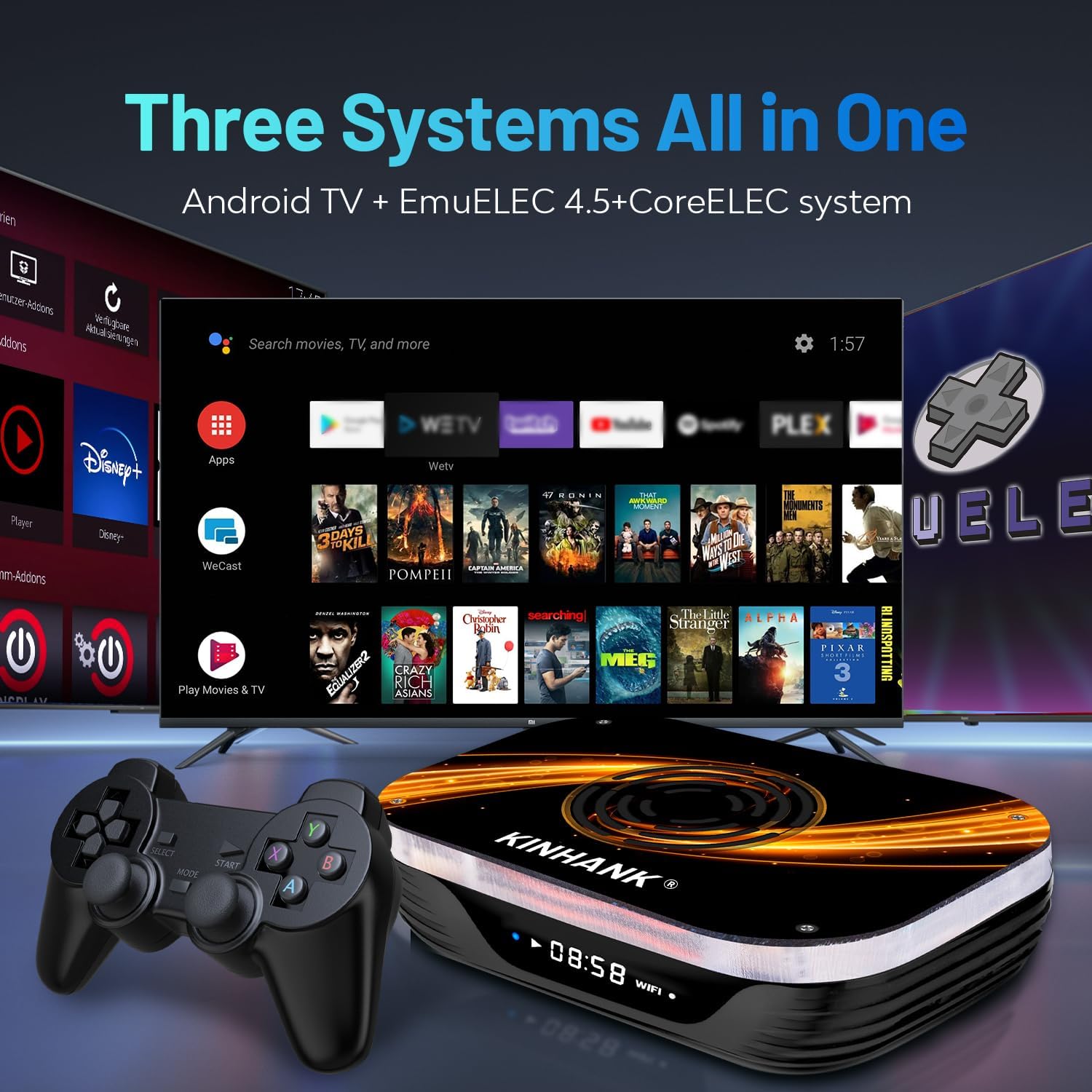
Image: The Super Console X3 Plus displaying its three integrated operating systems: Android TV, EmuELEC, and CoreELEC.

Image: The Super Console X3 Plus highlighting its extensive library of over 114,000 built-in games.
Contingut del paquet
Si us plau, verifiqueu que tots els elements que s'enumeren a continuació estiguin inclosos al vostre paquet:
- Super Console X3 Plus Unit
- 256G TF Card (pre-installed with games)
- 4G TF Card (for system files, if separate)
- Adaptador d'alimentació
- HD Cable (HDMI)
- Control remot
- Two Wireless Controllers

Image: A visual representation of the Super Console X3 Plus and its included accessories: console, TF cards, power supply, HD cable, remote control, and two controllers.
Guia de configuració
- Connectar l'alimentació: Plug the power adapter into the 'DC 5V' port on the console. Then, connect the adapter to a standard electrical outlet.
- Connectar-se al televisor: Use the provided HD Cable to connect the console's 'HD' port to an available HDMI input on your television.
- Connecteu els controladors: Insert the USB receiver for the wireless controllers into one of the USB ports on the console (USB 2.0 or USB 3.0). The controllers should automatically pair.
- Arrencada inicial: Power on your television and select the correct HDMI input source. The console will automatically power on and begin the boot-up sequence.

Imatge: Primer pla view of the console's ports, including TF Card slot, USB 3.0, USB 2.0, LAN, AV, HD (HDMI), SPDIF, and DC 5V power input.
Instruccions de funcionament
Canvi de sistema
The Super Console X3 Plus offers three distinct operating systems. You can switch between them as follows:
- Android TV 9.0: This system is ideal for streaming media, installing applications, and general internet browsing.
- EmuELEC 4.5: This is the dedicated retro gaming system, pre-loaded with a vast collection of classic games.
- CoreELEC: A lightweight, optimized system primarily for media playback, offering enhanced performance for video content.
To switch between systems, you typically need to reboot the console. A boot menu will appear, allowing you to select your desired operating system. Specific methods for launching EmuELEC or CoreELEC from within Android TV may also be available; refer to on-screen prompts or the system's internal documentation.

Image: Visual comparison of the user interfaces for Android 9.0, EmuELEC 4.5, and CoreELEC systems.
Navigating EmuELEC
Once in EmuELEC, use the wireless controllers to navigate through the game menus. Select a game to launch it. To exit a game or access the EmuELEC system menu, specific button combinations are usually required, such as pressing the SELECCIONA i COMENÇA buttons simultaneously. Consult the EmuELEC documentation for detailed controller shortcuts.
Afegint jocs
The console supports expanding its game library by adding more games to the TF card. Detailed instructions for transferring and integrating new game ROMs can be found in the EmuELEC system documentation or by contacting Kinhank customer support.
Ús del comandament a distància
The included remote control is primarily designed for navigating the Android TV interface, controlling media playback, and accessing system settings within Android TV. It may also function for basic navigation in other systems, but the game controllers are recommended for EmuELEC.
Manteniment
Sistema de refrigeració
The X3 Plus features an upgraded internal cooling fan that automatically activates upon booting to maintain optimal operating temperatures, typically around 50°C. To ensure efficient heat dissipation, always ensure that the console's ventilation openings are clear and unobstructed.

Image: A comparison illustrating the effectiveness of the upgraded cooling fan in the Super Console X3 Plus, showing reduced internal temperatures.
Neteja
To clean the exterior of your console, use a soft, dry, lint-free cloth. Avoid using liquid cleaners, aerosols, or abrasive materials, as these can damage the device's finish or internal components.
Actualitzacions de programari
Periodically check for available software updates for Android TV, EmuELEC, and CoreELEC. Updates can improve performance, add new features, and enhance system stability. Follow the on-screen instructions for any update procedures.
Resolució de problemes
- Sense energia: Ensure the power adapter is securely connected to both the console's DC 5V port and a functional electrical outlet.
- No es mostra al televisor: Verify that the HD Cable is firmly connected to both the console's HD port and an HDMI input on your television. Confirm that your TV is set to the correct HDMI input source.
- Controllers Not Responding:
- Check if the USB receiver for the wireless controllers is securely plugged into a USB port on the console.
- Ensure the controllers have fresh batteries.
- If controllers become disconnected, try re-pairing them according to on-screen instructions or by consulting the controller's specific manual.
- Sense so:
- Check the volume settings on your TV and within the console's operating system.
- Ensure the HD Cable is functioning correctly.
- If using external audio devices, verify all connections.
- Games Lagging or Freezing:
- Ensure the cooling fan is operating correctly and that the console's vents are not obstructed.
- Close any unnecessary applications running in the background on Android TV.
- Some emulated games may have performance limitations depending on the original system's requirements.
- System Not Shutting Off Properly: If the console reboots after attempting to shut down, try a forced shutdown by disconnecting the power after ensuring all data is saved. If the issue persists, contact customer support.
Especificacions
| Característica | Detall |
|---|---|
| Nom del model | X3 PLUS |
| Marca | Kinhank |
| Dimensions del producte | 4.8 x 3.3 x 1.8 polzades |
| Pes de l'article | 2.99 lliures |
| Número de model de l'article | X3 PLUS |
| Fabricant | Kinhank |
| Edat recomanada | 3 anys i més |
| Dispositiu d'entrada | Gamepad |
| Plataforma | Android TV 9.0, EmuELEC 4.5, CoreELEC |
| Color | Negre |

Image: Diagram illustrating the performance hierarchy of Android CPU chips, highlighting the S905X3.
Garantia i Suport
For technical assistance, warranty claims, or any inquiries regarding your Kinhank Super Console X3 Plus, please contact Kinhank customer service. Refer to the contact information provided with your product packaging or visit the official Kinhank weblloc web per obtenir els recursos de suport més actualitzats.


