1. Introducció
This manual provides essential information for the safe and efficient use of your ONN 32-Inch Class HD (720P) LED Smart TV, Model 100012589. Please read these instructions thoroughly before operating your television and retain them for future reference.

Image 1.1: The ONN 32-inch Smart TV displaying its Roku interface, alongside the included wall mount bracket. This image illustrates the product and its primary mounting accessory.
2. Informació important de seguretat
Observeu les següents precaucions de seguretat per evitar incendis, descàrregues elèctriques o lesions:
- No exposeu el televisor a la pluja o la humitat.
- No obriu el televisor casing; demaneu totes les tasques de manteniment a personal qualificat.
- Assegureu-vos una ventilació adequada al voltant del televisor.
- Eviteu que el cable d'alimentació sigui trepitjat o pessigat.
- Desendolleu el televisor durant tempestes o quan no l'utilitzeu durant períodes prolongats.
- Mantingueu el televisor allunyat de fonts de calor i de la llum solar directa.
3. Què hi ha a la caixa
En desempaquetar, comproveu que hi hagi tots els elements:
- Televisor intel·ligent LED ONN de 32 polzades de classe HD (720p)
- Wall Mount Bracket (TV stands are not included with this model)
- Control remot (no apareix explícitament a la llista però és estàndard per als televisors)
- Power Cable (not explicitly listed but standard for TVs)
4. Configuració
4.1 Instal·lació de muntatge a la paret
This television is designed for wall mounting and does not include traditional TV stands. The rear panel features VESA 400x400 compatible screw holes for easy installation of the included wall mount.
- Carefully unpack the TV and the wall mount bracket.
- Identify a suitable wall location, ensuring it can support the weight of the TV and mount.
- Attach the wall mount bracket to the TV using the provided screws, aligning with the VESA mounting points on the TV's rear.
- Securely fasten the other part of the wall mount to the wall according to the wall mount's specific instructions.
- Carefully lift and attach the TV to the wall-mounted bracket.

Image 4.1: The rear panel of the ONN 32-inch Smart TV, highlighting the VESA mounting points for wall bracket attachment. This view is crucial for proper wall mount installation.
4.2 Connexió de potència
After mounting, connect the power cable to the TV's power input and then to a standard electrical outlet.
4.3 Assistent d'encesa inicial i configuració
Press the power button on the remote control or TV. Follow the on-screen instructions to complete the initial setup, including network connection, channel scanning, and account setup for streaming services.
5. Funcionament del televisor
5.1 Funcions de control remot
Use the provided remote control to navigate the TV's interface. Common buttons include Power, Volume Up/Down, Channel Up/Down, Home, Back, and directional arrows for menu navigation.
5.2 Navegació per la interfície del televisor intel·ligent
The ONN Smart TV features an intuitive interface for accessing various functions and applications. Use the directional buttons on your remote to move between options and the OK/Select button to confirm.
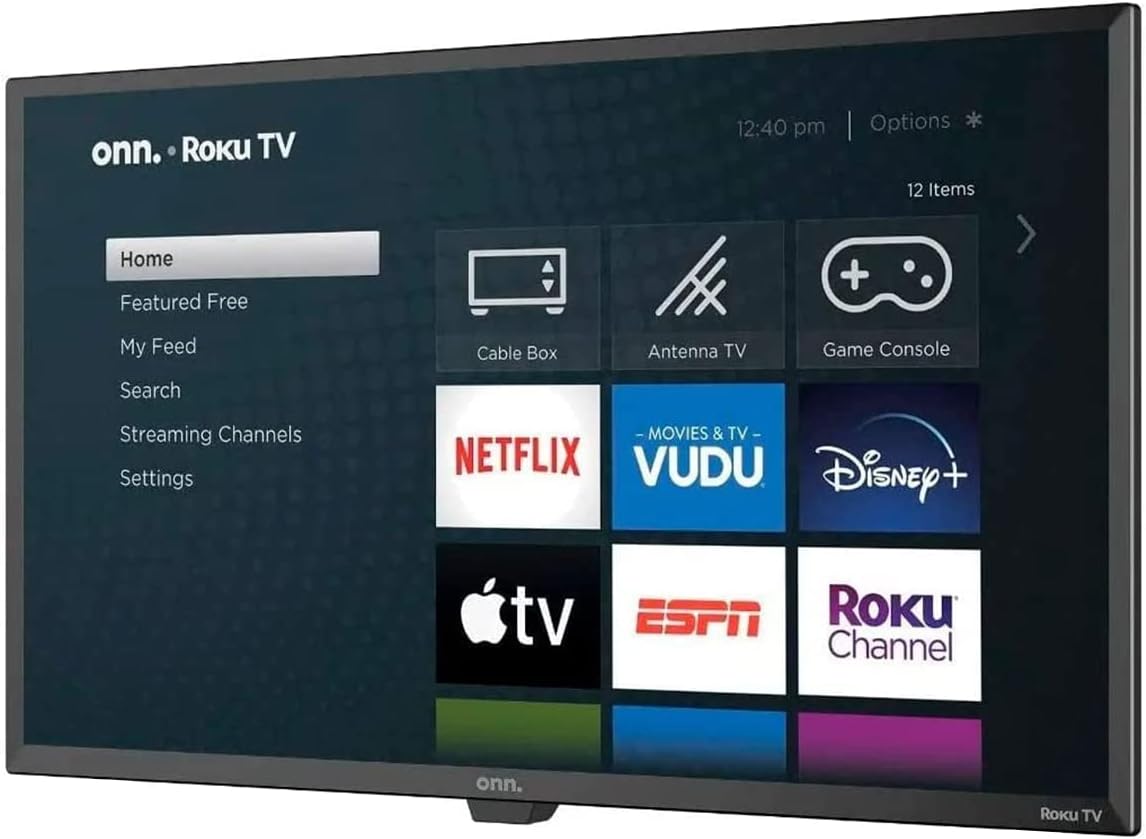
Image 5.1: The ONN Smart TV's home screen, showcasing the Roku operating system with various streaming application icons like Netflix, Disney+, and Apple TV. This illustrates the user interface for content selection.
5.3 Accés als serveis de transmissió en temps real
Your ONN Smart TV provides instant access to popular streaming services such as Netflix, YouTube, Disney+, and Apple TV. Select the desired app icon from the home screen to launch it. An active internet connection is required.
6. Connectivitat
El televisor ofereix diversos ports per connectar dispositius externs:
- Ports HDMI: For connecting high-definition devices like Blu-ray players, game consoles, or cable/satellite boxes.
- Port USB: Per connectar dispositius d'emmagatzematge USB per reproduir contingut multimèdia files.
- Wi-Fi: Connectivitat sense fil integrada per a accés a Internet i transmissió en temps real.
7. Smart Features and Voice Assistants
This Smart TV integrates with voice assistants for enhanced control:
- Compatibilitat amb Alexa: Control your TV using Amazon Alexa-enabled devices. You can issue commands to play movies, TV shows, adjust volume, and more.
- Google Assistant Compatibility: Use Google Assistant-enabled devices to control your TV, search for content, and manage playback.
Refer to the respective voice assistant's setup guide for pairing instructions with your ONN Smart TV.
8. Solució De Problemes
If you encounter issues with your TV, consult the following common problems and solutions:
| Problema | Possible solució |
|---|---|
| Sense poder | Assegureu-vos que el cable d'alimentació estigui connectat correctament tant al televisor com a una presa de corrent que funcioni. Proveu una altra presa de corrent. |
| No hi ha imatge, però hi ha so | Check the input source. Ensure external devices are powered on and connected correctly via HDMI. |
| No hi ha so, però hi ha imatge | Check the volume level and mute settings. Verify audio cables for external devices. |
| No es pot connectar a la Wi-Fi | Ensure your Wi-Fi router is on and within range. Re-enter the Wi-Fi password. Restart the TV and router. |
| El control remot no funciona | Canvieu les piles. Assegureu-vos que no hi hagi cap obstacle entre el comandament a distància i el sensor d'infrarojos del televisor. |
9. Especificacions
| Característica | Detall |
|---|---|
| Número de model | 100012589 |
| Mida de la pantalla | 32 polzades |
| Tecnologia de visualització | LED |
| Resolució | 720p (HD) |
| Relació d'aspecte | 16:9 |
| Connectivitat | HDMI, USB, Wi-Fi |
| Tipus d'altaveu | Integrat |
| Pes de l'article | 16.32 lliures |
| Voltage | 2.4E+2 volts (CA) |
| Wattage | 100 watts |
| Serveis d'Internet compatibles | Netflix, YouTube, Disney+, Apple TV |
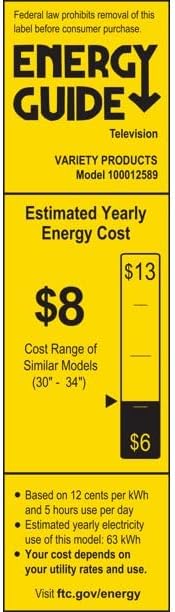
Image 9.1: The Energy Guide label for the ONN Model 100012589 television, indicating an estimated yearly energy cost of $8 based on 12 cents per kWh and 5 hours use per day.
10. Manteniment
10.1 Neteja de la pantalla
Netegeu suaument la pantalla amb un drap suau i sense borrissol. Per a marques difícils, netegeu suaument.ampNetegeu el drap amb aigua o un netejador de pantalles especialitzat. Eviteu productes químics agressius o materials abrasius.
10.2 Neteja de la Casing
Netegeu el televisor casing with a soft, dry cloth. Do not use liquid cleaners directly on the TV.
11. Garantia i Suport
This product is offered as an Amazon Renewed item. Amazon Renewed products are professionally inspected and tested to work and look like new. If you are not satisfied with your purchase, renewed products are eligible for replacement or refund under the Garantia renovada d'Amazon.
For further assistance or support, please refer to the Amazon Renewed customer service channels.


