1. Acabatview
The Hoco ES61 Manner Sports Wireless Bluetooth Headset is designed for active lifestyles, offering a blend of comfort, long battery life, and versatile connectivity. This manual provides detailed instructions to help you get the most out of your headset.
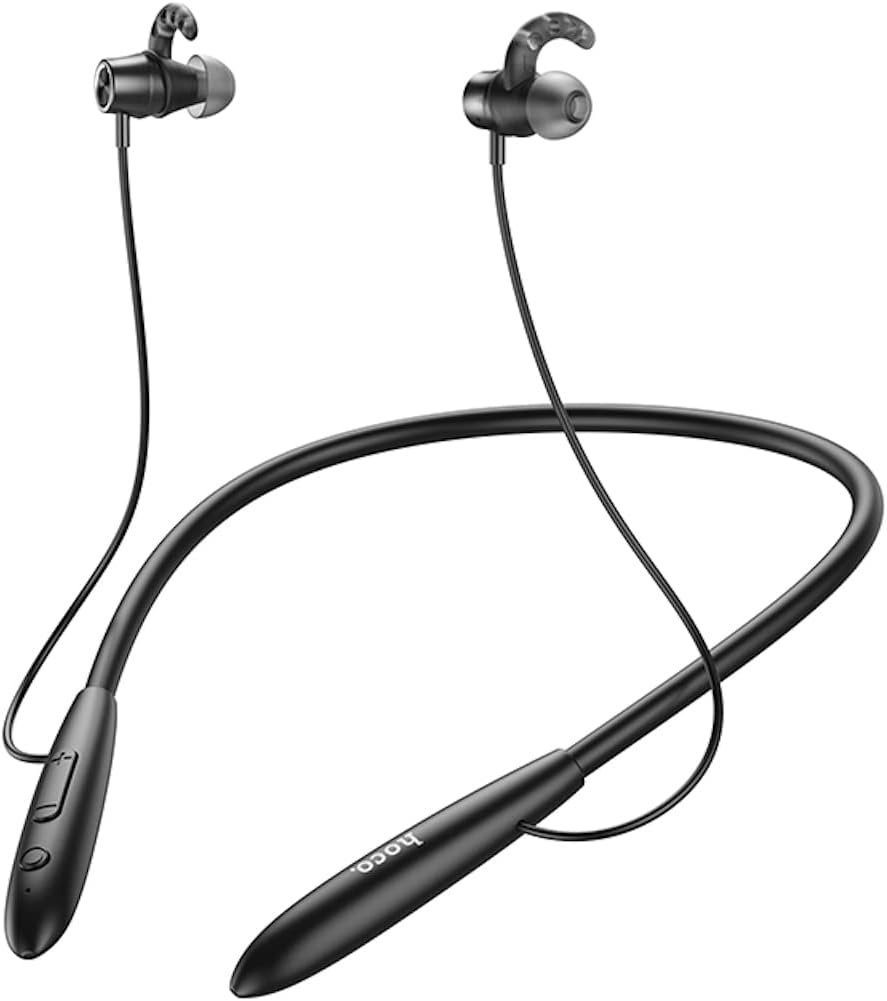
Imatge: Frontal view of the Hoco ES61 headset, showcasing its neckband design and in-ear earbuds.
2. Característiques del producte
- Connectivitat Bluetooth 5.1: Equipped with JL AC7006 chip for stable and efficient wireless connection.
- Durada de la bateria ampliada: Features a 200mAh battery, providing up to 20 hours of music/talk time and an impressive 330 hours of standby time.
- Càrrega ràpida: Es carrega completament en 2 hores aproximadament.
- Disseny lleuger i còmode: The earphone cord measures 85cm in length, and the headset weighs only 22g, ensuring comfort during extended wear.
- Opcions de reproducció versàtils: Supports Bluetooth audio streaming and TF card playback (up to 32GB) for direct music listening.
- Multi-language Voice Prompts: Offers voice prompts in both Chinese and English for user convenience.
- Àmplia compatibilitat: Compatible with a broad range of devices including iPhone, Samsung, OnePlus, Huawei, Xiaomi, and Oppo smartphones.

Imatge: Primer pla view of the Hoco ES61 headset, highlighting the integrated TF card slot for direct music playback.
Vídeo: Presentació oficial del producte en vídeoasing the Hoco ES61 Bluetooth Headset's features, including its 20-hour battery life, voice prompts, and compatibility with iOS and Android devices.
3. Guia de configuració
3.1 Càrrega dels auriculars
Before first use, fully charge the headset. Use a standard USB charger (not included) to connect the charging port on the headset to a power source.
- The LED indicator will typically show a red light during charging.
- Once fully charged (approximately 2 hours), the LED indicator will turn blue or off.
3.2 Vinculació Bluetooth
To connect your Hoco ES61 headset to a Bluetooth-enabled device:
- Assegureu-vos que els auriculars estan apagats.
- Press and hold the multi-function button (usually the power button) for approximately 3-5 seconds until the LED indicator flashes red and blue alternately. This indicates pairing mode.
- Al dispositiu (telèfon intel·ligent, tauleta, etc.), activeu el Bluetooth i cerqueu els dispositius disponibles.
- Select "Hoco ES61" from the list of found devices.
- Once connected, the LED indicator on the headset will typically flash blue slowly or turn off, and you will hear a voice prompt confirming the connection.
Reproducció de targetes TF 3.3
The Hoco ES61 supports direct music playback from a TF (MicroSD) card.
- Carefully insert a TF card (up to 32GB) with your music files into the designated TF card slot on the headset.
- The headset will automatically switch to TF card playback mode if a card is detected and contains playable audio files.
- Use the headset controls to manage playback (play, pause, skip tracks).
4. Instruccions de funcionament
4.1 Controls bàsics
| Botó/Acció | Funció |
|---|---|
| Botó multifunció (MFB) | Power On/Off, Play/Pause, Answer/End Call |
| Puja el volum (+) | Increase Volume, Next Track (long press) |
| Baixar el volum (-) | Decrease Volume, Previous Track (long press) |
4.2 Reproducció de música
- Reproduir/pausa: Premeu breument el MFB.
- Pista següent: Premeu llargament el botó d'apujar el volum (+).
- Pista anterior: Premeu llargament el botó per baixar el volum (-).
- Ajust de volum: Premeu breument els botons Pujar volum (+) o Baixar volum (-).
4.3 Gestió de trucades
- Respondre/Finalitzar la trucada: Short press the MFB during an incoming call.
- Rebutja la trucada: Long press the MFB during an incoming call.
- Torna a marcar l'últim número: Double-click the MFB when not on a call.

Image: The Hoco ES61 headset resting on a smartphone, illustrating its use with mobile devices for music and calls.
5. Manteniment i cura
- Keep the headset dry. Do not expose it to extreme temperatures or humidity.
- Clean the earbuds and charging port regularly with a soft, dry cloth to prevent dust and debris buildup.
- Eviteu utilitzar productes químics aggressivs o netejadors abrasius.
- Guardeu els auriculars en un lloc fresc i sec quan no els feu servir.
- No intenteu desmuntar ni modificar els auriculars, ja que això anul·larà la garantia i els pot fer malbé.

Image: The Hoco ES61 headset shown with different sizes of silicone ear tips, emphasizing the importance of proper fit for comfort and sound quality.
6. Solució De Problemes
6.1 Headset Not Turning On
- Ensure the headset is fully charged. Connect it to a charger and check the LED indicator.
- Press and hold the multi-function button for a few seconds to power on.
6.2 No es pot emparellar amb el dispositiu
- Make sure the headset is in pairing mode (LED flashing red and blue alternately).
- Assegureu-vos que el Bluetooth estigui activat al dispositiu i que estigui dins del seu abast (normalment 10 metres).
- Forget/delete "Hoco ES61" from your device's Bluetooth list and try pairing again.
- Reinicieu els auriculars i el dispositiu.
6.3 Sense so o volum baix
- Augmenta el volum tant dels auriculars com del dispositiu connectat.
- Assegureu-vos que els auriculars estiguin connectats correctament al dispositiu.
- If using TF card, ensure the card is inserted correctly and contains playable audio files.
- Check for any obstructions in the earbud nozzles and clean if necessary.
6.4 Durada curta de la bateria
- Assegureu-vos que els auriculars estiguin completament carregats abans d'utilitzar-los.
- Battery life can vary based on volume level and usage patterns.
- Eviteu exposar la bateria a temperatures extremes.
7. Especificacions
| Característica | Detall |
|---|---|
| Versió Bluetooth | 5.1 |
| Xip Bluetooth | JL AC7006 |
| Capacitat de la bateria | 200 mAh |
| Temps de càrrega | Aprox. 2 hores |
| Música/Temps de conversa | Fins a 20 hores |
| Temps d'espera | Fins a 330 hores |
| Earphone Cord Length | 85 cm |
| Pes | 22 g |
| Suport de la targeta TF | Sí, fins a 32 GB |
| Indicacions de veu | xinès i anglès |
| Compatibilitat | iPhone, Samsung, OnePlus, Huawei, Xiaomi, Oppo |
8. Garantia i Suport
For warranty information and customer support, please refer to the product packaging or contact your retailer. Keep your purchase receipt as proof of purchase for any warranty claims.


