Introducció
Thank you for choosing Tronsmart Onyx Pure One Wireless Earbuds. These earbuds are designed to provide an immersive audio experience with advanced features such as Dual Driver Technology, Bluetooth 5.3 connectivity, 3EQ Modes for customized sound, and intuitive touch controls. With a comfortable ergonomic design and IPX5 water resistance, they are perfect for music, sports, and travel.
Contingut del paquet
Marqueu la casella per assegurar-vos que hi hagi tots els elements:
- Auriculars sense fil
- Estoig de càrrega sense fil
- Cable de càrrega tipus C.
- 3 Pairs of Ear Tips (S, M, L)

The image displays the complete package contents of the Tronsmart Onyx Pure One, including the earbuds, charging case, charging cable, and various sizes of ear tips.
Producte acabatview
The Tronsmart Onyx Pure One earbuds feature a compact design with advanced audio components for superior sound quality.

This image shows the Tronsmart Onyx Pure One earbuds in their charging case, highlighting their sleek black finish and compact design.
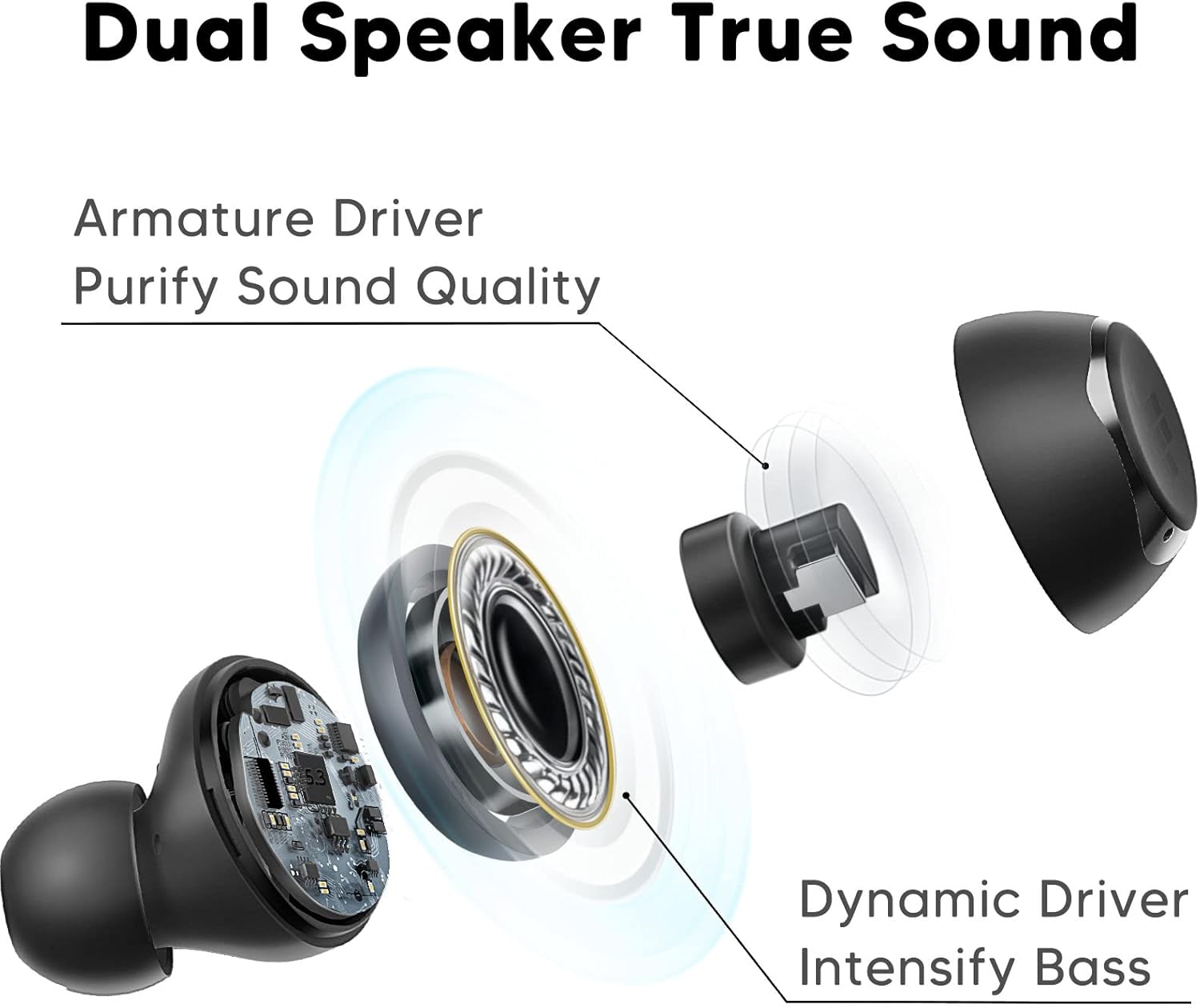
Un diagrama detallat mostraasing the innovative Dual Driver Technology, featuring both an armature driver for sound clarity and a dynamic driver for intensified bass.
Configuració
1. Càrrega dels auriculars i l'estoig
Before first use, fully charge the charging case and earbuds. Connect the provided Type-C charging cable to the charging port on the case and a power source. The indicator light on the case will show charging status. The earbuds will charge automatically when placed inside the case.

This image highlights the impressive battery life of over 32 hours with the charging case, and 7 hours on a single charge for the earbuds.
2. Maridatge inicial
The Tronsmart Onyx Pure One earbuds feature one-step auto pairing for convenience.
- Obre l'estoig de càrrega. Els auriculars entraran automàticament en mode d'emparellament.
- Al dispositiu (telèfon intel·ligent, tauleta, ordinador portàtil), activeu el Bluetooth i cerqueu dispositius nous.
- Select "Tronsmart Onyx Pure" from the list of available devices to connect.
- Once connected, the earbuds will automatically reconnect to your device when taken out of the case after the first pairing.

This image demonstrates the one-step auto pairing process, showing the earbuds ready to connect to a device via Bluetooth.
3. Posar-se els auriculars
Per a una qualitat de so i una comoditat òptimes, trieu les puntes d'orella correctes i assegureu-vos que estiguin ben ajustades.
- Select the ear tips (S, M, L) that best fit your ear canals.
- Introduïu suaument l'auricular a l'orella.
- Twist the earbud slightly to lock it into place, ensuring a snug and comfortable fit.
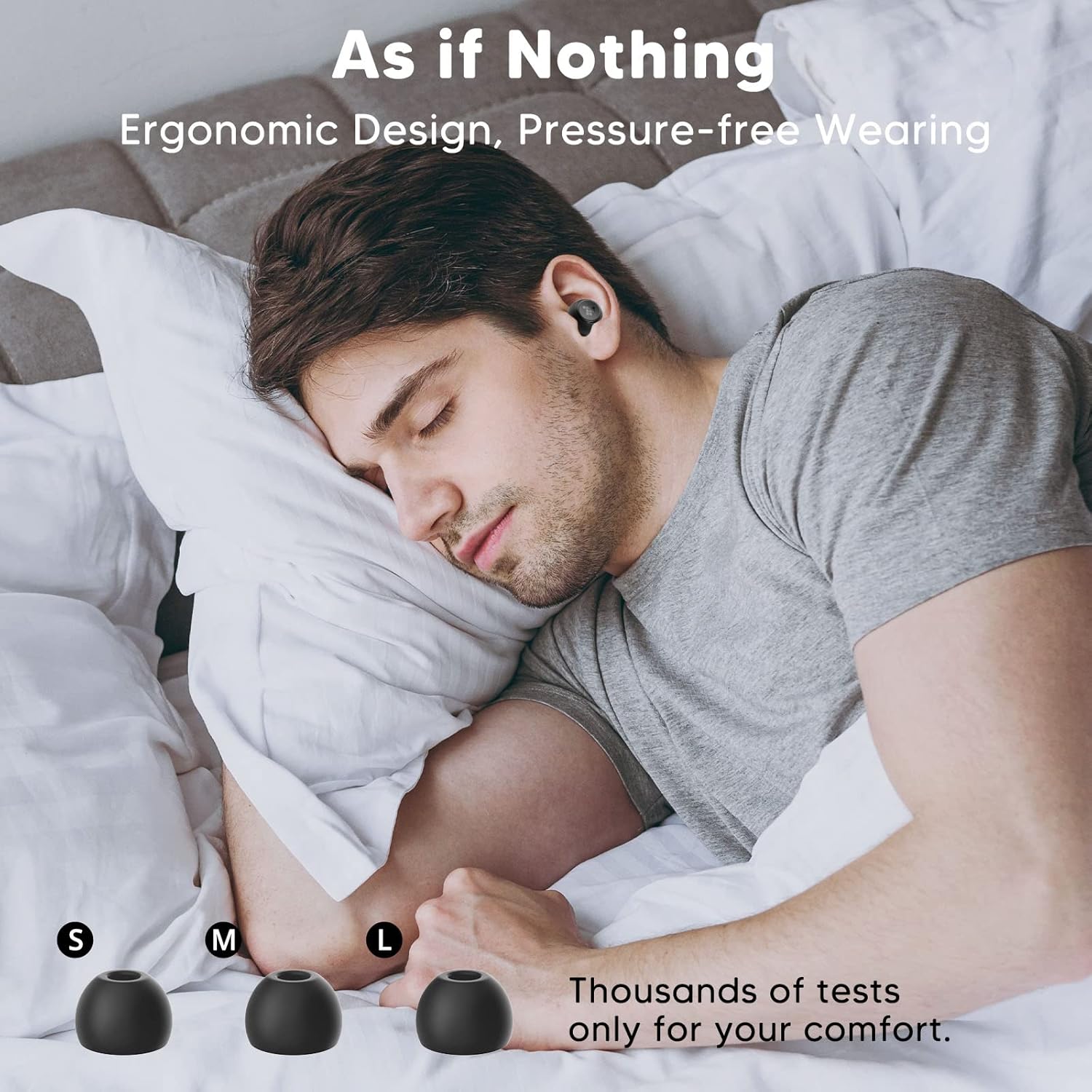
This image illustrates the ergonomic design of the earbuds, providing a comfortable and pressure-free wearing experience, even during sleep.

A visual guide demonstrating the three simple steps to properly wear the earbuds: select ear tips, insert, and twist to lock for a secure and comfortable fit.
Funcionament dels auriculars
Controls tàctils
The Tronsmart Onyx Pure One earbuds feature intuitive touch controls for easy management of music, calls, and voice assistant.
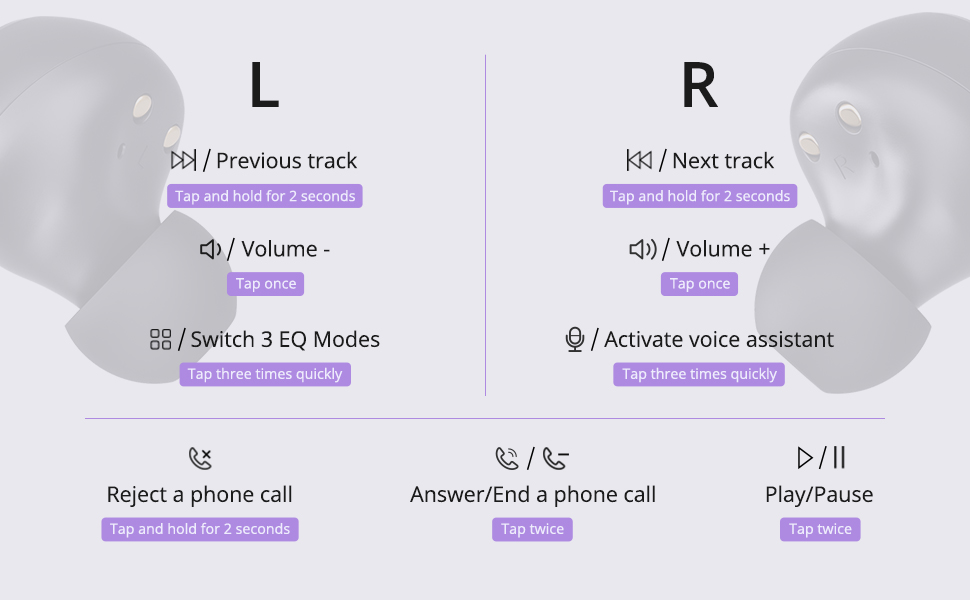
Aquest diagrama ofereix una visió completaview of all touch control functions for both the left and right earbuds, including music playback, volume adjustment, call management, and voice assistant activation.
| Funció | Auricular esquerre | Auricular dret |
|---|---|---|
| Reproduir/Pausa | Toqueu dues vegades ràpidament | |
| Baixa el volum | Toqueu una vegada | |
| Puja el volum | Toqueu una vegada | |
| Pista anterior | Manteniu premut durant 2 segons | |
| Pista següent | Manteniu premut durant 2 segons | |
| Canvia els modes d'equalització | Toqueu tres vegades ràpidament | |
| Activa l'Assistent de veu | Toqueu tres vegades ràpidament | |
| Respondre/Finalitzar la trucada | Toqueu dues vegades ràpidament | |
| Rebutja la trucada | Manteniu premut durant 2 segons | |
Modes EQ
The earbuds are equipped with 3 EQ Modes to enhance your listening experience:
- Mode normal: Delivers well-balanced bass, perfect for casual listening.
- Mode de baix: Enhances deep bass, ideal for immersive music.
- Mode pur: Presents clear vocals, suitable for opera, podcasts, and audiobooks.

This image visually represents the three distinct EQ modes (Normal, Bass, Pure) available, allowing users to choose the suitable mode for an optimized sound experience.
Calls and Voice Assistant
Manage your calls and activate your device's voice assistant directly from the earbuds.
This video demonstrates the functionality of the Tronsmart Onyx Pure One Wireless Earbuds, including activating the voice assistant and answering calls, showcasing their seamless integration into daily use.
Manteniment
Neteja
Per mantenir un rendiment i una higiene òptims, netegeu regularment els auriculars i l'estoig de càrrega:
- Feu servir un drap suau, sec i sense borrissol per netejar els auriculars i l'estoig de càrrega.
- Traieu les puntes de les orelles i netegeu-les amb aigua i sabó suau, i després eixugueu-les bé abans de tornar-les a col·locar.
- Netegeu suaument els contactes de càrrega dels auriculars i de la funda amb un bastonet de cotó sec.
Resistència a l'aigua (IPX5)
The Tronsmart Onyx Pure One earbuds are IPX5 water-resistant, meaning they can withstand splashes and sweat. They are suitable for workouts and light rain, but are not designed for submersion in water.

This image visually confirms the IPX5 water resistance of the earbuds, showing them with water droplets, making them suitable for various activities.
Resolució de problemes
If you encounter any issues with your Tronsmart Onyx Pure One earbuds, please refer to the following common solutions:
- Auriculars que no s'emparellan: Ensure both earbuds are charged. Place them back in the case, close the lid, wait a few seconds, then open the lid again. On your device, forget the "Tronsmart Onyx Pure" Bluetooth connection and try pairing again.
- Només funciona un auricular: Check if both earbuds are charged. Try placing both earbuds back into the charging case, close the lid, and then take them out again to re-establish the connection.
- Sense so: Comprova el nivell de volum tant del dispositiu com dels auriculars. Assegura't que els auriculars estiguin connectats correctament al dispositiu. Prova de reproduir àudio des d'una altra aplicació o dispositiu.
- Problemes de càrrega: Ensure the charging cable is securely connected to both the case and the power source. Try using a different charging cable or power adapter. Clean the charging contacts on the earbuds and case.
- Mala qualitat del so: Ensure the ear tips provide a snug fit to your ear canal. Try different sized ear tips. Clean any debris from the earbud nozzles.
If the issue persists, please contact Tronsmart customer support for further assistance.
Especificacions
Detailed technical specifications for the Tronsmart Onyx Pure One Wireless Earbuds:
| Característica | Detall |
|---|---|
| Nom del model | Onyx Pure One |
| Tecnologia de connectivitat | Sense fil, Bluetooth 5.3 |
| Tecnologia de comunicació sense fils | Bluetooth |
| Tipus de control | Control tàctil |
| Durada de la bateria | 32 hores (amb estoig de càrrega) |
| Tipus de controlador d'àudio | Hybrid Driver (Dual Driver Technology) |
| Nivell de resistència a l'aigua | IPX5 (impermeable) |
| Material | Silicona, plàstic |
| Pes de l'article | 40 Milligrams (earbuds) |
| Dimensions del producte | 0.71 x 0.83 x 1.02 polzades |
| Dispositius compatibles | Telèfons intel·ligents, tauletes, ordinadors portàtils, ordinadors de sobretaula, altaveus intel·ligents |

This image illustrates the wide compatibility of the Tronsmart Onyx Pure One earbuds with various devices, including smartphones, tablets, laptops, and desktops.
Garantia i Suport
Tronsmart products are built with quality and reliability in mind. Your Tronsmart Onyx Pure One Wireless Earbuds come with a standard manufacturer's warranty. For detailed warranty information, please refer to the warranty card included in your package or visit the official Tronsmart weblloc.
If you require technical support, have questions about your product, or need assistance with troubleshooting, please contact Tronsmart customer service through their official channels. Our professional technical team is ready to assist you.
You can find contact information on the Tronsmart official weblloc web o a través del venedor on vau comprar el producte.


