1. Introducció
Thank you for choosing the hygger 18W Smart Aquarium Light. This full spectrum LED light is designed for 12-18 inch freshwater planted tanks, offering advanced control via Bluetooth and a dedicated mobile application. It features a 24/7 lighting cycle, multiple scene modes, and extensive color customization to create an optimal environment for your aquatic life.

Image 1.1: The hygger 18W Smart Aquarium Light illuminating a planted freshwater tank.
2. Informació de seguretat
Si us plau, llegiu i comprengui totes les instruccions de seguretat abans d'utilitzar aquest producte. Si no segueix aquestes instruccions, pot provocar descàrregues elèctriques, incendis o lesions greus.
- Seguretat elèctrica: Ensure your hands are dry before handling the power adapter or plugging/unplugging the light. Do not operate if the cord or plug is damaged.
- Exposició a l'aigua: The light unit is waterproof, but the power adapter is not. Keep the power adapter away from water. Do not immerse the light in water.
- Instal·lació: Securely mount the light to prevent it from falling into the aquarium.
- Ventilació: Ensure adequate ventilation around the light to prevent overheating.
- Nens i animals de companyia: Mantenir el producte fora de l'abast dels nens i mascotes.
- Manteniment: Always unplug the light from the power source before performing any maintenance or cleaning.
3. Contingut del paquet
Verifiqueu que tots els articles siguin presents i en bon estat en desempaquetar-los.
- hygger 18W Smart Aquarium Light Unit
- Adjustable Mounting Brackets (pre-attached or separate)
- Adaptador d'alimentació DC 24V/1A
- Manual d'instruccions

Image 3.1: Components and dimensions of the hygger 18W Smart Aquarium Light.
4. Configuració
4.1 Instal·lació física
- Desembaleu tots els components i inspeccioneu-los per detectar qualsevol dany.
- Attach the adjustable mounting brackets to the light unit if not already installed.
- Place the light securely on top of your aquarium, ensuring the brackets are extended to fit the tank size (12-18 inches).
- Connect the power adapter to the light unit, then plug the adapter into a suitable power outlet.
4.2 App Download and Initial Connection
The hygger Smart Aquarium Light is controlled via Bluetooth using the "TUYA" app.
- Download the "TUYA Smart" app from the App Store (iOS) or Google Play Store (Android).
- Obriu l'aplicació i registreu/inicieu sessió al vostre compte.
- Assegureu-vos que el Bluetooth estigui habilitat al vostre dispositiu mòbil.
- In the app, tap "Add Device" or the "+" icon to search for nearby devices.
- When prompted, allow "Nearby Devices" permission for the app. This is crucial for Bluetooth connectivity.
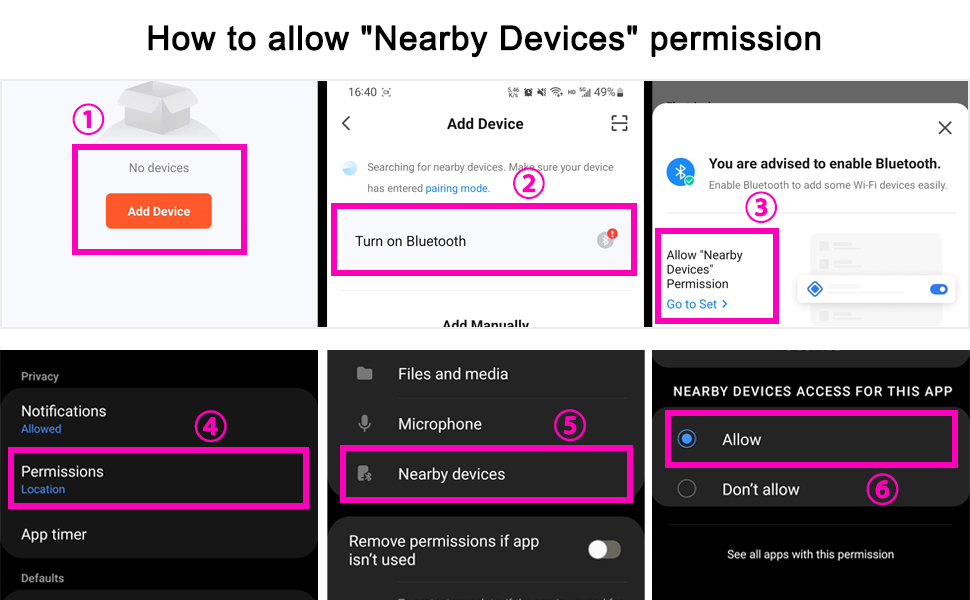
Image 4.1: Steps to grant "Nearby Devices" permission for the TUYA app.
- Select the hygger aquarium light from the discovered devices.
- Seguiu les indicacions de la pantalla per completar el procés de vinculació.
- Actualització del firmware: It is recommended to update the light's firmware immediately after connecting to ensure optimal performance and access to the latest features. Check for updates within the app settings.
5. Instruccions de funcionament
5.1 botons físics
The light unit features four physical buttons for basic control without the app:
- Botó d'encesa: Encén/apaga la llum.
- Botó d'escena: Cycles through default scene modes (Sunlight, Moonlight, Fishlight, Oceanblue).
- Botó amunt: Increases brightness or adjusts other parameters.
- Botó avall: Decreases brightness or adjusts other parameters.

Image 5.1: Physical control buttons on the light unit.
5.2 App Control Overview
The TUYA app provides comprehensive control over your aquarium light, allowing for advanced customization and scheduling.

Image 5.2: App interface for Bluetooth control.
5.3 1-Click Scene Switching
The app offers pre-set scenes for quick selection:
- Sunlight Scene: Simulates bright daylight conditions.
- Moonlight Scene: Provides a dim, calming blue light for nighttime.
- Fishlight Scene: Optimized lighting to enhance fish colors.
- Oceanblue Light Scene: Creates a deep blue aquatic effect.
- User Defined Scenes (x2): Customize and save your preferred color and brightness settings.

Image 5.3: App interface for selecting and customizing lighting scenes.
5.4 24/7 Lighting Cycle
Automate your aquarium lighting with the 24/7 cycle feature:
- Sunrise Sunset Scene: Simulates a natural sunrise and sunset, gradually increasing i decreasing light intensity.
- 8 Times Set Scene: Allows you to customize specific lighting settings (color, brightness) for up to 8 different time periods throughout the day.

Image 5.4: Configuration options for 24/7 lighting cycles.
5.5 Color Changing and Brightness Adjustment
The light features high-quality 5054 RGB LED lamp beads, offering over 300 colors. You can freely adjust the brightness and color temperature (3000-6700K) to create a vibrant or subtle atmosphere.
- Use the "Dim & Color" section in the app to access the color wheel and brightness slider.
- Adjust RGB values individually for precise color mixing.

Image 5.5: App controls for color selection and brightness adjustment.
5.6 Funció de memòria
The light includes a power-off memory function. If power is interrupted, the light will restore its previous settings within one hour of power being restored.
6. Manteniment
Un manteniment regular garanteix la longevitat i el rendiment òptim de la llum del vostre aquari.
- Neteja: Periodically wipe the light unit with a soft, damp cloth to remove dust, water spots, or algae buildup. Ensure the light is unplugged before cleaning. Do not use harsh chemicals or abrasive materials.
- Inspecció: Regularly check the power cord and adapter for any signs of damage. If damage is found, discontinue use and replace the component.
- Impermeabilització: While the light unit is waterproof, avoid submerging it. The full sealed process protects against splashes and humidity.
7. Solució De Problemes
7.1 La llum no s'encén
- Check if the power adapter is securely plugged into both the light unit and the wall outlet.
- Comproveu que la presa de corrent funcioni.
- Inspeccioneu el cable d'alimentació i l'adaptador per detectar qualsevol dany visible.
7.2 Problemes de connectivitat de l'aplicació
- Assegureu-vos que el Bluetooth estigui habilitat al vostre dispositiu mòbil.
- Confirm that the TUYA app has "Nearby Devices" permission enabled (refer to Section 4.2).
- Make sure your mobile device is within Bluetooth range of the light.
- Restart the TUYA app and/or your mobile device.
- Check for and install any available firmware updates for the light within the app.
7.3 Resetting the Light
If the light is unresponsive or you are unable to connect via the app, you may need to reset it:
- Plug in the power adapter to the light unit.
- After 10 seconds, unplug and plug in the connector between the light and the power adapter 3 times.
- Wait a few seconds; the light will flash, indicating it has been reset and can now be found by the TUYA app for re-pairing.
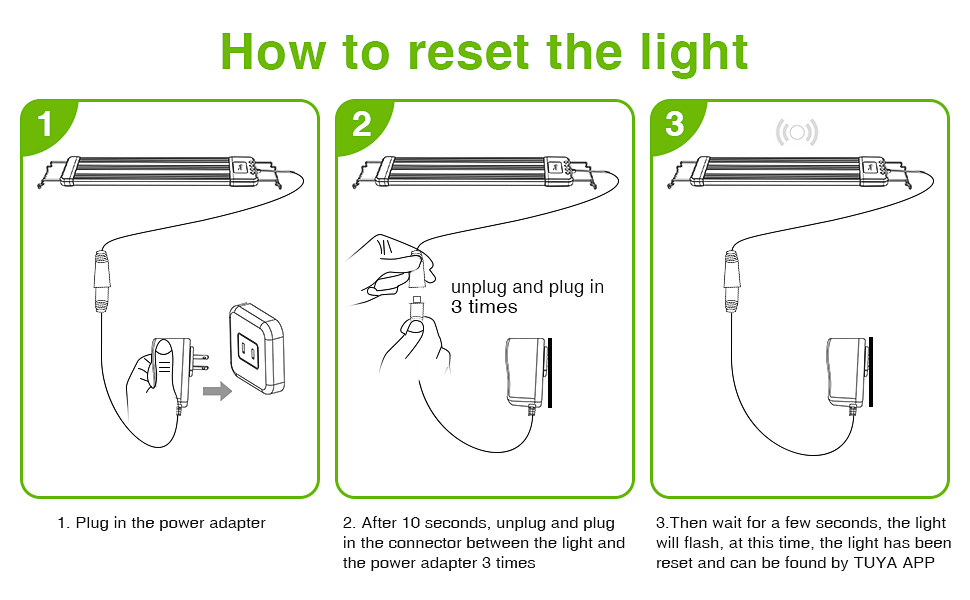
Image 7.1: Visual guide for resetting the light unit.
8. Especificacions
| Característica | Especificació |
|---|---|
| Nom del model | HG028-18W |
| Wattage | 18W |
| Mida adequada del tanc | 12"-18" Freshwater Planted Tank |
| Tipus de font de llum | LED (5054 RGB lamp comptes) |
| Nombre de fonts de llum | 21 |
| Brillantor | 1170 lúmens |
| Temperatura de color | 3000-6700K |
| Índex de reproducció del color (CRI) | Fins a 95 |
| Mètode de control | Bluetooth App (TUYA), Physical Buttons |
| Material | Aluminum Alloy (shell) |
| Nivell de resistència a l'aigua | Waterproof (light unit only) |
| Dimensions del producte (LxWxH) | 11.02" x 4.02" x 0.79" |
| Pes de l'article | 1.41 lliures (0.64 kg) |
| Font d'alimentació | Cable elèctric (adaptador CC 24V/1A) |

Image 8.1: Color rendering index comparison.
9. Garantia i Suport
9.1 Informació de la garantia
The hygger 18W Smart Aquarium Light typically comes with a 1-year limited warranty from the date of purchase, covering defects in materials and workmanship. Please retain your proof of purchase for warranty claims. The warranty does not cover damage caused by misuse, accident, unauthorized modification, or failure to follow the instructions in this manual.
9.2 Atenció al client
For technical assistance, troubleshooting not covered in this manual, or warranty inquiries, please contact hygger customer support. Refer to the contact information provided on the product packaging or the official hygger weblloc.
Weblloc: www.hygger-online.com (Example, please verify official weblloc)


