1. Introducció
Thank you for choosing the Steelplay Impulse Gaming Headset. This manual provides detailed instructions for setting up, operating, and maintaining your headset. The Steelplay Impulse offers versatile connectivity, supporting both Bluetooth wireless and 3.5mm wired connections, making it compatible with a wide range of devices including PC, Mac, Nintendo Switch, smartphones, tablets, PlayStation 4, PlayStation 5, Xbox One, and Xbox Series consoles.
Key features include a detachable microphone, up to 28 hours of battery life, comfortable ear cushions, an adjustable headband, and integrated controls for audio and microphone management.
2. Producte acabatview i Components
The Steelplay Impulse Gaming Headset package includes the following components:
- Steelplay Impulse Gaming Headset
- Micròfon desmuntable
- 3.5mm Audio Jack Cable (2 meters)
- USB-C Charging Cable (1.5 meters)
Familiarize yourself with the headset's main parts:

Figure 2.1: Steelplay Impulse Gaming Headset with detachable microphone attached.
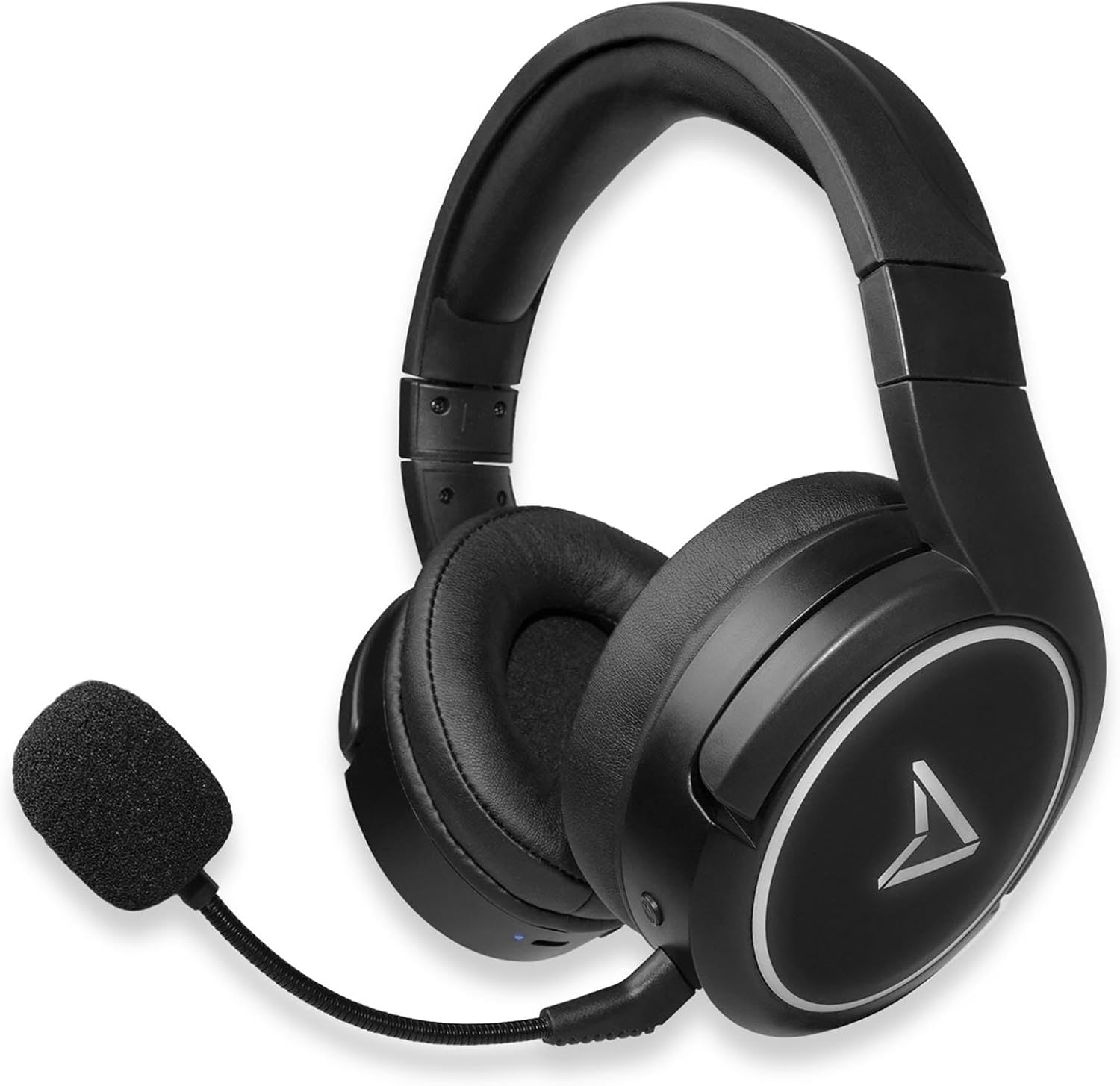
Figure 2.2: Steelplay Impulse Gaming Headset, highlighting the left earcup with integrated controls and microphone port.

Figura 2.3: Primer pla view of the detachable microphone, showing its flexible arm and 3.5mm jack connector.
3. Configuració
3.1 Càrrega inicial
Before first use, fully charge the headset. Connect the supplied USB-C charging cable to the headset's USB-C port and the other end to a compatible USB power source (e.g., computer USB port, USB wall adapter). The charging indicator light will show the charging status and turn off or change color when fully charged. A full charge provides up to 28 hours of autonomy.
3.2 Connexió sense fil Bluetooth
The Steelplay Impulse headset can connect wirelessly via Bluetooth to compatible devices such as PC, Mac, Nintendo Switch, Android smartphones, iOS smartphones, and tablets.
- Encès: Press and hold the Power button on the headset until the indicator light flashes, indicating it is in pairing mode.
- Activa el Bluetooth: On your device (PC, Mac, Switch, smartphone, tablet), navigate to the Bluetooth settings.
- Parella: Select "Steelplay Impulse" from the list of available devices. Once connected, the indicator light on the headset will typically show a solid color or slow flash.
3.3 Wired Connection (3.5mm Jack)
For wired use, connect the supplied 3.5mm audio jack cable to the headset's 3.5mm port and the other end to your device. This connection is compatible with PS5, PS4, Xbox Series X/S, Xbox One, Nintendo Switch, PC, laptops, Mac, smartphones, and tablets.
- Microphone Note: When using the 3.5mm wired connection, the detachable microphone functions on all compatible platforms.
- Ensure the 3.5mm jack is fully inserted into both the headset and your device for optimal audio and microphone performance.
4. Instruccions de funcionament
4.1 Encès/Apagat
- Per encendre: Premeu i manteniu premut el botó d'engegada durant aproximadament 3 segons fins que l'indicador lluminós s'il·lumini.
- Per apagar: Premeu i manteniu premut el botó d'engegada durant aproximadament 5 segons fins que l'indicador lluminós s'apagui.
4.2 Control de volum
The headset features integrated volume controls, typically located on one of the earcups. Use the volume up (+) and volume down (-) buttons or wheel to adjust the audio level.
4.3 Ús del micròfon
- Col·locació del micròfon: Insert the detachable microphone's 3.5mm jack into the dedicated microphone port on the headset.
- Compatibilitat amb micròfons: The detachable microphone is designed for use with PC, Mac, and mobile devices when connected via Bluetooth. When using the 3.5mm wired connection, the microphone is compatible with all listed platforms (PS5, PS4, Xbox Series X/S, Xbox One, Switch, PC, Mac, smartphone, tablet).
- Funció de silenci: The headset includes integrated microphone controls. Refer to the specific button layout on your headset for the microphone mute function.
5. Manteniment
Proper maintenance ensures the longevity and performance of your Steelplay Impulse Gaming Headset.
- Neteja: Use a soft, dry cloth to clean the earcups and headband. For stubborn dirt, a slightly damp cloth can be used, but ensure no moisture enters the speaker grilles or ports. Avoid harsh chemicals or abrasive cleaners.
- Emmagatzematge: Store the headset in a cool, dry place away from direct sunlight and extreme temperatures. If storing for an extended period, ensure the battery is partially charged (around 50%) to help preserve battery health.
- Cura del cable: Avoid sharply bending or twisting the audio and charging cables. Disconnect cables by pulling the plug, not the cable itself.
- Resistència a l'aigua: This product is not waterproof. Avoid exposure to liquids.
6. Solució De Problemes
Si teniu problemes amb els auriculars, consulteu les solucions habituals següents:
- Sense so:
- Ensure the headset is powered on and connected (Bluetooth or wired).
- Comproveu els nivells de volum tant dels auriculars com del dispositiu connectat.
- If using Bluetooth, try re-pairing the headset.
- If wired, ensure the 3.5mm cable is fully inserted and try a different audio port if available.
- El micròfon no funciona:
- Ensure the detachable microphone is securely attached.
- Check if the microphone is muted on the headset or in your device's settings.
- Verify microphone input settings on your PC or console.
- Remember the microphone's specific compatibility for Bluetooth (PC, Mac, mobile) vs. wired (all platforms).
- Problemes de vinculació de Bluetooth:
- Assegureu-vos que els auriculars estiguin en mode d'emparellament (indicador lluminós intermitent).
- Desactiva i activa el Bluetooth al dispositiu.
- Remove "Steelplay Impulse" from your device's Bluetooth list and attempt to re-pair.
- Assegureu-vos que els auriculars estiguin prou carregats.
- Problemes de càrrega:
- Verify the USB-C cable is correctly connected to both the headset and the power source.
- Prova un cable USB-C o una font d'alimentació diferent.
- Assegureu-vos que el port de càrrega dels auriculars estigui net i lliure de brutícia.
7. Especificacions
| Característica | Descripció |
|---|---|
| Nom del model | JVAMUL00143 |
| Marca | Steelplay |
| Tecnologia de connectivitat | Bluetooth, amb cable (connector de 3.5 mm) |
| Tecnologia de comunicació sense fils | Bluetooth |
| Dispositius compatibles | PC, Mac, Switch, Android/iOS smartphones, tablets, PS5, PS4, Xbox Series X/S, Xbox One |
| Micròfon | Detachable, included |
| Durada de la bateria | Fins a 28 hores |
| Interval de freqüència | 20 Hz - 20000 Hz |
| Material | Plàstic |
| Color | Negre |
| Col·locació de l'orella | Over-Ear (Circum-Aural) |
| Tipus de control | Control Integrat |
| Característica del cable | Desmuntable |
| Nivell de resistència a l'aigua | No resistent a l'aigua |
8. Garantia i Suport
The Steelplay Impulse Gaming Headset comes with a standard manufacturer's warranty. Please refer to the warranty card included in your product packaging or visit the official Steelplay weblloc web per obtenir informació detallada sobre els termes i condicions de la garantia.
For technical support, troubleshooting assistance beyond this manual, or warranty claims, please contact Steelplay customer service through their official weblloc web o el distribuïdor on vau comprar el producte.


