1. Introducció
Thank you for choosing the DDPAI X5Pro Dash Camera. This advanced car camera system is designed to provide high-quality video recording of your journeys, enhancing safety and providing crucial evidence in case of incidents. Featuring a 4K front camera, a Full HD rear camera, built-in GPS, and intelligent monitoring functions, the X5Pro offers a comprehensive solution for your vehicle's surveillance needs. Please read this manual carefully before use to ensure proper installation and operation.
2. Contingut del paquet
Si us plau, verifiqueu que tots els elements que s'enumeren a continuació estiguin inclosos al vostre paquet:
- DDPAI X5Pro Dash Camera (Main Unit)
- Càmera posterior RC1
- Power Cable (Front Camera)
- Power Cable (Rear Camera)
- Muntatge del cotxe
- Adaptador d'alimentació
- Manual d'usuari
- Adhesiu 3M
- Adhesius electrostàtics
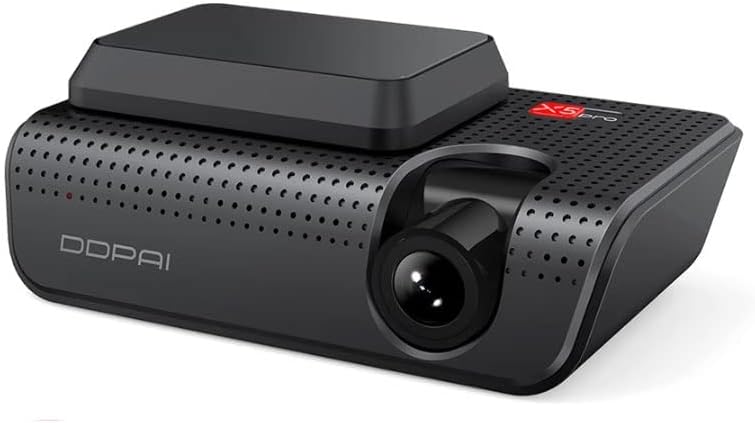
Image: Contents of the DDPAI X5Pro Dash Camera package, including the main unit, rear camera, cables, mount, and documentation.
3. Producte acabatview
The DDPAI X5Pro is equipped with advanced features to ensure comprehensive recording and monitoring:
- Càmera frontal: Features a Sony IMX415 sensor for stunning 4K resolution (2160p) video capture. It utilizes 7 optical lenses and offers a wide 140° viewing angle to capture more of the road.
- Rear Camera (RC1): Records in Full HD quality, providing a complete view of your vehicle's surroundings.
- Realcube Algorithm: Enhances overall image quality, improving beauty, contrast ratio, color calibration, and resolution.
- NightVIS Technology: Significantly improves night vision for clear recordings in low-light conditions.
- Emmagatzematge: Comes with 32GB of built-in storage, expandable up to 128GB via an SD card (not included).
- GPS: Integrated GPS compatible with Glonass, BDS, and Galileo satellites for accurate location and speed data.
- Wi-Fi: Built-in 5GHz Wi-Fi for fast connection to the DDPAI APP on your smartphone.
- 6-axis Gyroscope: Used for features like Sense Reality, which overlays driving data onto your videos.
- Monitorització 24 hores: Provides continuous surveillance when your vehicle is parked.
- Accident Detection: Registra i bloqueja automàticament el menjartage during collisions.
- Assistència en carretera: An additional safety feature for emergencies.
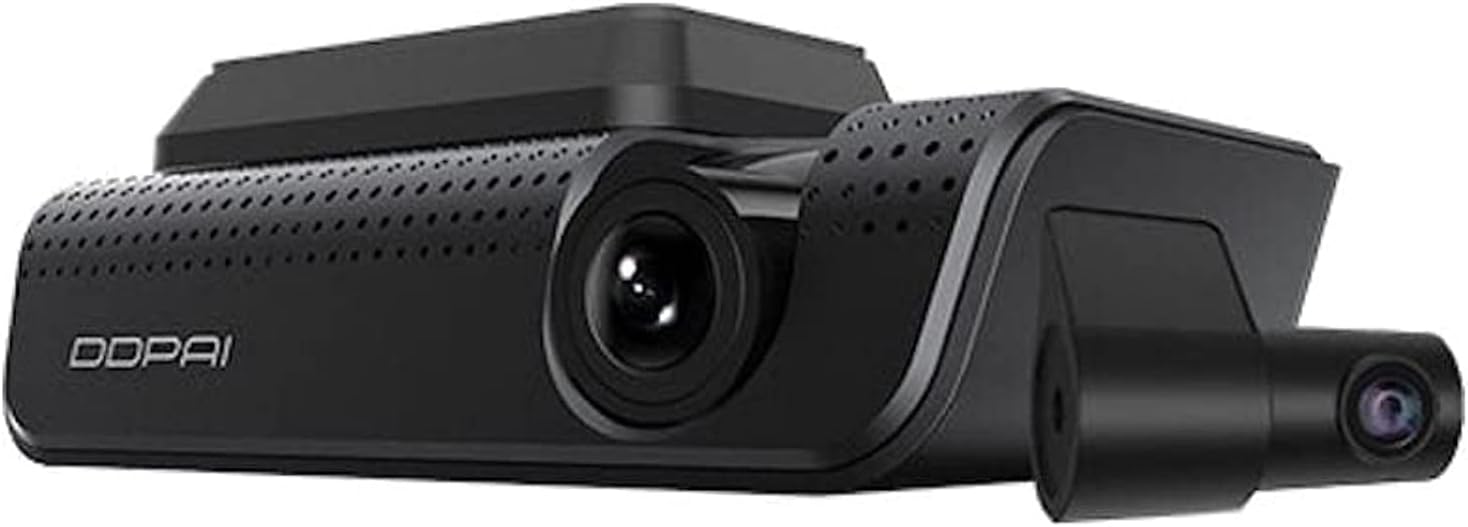
Image: The main DDPAI X5Pro dash camera unit, showcasing its sleek design and front lens.

Image: The DDPAI X5Pro main unit alongside its compact RC1 rear camera.

Image: Visual representation of key features including dual-channel recording, 4K UHD resolution, storage capacity, multi-GPS system, 5GHz Wi-Fi, HD video at 90FPS, and 24-hour parking monitor.
4. Configuració
Follow these steps to properly install your DDPAI X5Pro Dash Camera:
- Prepareu la zona de muntatge: Clean the windshield area where you intend to mount the dash camera. Ensure it is free of dust and grease. Apply the electrostatic sticker to the windshield first, then attach the 3M adhesive mount to the sticker for easier removal later.
- Muntar la càmera frontal: Attach the DDPAI X5Pro main unit to the car mount. Securely affix the mount to the prepared area on your windshield, typically behind the rearview mirall per evitar obstruir-vos view.
- Connect Power to Front Camera: Route the front camera's power cable from the camera to your vehicle's power adapter (cigarette lighter socket or fuse box for hardwiring). Ensure the cable is neatly tucked away to avoid interference with driving.
- Install Rear Camera (RC1): Mount the RC1 rear camera on your rear windshield. Connect its power cable to the main front camera unit. Route the cable carefully along the vehicle's interior trim.
- Power On and Initial Setup: Start your vehicle. The dash camera should power on automatically. Download the DDPAI APP from your smartphone's app store. Connect your smartphone to the dash camera's 5GHz Wi-Fi network (SSID and password typically found on the camera or in the manual).
- Configure Settings via App: Use the DDPAI APP to adjust settings such as video resolution, loop recording duration, G-sensor sensitivity, parking monitoring mode, and GPS settings. Ensure the date and time are correct.

Image: The DDPAI X5Pro dash camera mounted on a car's windshield, demonstrating typical installation placement.
5. Funcionament
Once installed, the DDPAI X5Pro operates largely automatically. Here's how to interact with its features:
- Enregistrament automàtic: The camera will automatically start recording when your vehicle's ignition is turned on. Footage is saved in a loop, overwriting the oldest files when the storage is full, unless locked.
- Using the DDPAI APP:
- Viu View: Connect via Wi-Fi to view foo en temps realtage de les dues càmeres del teu telèfon intel·ligent.
- Reproducció i descàrrega: Browse recorded videos, play them back, and download important clips directly to your phone.
- Millora del vídeo: The app allows you to enhance photos and videos with filters, music, and special effects before sharing.
- Ajust de configuració: All camera settings can be conveniently managed through the app.
- Monitorització d'aparcament les 24 hores: When the vehicle is parked and the camera is hardwired, it can monitor for impacts or motion, recording events even when the car is off. This feature helps protect your vehicle from potential damage or theft.
- Accident Detection (G-Sensor): The built-in G-sensor detects sudden impacts or rapid acceleration/deceleration. When triggered, it automatically locks the current video segment to prevent it from being overwritten, ensuring critical evidence is preserved.
- Sense Reality: This feature combines GPS data, 6-axis gyroscope information, and gravity sensor data to overlay driving metrics (like speed, acceleration, and braking) onto your recorded videos, creating a more immersive viewexperiència.
6. Manteniment
Proper maintenance ensures the longevity and optimal performance of your DDPAI X5Pro Dash Camera:
- Neteja de les lents: Regularly clean the front and rear camera lenses with a soft, lint-free cloth. Avoid abrasive materials or harsh chemicals that could scratch the lens.
- Mantenir sec: Ensure the camera unit remains dry. Avoid exposing it to excessive moisture or direct water spray.
- Gestió de la targeta SD: If using an external SD card, it is recommended to format it periodically (e.g., once a month) using the DDPAI APP or the camera's settings. This helps maintain card health and prevents data corruption. Use a high-endurance microSD card designed for dash cams.
- Actualitzacions de firmware: Check the DDPAI APP regularly for firmware updates. Keeping your camera's firmware up-to-date ensures you have the latest features and bug fixes.
- Consideracions sobre la temperatura: Avoid leaving the camera in direct sunlight for extended periods in extremely hot climates, as this can affect its lifespan. The camera is designed to withstand typical in-car temperatures, but extreme conditions should be minimized.
7. Solució De Problemes
If you encounter issues with your DDPAI X5Pro, refer to the following common problems and solutions:
| Problema | Causa possible | Solució |
|---|---|---|
| La càmera no s'encén. | No power supply; faulty power adapter/cable; loose connection. | Check power cable connection to camera and car's power source. Test power adapter in another socket or with another device. Ensure vehicle's ignition is on if not hardwired. |
| Rear camera frequently disconnects or shows no image. | Loose cable connection; damaged cable; faulty rear camera. | Ensure the rear camera cable is securely connected to both the rear camera and the main unit. Inspect the cable for any visible damage. Try restarting the main unit. |
| Cannot connect to camera via Wi-Fi. | Incorrect Wi-Fi password; camera Wi-Fi not active; interference. | Ensure you are connecting to the correct Wi-Fi network (DDPAI_X5Pro_XXXX). Verify the password. Restart the camera and your smartphone. Move closer to the camera. |
| Footage és borrós o poc clar. | Dirty lens; protective film still on lens; camera not focused. | Clean the camera lenses with a soft cloth. Remove any protective film. Ensure the camera is securely mounted and not vibrating excessively. |
| El GPS no rep senyal o és inexacte. | Poor satellite visibility; camera placement; firmware issue. | Assegureu-vos que la càmera tingui clar view of the sky. Avoid placing it under metallic tints or near other electronic devices that might cause interference. Check for firmware updates. |
| Camera stops recording or freezes. | SD card error; incompatible SD card; firmware issue. | Format the SD card via the DDPAI APP. Ensure you are using a high-endurance microSD card (Class 10 or U3 recommended). Check for and install any available firmware updates. |
If the problem persists after trying these solutions, please contact DDPAI customer support.
8. Especificacions
Key technical specifications for the DDPAI X5Pro Dash Camera:
| Característica | Detall |
|---|---|
| Nom del model | X5 Pro |
| Sensor de càmera frontal | Sony IMX415 |
| Resolució de captura de vídeo | Front: 4K (2160p); Rear: Full HD |
| Viewangle ing | 140° (frontal) |
| Emmagatzematge intern | eMMC de 32 GB |
| Suport d'emmagatzematge extern | Up to 128GB MicroSD Card |
| Connectivitat | Wi-Fi (5 GHz) |
| Característiques especials | Built-In GPS (Glonass, BDS, Galileo), 6-axis Gyroscope, 24-Hour Monitoring, Accident Detection, NightVIS Technology, Realcube Algorithm, Sense Reality |
| Color | Negre |
| Tipus de muntatge | Muntatge al quadre de comandament |
| Components inclosos | Car Mount, Power Adapter, User Manual |
9. Garantia i Suport
For warranty information, please refer to the specific warranty card or section included with your product packaging. DDPAI typically offers a limited warranty against manufacturing defects. Keep your purchase receipt as proof of purchase.
For technical support, troubleshooting assistance, or inquiries about your DDPAI X5Pro Dash Camera, please visit the official DDPAI website or contact their customer service through the contact information provided in your product documentation or the DDPAI APP. Regular firmware updates are released via the DDPAI APP to improve performance and add new features.


