Introducció
Thank you for choosing the johgee Smart WiFi Water Timer. This device allows you to automate your garden and lawn watering with precision and convenience. Featuring two independent outlets, a Wi-Fi hub for remote control, and compatibility with smart assistants like Alexa, this timer provides flexible scheduling options including cyclic, timed, and manual modes, along with a rain delay function.

Figura 1: The johgee Smart WiFi Water Timer system, including the 2-zone timer unit, the compact Wi-Fi hub, and a smartphone displaying the intuitive control application. This image provides an overview of the main components of the smart watering system.
Contingut del paquet
Si us plau, verifiqueu que tots els components siguin presents al vostre paquet:
- 1 x johgee Smart WiFi Water Timer (2-Zone)
- 1 x Wi-Fi Hub
- Connection Accessories (e.g., O-rings, adapters, quick connectors)
- Manual d'usuari (aquest document)
Configuració i instal·lació
1. Instal·lació física
Follow these steps to physically install your water timer:
- Assegureu-vos que l'aixeta exterior estigui neta i lliure de residus.
- Attach the 360° rotating connector of the water timer to your outdoor faucet. Screw it on tightly to prevent leaks. Use the appropriate O-ring for your faucet type (3/4" for USA-type, 1/2" adapter for EU-type).
- Connect your garden hoses to the two independent outlets (ZONE1 and ZONE2) at the bottom of the timer. Ensure a secure connection.
- Insert 4 AA batteries (not included) into the water timer unit. Ensure correct polarity.
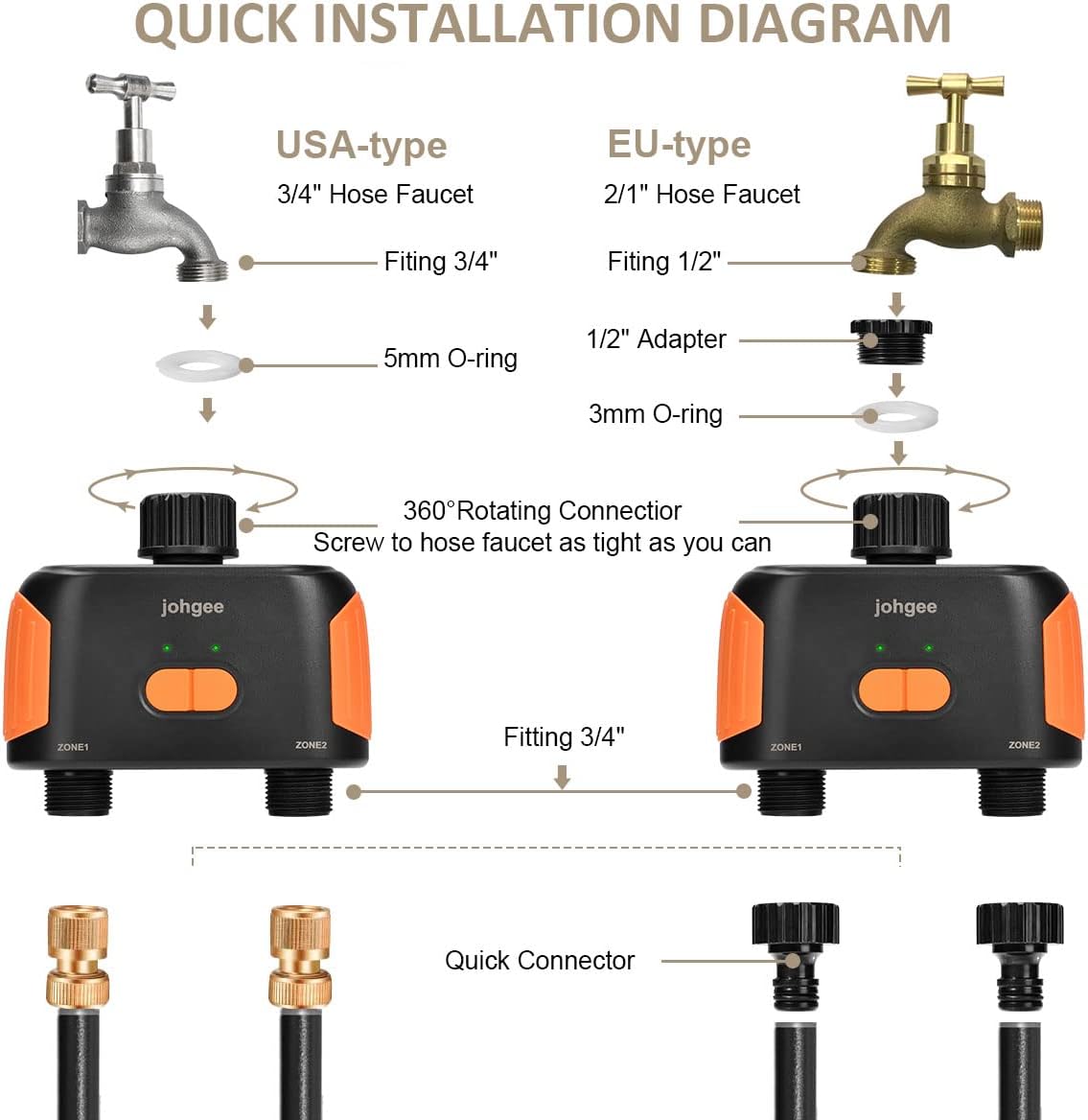
Figura 2: A detailed diagram illustrating the quick installation process for the johgee Smart WiFi Water Timer, showing connections for both USA-type (3/4" hose faucet) and EU-type (2/1" hose faucet) systems, along with the necessary O-rings and quick connectors.
2. Wi-Fi Hub and App Setup
The Wi-Fi Hub is essential for remote control and smart features. It connects the water timer to your home Wi-Fi network (2.4GHz only).
- Plug the Wi-Fi Hub into a standard indoor power outlet within 15 meters (49.2 feet) of the water timer. Ensure it is within range of your 2.4GHz Wi-Fi network.
- Baixeu l'aplicació "Smart Life" des de la botiga d'aplicacions del vostre telèfon intel·ligent (iOS o Android).
- Registra't o inicia la sessió al teu compte de Smart Life.
- In the app, add the Wi-Fi Hub by following the on-screen instructions. This typically involves putting the hub into pairing mode (refer to the hub's indicator light behavior) and entering your Wi-Fi password.
- Once the hub is connected, add the water timer as a device within the app. The app will guide you through pairing the timer with the hub. This may involve pressing and holding a button on the timer until its indicator lights flash.

Figura 3: This image illustrates the convenience of remote control, showing a woman using her smartphone to manage the johgee Smart WiFi Water Timer from anywhere, with the Wi-Fi hub plugged into a wall outlet, enabling smart life integration.

Figura 4: A visual representation detailing the optimal placement for the Wi-Fi Hub relative to the water timer, indicating a maximum effective distance of 15 meters (49.2 feet) for reliable wireless communication.
Funcionament
The johgee Smart WiFi Water Timer offers various modes and features for comprehensive watering control.
1. Control i programació d'aplicacions
Each of the two outlets can be programmed independently with up to 20 different watering plans, allowing for a total of 40 customizable schedules.

Figura 5: This image highlights the dual outlet design of the johgee Smart WiFi Water Timer, emphasizing its capacity to manage two separate watering zones with up to 40 individual and customizable watering plans through the mobile application.
Timed/Schedule Irrigation Mode
Set specific start and end times for watering, with options for daily, weekly, or custom schedules.

Figura 6: Screenshots from the johgee app demonstrating the Timed/Schedule Irrigation Mode, allowing users to set precise watering durations and intervals, along with various scheduling options like weekly, odd day, even day, or every few days.
Cyclic Irrigation Mode
Program recurring watering cycles within a set timeframe, ideal for frequent, short watering sessions.

Figura 7: This image illustrates the Cyclic Irrigation Mode within the johgee app, showing how to configure up to 20 separate irrigation programs with detailed start times, end times, irrigation durations, and interval times for precise watering cycles.
Reg manual
Initiate watering instantly for a specified duration directly from the app or by pressing the buttons on the timer unit.
2. Rain Delay System
The timer can automatically detect local weather conditions. You can also manually postpone watering for 1 to 7 days to conserve water during rainy periods or when the ground is already wet.

Figura 8: An image depicting the johgee Smart WiFi Water Timer connected to a faucet during rainfall, with a smartphone screen displaying the Rain Delay options, allowing users to postpone watering for up to 7 days.
3. Control de veu intel·ligent
Integrate your johgee water timer with Amazon Alexa or Google Assistant for convenient voice commands. You can control both watering zones using simple phrases.

Figura 9: This image showcases the smart integration of the johgee 2-Zone WiFi Water Timer with voice assistants like Alexa and Google, allowing users to control their irrigation system through simple voice commands for a more convenient watering experience.
4. Real-time Notifications
Receive instant notifications on your smartphone regarding watering status, weather updates, and other important alerts from the app.
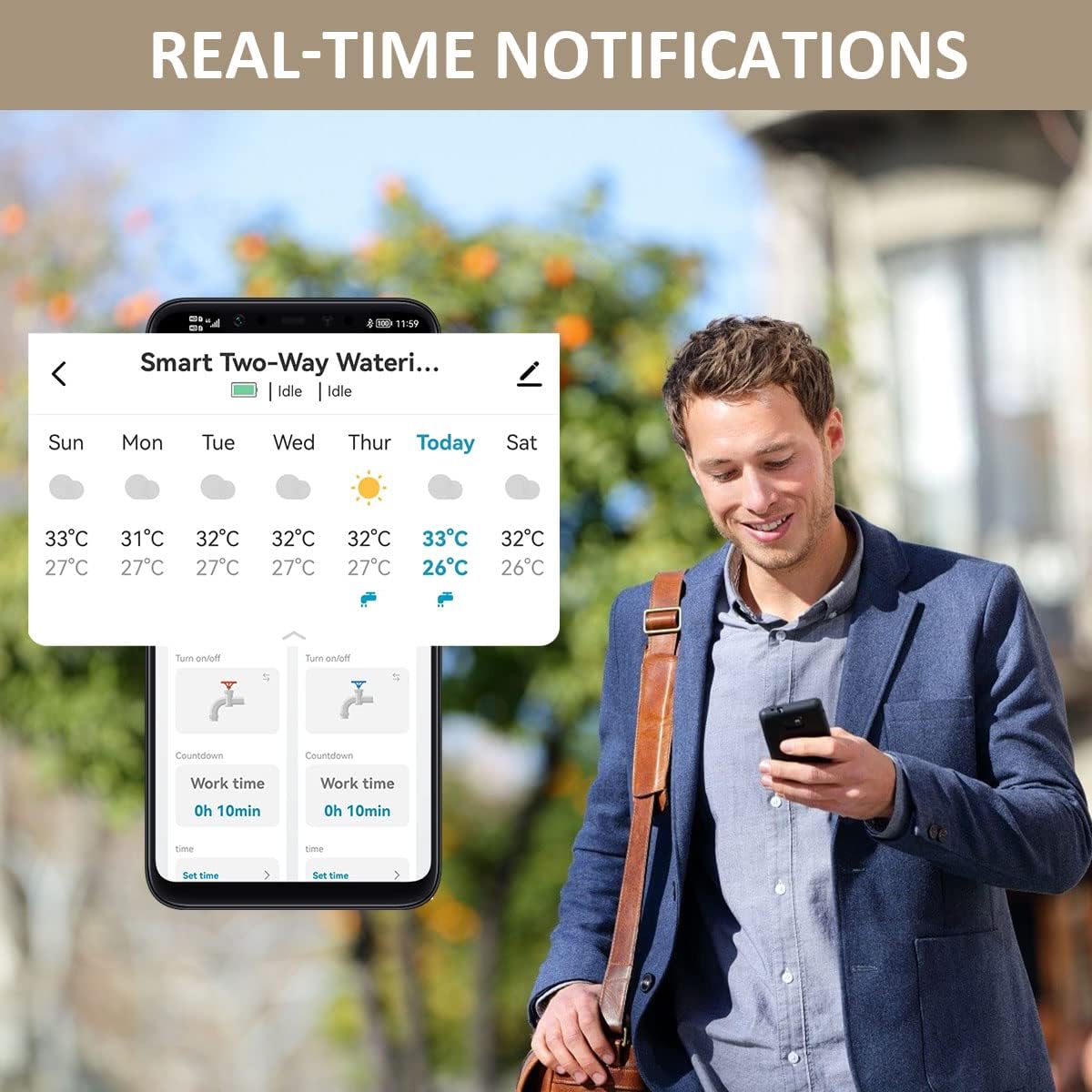
Figura 10: An image of a person viewing their smartphone, which displays real-time notifications and current weather conditions from the johgee water timer application, ensuring users are always informed about their irrigation system's status.
Manteniment
1. Substitució de la bateria
The water timer unit requires 4 AA batteries for operation. When the battery indicator in the app shows low power, replace all four batteries with new ones. Ensure correct polarity during installation.
2. Neteja
Periodically inspect the timer and its connections for any debris or mineral buildup. Clean with a soft, damp drap. No utilitzeu productes de neteja abrasius ni submergiu la unitat en aigua.
3. Hivernació
Before the first frost, disconnect the water timer from the faucet and hoses. Remove the batteries. Store the timer and hub indoors in a dry, protected area to prevent damage from freezing temperatures.
Resolució de problemes
| Problema | Causa possible | Solució |
|---|---|---|
| Timer not connecting to Wi-Fi Hub. | Hub out of range; incorrect Wi-Fi password; hub not in pairing mode; 5GHz Wi-Fi network. | Move hub closer to timer; ensure hub is within 2.4GHz Wi-Fi range; re-enter Wi-Fi password; put hub/timer into pairing mode as per app instructions. |
| Fuites d'aigua per les connexions. | Loose connection; missing or damaged O-ring; cross-threaded connection. | Ensure all connections are tightened securely; check and replace O-rings if damaged; ensure threads are aligned correctly before tightening. |
| El temporitzador no rega segons el programat. | Low batteries; schedule not saved; rain delay active; timer disconnected from hub. | Replace batteries; verify schedule settings in app are saved; check if rain delay is enabled; ensure timer is connected to hub and hub is online. |
| El control per veu no funciona. | Not linked to Alexa/Google Assistant; incorrect device name; internet connectivity issues. | Ensure Smart Life skill/service is enabled and linked in your smart assistant app; use the exact device name configured in Smart Life; check internet connection. |
Especificacions
| Característica | Detall |
|---|---|
| Número de model | SGW02 |
| Marca | johgee |
| Nombre de zones | 2 |
| Connectivitat | Wi-Fi (2.4GHz only), Bluetooth |
| Compatibilitat de control de veu | Alexa, Assistent de Google |
| Font d'alimentació (temporitzador) | 4 piles AA (no incloses) |
| Power Source (Hub) | Presa de corrent de CA |
| Max Distance (Hub to Timer) | 15 metres (49.2 peus) |
| Watering Modes | Cyclic, Timed, Manual |
| Retard de pluja | 1-7 dies |
| Pes de l'article | 1.23 lliures (558 grams) |
| Dimensions del paquet | 6.02 x 5.83 x 2.48 polzades |
Informació de la garantia
johgee products are manufactured to high quality standards. This product comes with a limited warranty against defects in materials and workmanship. Please retain your proof of purchase for warranty claims. For specific warranty terms and conditions, refer to the product packaging or contact customer support.
Atenció al client
If you encounter any issues or have questions regarding your johgee Smart WiFi Water Timer, please contact our customer support team. For the most up-to-date contact information, please visit the official johgee weblloc web o consulteu les dades de contacte que figuren a l'embalatge del producte.
Recursos en línia:
- Visita el johgee Store on Amazon per a informació i actualitzacions del producte.


