1. Introducció
This manual provides comprehensive instructions for the setup, operation, and maintenance of your Vonets VAP11N-300 2.4GHz Mini WiFi Bridge/Repeater. Please read this manual carefully before using the device to ensure proper functionality and to maximize its performance.
The Vonets VAP11N-300 is a versatile networking device designed to extend wireless connectivity to wired devices or to expand your existing Wi-Fi network. Its compact size and flexible power options make it suitable for a wide range of applications.
2. Què hi ha a la caixa
En desempaquetar, assegureu-vos que tots els elements que s'enumeren a continuació hi siguin presents i estiguin en bon estat:
- Vonets VAP11N-300 Mini WiFi Bridge/Repeater Unit
- USB Power Cable with Ethernet Connector
- Manual d'usuari (aquest document)
If any items are missing or damaged, please contact Vonets customer support.
3. Producte acabatview
The Vonets VAP11N-300 is an industrial-grade mini WiFi bridge/repeater that offers super stability and versatile networking functions. It supports both WiFi to wired and wired to WiFi functionalities.
Les característiques clau inclouen:
- Nova actualització 2025: Features a new process design for enhanced stability.
- Font d'alimentació flexible: Suporta ample voltage (DC5V-15V) and low power consumption (<2W). Power can be supplied via DC2.5 power hole, DC2.0 power plug, or USB interface, allowing convenient power sharing with customer equipment.
- Transmissió d'alta velocitat: Achieves 300Mbps WiFi rate with 802.11b/g/n WiFi protocol. Point-to-Point transmission distance can reach up to 60 meters without obstacles for small data, and less than 50 meters for video transmission.
- Continuous Update Service: The device software is continuously optimized, allowing online firmware upgrades for optimal function.
- SSA Signal Strength Detection: Supports automatic matching connection function for improved WiFi application.
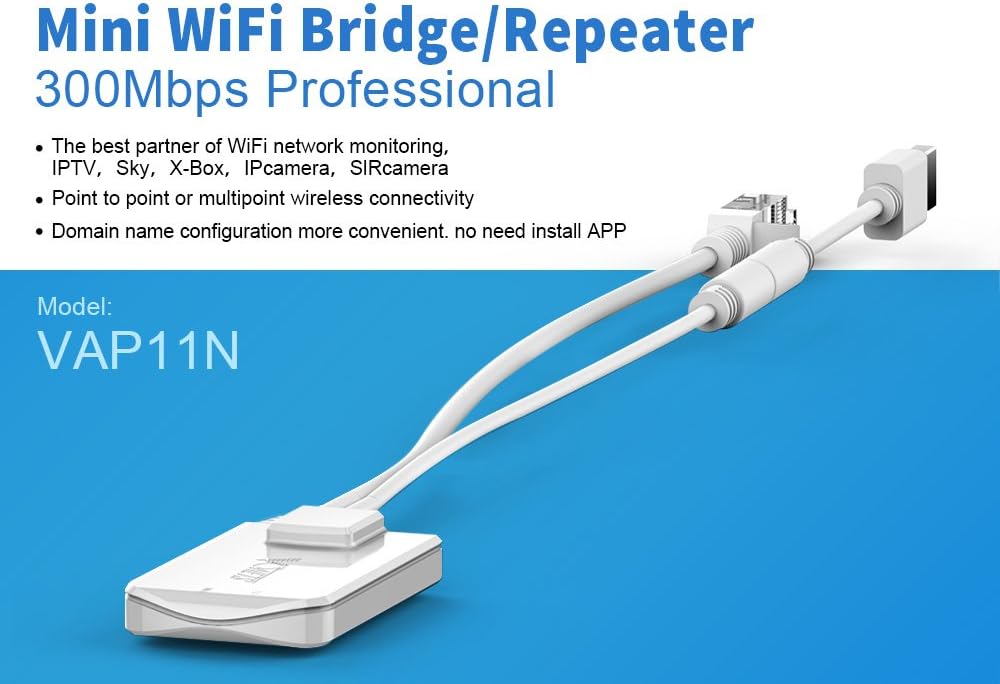
Image: The Vonets VAP11N-300 Mini WiFi Bridge/Repeater, highlighting its compact design and 300Mbps professional capabilities.

Image: The Vonets VAP11N-300 device shown with its integrated USB power cable and Ethernet connector.
4. Configuració
Follow these steps for initial setup and configuration of your Vonets VAP11N-300.
4.1. Connexió inicial
- Encès: Connect the VAP11N-300 to a power source. A 5V/1A power supply (e.g., a computer USB port or a USB wall adapter) is recommended. The device's LED light should illuminate.
- Connexió a l'ordinador: Use the Ethernet cable to connect the VAP11N-300 to your computer's LAN port.

Image: Close-up of the Vonets VAP11N-300 showing the Ethernet port and USB power input, illustrating how it connects to an IP camera for shared power.
4.2. Configuració via Web Navegador
The VAP11N-300 can be configured using a web browser on a computer or smartphone. The configuration process is demonstrated in the video below.
Video: Official Vonets VAP11N-300 Configuration Video. This video guides users through the setup process using both a computer and a smartphone, demonstrating how to access the device's web interface, enter login credentials, scan for Wi-Fi hotspots, input Wi-Fi passwords, and reboot the device for successful configuration.
- Accés Web Interfície: Obre a web browser (e.g., Internet Explorer, Chrome) and enter the configured domain `http://vonets.cfg` or the default IP address `192.168.254.254` in the address bar.
- Inici de sessió: Enter the User ID and password. Both are typically "admin" by default. Click "Login".
- Scan Hotspots: Navigate to the "Scan Hotspots" section. The device will search for available Wi-Fi networks.
- Seleccioneu la xarxa: Choose your desired Wi-Fi network (SSID) from the list and click "Next".
- Introduïu la contrasenya: Input the password for your selected Wi-Fi network.
- Apply & Reboot: Click "Apply" to save the settings. Then, click "Reboot" or power cycle the device. The device will take approximately 1 minute to reboot. Wait until the LED light flashes normally, indicating a successful connection.
Note: If you encounter issues accessing the configuration page after connecting as a bridge, try using `vonets.cfg` or ensure your computer's IP settings are compatible (e.g., temporarily disable DHCP server on the device if network conflicts occur).
5. Modes de funcionament
The Vonets VAP11N-300 supports two primary operating modes:
5.1. AP Mode (Access Point Mode)
In AP mode, the device functions as a wireless access point, converting a wired network connection into a wireless one. This is suitable for scenarios where an Ethernet cable provides internet access to a computer, and you wish to share this connection wirelessly without dialing.

Image: Diagram illustrating the AP Mode, where the VAP11N-300 connects to a wired network and broadcasts a Wi-Fi signal for wireless devices.
5.2. Repeater Mode (Bridge Mode)
In Repeater mode, the device extends the range of an existing Wi-Fi network. It can convert a Wi-Fi signal to an RJ45 network connection, allowing devices with only an Ethernet port (like some smart TVs or gaming consoles) to connect to the internet wirelessly. It also functions as a Wi-Fi signal repeater to boost coverage.

Image: Diagram illustrating the Repeater Mode, showing the VAP11N-300 extending Wi-Fi coverage within a multi-story building.
6. Escenaris d'aplicació
The Vonets VAP11N-300 is a good partner for various network applications due to its compact size and versatile functionality. Common uses include:
- Balances electròniques
- DVRs (Digital Video Recorders)
- IP cameras and SIR cameras (for wireless monitoring)
- Dispositius mèdics
- Dispositius IoT
- Gaming consoles (e.g., PS3)
- Network printers
- Robots
- Doll machines
- Wireless video surveillance systems (point-to-point or multipoint connectivity)

Image: A diagram showing various wireless monitoring applications, including connecting cameras to a recorder via the VAP11N-300 in bridge mode.

Image: Collage of various application scenarios for the WiFi bridge, including security systems, industrial automation, data collection, power systems, smart farms, and medical devices.
7. Especificacions
Below are the technical specifications for the Vonets VAP11N-300:
| Atribut | Valor |
|---|---|
| Nom del producte | VAP11N-300 |
| funció WiFi | Repeater/Bridge |
| Freqüència WiFi | Radiofreqüència de 2.4 GHz |
| Protocol WiFi | 802.11b/g/n |
| Velocitat de transmissió | 300 megabits per segon |
| Color | Blanc |
| Mida del dispositiu | 59.5 x 35 x 11.5 mm (L x A x A) |
| Treball Voltage | DC5V-15V |
| Consum d'energia | <2W |
| Tipus de connector | RJ45 |
| Pes de l'article | 2.08 unces |
| Fabricant | Shenzhen Houtian Network Communication Technology Co.,Ltd |
| Data de primera disponibilitat | 23 de juny de 2022 |
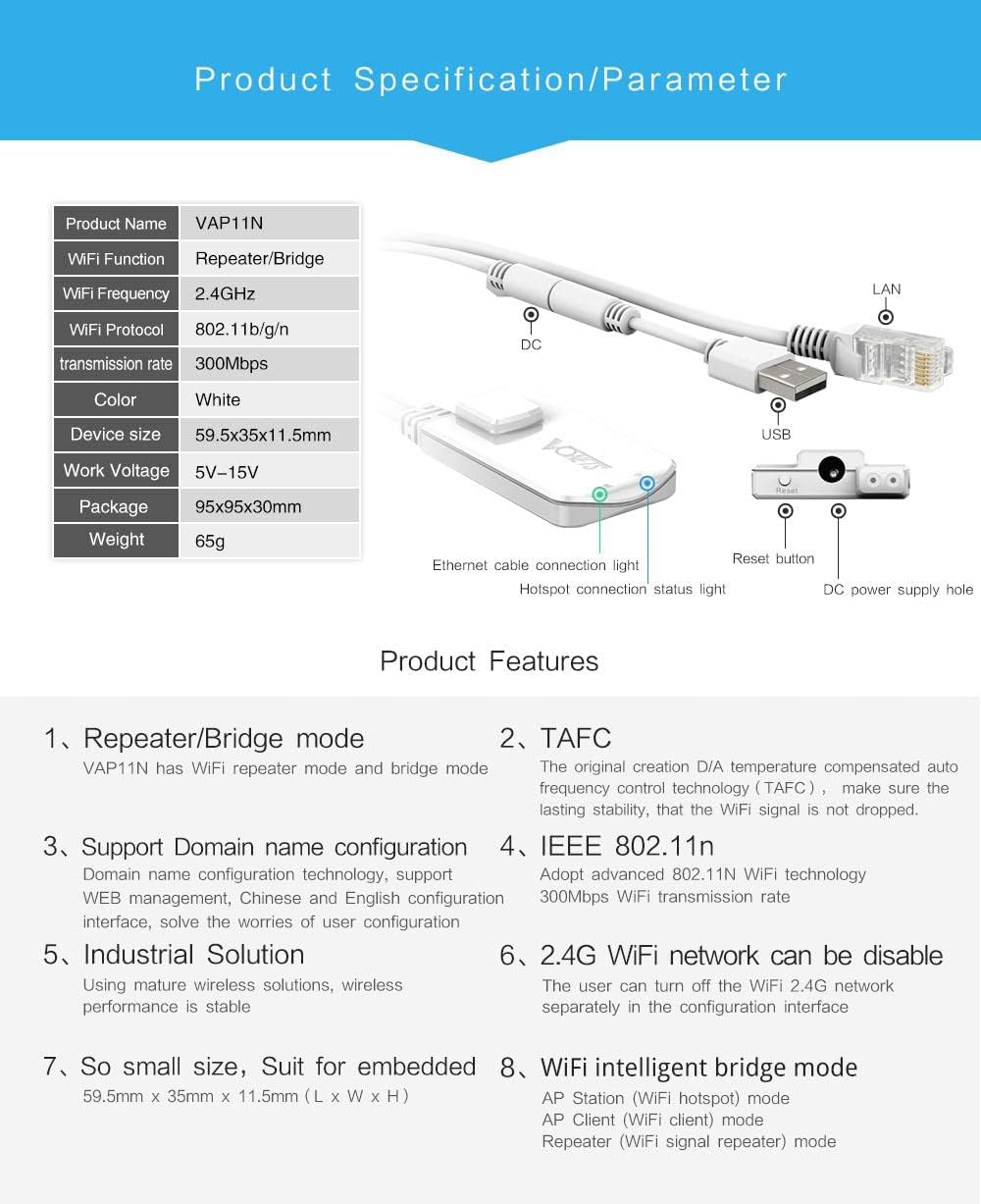
Image: Detailed product specifications and parameters for the VAP11N-300.
8. Manteniment
To ensure the longevity and optimal performance of your Vonets VAP11N-300, consider the following maintenance tips:
- Actualitzacions de firmware: Regularly check the official Vonets website for the latest firmware updates. Updating the firmware can improve performance, add new features, and fix bugs. The device supports online software optimization.
- Col·locació adequada: Place the device in a well-ventilated area, away from direct sunlight, heat sources, and moisture. Avoid placing it near large metal objects or other electronic devices that may cause interference.
- Reinicis regulars: Periodically rebooting the device (power cycling it) can help clear its memory and resolve minor performance issues.
- Neteja: Mantingueu el dispositiu net i lliure de pols. Feu servir un drap suau i sec per netejar l'exterior. No utilitzeu netejadors líquids ni aerosols.
- Font d'alimentació: Always use a stable power supply within the specified voltage range (DC5V-15V).
9. Solució De Problemes
If you encounter issues with your Vonets VAP11N-300, try the following troubleshooting steps:
- No es pot accedir Web Interfície:
- Ensure the device is properly powered on and connected to your computer via Ethernet.
- Verify you are using the correct IP address (`192.168.254.254`) or domain (`http://vonets.cfg`).
- Check your computer's network settings to ensure it's configured to obtain an IP address automatically (DHCP).
- Desactiveu temporalment qualsevol tallafocs o programari antivirus que pugui estar bloquejant l'accés.
- No hi ha connexió a Internet després de la configuració:
- Double-check the Wi-Fi password entered during configuration. Ensure it matches your router's Wi-Fi password exactly.
- Confirm that the selected Wi-Fi hotspot is active and providing internet access.
- Reboot both the VAP11N-300 and your main router.
- Ensure the DHCP server setting on the VAP11N-300 is set to "Disable" (recommended configuration) to avoid IP conflicts with your main router.
- Desconnexions freqüents:
- Check the signal strength of the Wi-Fi network the VAP11N-300 is connected to. If the signal is weak, try moving the device closer to the main router or reducing obstacles.
- Ensure there are no strong sources of interference (e.g., microwaves, cordless phones) nearby.
- Update the device firmware to the latest version.
- Device Gets Warm:
- It is normal for networking devices to generate some heat during operation. Ensure adequate ventilation around the device.
- If the device becomes excessively hot or exhibits unusual behavior, disconnect power and contact support.
10. Garantia i assistència
For warranty information, please refer to the documentation provided with your purchase or contact your retailer. Vonets is committed to providing reliable products and customer satisfaction.
For technical support or further assistance, please feel free to contact Vonets support via email:
suport@vonets.com
You can also visit the official Vonets weblloc per a més informació i recursos: www.vonets.com


