Introducció
This manual provides comprehensive instructions for the WAVLINK N300 Outdoor Wireless LAN Repeater. It covers the setup, operation, and maintenance of your device, which is designed for long-range outdoor wireless data transmission. The N300 features a built-in 11dBi directional antenna and supports speeds up to 300Mbps, making it suitable for Point-to-Point (PtP) and Point-to-MultiPoint (PtMP) applications over distances up to 1.5km in optimal conditions.

Image: The WAVLINK N300 Outdoor Wireless LAN Repeater main unit, showcasing its sleek design and integrated antenna.
Producte acabatview
Característiques clau
- Port: 1 x WAN/LAN
- Botó: 1 x Restablir
- Indicadors LED: 1 x Power, 1 x WAN/LAN, 1 x WiFi, 3 x Signal
- Font d'alimentació: DC24V/0.5A Ethernet Power Supply (Passive PoE)
- Voltage/Freqüència: Input: 100-240 Va.c. 50/60 Hz
- Dimensions: 180 mm x 50 mm x 50 mm (Llarg x Amplada x Altura)
- Velocitat sense fil: 11n: Up to 300 Mbps (dynamic), 11g: Up to 54 Mbps (dynamic), 11b: Up to 11 Mbps (dynamic)
- Banda de freqüència: 2.4 GHz
- Antena: 2 x 11 dBi Dual-directional antenna
- Seguretat sense fils: Xifratge WPA-PSK/WPA2-PSK

Image: The WAVLINK N300 device illustrating its 300Mbps wireless speed capability.
Contingut del paquet
- 1 x 11 dBi Antenna
- 1 x Wi-Fi AP/Router Main Unit
- 1 x RJ-45 Network Cable
- 1 x adaptador de corrent
- 1 x PoE Converter
- 1 x Main Unit Bracket
- 2 x Binding Bands
- 1 x joc de cargols
- 1 x Guia d'instal·lació ràpida
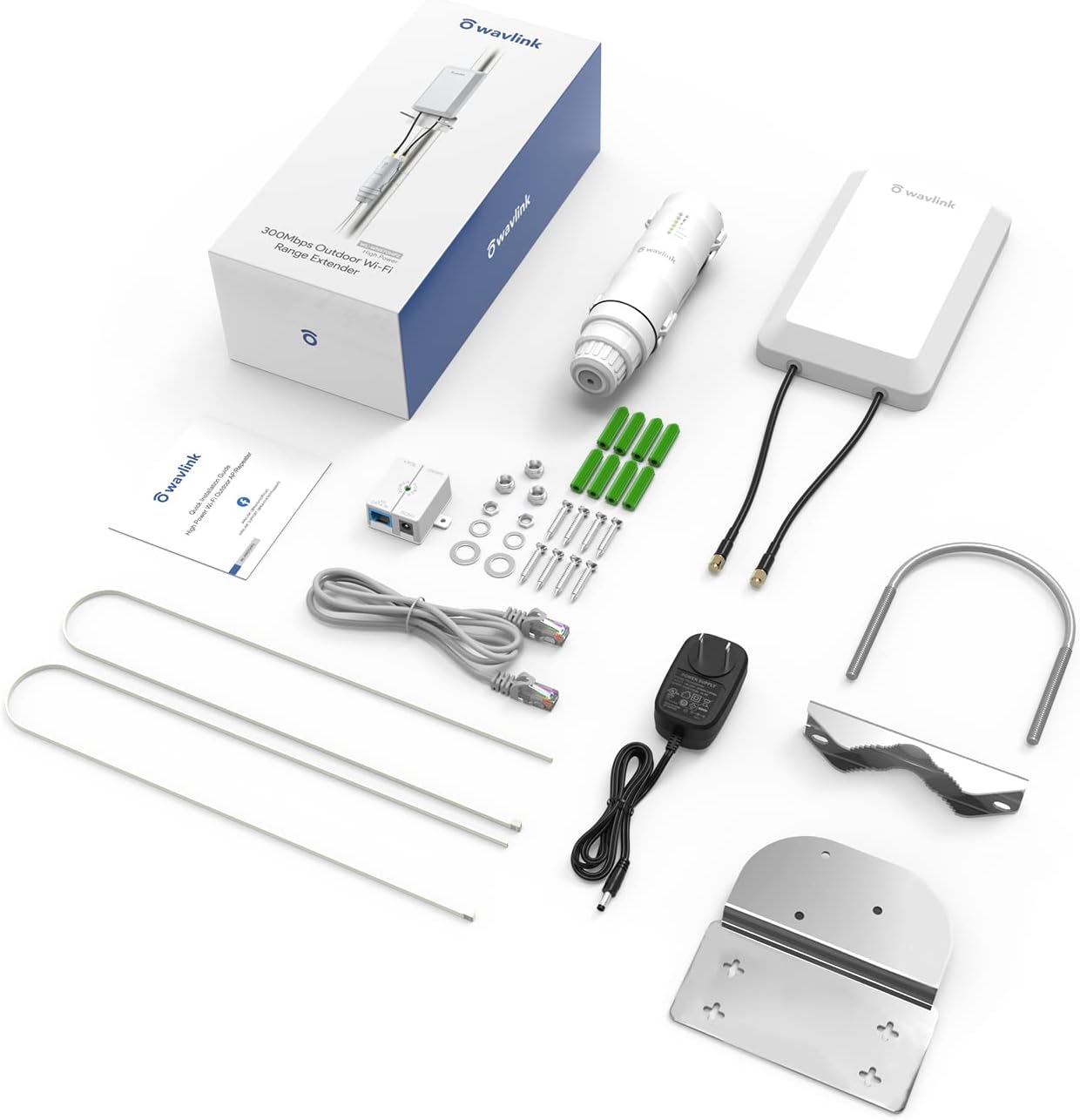
Image: All components included in the WAVLINK N300 Outdoor Wireless LAN Repeater package.
Guia de configuració
Initial Configuration Steps
- Encès: Connect the device using the provided PoE converter and power adapter.
- Connexió inicial: On a Wi-Fi enabled device (e.g., laptop or smartphone), search for available Wi-Fi networks. Connect to the default SSID, typically named "WAVLINK-N_xxxx" (where xxxx are the last four digits of the device's MAC address).
- Interfície de gestió d'accés: Obre a web browser and enter the default IP address (usually found in the Quick Install Guide, common defaults are 192.168.10.1 or 192.168.1.1).
- Inici de sessió: Enter the default username and password (default is often "admin" for both).
- Canvia les credencials predeterminades: For security, immediately change the default administrator password.
- Configura la configuració de Wi-Fi: Set your desired Wi-Fi network name (SSID) and password.
- Seleccioneu el mode de funcionament: Choose the appropriate operating mode (AP/Router or Repeater) based on your network requirements. Save the settings. The device will reboot. If using Repeater mode, you may need to scan for your existing Wi-Fi network and enter its password.
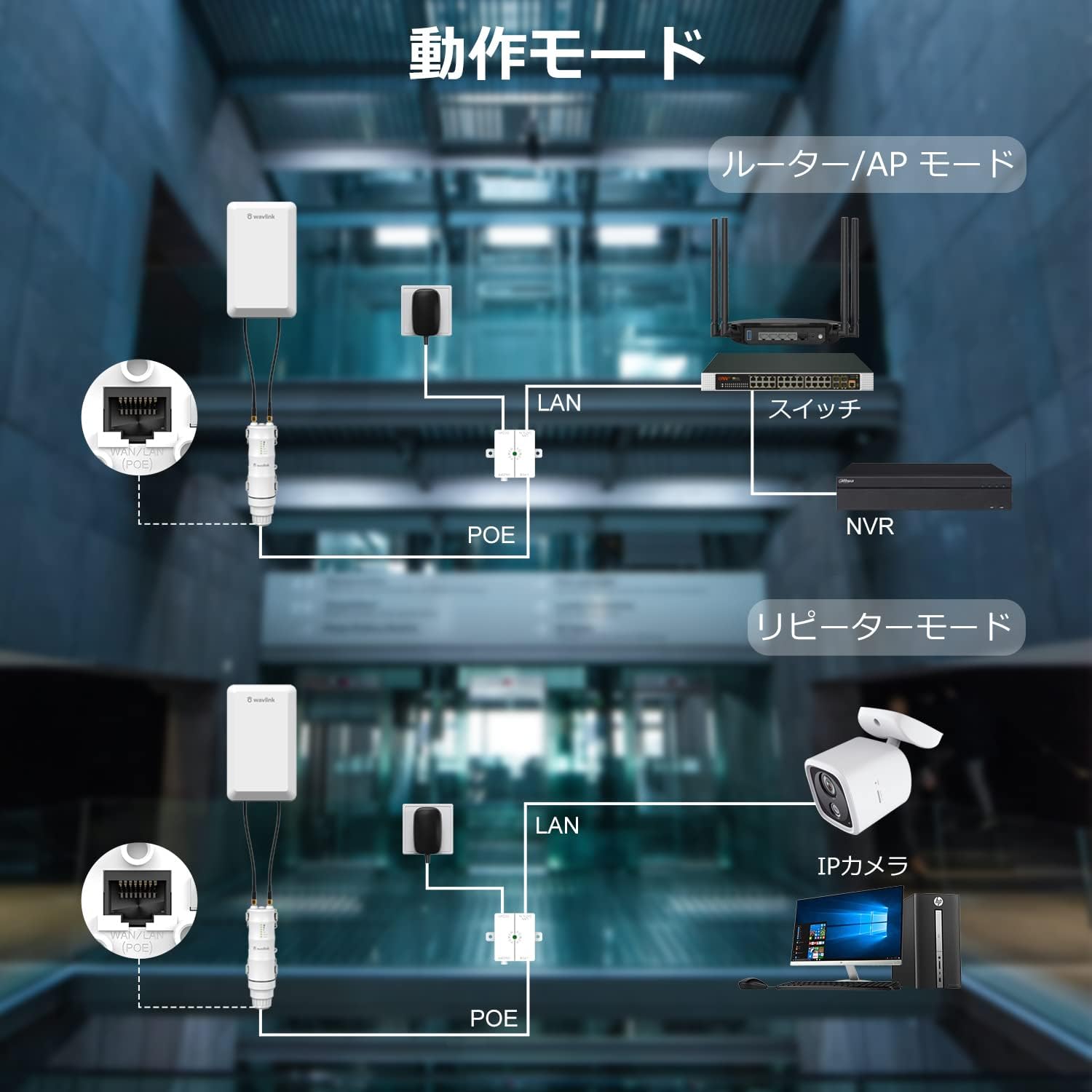
Image: Diagram illustrating the different operation modes and network connections for the WAVLINK N300.
Modes de funcionament
The WAVLINK N300 supports multiple operating modes to suit various network extension needs:
- AP/Router Mode: In this mode, the device connects to your main network via an Ethernet cable and broadcasts a new Wi-Fi network. This is suitable for extending a wired network wirelessly.
- Mode de repetidor: This mode extends the coverage of an existing Wi-Fi network by wirelessly connecting to it and then re-broadcasting the signal. It is ideal for eliminating Wi-Fi dead zones and improving signal strength in remote areas.
- AP+Repeater Mode: This mode combines functionalities, potentially acting as an Access Point while simultaneously repeating another wireless signal. Refer to the Quick Install Guide for specific configuration details.
- Mode d'encaminador: The device functions as a primary router, connecting directly to an internet source (e.g., a modem) and creating a new network for multiple devices.

Image: Visual representation of the WAVLINK N300 operating in AP+Repeater, AP, and Router modes.
Instal·lació
Opcions de muntatge
The WAVLINK N300 offers flexible mounting options for outdoor deployment:
- Muntatge de pal: Secure the device to a pole using the provided bracket and binding bands. Ensure the pole is stable and the device is positioned for optimal signal transmission.
- Muntatge en paret: Attach the device to a wall using the bracket and screws. Choose a location that provides clear line of sight to the desired coverage area.
Alimentació per Ethernet (PoE)
The device supports Passive Power over Ethernet (PoE), which allows both electrical power and data to be transmitted over a single Ethernet cable using the included PoE converter. This feature simplifies outdoor installation by reducing the number of cables required, making deployment more convenient and tidy.

Image: Illustrations of fixing the antenna and bracket plate, pole mounting, and wall mounting options for the WAVLINK N300.
Especificacions tècniques
| Model | N300 |
| Ports | 1 x WAN/LAN |
| Botó | 1 x Restablir |
| Indicadors LED | Power, WAN/LAN, WiFi, 3 Signal LEDs |
| Font d'alimentació | DC24V/0.5A Ethernet Power Supply (Passive PoE) |
| Voltage / Freqüència | Input: 100-240 Va.c. 50/60 Hz |
| Dimensions (LxWxH) | 180 mm x 50 mm x 50 mm |
| Estàndards sense fil | IEEE 802.11b/g/n |
| Wireless Speed (2.4GHz) | 11n: Up to 300 Mbps, 11g: Up to 54 Mbps, 11b: Up to 11 Mbps |
| Banda de freqüència | 2.4 GHz |
| Antena | 2 x 11 dBi Dual-directional antenna |
| Seguretat sense fils | Xifratge WPA-PSK/WPA2-PSK |
Manteniment i durabilitat
The WAVLINK N300 is engineered for robust outdoor performance and requires minimal maintenance. Its durable design ensures reliable operation in various environmental conditions.
- Weather-Resistant Enclosure: The device features a sturdy, custom-made enclosure designed to withstand harsh outdoor elements.
- Protecció contra llamps: Supports 4KV lightning protection to safeguard the device from electrical surges.
- Protecció ESD: Provides 15KV ESD (Electrostatic Discharge) protection for enhanced durability.
- Anticongelant: Designed to operate in cold temperatures, preventing performance degradation due to freezing.
- Disseny impermeable: Ensures protection against water ingress, making it suitable for outdoor installation in rainy or humid environments.

Image: Icons representing the lightning protection, anti-freezing, and waterproof features of the WAVLINK N300.
Resolució de problemes
If you encounter issues with your WAVLINK N300, refer to the following common troubleshooting steps:
- Unstable Connection / Poor Signal:
- Ensure clear line of sight between the device and the target area. Obstacles like thick walls or trees can significantly reduce signal strength.
- Verify the device is within the effective range. Actual performance can vary greatly from the theoretical 1.5km depending on environmental conditions.
- Check for sources of interference (e.g., other 2.4GHz devices, microwaves).
- Re-orient the antenna for optimal signal reception.
- Cannot Access Management Page After Mode Change (e.g., to AP Mode):
- If you lose access to the configuration page after changing modes, disconnect the network cable, restart the device, and then attempt to access the configuration page again. This can sometimes resolve IP address conflicts or access issues.
- Forgot Password or Configuration Issues:
- Use the reset button to restore the device to factory default settings. This will erase all custom configurations. Refer to the Quick Install Guide for the exact reset procedure.
- Sense energia:
- Verify the power adapter and PoE converter are correctly connected and receiving power.
- Comproveu totes les connexions de cable.
Atenció al client
For further assistance, please refer to the FAQ section on the WAVLINK website or contact our technical support team via email at postsales@wavlink.com. When contacting support, please provide your product model (N300) and a detailed description of the issue.


