1. Introducció
This manual provides detailed instructions for the assembly, operation, and maintenance of your JONSBO MOD3 Open Type ATX Mid Tower Gaming Computer Case. Designed for E-sports enthusiasts, the MOD3 chassis offers an open structure for optimal cooling and component visibility. Please read this manual thoroughly before beginning assembly to ensure proper installation and safe usage.

Image 1.1: JONSBO MOD3 MechWarrior branding banner. This banner image features the 'MECHWARRIOR JONSBO MOD 3' branding, highlighting key features like E-sports style, 360 water cooler support, E-ATX motherboard compatibility, 5V ARGB lighting, and 49mm cable management space.
2. Característiques
The JONSBO MOD3 case is engineered with a focus on performance and aesthetics, offering a unique open design and robust construction.
- Disseny: Open Type ATX Mid Tower with a distinctive mecha-inspired aesthetic.
- Material: Constructed from 2.5+2.0 Aluminum-magnesium alloy for durability, featuring 4.0mm tempered glass side panels.
- Il·luminació: Integrated 5V Addressable RGB (ARGB) lighting effect on the front panel for customizable illumination.
- Gestió de cables: Provides 49mm of space behind the backplane for efficient cable routing.
- Suport de la placa base: Compatible with EATX (XL-ATX), ATX, MATX, and ITX motherboards.
- Ranures d'expansió: Features 7 expansion slots for various add-on cards.
- Baies en cotxe: Supports 2x 2.5" SSDs and 1x 3.5" HDD, or 3x 2.5" SSDs.
- E / S davantera: Includes 2x USB 3.0 ports, 1x Audio output, and 1x Microphone input.
- Suport de refrigeració:
- Top: Up to 3x 120mm fans (optional).
- Front: Up to 3x 120mm fans (optional).
- CPU Cooler Height: Maximum 170mm.
- Liquid Cooler: Supports 240mm or 360mm radiators.
- Longitud de la GPU: Maximum 400mm.
- Suport PSU: Standard ATX PS2 power supplies, maximum 195mm length.
- Dimensions: 9.13 x 25.47 x 24.41 polzades (232 x 647 x 620 mm).
- Pes: 8 kg (17.64 lliures).

Image 2.1: JONSBO MOD3 mecha chassis design explanation. This image explains the JONSBO MOD3's mecha chassis design, emphasizing its open structure for high-end configurations, heat dissipation, vivid display of internal hardware, and personalized trend host customization.
Video 2.1: JONSBO MOD3 Open Type ATX Mid Tower Gaming Computer Case Overview. This official product video from Jonsbo showcases the MOD3 Open Type ATX Mid Tower Gaming Computer Case, highlighting its unique design, customizable RGB lighting, and structural features. It provides a dynamic overview of the case's aesthetics and build quality.
3. Guia de configuració
Follow these steps for proper assembly of your JONSBO MOD3 computer case and components.
3.1. Llista de comprovació de components
Before starting, ensure you have all necessary components:
- JONSBO MOD3 Case
- Motherboard (EATX, ATX, MATX, or ITX)
- CPU and CPU Cooler (Max. 170mm height)
- Graphics Card (Max. 400mm length)
- Power Supply Unit (Standard ATX PS2, Max. 195mm length)
- Storage Drives (2.5" SSDs, 3.5" HDDs)
- RAM modules
- Optional: Case fans (120mm), Liquid cooling radiator (240/360mm)
- Joc de tornavís
3.2. Preparació del cas
The JONSBO MOD3 features a full structure detachable design for ease of assembly.
- Carefully remove the tempered glass side panels by unscrewing the 18 knurled alloy screws. Store them safely to prevent damage.
- Identify the main component areas: motherboard tray, GPU area, power supply area, and drive bays.

Image 3.1: JONSBO MOD3 full structure detachable design diagram. This detailed diagram showcases the full structure detachable design of the JONSBO MOD3, indicating areas for motherboard, GPU, power supply, and drive bays, along with overall dimensions and cooling options.
3.3. Instal·lació de la placa base
- Install the CPU, CPU cooler (if air-cooled), and RAM onto your motherboard before placing it in the case.
- Align the motherboard with the standoffs on the motherboard tray. Ensure the I/O shield is correctly positioned.
- Fixeu la placa base amb els cargols adequats.
3.4. Instal·lació de la font d'alimentació
- Locate the power supply mounting area.
- Slide the power supply into position and secure it with screws from the rear of the case.
- Route the necessary power cables through the cable management cutouts.
3.5. Instal·lació de la unitat
- Install 2.5" SSDs and/or 3.5" HDDs into the designated drive bays. The case supports 2x 2.5" SSDs + 1x 3.5" HDD, or 3x 2.5" SSDs.
- Secure the drives with screws.
3.6. Instal·lació de la GPU
- Remove the necessary expansion slot covers.
- Insert your graphics card into the PCIe slot on the motherboard.
- Secure the GPU with screws. The case supports GPUs up to 400mm in length.
3.7. Instal·lació del sistema de refrigeració
The MOD3 case supports various cooling configurations:
- Fans: Optional 120mm fans can be installed at the top (up to 3) and front (up to 3) of the case.
- Refrigeració líquida: Radiators up to 240mm or 360mm can be installed. Refer to your liquid cooler's manual for specific mounting instructions.
3.8. Gestió de cables
Utilize the 49mm cable management space behind the motherboard tray to route and organize all power and data cables. This improves airflow and maintains a clean aesthetic.

Image 3.2: JONSBO MOD3 gaming computer case with internal components and RGB lighting. This image displays the JONSBO MOD3 open-type ATX mid-tower gaming computer case, fully assembled with internal components such as a motherboard, GPU, power supply, and cooling fans, all illuminated with vibrant RGB lighting. The case features a distinctive mecha-inspired design with tempered glass side panels, showcasing the hardware within.
4. Instruccions de funcionament
4.1. Encendre/apagar
Once all components are installed and connected, press the power button located on the front I/O panel to turn on your system. Press it again to turn off, or use your operating system's shutdown function.
4.2. Front Panel I/O
The front panel provides convenient access to:
- Botó d'encesa: For system power control.
- Ports USB 3.0 (x2): Per a la transferència de dades d'alta velocitat amb dispositius compatibles.
- Sortida d'àudio: Per a auriculars o altaveus.
- Entrada de micròfon: Per connectar un micròfon.
4.3. Control d'il·luminació ARGB
The JONSBO MOD3 features 5V ARGB lighting on the front panel. This lighting can typically be controlled via your motherboard's RGB software (if compatible) or a dedicated controller (if included with your system build). Refer to your motherboard's manual for ARGB software instructions.

Image 4.1: JONSBO MOD3 front panel features and knurled screws. This image highlights the front panel features of the JONSBO MOD3, including the 5V ARGB light effect, power button, USB 3.0 ports, audio input/output, and the 18 knurled alloy screws used for securing panels.
5. Manteniment
Regular maintenance helps ensure the longevity and optimal performance of your computer case.
5.1. Neteja
- Exterior: Utilitzeu un suau, damp cloth to wipe down the aluminum-magnesium alloy surfaces. Avoid abrasive cleaners.
- Vidre temperat: Clean with a glass cleaner and a microfiber cloth to avoid streaks.
- Interior: Periodically use compressed air to remove dust buildup from fans, radiators, and internal components. Ensure the system is powered off and unplugged before cleaning the interior.
5.2. Atenció general
- Avoid placing the case in direct sunlight or near heat sources.
- Ensure adequate ventilation around the case to maintain optimal airflow.
- Handle the tempered glass panels with care to prevent chipping or breakage.
6. Solució De Problemes
Aquesta secció tracta problemes comuns que podeu trobar.
- El sistema no s'encén:
- Check if the power supply is switched on and properly connected to the wall outlet.
- Verifiqueu que el cable del botó d'engegada de la carcassa estigui connectat correctament al capçal del panell frontal de la placa base.
- Ensure all power cables to the motherboard and components are securely seated.
- Sense sortida de pantalla:
- Confirm that your monitor cable is connected to the graphics card, not the motherboard's integrated graphics port (unless using integrated graphics).
- Torneu a col·locar la targeta gràfica a la ranura PCIe.
- Check power connections to the graphics card.
- La il·luminació ARGB no funciona:
- Ensure the 5V ARGB cable from the case is connected to the correct 5V ARGB header on your motherboard (not 12V RGB).
- Verify that your motherboard's RGB software is installed and configured correctly.
- Soroll excessiu:
- Check all fans (CPU, GPU, case) for obstructions or loose mounting.
- Ensure cables are not interfering with fan blades.
- Clean any dust buildup from fans and filters.
7. Especificacions
| Característica | Especificació |
|---|---|
| Nom del model | MOD3 |
| Tipus de cas | Torre mitja |
| Compatibilitat amb la placa base | EATX (XL-ATX), ATX, MATX, ITX |
| Material | Aluminum-magnesium alloy, Tempered Glass |
| Ranures d'expansió | 7 |
| Drive Bays | 2x 2.5" SSD + 1x 3.5" HDD OR 3x 2.5" SSD |
| Ports d'E / S frontals | 2x USB 3.0, 1x Audio, 1x Mic |
| Longitud màxima de la GPU | 400 mm |
| Alçada màxima del refrigerador de la CPU | 170 mm |
| Suport PSU | Standard ATX PS2 (Max. 195mm) |
| Suport del ventilador (superior) | 3x 120mm (optional) |
| Suport del ventilador (frontal) | 3x 120mm (optional) |
| Suport de refrigeració líquida | 240 mm / 360 mm |
| Espai de gestió de cables | 49 mm |
| Dimensions del producte (LxWxH) | 9.13 x 25.47 x 24.41 polzades (232 x 647 x 620 mm) |
| Pes net | 8 kg (17.64 lliures) |
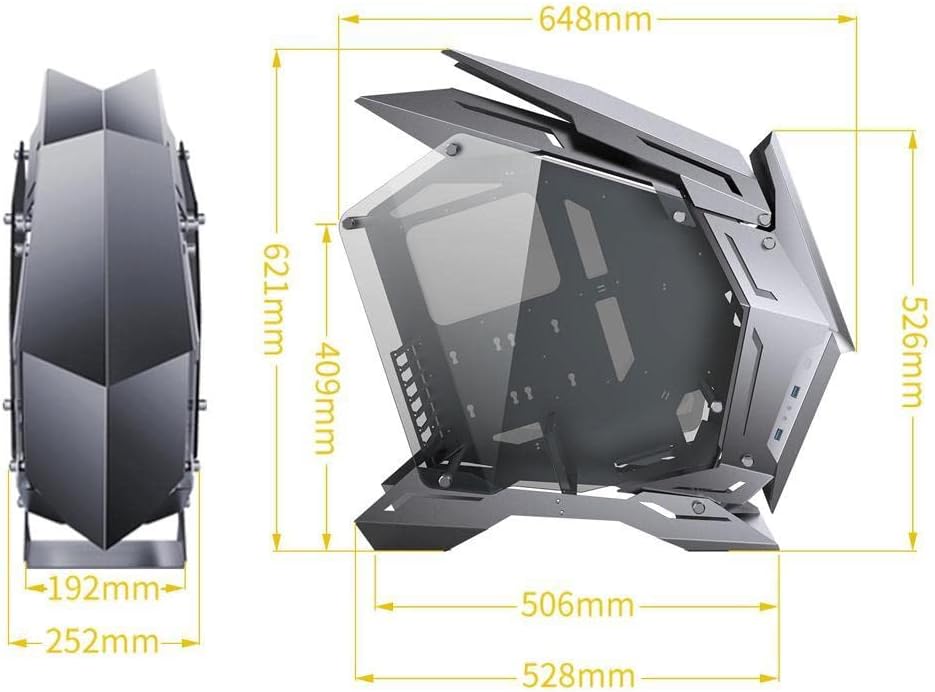
Image 7.1: JONSBO MOD3 computer case dimensions diagram. This technical diagram illustrates the precise dimensions of the JONSBO MOD3 computer case, including height, width, and depth measurements in millimeters, crucial for planning component compatibility and placement.
8. Garantia i Suport
Jonsbo products are manufactured to high-quality standards. For warranty information and technical support, please refer to the official Jonsbo weblloc web o poseu-vos en contacte amb el vostre distribuïdor local. Conserveu el comprovant de compra per a reclamacions de garantia.
Per a més ajuda, podeu visitar el Jonsbo Store on Amazon.


