Introducció
The Logitech MX Keys Mini for Mac is a minimalist wireless illuminated keyboard designed for enhanced productivity across Apple macOS, iPadOS, and iOS devices. This compact keyboard features backlit keys, USB-C charging, and tactile typing for a comfortable user experience.
Note: This product is a renewed item, professionally inspected and tested to function and appear like new. Renewed products are eligible for replacement or refund under the Amazon Renewed Guarantee if not satisfied with the purchase.

Image: Logitech MX Keys Mini for Mac keyboard in Pale Grey, showcasing el seu disseny compacte.
Què hi ha a la caixa
Upon unboxing your Logitech MX Keys Mini for Mac, you will find the following items:
- Logitech MX Keys Mini for Mac Wireless Illuminated Keyboard
- Cable de càrrega USB-C

Image: The Logitech MX Keys Mini for Mac keyboard and its included USB-C charging cable, as packaged.
Configuració
1. Càrrega del teclat
Before initial use, ensure your keyboard is fully charged. Connect the included USB-C cable to the USB-C port located on the back of the keyboard and plug the other end into a compatible USB-C power source (e.g., your Mac, a wall adapter). The keyboard can be used while charging.
2. Pairing via Bluetooth Low Energy
The MX Keys Mini for Mac utilizes Bluetooth Low Energy for wireless connectivity. It can be paired with up to three different devices simultaneously.
- Enceneu el teclat amb l'interruptor d'encesa situat a la part posterior.
- Press and hold one of the Easy-Switch keys (labeled 1, 2, or 3) on the top row of the keyboard until the LED indicator above the key starts blinking rapidly. This indicates the keyboard is in pairing mode.
- On your Mac, iPad, or iPhone, navigate to Bluetooth settings.
- Select "MX Keys Mini for Mac" from the list of available devices to complete the pairing process.
- Repetiu el procés per a un màxim de dos dispositius més utilitzant les altres tecles Easy-Switch.
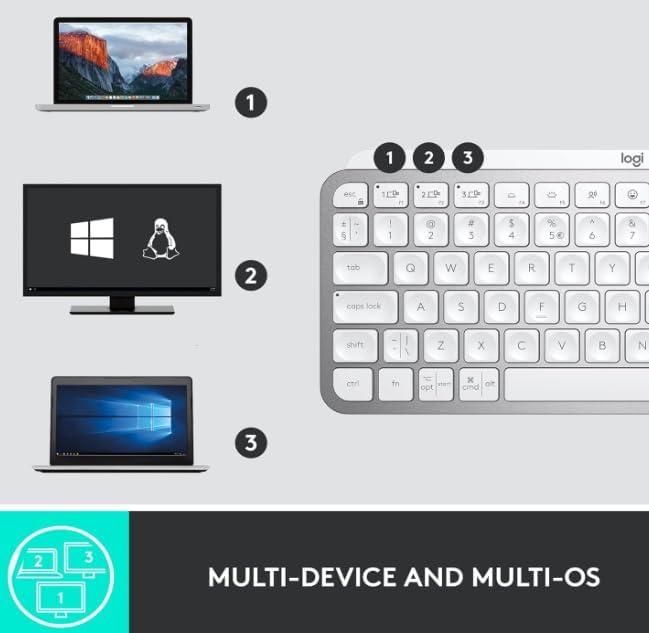
Image: The keyboard demonstrating multi-device connectivity with a MacBook, an iMac, and an iPad, highlighting the Easy-Switch functionality.
En funcionament
Funcions clau
The MX Keys Mini for Mac features a Mac-specific layout with Perfect Stroke keys designed for comfortable and precise typing. The top row includes dedicated multimedia keys and smart keys.
- Tecles de canvi fàcil (1, 2, 3): Quickly switch between up to three paired devices.
- Tecles intel·ligents: Includes dedicated keys for voice-to-text Dictation, Mic Mute/Unmute, and Emoji access.
- Controls multimèdia: Play/pause, volume up/down, and mute controls.
- Brillantor de la llum de fons: Adjust the illumination level of the keys.

Imatge: Una imatge detallada view of the keyboard highlighting key features such as Easy Switch buttons, Smart Keys, USB-C charging port, compact size, Perfect Stroke keys, and Smart Backlighting.
Il·luminació intel·ligent
The keyboard features smart backlighting that automatically adjusts to ambient lighting conditions. The keys illuminate when your hands approach and dim when you move away, conserving battery life.
Personalització
Customize your keyboard experience using the Logitech Options+ software (available for download from the Logitech website). This software allows you to:
- Remap function keys to perform specific actions.
- Adjust global settings or create application-specific key assignments.
- Gestiona les connexions dels dispositius Easy-Switch.
- Configure backlighting behavior and battery saving modes.
Manteniment
Durada de la bateria i càrrega
The MX Keys Mini for Mac is equipped with a USB-C rechargeable battery. A full charge provides approximately 10 days of battery life with backlighting enabled, or up to 5 months with backlighting turned off. To maximize battery life, consider disabling backlighting when not needed via the Logitech Options+ software.
Neteja
Per netejar el teclat, netegeu suaument les tecles i la superfície amb un drap suau i sense borrissol. Eviteu utilitzar productes químics agressius o materials abrasius.
Resolució de problemes
Problemes de connectivitat
- El teclat no es connecta: Ensure the keyboard is powered on and fully charged. Verify that Bluetooth is enabled on your device and the keyboard is in pairing mode (blinking LED on Easy-Switch key).
- Connexió intermitent: Move the keyboard closer to your device to reduce interference. Ensure no other devices are causing Bluetooth interference.
- Dispositius de commutació: Press the corresponding Easy-Switch key (1, 2, or 3) to connect to a previously paired device.
La retroiluminació no funciona
- Check battery level; backlighting may be disabled when the battery is low.
- Ensure backlighting is not disabled in the Logitech Options+ software.
- Adjust backlighting brightness using the dedicated keys on the top row.
Especificacions
| Característica | Detall |
|---|---|
| Dimensions del producte | 5.19 x 7.72 x 0.83 polzades |
| Pes de l'article | 1.48 lliures |
| Bateries | 1 bateria de polímer de liti (inclosa) |
| Tecnologia de connectivitat | Bluetooth, USB-C |
| Descripció del teclat | Membrana |
| Dispositius compatibles | Laptop, Tablet (macOS, iPadOS, iOS) |
| Característiques especials | LED Lights, Portable, Rechargeable, Ten Key Less, Wireless |
| Color | Gris pàl·lid |
| Il·luminació del teclat | Single Color, Smart Illumination |
Garantia i Suport
For information regarding product warranty, technical support, and additional resources, please visit the official Logitech support website. As a renewed product, it is covered by the Amazon Renewed Guarantee, offering replacement or refund if you are not satisfied with your purchase.


