Introducció
The Technical Pro CLUB15 is a complete wireless speaker system designed for powerful audio performance. This system includes two 15-inch rechargeable Bluetooth speakers, stands, a remote control, a microphone, and integrated lighting. It features TWS (True Wireless Stereo) technology, allowing both speakers to connect wirelessly to a single Bluetooth source for a synchronized stereo experience without the need for audio cables between them. The built-in rechargeable battery provides hours of continuous music playback, making it ideal for various applications.

Figure 1: Technical Pro CLUB15 Speaker System with included accessories.
Què hi ha a la caixa
En desembalar, assegureu-vos que hi hagi tots els components següents:
- Technical Pro CLUB15 15" Rechargeable Bluetooth Speakers (2 units)
- Suports d'altaveus (2 unitats)
- Control remot
- Micròfon
- Llum de festa
- Cable d'alimentació
- Manual d'usuari (aquest document)
Configuració
Follow these steps to set up your Technical Pro CLUB15 speaker system for optimal performance.
1. Col·locació de l'altaveu i muntatge del suport
Carefully remove the speakers and stands from their packaging. Extend the legs of the speaker stands and secure them firmly on a flat, stable surface. Place each speaker onto a stand, ensuring it is securely seated on the pole mount. The speakers are equipped with wheels for easy transport before placement.
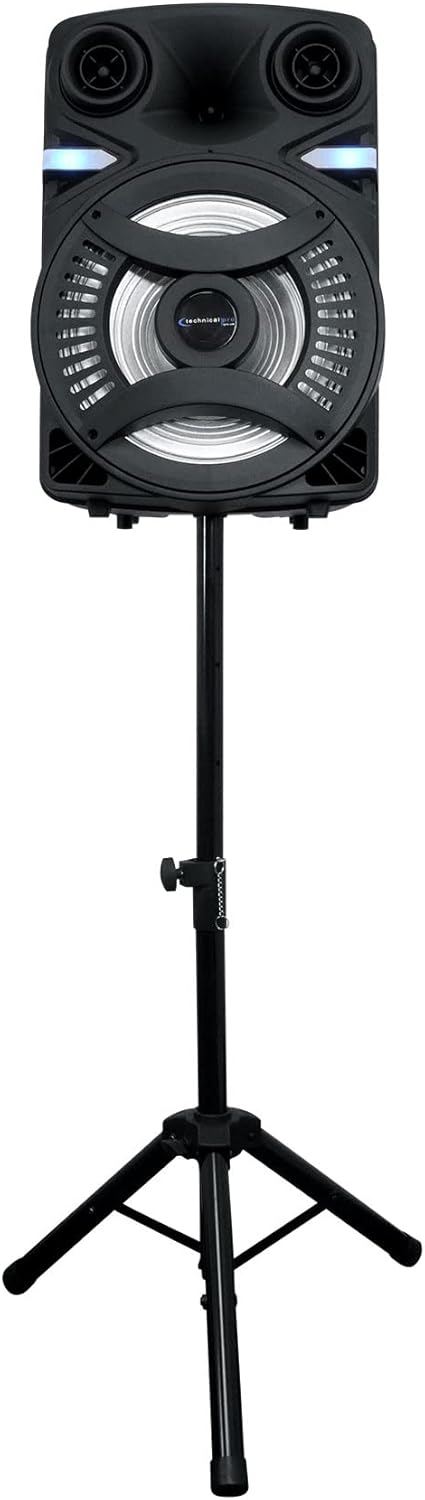
Figure 2: Speaker mounted on its stand.
2. Power Connection and Charging
Connect the provided power cable to the AC input on the rear panel of each speaker and then to a standard electrical outlet (110/220v). The built-in rechargeable battery will begin charging automatically. It is recommended to fully charge the speakers before first use for optimal battery life.
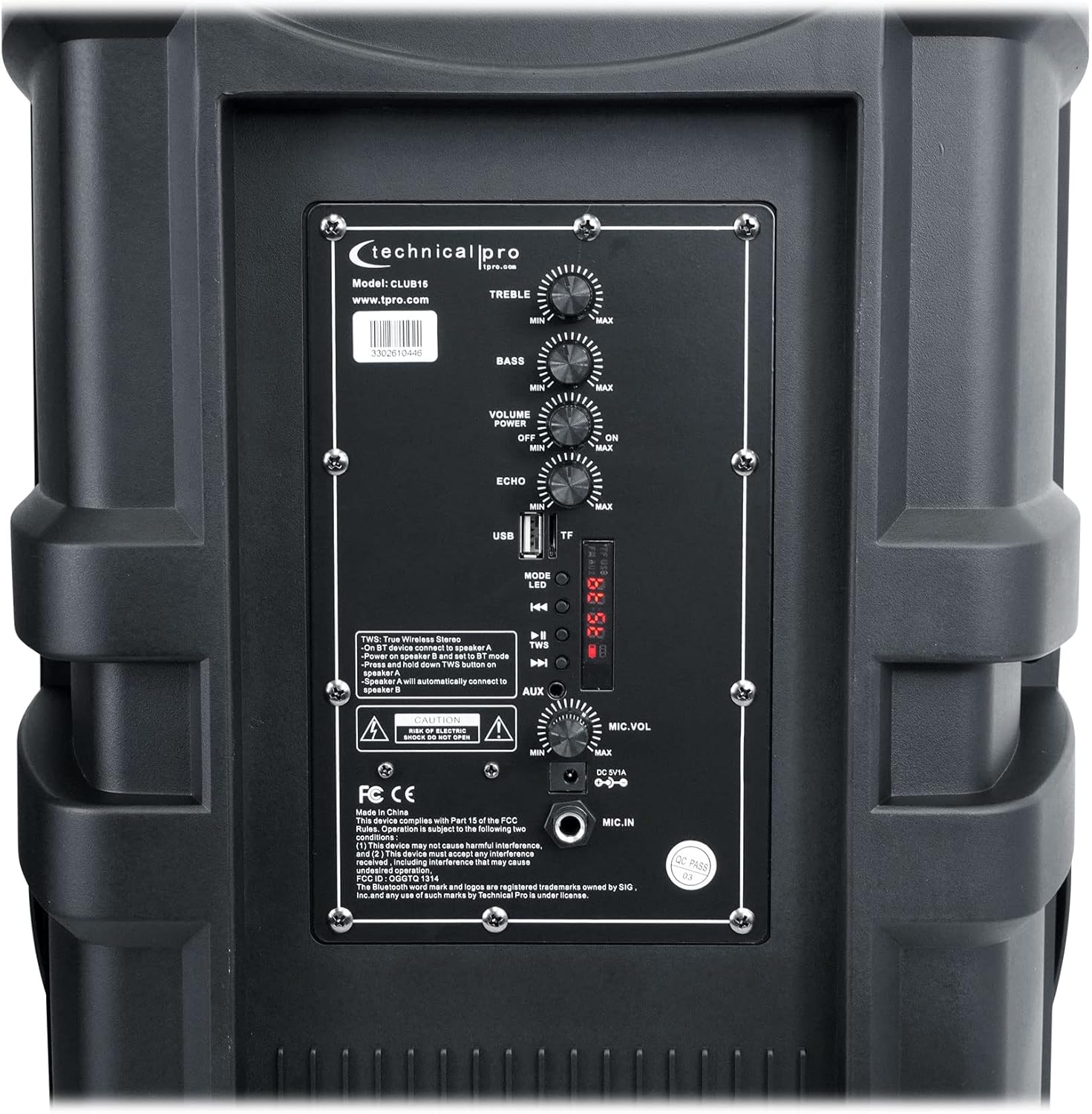
Figure 3: Rear control panel with power input (DC 12V) and other controls.
Ensure the power switch on the rear panel is in the OFF position before connecting the power cable. Once connected, you can turn the power switch ON to operate the speaker or charge the battery.
Instruccions de funcionament
1. Controls bàsics sobreview
The rear panel of each speaker features various controls for audio adjustment and input selection:
- AGUTS: Ajusta la sortida d'alta freqüència.
- BAIX: Ajusta la sortida de baixa freqüència.
- VOLUM: Controls the overall master volume.
- ECO: Ajusta l'efecte d'eco per a l'entrada de micròfon.
- MIC.VOL: Controla el volum de l'entrada del micròfon.
- Mode: Switches between input sources (Bluetooth, USB, TF Card, AUX).
- LED: Toggles the LED lights on/off.
- Ranures per a targetes USB/TF: Per reproduir àudio files from USB drives and TF cards.
- Entrada AUX: Entrada de 3.5 mm per a dispositius d'àudio externs.
- MIC.IN: 1/4" input for the included microphone.
2. Bluetooth Connectivity (A2DP & AVRCP)
- Power on the speaker(s).
- Premeu el botó MODE button until "BLUE" or "Bluetooth" appears on the LCD screen, indicating Bluetooth mode.
- Al dispositiu amb Bluetooth (telèfon intel·ligent, tauleta, etc.), cerqueu els dispositius Bluetooth disponibles.
- Select "TECHNICAL PRO" or "CLUB15" from the list.
- Once paired, the speaker will emit a confirmation tone, and you can begin streaming audio wirelessly.
Bluetooth Range: Approximately 30 feet (9 meters).
3. Funció TWS (True Wireless Stereo)
The TWS function allows two CLUB15 speakers to connect wirelessly to each other, creating a true stereo sound experience from a single Bluetooth source.
- Ensure both CLUB15 speakers are powered on and in Bluetooth mode.
- En un dels altaveus (aquest serà l'altaveu principal), premeu i manteniu premut el botó MODE button for a few seconds until you hear a confirmation tone, indicating TWS pairing mode.
- The primary speaker will automatically search for and connect to the second speaker. Once connected, you will hear another confirmation tone.
- Now, connect your Bluetooth device to the primary speaker as described in the "Bluetooth Connectivity" section. Audio will play through both speakers in stereo.
Note: When TWS is active, all other inputs (USB, TF Card, AUX, MIC) will only function on the primary speaker. Only Bluetooth audio will be streamed to both speakers simultaneously.
4. Reproducció de targetes USB/TF
The CLUB15 speakers support playback of .mp3 and .wav files from USB flash drives (up to 120GB) and TF cards (up to 32GB).
- Insert a USB flash drive or TF card into the corresponding slot on the rear panel.
- The speaker will automatically switch to USB or TF Card mode and begin playing audio. If not, press the MODE botó per seleccionar l'entrada correcta.
- Use the playback controls (Play/Pause, Next/Previous Track) on the speaker's LCD screen or the remote control to manage your music. The repeat function is available for continuous playback.
5. Ús del micròfon
Connect the included microphone to the 1/4" MIC.IN connector al panell posterior.
- Ajusteu el volum del micròfon amb el botó MIC.VOL perilla.
- Apply echo effect to the microphone audio using the ECO perilla.
Note: When TWS is active, the microphone input will only be active on the primary speaker.
Manteniment
Proper maintenance ensures the longevity and optimal performance of your Technical Pro CLUB15 speakers.
- Neteja: Use a soft, dry cloth to wipe down the speaker's exterior. Avoid using abrasive cleaners, solvents, or harsh chemicals, as they may damage the finish.
- Cura de la bateria: To maximize the life of the built-in rechargeable battery, avoid completely draining it frequently. Recharge the battery regularly, especially if the speaker will not be used for an extended period. Store the speaker in a cool, dry place.
- Emmagatzematge: When not in use, store the speakers in a clean, dry environment, away from extreme temperatures and direct sunlight.
- Manipulació: While the speakers feature a rugged ABS plastic face and perforated steel grill, handle them with care to prevent damage to internal components or the exterior.
Resolució de problemes
If you encounter issues with your Technical Pro CLUB15 speakers, refer to the following common problems and solutions:
| Problema | Causa possible | Solució |
|---|---|---|
| No power/Speaker not turning on. | Battery drained; Power cable not connected; Power switch off. | Charge the battery; Ensure power cable is securely connected; Turn the power switch ON. |
| No hi ha so de l'altaveu. | Volume too low; Incorrect input mode; Device not paired (Bluetooth); Audio cable loose. | Increase VOLUME; Press MODE to select correct input; Re-pair Bluetooth device; Check audio cable connections. |
| El dispositiu Bluetooth no s'està emparellant. | Speaker not in Bluetooth mode; Device too far; Interference; Speaker already paired. | Ensure speaker is in Bluetooth mode; Move device closer (within 30 ft); Turn off other Bluetooth devices; Disconnect from previous device. |
| TWS not connecting. | Els altaveus no estan en mode d'emparellament TWS; Massa separats. | Ensure both speakers are in Bluetooth mode, then press and hold MODE on one speaker to initiate TWS pairing; Keep speakers within close proximity during pairing. |
| El micròfon no funciona. | MIC.VOL too low; Microphone not connected properly; TWS active (mic only works on primary speaker). | Increase MIC.VOL; Ensure microphone is fully plugged into MIC.IN; If TWS is active, use the microphone with the primary speaker. |
| La targeta USB/TF no funciona. | Incorrecte file format; Card/drive not inserted correctly; Max size exceeded. | Assegureu-vos files are .mp3 or .wav; Reinsert card/drive; Check if size is within limits (USB 120GB, TF 32GB). |
Especificacions
| Característica | Detall |
|---|---|
| Número de model | CLUB15 |
| Potència màxima | 6000 watts |
| Mida del woofer | 15 inches (LED woofer, 1" voice coil) |
| Tipus de Tweeter | Tweeter piezoelèctric |
| Font d'alimentació | Alimentat per bateria (bateria recarregable integrada) |
| Voltage | 110/220v |
| Versió Bluetooth | A2DP & AVRCP stereo Bluetooth device compatible |
| Interval Bluetooth | 30 peus (aprox. 9 metres) |
| USB Max Size | 120 GB |
| TF Card Max Size | 32 GB |
| Àudio compatible Files | .mp3 & .wav |
| Entrades | Bluetooth, USB, TF Card, Aux (3.5mm), 1/4'' Microphone Input |
| Impedància | 8 ohms |
| Sensibilitat | 95 ±2dB (1W@1M) |
| Material | ABS Plastic Face & Rugged perforated steel grill |
| Product Weight (each) | 39 lliures (17.7 kg) |
| Dimensions del producte (unitat) | 41.5 cm de llargada x 32.5 cm d'amplada x 63.5 cm d'alçada |
| UPC | 817802017729 |
Garantia i Suport
Technical Pro products are designed for reliability and performance. For specific warranty details and terms, please refer to the warranty card included with your product or visit the official Technical Pro weblloc web. Conserveu el rebut de compra com a comprovant de compra per a qualsevol reclamació de garantia.
For technical support, troubleshooting assistance beyond this manual, or service inquiries, please contact Technical Pro customer support through their official channels. You can often find contact information on the manufacturer's weblloc web o a través del venedor on es va comprar el producte.
Visita el Botiga Technical Pro a Amazon per a més informació i actualitzacions del producte.


