Introducció
Gràcies per la compraasing the ciciglow L019 Wired Telephone. This manual provides detailed instructions for setting up, operating, and maintaining your new telephone. Please read this manual thoroughly before use to ensure proper functionality and to maximize your user experience.
The ciciglow L019 is designed for ease of use, featuring large buttons, hands-free calling, caller ID display, and high-definition call quality, making it suitable for various environments including home, office, and hotel settings.
Informació de seguretat
- Do not expose the telephone to direct sunlight, high humidity, or extreme temperatures.
- Avoid placing the telephone near heat sources or in dusty environments.
- Do not disassemble the telephone. Refer all servicing to qualified personnel.
- Clean the telephone with a soft, damp tela. No utilitzeu netejadors abrasius ni dissolvents.
- Keep the telephone away from water or other liquids.
Contingut del paquet
Si us plau, comproveu el contingut del paquet per assegurar-vos que hi hagi tots els elements:
- 1 x ciciglow L019 Wired Telephone Unit
- 1 x Handset Receiver
- 1 x US Standard Telephone Line Cord
- 1 x UK Standard Telephone Line Cord
- 1 x Manual d'instruccions (aquest document)
Producte acabatview
Familiarize yourself with the components of your ciciglow L019 Wired Telephone.

Figure 1: ciciglow L019 Wired Telephone main unit and handset.
The telephone features a clear display, large numeric keypad, and dedicated function buttons for ease of use.
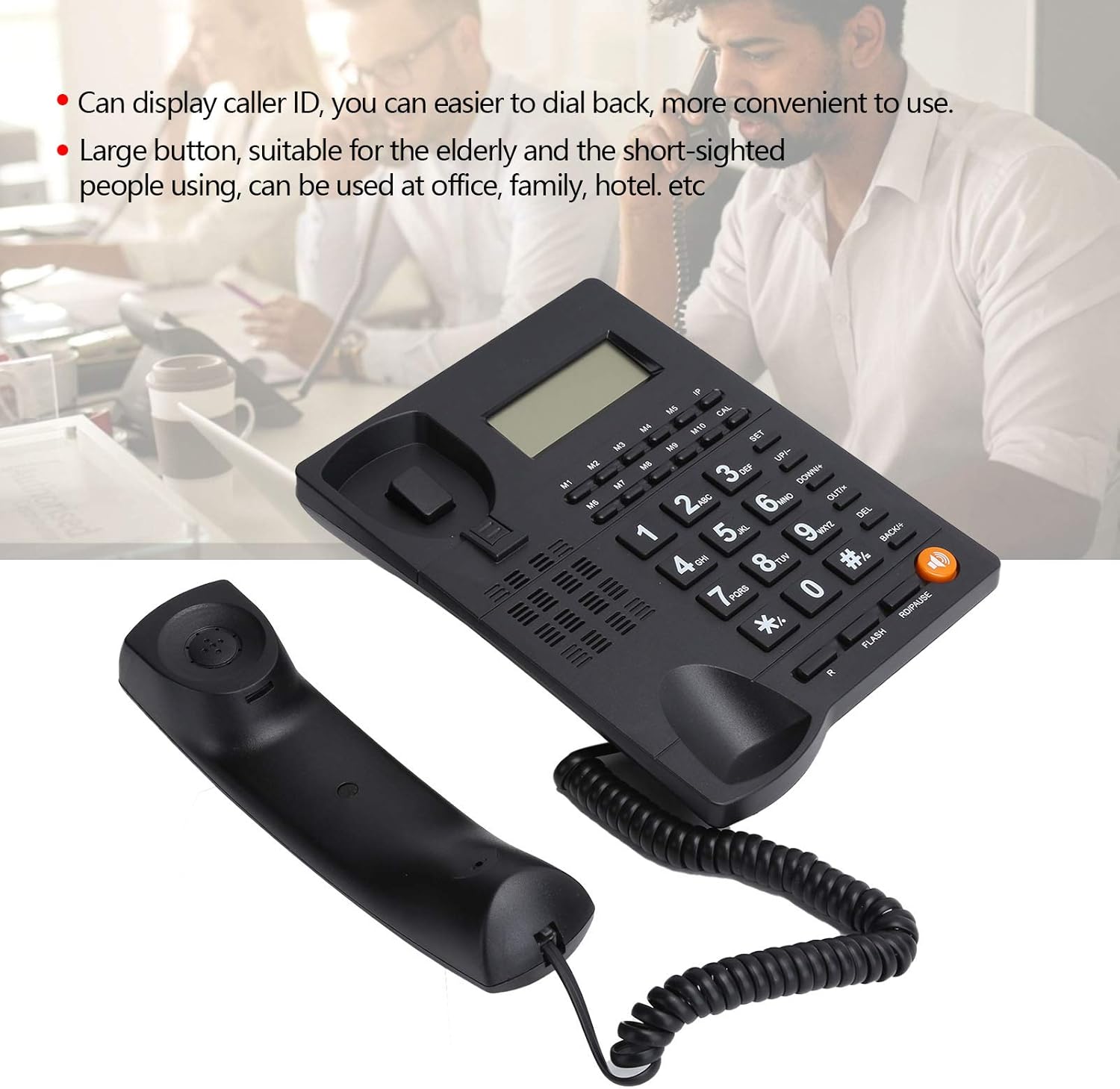
Figure 2: The telephone's display shows caller ID, and the large buttons are designed for easy visibility and pressing.

Figura 3: Primer pla view of the large, easy-to-read keypad and memory buttons (M1-M10).
Configuració
The ciciglow L019 telephone is designed for simple plug-and-play installation.
1. Connexió del telèfon
- Locate the coiled cord.
- Plug one end of the coiled cord into the handset.
- Plug the other end of the coiled cord into the port labeled with a handset icon on the side of the telephone base unit.

Figura 4: lateral view of the telephone, illustrating the handset and line connection ports.
2. Connecting to the Telephone Line
- Select the appropriate telephone line cord (US or UK standard) for your region.
- Plug one end of the telephone line cord into the port labeled "LINE" on the back of the telephone unit.
- Connecteu l'altre extrem del cable de la línia telefònica a la presa de telèfon de la paret.

Figura 5: posterior view of the telephone, showing the "LINE" and "EXT" ports, and wall-mounting slots.
3. Muntatge a la paret (opcional)
The telephone unit can be wall-mounted. Use the integrated slots on the back of the unit to secure it to a wall using appropriate screws (not included).
Instruccions de funcionament
Fent una trucada
- Aixequeu el telèfon o premeu Altaveu button for hands-free mode.
- Marqueu el número de telèfon desitjat amb el teclat numèric.
- Espereu que la trucada es connecti.
- Per finalitzar la trucada, pengeu l'auricular o premeu la tecla Altaveu botó de nou.
Responent una trucada
- When the telephone rings, lift the handset or press the Altaveu botó per respondre.
- Per finalitzar la trucada, pengeu l'auricular o premeu la tecla Altaveu botó de nou.
Trucades mans lliures
To use the hands-free function:
- Durant una trucada, premeu el botó Altaveu button to activate hands-free mode. The speaker indicator will light up.
- You can then place the handset back on the cradle.
- To switch back to handset mode, simply lift the handset.
- To end a hands-free call, press the Altaveu botó de nou.
Control de volum
Adjust the call volume using the UP/+ i BAIX/- buttons during a call.
Pantalla d'identificació de trucades
When an incoming call is received, the caller's number (if available and subscribed to Caller ID service) will be displayed on the screen.
Funció de remarcació
Per tornar a marcar l'últim número al qual s'ha trucat:
- Aixequeu el telèfon o premeu Altaveu botó.
- Premeu el botó RD/PAUSE button. The last dialed number will be redialed automatically.
Memory Buttons (M1-M10)
The telephone features 10 memory buttons (M1-M10) for storing frequently called numbers. Refer to the full instruction manual for detailed programming steps.
Manteniment
- Neteja: Wipe the telephone surface with a soft, slightly damp tela. No utilitzeu netejadors líquids o aerosols.
- Emmagatzematge: If storing the telephone for an extended period, disconnect it from the telephone line and store it in a cool, dry place.
Resolució de problemes
| Problema | Causa possible | Solució |
|---|---|---|
| Sense to de marcatge | Línia telefònica no connectada correctament. | Ensure the telephone line cord is securely plugged into both the telephone unit and the wall jack. |
| No sento la persona que truca / La persona que truca no em sent | Volume too low; Handset not properly connected; Faulty line. | Adjust volume using UP/+ and DOWN/- buttons. Check handset cord connection. Test with another phone if possible to rule out line issue. |
| No es mostra l'identificador de trucades | Caller ID service not subscribed; Caller blocked ID. | Poseu-vos en contacte amb el vostre proveïdor de serveis telefònics per assegurar-vos que el servei d'identificació de trucades estigui actiu. |
| Els botons no responen | Error temporal de programari. | Disconnect the telephone line for a few minutes, then reconnect it. |
Especificacions
- Model: L019
- Marca: ciciglow
- Tipus: Wired Telephone
- Material: Acrilonitril butadiè estirè (ABS)
- Color: Negre
- Pes: Aproximadament 476.4 grams
- Font d'alimentació: Elèctric amb cable
- Tipus de marcador: Teclat únic
- Tipus de contestador: Digital (Note: This refers to the phone's internal processing, not an integrated answering machine)
- Operació multilínia: Operació en una sola línia
- Identificador de trucada: Sí
- Característiques: Hands-free calling, Volume control, Backlight, Number redial functions, Large buttons, HD call quality, Intelligent voice chip, Anti-interaction system for noise reduction.
Garantia i Suport
Information regarding specific warranty terms and customer support contact details is not provided in this manual. Please refer to the product packaging or the retailer's website for warranty information and customer service contacts.
Per a més ajuda, també podeu visitar el ciciglow Brand Store on Amazon.


