1. Introducció
This manual provides detailed instructions for the installation, operation, and maintenance of your Rosewill FBM-X2-400-HELIX Micro ATX Mini Tower PC Case. This versatile case is designed to accommodate Micro ATX and Mini ITX motherboards, offering a compact yet spacious solution for both office and gaming PC builds. It comes equipped with a pre-installed 400W power supply unit and features excellent airflow design.
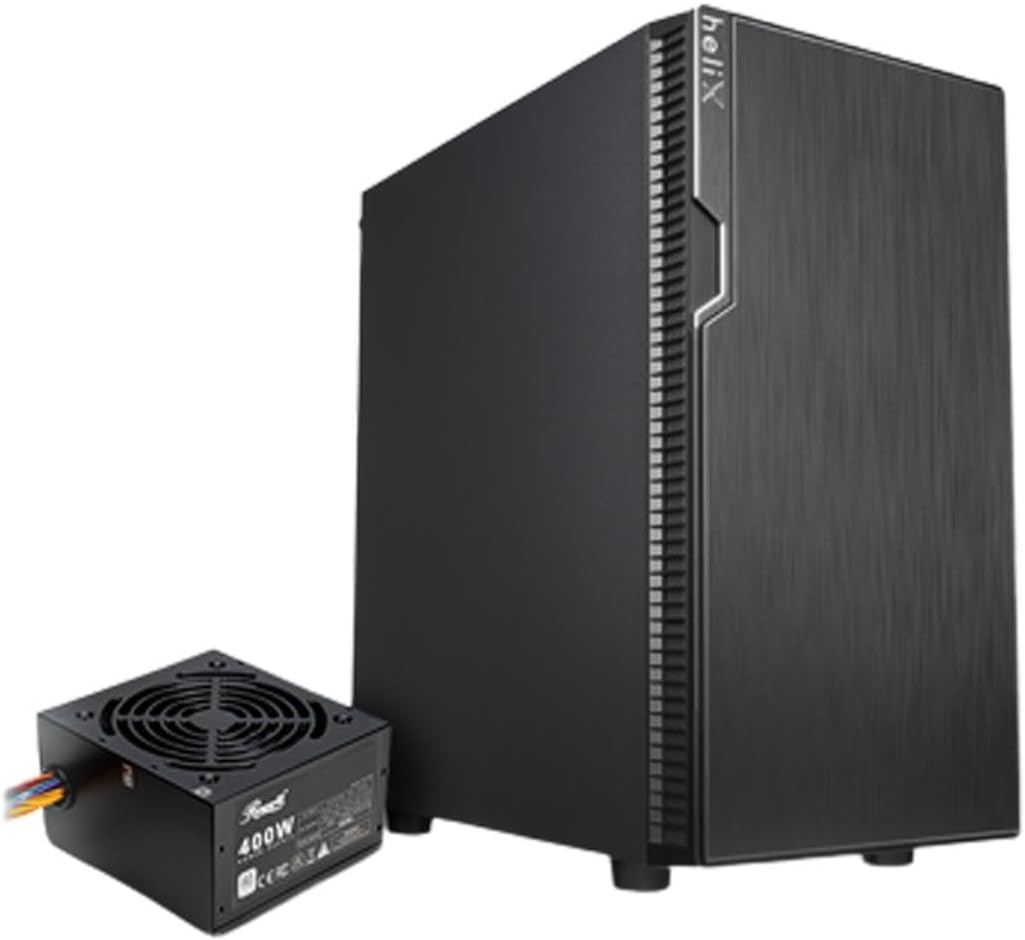
Figure 1: Rosewill FBM-X2-400-HELIX Micro ATX Mini Tower PC Case with included 400W Power Supply Unit.
2. Informació de seguretat
- Desconnecteu sempre la font d'alimentació de la presa de corrent abans d'instal·lar o fer el manteniment de qualsevol component de l'interior de la carcassa de l'ordinador.
- Handle all components with care to prevent damage from electrostatic discharge (ESD). Consider using an anti-static wrist strap.
- Mantingueu les peces petites i els cargols fora de l'abast dels nens.
- Assegureu-vos que hi hagi una ventilació adequada al voltant de la carcassa de l'ordinador per evitar el sobreescalfament.
- Do not attempt to modify the case or its components, as this may void your warranty and pose safety risks.
3. Característiques clau
- Disseny elegant: A versatile, compact, and sturdy steel/plastic mini case suitable for office or gaming PC systems.
- Interior espaiós: Features four expansion slots, one internal 3.5" drive bay, and three internal 2.5" drive bays. Supports Micro ATX or Mini ITX motherboards.
- Pre-Installed 400W Power Supply Unit: Includes a CE and FCC certified non-modular 400W PSU for convenience.
- Great Cable Management: Designed for easy organization of internal cables and wires.
- Excel·lent flux d'aire: Comes with one pre-installed 120mm fan in the rear. Supports two additional 120mm fans in the front and two 120mm fans on top, or one 240mm radiator in the front.
4. Especificacions
| Característica | Especificació |
|---|---|
| Marca | Rosewill |
| Nom del model | FBM-X2-400-HELIX |
| Tipus de cas | Mini-torre |
| Compatibilitat amb la placa base | Micro ATX, Mini ITX |
| Pre-Installed PSU | 400W (Non-Modular, CE/FCC Certified) |
| Badies d'unitat externes | Cap |
| Badies d'unitat internes de 3.5" | 1 |
| Badies d'unitat internes de 2.5" | 3 |
| Ranures d'expansió | 4 |
| Ports d'E / S frontals | 2x USB 2.0, 1x USB 3.0, Entrada/Sortida d'àudio |
| Ventiladors preinstal·lats | 1x Ventilador posterior de 120 mm |
| Suport del ventilador (frontal) | 2x 120 mm |
| Suport del ventilador (superior) | 2x 120 mm |
| Suport del radiador (davanter) | 1x 240 mm |
| Material | Acer d'aliatge, plàstic |
| Color | Negre |
| Dimensions (LxWxH) | 16.75 x 16.65 x 10 polzades |
| Pes de l'article | 11.82 lliures |
5. Contingut del paquet
Si us plau, comproveu el contingut del paquet en desembalar-lo per assegurar-vos que hi hagi tots els elements:
- Rosewill FBM-X2-400-HELIX PC Case
- Pre-installed 400W Power Supply Unit
- Caixa d'accessoris (que conté cargols, separadors, brides per a cables, etc.)
- Manual d'usuari (aquest document)
6. Configuració i instal·lació
Follow these steps to assemble your PC within the Rosewill FBM-X2-400-HELIX case.
6.1. Preparació
- Desembaleu la carcassa de l'ordinador i col·loqueu-la sobre una superfície plana i estable.
- Remove the side panels by unscrewing the thumbscrews at the rear of the case.
- Gather all necessary components: motherboard, CPU, RAM, storage drives, graphics card (if applicable), and any additional fans or radiators.

Figure 2: Internal layout of the PC case, highlighting the pre-installed power supply and available drive bays.
6.2. Instal·lació de la placa base
- Install the CPU, CPU cooler, and RAM onto your Micro ATX or Mini ITX motherboard before placing it into the case.
- Align the motherboard with the standoffs inside the case. Ensure the I/O shield is properly seated in the rear opening.
- Secure the motherboard with the appropriate screws from the accessory kit.
6.3. Unitat d'alimentació (PSU)
The 400W PSU is pre-installed in the bottom rear section of the case. Connect the necessary power cables to your motherboard (24-pin ATX, 4/8-pin CPU), graphics card (if required), and storage drives.

Figure 3: Included PSU connectors for various components.
6.4. Instal·lació de la unitat d'emmagatzematge
The case supports one 3.5" HDD and three 2.5" SSDs/HDDs.
- For 3.5" HDD: Locate the 3.5" drive bay and secure the drive using the provided screws.
- For 2.5" SSD/HDD: Mount the 2.5" drives to the designated mounting points using the provided screws.
- Connect SATA data and power cables to each installed drive.
6.5. Instal·lació de la targeta d'expansió
The case provides four expansion slots for graphics cards or other PCI-E devices.
- Traieu les cobertes de les ranures necessàries de la part posterior de la carcassa.
- Insert your graphics card or other expansion card into the appropriate PCI-E slot on the motherboard.
- Fixeu la targeta amb un cargol.
6.6. Gestió de cables
Utilitza els retalls de cables i els punts d'amarratge que hi ha darrere de la safata de la placa base per organitzar els cables. Això millora el flux d'aire i dóna al teu sistema un aspecte més net.
6.7. Connexions del panell frontal
Connecteu els cables del panell frontal (USB 2.0, USB 3.0, àudio HD, interruptor d'alimentació, interruptor de reinici, LED d'alimentació, LED del disc dur) als capçals corresponents de la placa base. Consulteu el manual de la placa base per conèixer la ubicació exacta dels capçals.

Figure 4: Front I/O panel with USB 3.0, USB 2.0, and audio ports.
6.8. Sistema de refrigeració
The case includes one pre-installed 120mm rear fan. Additional fans or a 240mm AIO radiator can be installed for enhanced cooling.
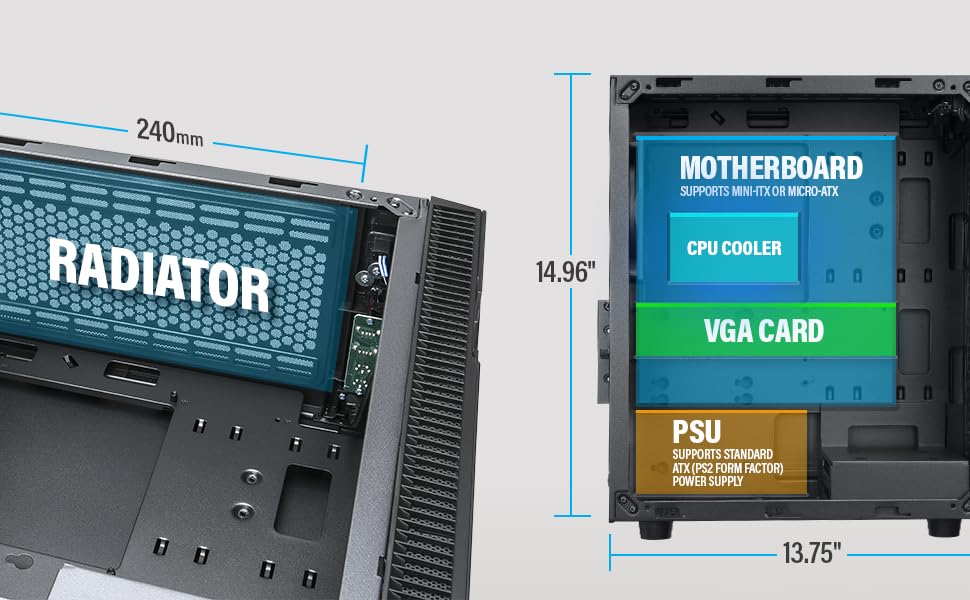
Figure 5: Diagram illustrating component clearance and radiator support.
6.9. Assemblea Final
- Once all components are installed and cables are managed, reattach the side panels.
- Connecteu el monitor, el teclat, el ratolí i el cable d'alimentació a l'ordinador.
6.10. Official Product Video: Installation Overview
Vídeo 1: Un overview of the Rosewill Micro ATX Mini Tower Case, including its pre-installed 400W PSU and internal features. This video provides a visual guide to the case's design and component layout.
7. Instruccions de funcionament
After completing the setup, you can power on your PC.
- Ensure all external cables (power, monitor, peripherals) are securely connected.
- Press the power button located on the front I/O panel of the case.
- The power LED will illuminate, indicating the system is powered on.
- To shut down, use the operating system's shutdown function or press and hold the power button for a few seconds.
8. Manteniment
Un manteniment regular ajuda a garantir un rendiment òptim i una llarga vida útil dels components del teu PC.
- Filtres de pols: Periodically check and clean any removable dust filters (e.g., front, top, bottom) to maintain good airflow and prevent dust buildup inside the case.
- Neteja interior: Every few months, open the side panels and use compressed air to gently remove dust from fans, heatsinks, and other components.
- Comprovació del cable: Ensure all internal cables remain securely connected and are not obstructing airflow.
9. Solució De Problemes
Si teniu problemes, consulteu els següents consells habituals per a la resolució de problemes:
- Sense energia: Check if the power cable is securely connected to both the PSU and the wall outlet. Ensure the power switch on the PSU is in the 'ON' position. Verify front panel power switch connection to the motherboard.
- Sense pantalla: Ensure your monitor is connected to the graphics card (or motherboard if using integrated graphics) and is powered on. Reseat the graphics card and RAM modules.
- Sobreescalfament: Check if all case fans and CPU cooler fans are spinning. Ensure dust filters are clean and there is adequate airflow. Verify thermal paste application on the CPU.
- Els ports USB no funcionen: Check the front panel USB cable connections to the motherboard. Ensure drivers are installed for your operating system.
10. Garantia i Suport
For warranty information, technical support, or service inquiries, please refer to the official Rosewill weblloc web o poseu-vos en contacte amb el seu departament d'atenció al client. Conserveu el comprovant de compra per a reclamacions de garantia.


