Introducció
Thank you for choosing the JOYACCESS Rechargeable Silent 2.4G Wireless Keyboard. This manual provides essential information for setting up, operating, maintaining, and troubleshooting your new keyboard. Please read it thoroughly to ensure optimal performance and longevity of your device.
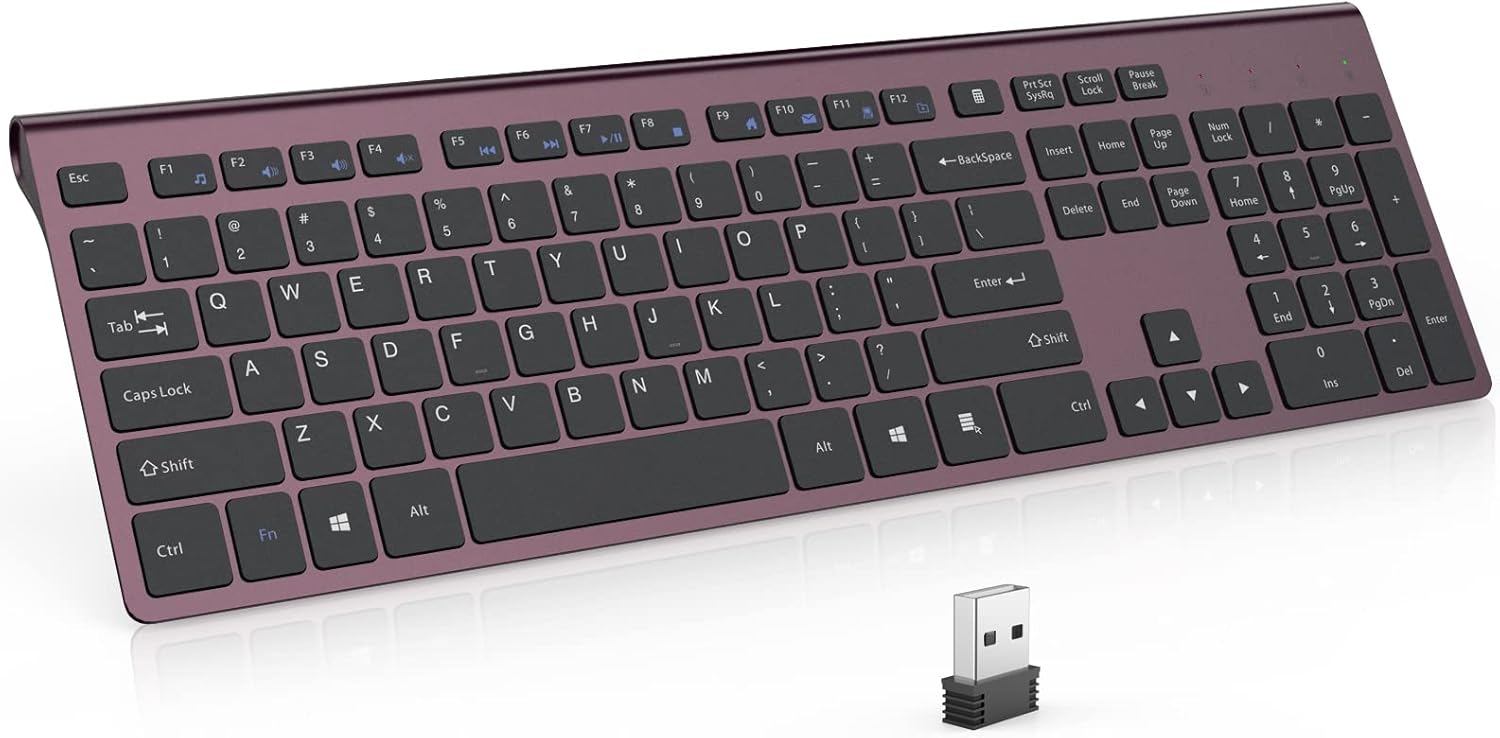
Image: The JOYACCESS Rechargeable Silent 2.4G Wireless Keyboard, showcasing its full-size layout and sleek design, with the USB receiver visible in the foreground.
Contingut del paquet
- JOYACCESS 2.4G Wireless Keyboard
- Receptor Nano USB
- Cable de càrrega USB
- Manual d'usuari (aquest document)
Instruccions de configuració
1. Càrrega del teclat
Before first use, it is recommended to fully charge the keyboard. The keyboard is equipped with a 500mAh rechargeable lithium battery.
- Locate the Micro USB charging port on the keyboard.
- Connect the provided USB charging cable to the keyboard's charging port and the other end to a USB power source (e.g., computer USB port, USB wall adapter).
- The charging indicator light will illuminate during charging. It will turn off or change color once fully charged.

Imatge: Primer pla view of the keyboard's Micro USB charging port with a charging cable connected, indicating the charging process.
2. Connexió del receptor USB
The keyboard connects wirelessly via a 2.4G USB receiver. No software or drivers are required for installation.
- Locate the Nano USB receiver. It is typically stored in the battery compartment or a dedicated slot on the keyboard for safekeeping.
- Plug the Nano USB receiver into an available USB port on your computer, laptop, or Smart TV.
- The system will automatically detect and install the necessary drivers. This process may take a few seconds.
- Once installed, the keyboard is ready for use.
Instruccions de funcionament
Ús bàsic
Simply begin typing. The keyboard features a full-size layout with a numeric keypad, arrow keys, and standard function keys.
Tecles de funció (F1-F12)
The top row of keys includes standard function keys (F1-F12) which may have secondary multimedia or shortcut functions. These functions are typically accessed by pressing the Fn simultàniament amb la tecla de funció desitjada.
- Fn+F1: Reproductor multimèdia
- Fn+F2: Baixa el volum
- Fn+F3: Puja el volum
- Fn+F4: Silenciar
- Fn+F5: Pista anterior
- Fn+F6: Pista següent
- Fn+F7: Reproduir/Pausa
- Fn+F8: Atureu-vos
- Fn+F9: Pàgina d'inici
- Fn+F10: Correu electrònic
- Fn+F11: El meu ordinador
- Fn+F12: Preferits
Mode d'estalvi d'energia
Per estalviar bateria, el teclat entrarà automàticament en mode de repòs després de 8 minuts d'inactivitat. Per activar-lo, només cal que premeu qualsevol tecla. El teclat es tornarà a connectar automàticament.

Image: Hands typing on the JOYACCESS keyboard, highlighting its low-profile keys and quiet operation.
Manteniment
Neteja
- Disconnect the keyboard from its power source and turn it off before cleaning.
- Utilitzeu un drap suau i sense pelusa lleugerament dampesbandida amb aigua o una solució netejadora suau per netejar la superfície.
- Eviteu utilitzar productes químics agressius, netejadors abrasius o ruixar líquids directament sobre el teclat.
- Feu servir aire comprimit per eliminar la pols i les restes que hi ha entre les tecles.
Cura de la bateria
- To prolong battery life, avoid fully discharging the keyboard frequently.
- Guardeu el teclat en un lloc fresc i sec quan no el feu servir durant períodes prolongats.
- Si no fareu servir el teclat durant molt de temps, carregueu-lo al 50% aproximadament abans de guardar-lo.
Resolució de problemes
- El teclat no respon:
- Assegureu-vos que el receptor USB estigui ben connectat a un port USB que funcioni.
- Comproveu si el teclat està encès.
- Recarrega el teclat si la bateria està baixa.
- Proveu de connectar el receptor USB a un port USB diferent.
- Reinicieu l'ordinador.
- Keys are sticky or not registering:
- Clean the keyboard to remove any debris or spills that might be affecting the keys.
- Ensure you are pressing the keys directly and firmly.
- Poor wireless connection or lag:
- Apropa el teclat al receptor USB.
- Eviteu col·locar el receptor a prop d'altres dispositius sense fil o objectes metàl·lics grans que puguin causar interferències.
- Ensure there are no large obstructions between the keyboard and the receiver.
Especificacions
| Marca | JOIA ACCÉS |
| Model | B0B654P96Y |
| Tecnologia de connectivitat | Sense fil 2.4G (receptor USB) |
| Capacitat de la bateria | Bateria de liti de 500 mAh |
| Durada de la bateria | Up to 6 months on a single charge (based on 2 hours non-stop use per day) |
| Tipus de teclat | Silent, Scissor Switch, Full-Size with Numeric Keypad |
| Dispositius compatibles | Windows 2000 / ME / XP / Vista / 7 / 8 / 10, Macbook, Desktops, Chrome-book, PC, Laptop, Smart TV |
| Dimensions del producte | 17.7 x 6.7 x 1.6 polzades (44.96 x 17.02 x 4.06 cm) |
| Pes de l'article | 1.61 lliures (0.73 kg) |
| Material | Plàstic |

Image: The keyboard displayed with approximate length and width measurements, illustrating its ultra-slim, full-size design on a desk next to a monitor.
Garantia i Suport
JOYACCESS products are designed for reliability and performance. For warranty information or technical support, please refer to the contact details provided with your purchase or visit the official JOYACCESS weblloc web. Conserveu el rebut de compra com a comprovant de compra per a reclamacions de garantia.
For further assistance, please contact JOYACCESS customer service.
