Introducció
This user manual provides comprehensive instructions for the safe and efficient operation of your ZTE Blade V40 Vita Smartphone. Please read this manual thoroughly before using your device to ensure proper functionality and to prevent damage.

Imatge: Anvers i revers view of the ZTE Blade V40 Vita Smartphone, showcasing its design and triple camera setup.
Contingut del paquet
Ensure all items are present in the package before initial setup. If any item is missing or damaged, contact your retailer.
- Smartphone ZTE Blade V40 Vita
- Cable USB-Type C
- Power Adapter (22.5W Fast Charger)
- Eina expulsora de SIM
- Guia d'inici ràpid
- Fullet d'informació de seguretat
Dispositiu acabatview
Familiarize yourself with the physical components of your ZTE Blade V40 Vita.
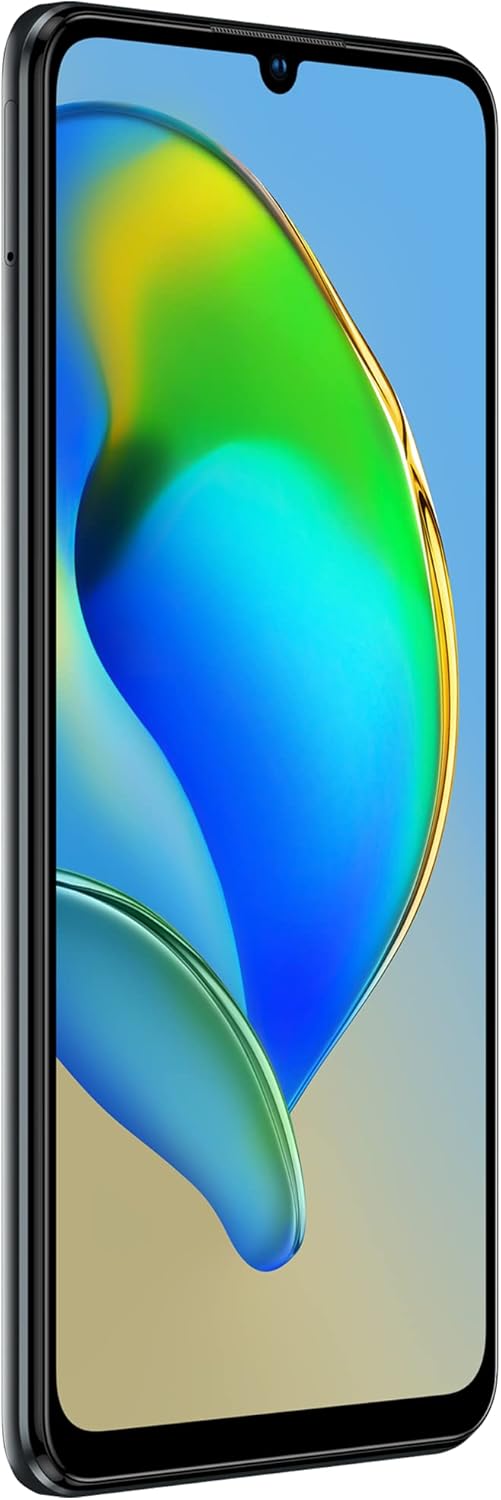
Image: Right side of the phone showing the power button with integrated fingerprint sensor and volume rocker.

Image: Close-up of the triple camera module on the rear of the ZTE Blade V40 Vita, highlighting the 48MP main sensor.
- Davant: 6.74-inch HD+ Display, Front Camera, Earpiece.
- costat dret: Power Button (with integrated Fingerprint Sensor), Volume Up/Down Buttons.
- A baix: USB Type-C Port, Speaker, Microphone, 3.5mm Headphone Jack.
- A dalt: Secondary Microphone.
- Costat esquerre: SIM/microSD Card Tray.
- posterior: Triple Camera System (48MP Main, 2MP Depth, 2MP Macro), LED Flash.
Configuració
1. Inserció de targetes SIM i microSD
Your device supports dual SIM cards and a microSD card for expandable storage up to 1TB.
- Locate the SIM/microSD card tray on the left side of the phone.
- Introduïu l'eina d'expulsió de la SIM al forat petit que hi ha al costat de la safata per obrir-la.
- Traieu la safata amb cura.
- Col·loqueu la targeta (o targetes) nano-SIM i/o la targeta microSD a les ranures designades de la safata, assegurant-vos que l'orientació sigui correcta.
- Empenyeu suaument la safata cap al telèfon fins que encaixi al seu lloc.

Image: Illustration of the SIM and microSD card tray, showing how to insert the cards.
2. Assistent d'encesa inicial i configuració
Per encendre el dispositiu per primera vegada:
- Press and hold the Power button on the right side until the ZTE logo appears.
- Follow the on-screen instructions to complete the initial setup, including language selection, Wi-Fi connection, Google account setup, and security settings (fingerprint, PIN/pattern).
3. Càrrega del dispositiu
Abans del primer ús, es recomana carregar completament la bateria.
- Connect the USB Type-C cable to the phone's charging port and the other end to the provided 22.5W power adapter.
- Connecteu l'adaptador de corrent a una presa de corrent.
- L'indicador de càrrega apareixerà a la pantalla.
- The device supports 22.5W fast charging, allowing for 50% charge in approximately 55 minutes.

Image: Visual representation of the 5130mAh battery capacity and 22.5W fast charging capability.
Instruccions de funcionament
1. Navegació bàsica
The ZTE Blade V40 Vita features a responsive 6.74-inch HD+ display with a 90Hz refresh rate for smooth interaction.
- Toca: Seleccioneu un element o obriu una aplicació.
- Toca i mantén premut: Accedir a menús contextuals o moure elements.
- Llisca: Navigate through screens, scroll lists, or dismiss notifications.
- Pessiga per fer zoom: Apropar o allunyar les imatges i web pàgines.
- Sensor d’empremta digital: Unlock your device quickly and securely using the side-mounted fingerprint sensor.

Image: Depiction of the 6.74-inch display size of the ZTE Blade V40 Vita.

Image: Graphic illustrating the 90Hz refresh rate for smoother scrolling and gaming experience.
2. Fer trucades i enviar missatges
- Trucades: Open the Phone app, enter the number or select a contact, and tap the call icon.
- Missatges: Obre l'aplicació Missatges, toca la icona de missatge nou, introdueix el destinatari i el teu missatge i, a continuació, toca Envia.
3. Ús de la càmera
The ZTE Blade V40 Vita is equipped with a 48MP triple camera system for high-quality photos and videos.
- Obre l'aplicació Càmera des de la pantalla d'inici o des del calaix d'aplicacions.
- Seleccioneu el mode desitjat (Foto, Vídeo, Retrat, Macro).
- Toqueu el botó de l'obturador per capturar una imatge o iniciar/aturar la gravació de vídeo.
- The AI camera automatically adjusts settings for optimal results.

Imatge: Primer pla view of the triple camera setup on the ZTE Blade V40 Vita, highlighting the lens arrangement.
4. Característiques de connectivitat
- Bluetooth: Pair with wireless headphones, speakers, or other Bluetooth-enabled devices. Go to Settings > Connected devices > Bluetooth.
- NFC: Use Near Field Communication for quick pairing with compatible devices or for mobile payments. Ensure NFC is enabled in Settings > Connected devices > Connection preferences > NFC.
- Wi-Fi: Connecteu-vos a xarxes sense fil per accedir a Internet. Aneu a Configuració > Xarxa i Internet > Wi-Fi.
5. Memory Fusion Technology
The ZTE Blade V40 Vita features Memory Fusion Technology, which allows you to expand the 4GB RAM by utilizing up to 2GB of internal storage, enhancing multitasking and overall performance.

Image: Diagram illustrating the 4GB RAM expandable with an additional 2GB using Memory Fusion Technology.
6. DTS Sound
Enhance your audio experience with DTS Sound. This feature allows you to customize sound settings for movies and games, boosting bass and improving treble for a more immersive experience.
- Access DTS Sound settings through the Sound & vibration menu in Settings or via quick settings panel.
- Adjust presets or manually fine-tune audio parameters to suit your preferences.
Manteniment
1. Cura de la bateria
- Eviteu exposar el dispositiu a temperatures extremes.
- Feu servir només el carregador i el cable originals que s'inclouen amb el dispositiu.
- No deixeu el dispositiu carregant-se durant períodes prolongats després que estigui completament carregat.
- Per a una durada òptima de la bateria, intenta mantenir el nivell de càrrega entre el 20% i el 80%.
2. Actualitzacions de programari
Regularly check for software updates to ensure your device has the latest features, security patches, and performance improvements.
- Aneu a Configuració > Sistema > Actualització del sistema.
- Connecta't a una xarxa Wi-Fi estable abans de descarregar actualitzacions.
- Assegureu-vos que la bateria estigui prou carregada abans de començar una actualització.
3. Neteja del dispositiu
- Feu servir un drap suau i sense borrissol per netejar la pantalla i la carcassa del telèfon.
- Eviteu utilitzar productes químics agressius, netejadors abrasius o aerosols.
- Per a taques persistents, lleugerament dampen the cloth with water or a screen cleaner solution.
Resolució de problemes
This section addresses common issues you might encounter with your ZTE Blade V40 Vita.
El dispositiu no s'encén
- Assegureu-vos que la bateria estigui carregada. Connecteu el carregador i espereu uns minuts abans d'intentar engegar-lo.
- Mantingueu premut el botó d'engegada durant almenys 10-15 segons per forçar un reinici.
Problemes de càrrega
- Verify that the charging cable and adapter are securely connected to both the phone and the power outlet.
- Proveu d'utilitzar una presa de corrent diferent.
- Inspect the charging port on the phone for any debris or damage.
Poor Call Quality or No Network
- Comproveu si la targeta SIM està inserida correctament.
- Assegureu-vos que esteu en una zona amb cobertura de xarxa.
- Reinicieu el telèfon.
- Ves a Configuració > Xarxa i internet > Xarxa mòbil i assegura't que estigui seleccionat el tipus de xarxa que prefereixis.
Les aplicacions es bloquegen o es bloquegen
- Tanca i torna a obrir l'aplicació.
- Esborra la memòria cau i les dades de l'aplicació (Configuració > Aplicacions > [Nom de l'aplicació] > Emmagatzematge i memòria cau).
- Assegureu-vos que l'aplicació estigui actualitzada a la seva darrera versió des de Google Play Store.
- Reinicieu el telèfon.
Especificacions
Key technical specifications for the ZTE Blade V40 Vita Smartphone.
| Característica | Especificació |
|---|---|
| Nom del model | Blade V40 Vita |
| Número de model | P606F02B |
| Mostra | 6.74 inches HD+ (1600 x 720), 90Hz Refresh Rate |
| Sistema operatiu | Android 11.0, MyOS 11 |
| Processador | Mediatek Dimensity 1100 (Octa-core 1.6 GHz) |
| RAM | 4 GB (expandable up to 6 GB with Memory Fusion Technology) |
| Emmagatzematge intern | 128 GB (UFS 2.2) |
| Emmagatzematge ampliable | Up to 1 TB via MicroSD |
| Càmera posterior | Triple Camera: 48 MP (Main), 2 MP (Depth), 2 MP (Macro) |
| Bateria | 5130 mAh d'ions de liti |
| Carregant | Càrrega ràpida de 22.5 W |
| Connectivitat | 4G, Bluetooth, NFC, Wi-Fi, GPS |
| Jack d'àudio | 3.5 mm |
| Tipus de SIM | Doble SIM |
| Color | Zeus Black |
Garantia i Suport
Per obtenir informació sobre la garantia i assistència tècnica, consulteu la targeta de garantia inclosa al paquet del producte o visiteu el lloc web oficial de ZTE. weblloc.
- Disponibilitat de peces de recanvi: 10 Years (as per manufacturer information).
- Actualitzacions de programari: Information not available regarding guaranteed software update period.
- For further assistance, contact ZTE customer support or your point of purchase.


