1. Introducció
This manual provides instructions for the LogiLink ID0209 Wireless Keyboard. This keyboard is designed for comfortable, precise, and quiet typing, featuring an adjustable RGB backlight and a long-lasting battery. It connects wirelessly via 2.4 GHz radio technology and is compatible with various operating systems.

Figure 1: LogiLink ID0209 Wireless Keyboard
2. Contingut del paquet
Si us plau, comproveu el paquet per veure si hi ha els elements següents:
- LogiLink ID0209 Wireless Keyboard
- USB 2.4 GHz Receiver Dongle
- USB-A to Micro USB Charging Cable
- Manual d'usuari (aquest document)
3. Configuració
3.1 Càrrega del teclat
Before initial use, fully charge the keyboard. Connect the supplied USB-A to Micro USB cable to the keyboard's Micro USB port (located on the side) and the other end to a USB power source (e.g., computer USB port, USB wall adapter).
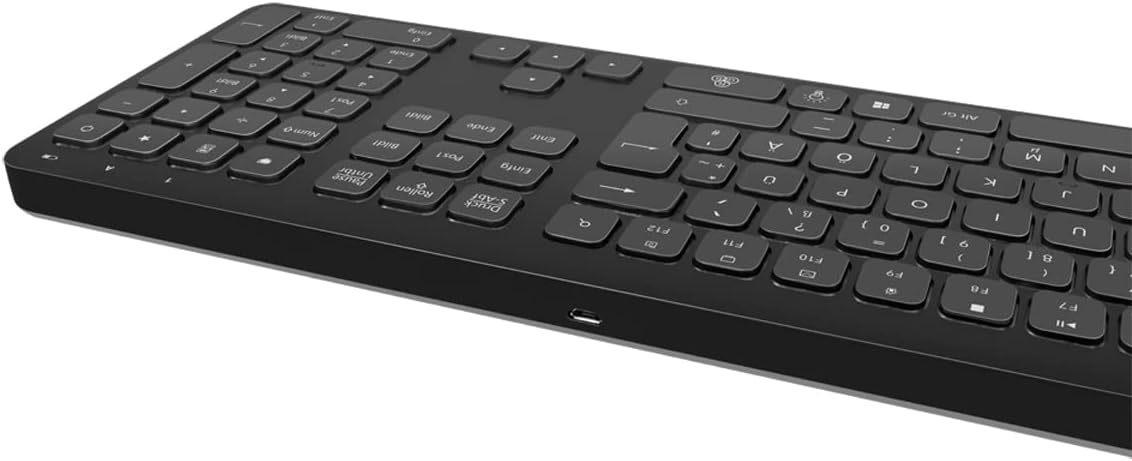
Figure 2: Keyboard side view with Micro USB charging port
3.2 Connecting the USB Receiver Dongle
Insert the 2.4 GHz USB receiver dongle into an available USB port on your computer or compatible device. The system will automatically detect and install the necessary drivers.

Figure 3: USB 2.4 GHz Receiver Dongle
3.3 Engegada/apagada
Locate the ON/OFF switch on the back of the keyboard. Slide the switch to the 'ON' position to power on the keyboard. Slide it to 'OFF' when not in use to conserve battery life.
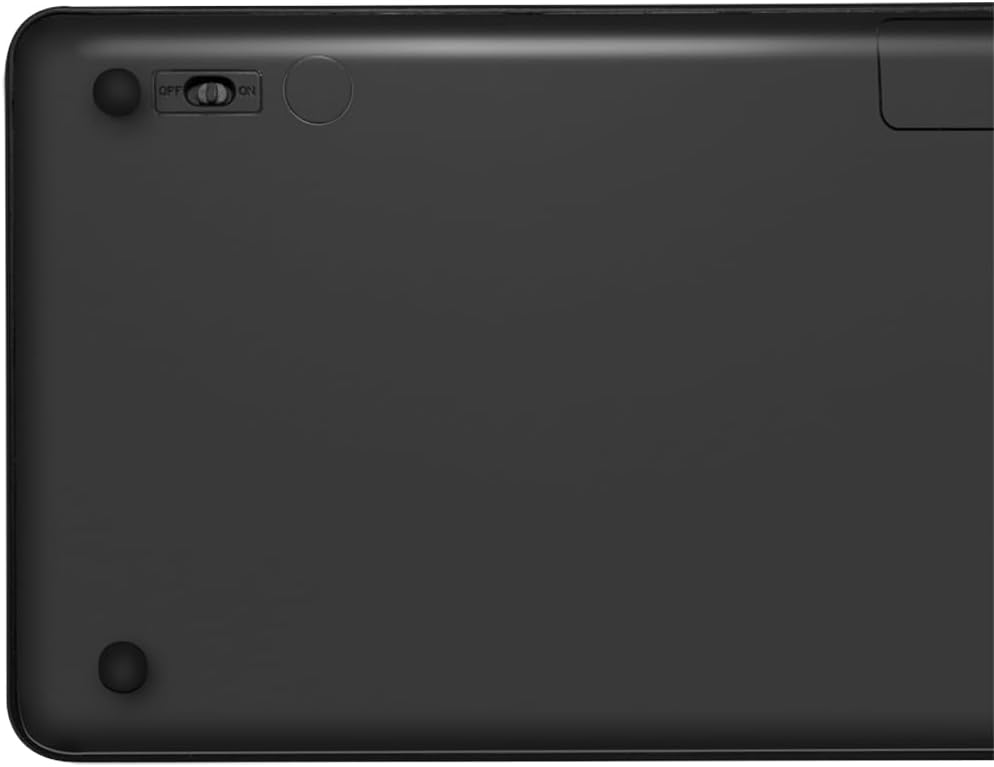
Figure 4: Keyboard back with ON/OFF switch
The keyboard should automatically connect to the USB receiver once both are powered on and within range (up to 10 meters).
4. Instruccions de funcionament
Control de retroiluminació 4.1
The keyboard features an adjustable RGB backlight with 7 colors and 3 brightness levels, including a breathing mode.
- Canvi de colors: Premeu el botó Fn + Light Bulb key to cycle through the 7 available colors (green, blue, yellow, purple, cyan, white, red).
- Ajust de brillantor: Premeu el botó Fn + Up Arrow key per augmentar la brillantor i Fn + Down Arrow key to decrease brightness. There are 3 brightness levels.
- Mode de respiració: Premeu el botó Fn + RGB Cycle key (often depicted as a swirling icon) to activate or deactivate the breathing backlight mode.

Figure 5: Keyboard with RGB backlight in use
4.2 tecles de drecera
The keyboard includes 17 shortcut keys for quick access to various functions. Some shortcut keys are specifically designed for Windows operating systems.
To use a shortcut key, press and hold the Fn key, then press the desired function key (e.g., F1-F12, multimedia keys).
- Controls multimèdia: Play/Pause, Stop, Previous Track, Next Track, Volume Up, Volume Down, Mute.
- Productivitat: Open Mail, Web Browser, My Computer, Search.
- Altres: Lock Screen, Calculator.

Figure 6: Close-up of keyboard keys, including numpad and function row
4.3 Automatic Energy-Saving Mode
The keyboard is equipped with an automatic energy-saving mode. After a period of inactivity, the keyboard will enter a sleep state to conserve battery. Press any key to wake it up.
5. Manteniment
Per garantir la longevitat i el rendiment òptim del teclat, seguiu aquestes pautes de manteniment:
- Neteja: Use a soft, dry, lint-free cloth to wipe the keyboard surface. For stubborn dirt, slightly dampNetegeu el drap amb aigua o una solució de neteja suau. Eviteu l'excés d'humitat.
- Emmagatzematge: Guardeu el teclat en un lloc fresc i sec, allunyat de la llum solar directa i de temperatures extremes.
- Eviteu líquids: Do not expose the keyboard to liquids. In case of accidental spills, immediately power off the keyboard and allow it to dry completely before use.
- Manejar amb cura: Eviteu deixar caure el teclat ni sotmetre'l a impactes forts.
6. Solució De Problemes
If you encounter issues with your LogiLink ID0209 keyboard, refer to the following common problems and solutions:
| Problema | Causa possible | Solució |
|---|---|---|
| El teclat no respon | El teclat està apagat Bateria baixa Receptor USB no connectat Fora de rang | Ensure keyboard is ON Carregueu el teclat Plug USB receiver firmly into a working USB port Move keyboard closer to the receiver (within 10m) |
| La llum de fons no funciona | La llum de fons està apagada Bateria baixa | Press Fn + Light Bulb key to turn on/cycle Carregueu el teclat |
| Les tecles són enganxoses o no responen | Brutícia o deixalles sota les claus | Clean the keyboard as per maintenance instructions |
| La connexió cau amb freqüència | Interferència Fora de rang Bateria baixa | Allunyeu-vos d'altres dispositius sense fil Move keyboard closer to the receiver Carregueu el teclat |
7. Especificacions
| Característica | Detall |
|---|---|
| Marca | LogiLink |
| Número de model | ID0209 |
| Tecnologia de connectivitat | 2.4 GHz Wireless (High-frequency) |
| abast sense fils | Fins a 10 metres |
| Nombre de claus | 111 claus |
| Tecles de drecera | 17 (some Windows-specific) |
| Llum de fons | Adjustable RGB (7 colors, 3 brightness levels, breathing mode) |
| Tipus de clau | Flat keys |
| Dispositius compatibles | Windows, Mac OS, Android, iOS, Smart TV systems |
| Característiques especials | Ergonomic, Backlit, Automatic Energy-Saving Mode |
| Port de càrrega | Micro USB |
| Color | Negre |
| Material | Plàstic |
| Fabricant | 2direct GmbH |
| País d'origen | Xina |
8. Garantia i Suport
For warranty information and technical support, please refer to the documentation provided with your purchase or visit the official LogiLink weblloc web. Conserveu el comprovant de compra per a reclamacions de garantia.


