1. Introducció
The LogiLink 4K 2x2 port bidirectional HDMI switch allows you to connect two (2) HDMI sources, such as a video camera, Blu-ray player, satellite receiver, digital video recorder, set-top boxes, or game consoles, to two (2) HDMI-compatible displays. This switch can simultaneously route one of the two HDMI input signals to two (2) UHD displays. The integrated Downscaler function supports displaying 4K content on Full HD screens, and both 4K and Full HD screens can operate simultaneously. This smart switch ensures no compromise on image and sound quality. 4K/UHD image signals are transmitted without loss, with HDCP 2.2/1.4, HDR, and 3D support. Audio transmission in LPCM 7.1, DTS, Dolby Digital, DTS-HD Master Audio, and Dolby TrueHD meets all your audio needs.
2. Característiques del producte
- Allows switching between two HDMI signal sources to two displays/TVs simultaneously.
- Compliant with HDMI 2.0, offering a bandwidth of 6 Gbit/s at 600 MHz per line (18 Gbit/s total).
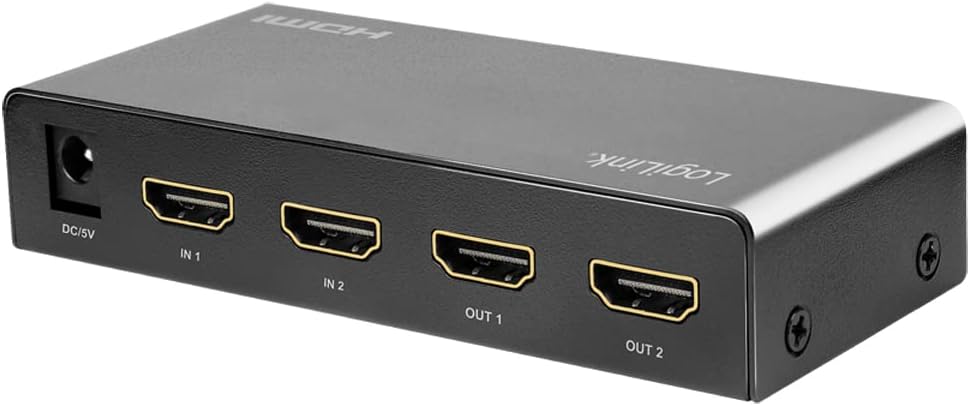
- Connections: 2 x HDMI A inputs, 5V DC power input; Outputs: 2 x HDMI A.
- Supports Ultra HD 4K/60 Hz YUV 4:4:4 and Full 3D.
- Supports 36-bit Deep Color (12 bits per channel).
- Supports EDID Pass-Through.
- Supports HDCP 1.4/2.2, HDR, and Downscaler functionality.
- Supports uncompressed audio like LPCM 7.1.
- Supports compressed audio data such as DTS, Dolby Digital (including DTS-HD Master Audio and Dolby TrueHD).
- C metàl·lic resistentasing, dimensions: 11.6 x 5.2 x 2.3 cm.
3. Contingut del paquet
Si us plau, comproveu el paquet per veure si hi ha els elements següents:
- LogiLink HD0039 2x2 Port Bidirectional HDMI Switch
- Adaptador de corrent continu de 5 V
- Manual d'usuari
4. Dispositiu acabatview


5. Instruccions de configuració
- Apagueu els dispositius: Before making any connections, ensure all HDMI source devices (e.g., Blu-ray player, game console) and display devices (e.g., TV, monitor) are powered off.
- Connectar fonts HDMI: Connect your HDMI source devices to the HDMI IN 1 and HDMI IN 2 ports on the LogiLink HD0039 switch using high-quality HDMI cables.
- Connecteu pantalles HDMI: Connect your HDMI display devices to the HDMI OUT 1 and HDMI OUT 2 ports on the switch using high-quality HDMI cables.
- Connecteu l'adaptador d'alimentació: Insert the 5V DC power adapter into the DC 5V port on the switch, then plug the adapter into a power outlet. The power LED on the switch should illuminate.
- Dispositius d'encesa: Power on your display devices first, then power on your HDMI source devices.
- Select Input/Output: Use the 'SOURCE' button on the front panel to select the desired input source (IN 1 or IN 2) and the 'SWITCH' button to toggle between output configurations.
6. Instruccions de funcionament
The LogiLink HD0039 switch offers flexible control for managing your HDMI signals.
6.1. Entrades de commutació
- Premeu el botó FONT button on the front panel to cycle between HDMI IN 1 and HDMI IN 2. The corresponding LED indicator (IN 1 or IN 2) will light up to show the currently selected input.
6.2. Switching Outputs
- Premeu el botó CAMBIAR button on the front panel to control which output ports receive the selected input signal. This switch allows you to send the selected input to OUT 1, OUT 2, or both simultaneously.
6.3. HDMI Version Selection
- A small switch labeled 1.4/2.0 is located on the front panel. This allows you to manually select the HDMI version. For 4K/60Hz content and HDR, ensure this switch is set to 2.0. For compatibility with older devices, you may switch to 1.4 si cal.
6.4. Selecció del mode d'àudio
- El ÀUDIO button allows you to select the audio mode. Refer to the LED indicators (HIGH/LOW) for the current audio setting. This feature can be used to optimize audio output for different display capabilities.
7. Manteniment
- Neteja: Feu servir un drap suau i sec per netejar el dispositiu. No utilitzeu netejadors líquids ni en aerosol.
- Ventilació: Assegureu-vos que el dispositiu estigui col·locat en una zona ben ventilada per evitar el sobreescalfament. No bloquegeu cap obertura de ventilació.
- Medi ambient: Mantingueu el dispositiu allunyat de la calor excessiva, la humitat, la pols i la llum solar directa.
- Potència: Always use the provided 5V DC power adapter. Disconnect the power adapter if the device will not be used for an extended period.
8. Solució De Problemes
| Problema | Causa possible | Solució |
|---|---|---|
| No picture on display. |
|
|
| Mala qualitat d'imatge o parpelleig. |
|
|
| Sense àudio. |
|
|
| 4K content not displaying correctly on Full HD screen. | Downscaler not active or issue. | Ensure the Downscaler function is enabled (it is integrated and should work automatically). If issues persist, try restarting all devices. |
9. Especificacions
| Característica | Especificació |
|---|---|
| Marca | LogiLink |
| Número de model | HD0039 |
| Color | Negre |
| Tipus de connector | HDMI |
| Nombre de Ports | 2 entrades, 2 sortides |
| Dispositius compatibles | Camera, Blu-ray Player, DVD Player, Television |
| Estàndard HDMI | HDMI 2.0 (backward compatible with 1.4) |
| Ample de banda | 18 Gbit/s (6 Gbit/s per line at 600 MHz) |
| Suport a la resolució | Up to 4K/60 Hz YUV 4:4:4, Full 3D |
| Profunditat de color | Color profund de 36 bits (12 bits per canal) |
| Suport HDCP | HDCP 1.4 / 2.2 |
| Suport HDR | Sí |
| Suport EDID | Pass-Through EDID |
| Suport d'àudio | LPCM 7.1, DTS, Dolby Digital, DTS-HD Master Audio, Dolby TrueHD |
| Downscaler Function | Integrated (4K to Full HD) |
| Font d'alimentació | 5V DC |
| CasinMaterial de g | Metall |
| Dimensions (L x A x A) | 11.6 x 5.2 x 2.3 cm |
| Fabricant | 2direct GmbH |
| País d'origen | Xina |
10. Garantia i Suport
LogiLink products are designed for reliability and performance. For specific warranty information, please refer to the warranty card included with your product or visit the official LogiLink website. For technical support or assistance, please contact your retailer or LogiLink customer service.
Spare parts availability and software update guarantees are not available for this product.


