1. Introducció
This manual provides detailed instructions for the proper use and maintenance of your VIMGO P10 Remote Control. Designed for seamless interaction with compatible VIMGO projectors, this remote offers intuitive control over various functions. Please read this manual thoroughly before operating the device to ensure optimal performance and longevity.
2. Producte acabatview
The VIMGO P10 Remote Control is an infrared remote designed for ergonomic handling and straightforward operation of your VIMGO projector. It features essential buttons for power, navigation, volume, and specific projector functions.
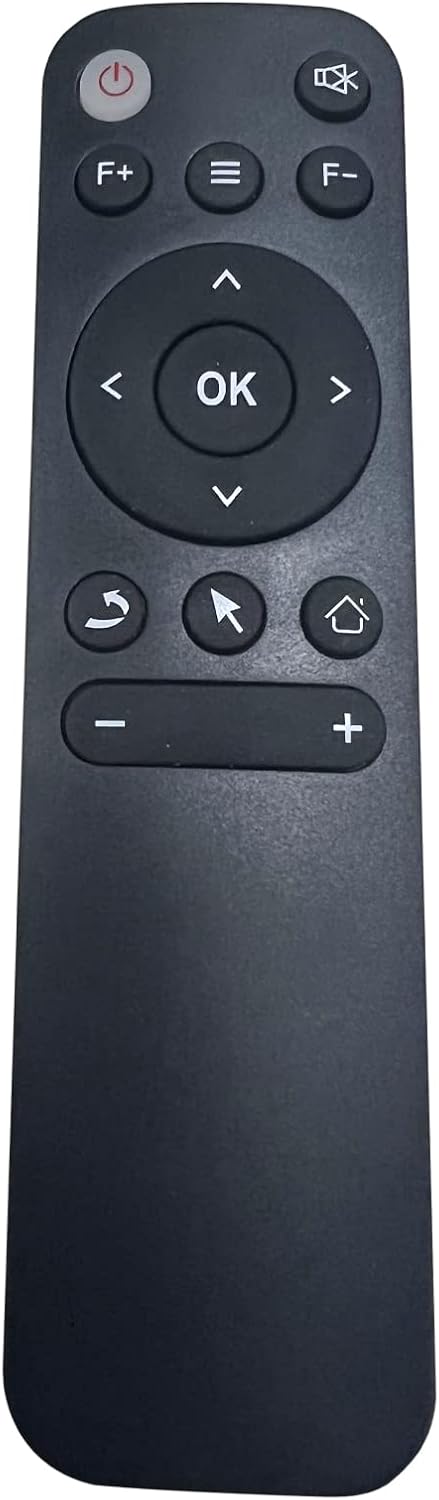
Image 1: VIMGO P10 Remote Control. Aquesta imatge mostra la part frontal view of the VIMGO P10 Remote Control, highlighting its ergonomic design and the layout of its buttons. Key buttons visible include Power, F+ (Function Plus), Menu, F- (Function Minus), directional navigation pad with OK button, Back, Mouse Mode, Home, Volume Down, and Volume Up.
Funcions del botó:
- Botó d'encesa: Encén o apaga el projector.
- F+ / F- Buttons: Function Plus and Function Minus, typically used for specific projector settings or modes.
- Botó de menú: Accesses the projector's main menu or settings.
- Panell de navegació (amunt, avall, esquerra, dreta): Navega pels menús i opcions.
- Botó D'acord: Confirma les seleccions.
- Botó enrere: Torna a la pantalla o menú anterior.
- Mouse Mode Button: Activates or deactivates the on-screen mouse pointer for easier navigation in certain applications.
- Botó d'inici: Returns to the projector's home screen.
- Volume Buttons (+ / -): Ajusta el volum de sortida d'àudio.
3. Configuració
3.1 Instal·lació de la bateria
- Localitzeu el compartiment de la bateria a la part posterior del comandament a distància.
- Feu lliscar la tapa de la bateria.
- Insert the required batteries (Product Specific batteries required, as per specifications) according to the polarity indicators (+ and -) inside the compartment.
- Tanqueu la tapa de la bateria amb seguretat.
3.2 Connexió inicial
The VIMGO P10 Remote Control uses infrared (IR) technology. Ensure there is a clear line of sight between the remote control and the IR receiver on your VIMGO projector for proper operation. No pairing process is typically required for IR remotes; it should function immediately upon battery installation.
4. Instruccions de funcionament
4.1 Funcions bàsiques
- Encès/apagat: Premeu el botó Poder button once to turn the projector on or off.
- Navegació: Utilitza el Amunt, Avall, Esquerra, Dreta arrows to move through menus and content.
- Selecció: Premeu el botó OK button to confirm a selection or open an item.
- Tornada: Premeu el botó Enrere botó per tornar a la pantalla anterior.
- Pantalla d'inici: Premeu el botó Casa button to quickly return to the projector's main interface.
4.2 Funcions avançades
- Accés al menú: Premeu el botó Menú button to open the projector's settings or options menu.
- Control de volum: Utilitza el Volum + i Volum - botons per ajustar el nivell de so.
- Mode ratolí: If your projector supports it, press the Mode del ratolí button to activate an on-screen cursor, allowing for more precise navigation in certain applications. Use the navigation pad to move the cursor. Press the button again to exit mouse mode.
5. Manteniment
5.1 Neteja
Per netejar el comandament a distància, utilitzeu un drap suau i sec. Per a la brutícia resistent, netegeu lleugerament.ampen the cloth with water and then wipe dry immediately. Do not use abrasive cleaners, alcohol, or solvents, as these can damage the surface.
5.2 Substitució de la bateria
Replace batteries when the remote's response becomes sluggish or stops working. Always replace all batteries at the same time with new ones of the same type. Do not mix old and new batteries or different types of batteries.
5.3 Emmagatzematge
Si no feu servir el comandament a distància durant un període prolongat, traieu-ne les piles per evitar fuites i possibles danys al dispositiu.
6. Solució De Problemes
- El comandament a distància no respon:
- Comproveu si les piles estan correctament instal·lades i tenen prou càrrega. Substituïu-les si cal.
- Ensure there is a clear line of sight between the remote and the projector's IR receiver. Remove any obstructions.
- Verify that the remote is pointed directly at the projector.
- Rang limitat:
- Substituïu les piles per unes de noves.
- Ensure no strong light sources (like direct sunlight) are interfering with the IR signal.
- Botons específics que no funcionen:
- Clean the remote's surface, especially around the buttons, to ensure no debris is preventing proper contact.
- Some functions may be specific to certain projector modes or applications. Refer to your projector's manual for details.
7. Especificacions
| Característica | Detall |
|---|---|
| Marca | VIMGO |
| Model | P10 |
| Tecnologia de connectivitat | infrarojos |
| Dispositius compatibles | Projector |
| Nombre màxim de dispositius compatibles | 1 |
| Característica especial | Ergonòmic |
| Pes de l'article | 0.106 unces |
| Dimensions del paquet | 5.94 x 2.56 x 1.54 polzades |
| Bateries | Product Specific batteries required |
8. Garantia i Suport
For warranty information or technical support, please refer to the documentation included with your VIMGO projector or visit the official VIMGO website. You may also contact VIMGO customer service directly for assistance with your P10 Remote Control.
Manufacturer: Shenzhen Sorstek.Co


