Introducció
This manual provides detailed instructions for the operation and maintenance of your Raynic CR1019 8.7-inch Digital Alarm Clock. Please read this manual thoroughly before use to ensure proper functionality and to maximize your product experience. This device features a large LED display, dual alarms, USB and Type-C charging ports, temperature and humidity display, and adjustable brightness and volume.
Contingut del paquet
- Raynic CR1019 Digital Alarm Clock
- Adaptador de corrent (amb cable elèctric)
- Manual d'usuari
Producte acabatview
The Raynic CR1019 Digital Alarm Clock is designed for ease of use and includes multiple features for convenience. The front panel displays time, date, day of the week, temperature, and humidity. The top panel features control buttons for various settings.

Figura 1: Davant view of the Raynic CR1019 Digital Alarm Clock displaying time, date, temperature, and humidity, with a smartphone connected for charging.

Figura 2: Acabatview of the Raynic Digital Alarm Clock highlighting its large LED display, dual alarms, USB/Type-C charging, snooze, 12/24H/DST, temperature/humidity, adjustable brightness, and volume.
Configuració
1. Connexió d'alimentació
- Connecteu l'adaptador de corrent proporcionat al port DC IN de la part posterior del despertador.
- Connecteu l'adaptador a una presa de corrent estàndard. La pantalla s'il·luminarà.
2. Instal·lació de bateria de reserva (opcional)
The clock requires 2 AAA batteries (not included) for battery backup. These batteries are only used to remember time and alarm settings during a power outage and do not power the display.

Figura 3: posterior view of the alarm clock with the battery compartment open, showing where to insert two AAA batteries for backup.
- Localitzeu el compartiment de la bateria a la part posterior del rellotge.
- Obriu la tapa del compartiment de la bateria.
- Introduïu 2 piles AAA, assegurant-vos de la polaritat correcta (+/-).
- Tanqueu la tapa del compartiment de la bateria.
Instruccions de funcionament
1. Configuració de l'hora i la data
Refer to the specific buttons on the top of the clock for time and date adjustments. Typically, a 'SET' or 'TIME SET' button is used to enter setting mode, and '+' / '-' buttons adjust values.
2. Dual Alarm Settings
The clock supports two independent alarms with four mode options: Weekdays (Mon-Fri), Weekends (Sat-Sun), Everyday (Mon-Sun), and One Time.

Figura 4: Illustration of dual alarm functionality, allowing two separate wake-up times for different users or purposes.
- Press the 'ALARM 1' or 'ALARM 2' button to select the desired alarm.
- Use the adjustment buttons to set the alarm time.
- Select the alarm mode (Weekdays, Weekends, Everyday, One Time) using the mode selection button.
- Confirma la configuració per activar l'alarma.
3. Ajust de la brillantor
The display brightness can be adjusted to 5 levels (L1 to L5) to suit your preference, especially for light-sensitive individuals.
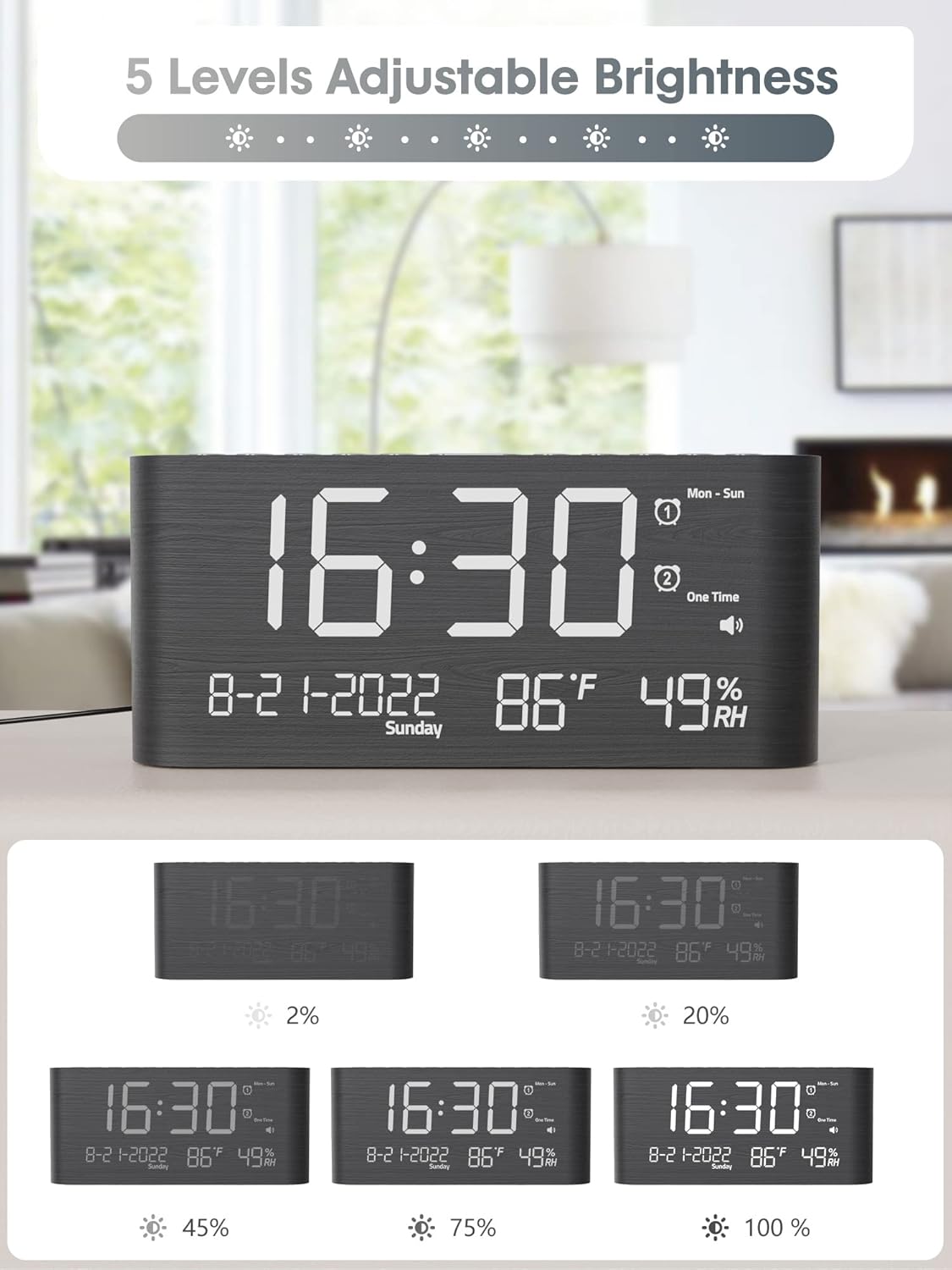
Figura 5: Visual representation of the 5 adjustable brightness levels of the clock display.
- Press the 'DIMMER' or 'BRIGHTNESS' button repeatedly to cycle through the 5 brightness levels.
- Seleccioneu la brillantor desitjada.
4. Ajust de volum
The alarm volume can be set to 5 levels, ranging from 0dB to 120dB, with a gradual ascending tone.

Figura 6: Depiction of the 5 adjustable volume levels for the alarm, suitable for various sleeping preferences.
- During alarm setting or when the alarm is sounding, use the 'VOLUME' or adjustment buttons to change the volume level.
5. 12H/24H/DST Switchable
You can switch between 12-hour and 24-hour time formats, and activate Daylight Saving Time (DST).

Figura 7: Illustration of switching between 12-hour, 24-hour, and Daylight Saving Time (DST) display modes.
- Press the '12/24H' button to toggle between 12-hour and 24-hour formats.
- Press the 'DST' button to activate or deactivate Daylight Saving Time.
6. Funció de posposició
When the alarm sounds, press the 'SNOOZE' button to temporarily silence the alarm for 9 minutes.

Figura 8: Demonstrating the 9-minute snooze function by pressing the snooze button on the clock.
7. USB and Type-C Charging Ports
The clock includes both USB and Type-C charging ports for convenient charging of external devices.

Figura 9: The back of the alarm clock with a smartphone and smartwatch charging simultaneously via the integrated USB and Type-C ports.
- Connecteu el cable de càrrega del dispositiu al port USB-A o Type-C de la part posterior del rellotge.
- Ensure your device begins charging.
8. Visualització de temperatura i humitat
The clock displays accurate indoor temperature and humidity readings.

Figura 10: The clock displaying current temperature and humidity, indicating its function for health care monitoring.
- The temperature and humidity are displayed automatically on the screen.
- To switch between Celsius and Fahrenheit, refer to the specific button (often combined with time/date settings).
Manteniment
- Neteja: Netegeu el rellotge amb un drap suau i sec. No utilitzeu productes de neteja abrasius ni dissolvents.
- Col·locació: Col·loca el rellotge sobre una superfície estable i plana. Evita la llum solar directa, les temperatures extremes i la humitat elevada.
- Potència: Utilitzeu sempre l'adaptador d'alimentació subministrat.
Resolució de problemes
- La pantalla està en blanc:
Ensure the power adapter is securely connected to both the clock and a working electrical outlet. If using battery backup, remember it only saves settings, it does not power the display. - L'alarma no sona:
Check if the alarm is activated and set to the correct time and mode. Verify the alarm volume is not set to 0dB. - L'hora és incorrecta:
Re-enter the time and date settings. Ensure 12H/24H format and DST settings are correct for your region. - Devices not charging via USB/Type-C:
Ensure the clock is powered on. Check the charging cables and the devices themselves. Try a different port or cable.
Especificacions
| Característica | Detall |
|---|---|
| Marca | Raynic |
| Número de model | CR1019 |
| Tipus de visualització | LED digital |
| Dimensions del producte | 1.7 cm d'amplada x 3.6 cm d'alçada (Nota: les dimensions completes són 8.7 cm de llargada x 1.7 cm d'amplada x 3.6 cm d'alçada) |
| Pes de l'article | 7.7 unces (0.48 lliures) |
| Font d'alimentació | Elèctric amb cable |
| Còpia de seguretat de la bateria | 2 AAA batteries required (not included) for memory only |
| Característiques especials | Dual Alarms, USB & Type-C Charging, Temperature, Humidity, Date, 5-level Brightness, 5-level Volume, 9-min Snooze, 12H/24H/DST |
| Material | Fusta |
Garantia i Suport
Raynic products are designed for reliability and performance. For warranty information or technical support, please refer to the contact details provided with your purchase documentation or visit the official Raynic weblloc. Conserveu el rebut de compra per a reclamacions de garantia.


