Introducció
Thank you for choosing the WOPET FT30 Automatic Pet Feeder. This device is designed to provide scheduled meals for your cat or small dog, ensuring they receive appropriate portions even when you are away. Please read this manual thoroughly before operating the feeder to ensure correct usage and optimal performance.
Producte acabatview i Components
Familiarize yourself with the main components of your WOPET FT30 Automatic Pet Feeder.
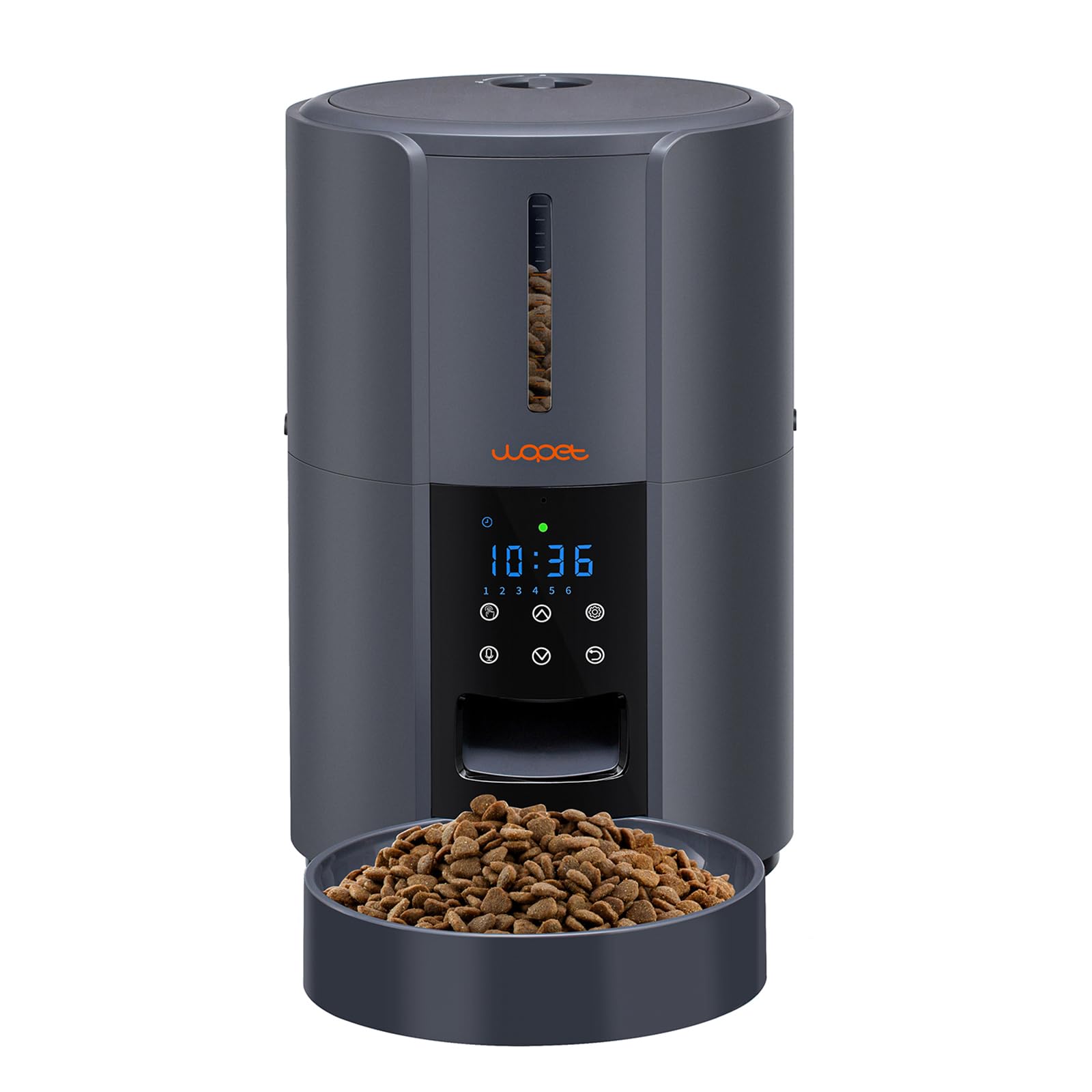
Imatge 1: WOPET FT30 Automatic Pet Feeder. This image displays the complete feeder unit, including the transparent food tank, the control panel with an LED display, and the detachable food bowl at the base.
- Dipòsit d'aliments: Transparent container for dry pet food.
- Tapa: Twist-lock lid with a desiccant bag compartment to keep food fresh.
- Tauler de control: Features an LED display and buttons for programming.
- Botiga d'alimentació: Where food is dispensed from the tank into the bowl.
- Bol de menjar: Detachable bowl for pets to eat from.
- Port d'alimentació: For connecting the wired power adapter.
- Compartiment de la bateria: Located at the bottom, for backup D-cell batteries.
Instruccions de configuració
- Desempaquetar i muntar: Remove all components from the packaging. Ensure the food bowl is securely attached to the base.
- Instal·leu la bossa dessecant: Open the lid and place the desiccant bag (included) into its designated compartment to maintain food freshness. Close the lid securely with a twist-lock mechanism.
- Omplir el dipòsit d'aliments: Open the lid and pour dry pet food into the transparent food tank. Ensure the food kibble size is appropriate for the feeder mechanism to prevent jams.
- Font d'alimentació:
- Potència primària: Connect the wired power adapter to the feeder's power port and plug it into a wall outlet.
- Backup Power (Optional but Recommended): Per a un funcionament ininterromput durant l'apagadatages, install 3 new D-cell alkaline batteries (not included) into the battery compartment at the bottom of the feeder.
- Encesa inicial: The LED display will light up. If the display is locked, long press the "SET" button for 3 seconds to unlock it.
Instruccions de funcionament
Configuració de l'hora actual
- Press the "SET" button once. The hour digit will flash.
- Use the "UP" and "DOWN" buttons to adjust the hour.
- Press "SET" again. The minute digit will flash.
- Use "UP" and "DOWN" to adjust the minute.
- Press "SET" to confirm and exit time setting.
Programming Meal Times and Portions
The feeder supports 1 to 6 meals daily, with up to 8 portions per meal (approximately 15g per portion).
- Press the "MEAL" button. "M1" (Meal 1) will appear, and the hour digit will flash.
- Adjust the hour for Meal 1 using "UP" and "DOWN". Press "MEAL" to confirm.
- Adjust the minute for Meal 1 using "UP" and "DOWN". Press "MEAL" to confirm.
- Adjust the number of portions (1-8) for Meal 1 using "UP" and "DOWN". Press "MEAL" to confirm.
- Repeat steps 1-4 for additional meals (M2, M3, M4, M5, M6) as desired. If a meal is not set, it will not dispense food.
- After setting all desired meals, press "SET" to exit programming mode.
Recording a Personalized Meal Call
You can record a 10-second voice message to play at each meal time.
- Press and hold the "MIC" button for approximately 3 seconds until you hear a beep.
- Digues el teu missatge clarament al micròfon.
- Release the "MIC" button when finished. The recording will automatically save.
- To test the recording, briefly press the "MIC" button.
Alimentació manual
To dispense a single portion of food immediately, press the "MANUAL" button once.
Manteniment
Neteja de l'alimentador
Regular cleaning ensures hygiene and proper functioning. The top lid, food tank, turnplate, and food bowl are detachable for easy cleaning.
- Desconnecteu l'alimentació: Unplug the power adapter and remove backup batteries before cleaning.
- Desmuntar: Remove the top lid, empty any remaining food from the tank, and detach the food tank and food bowl.
- Components de rentat: Hand wash the food tank, turnplate, and food bowl with mild soap and water. Rinse thoroughly.
- Assecar completament: Ensure all washed parts are completely dry before reassembling to prevent mold or food spoilage.
- Unitat base de neteja: Utilitza l'anunciamp cloth to wipe the main base unit (do not submerge in water).
- Torneu a muntar: Reassemble all parts once dry and reconnect power.
Substitució de la bossa dessecant
Replace the desiccant bag every 1-2 months, or as needed, to maintain optimal food freshness.
Resolució de problemes
| Problema | Causa possible | Solució |
|---|---|---|
| Feeder does not power on. | No power from adapter; batteries depleted or incorrectly installed. | Check power adapter connection. Replace D-cell batteries if using backup power. Ensure batteries are inserted with correct polarity. |
| Food is not dispensing. | Food tank empty; food jammed; incorrect settings. | Refill food tank. Check for food jams in the dispenser mechanism. Verify meal times and portion settings are correctly programmed. Ensure kibble size is suitable. |
| Display is locked or unresponsive. | Security lock engaged. | Long press the "SET" button for 3 seconds to unlock the display. The display locks automatically after 20 seconds of inactivity. |
| Voice recording is unclear or not playing. | Recording error; microphone obstruction. | Re-record the message, speaking clearly and directly into the microphone. Ensure no obstructions are covering the microphone. |
| Feeder resets settings unexpectedly. | Power interruption; battery issue. | Ensure both wired power and backup batteries are stable. Replace old batteries. If the issue persists, contact customer support. |
Especificacions
- Model: FT30
- Capacitat: 3 litres
- Menjars per dia: 1-6 àpats
- Racions per àpat: 1-8 racions (aprox. 15 g per ració)
- Gravació de veu: 10 segons
- Font d'alimentació: DC 5V/1A adapter (included) or 3 x D-cell alkaline batteries (not included)
- Dimensions: Aproximadament 31.39 x 20.7 x 19.99 cm
- Pes: Aproximadament 1.54 kg
- Material: Plàstic de qualitat alimentària
- Instruccions de cura: Rentat només a mà (parts desmuntables)
- Espècie objectiu: Gat, gos petit
Garantia i Suport
WOPET products are manufactured with quality and reliability in mind. For specific warranty information, please refer to the warranty card included with your purchase or visit the official WOPET weblloc.
If you encounter any issues or have questions regarding your WOPET FT30 Automatic Pet Feeder, please contact WOPET customer support for assistance. Contact details can typically be found on the product packaging or the official WOPET weblloc.


