1. Introducció
The ATOTO AC-FCR01W is an HD 1080P front camera designed to enhance driving safety by providing a clear view of the blind spot in front of your vehicle. It features a 150° wide viewing angle, strong light suppression, and a built-in G-sensor for automatic event recording. This camera is specifically designed for use with selected ATOTO P8 series head units.
Nota important de compatibilitat: The AC-FCR01W is only compatible with ATOTO P8 series head units that have the specified front and rear camera input interfaces. It is not compatible with other ATOTO products such as S8 series, F7 series, A6PF series, or SA102 series.

Image 1.1: Compatibility diagram for ATOTO AC-FCR01W. Shows the correct rear panel connection for compatible P8 series units and examples of incompatible ATOTO series (S8, F7, A6PF, SA102).
2. Configuració i instal·lació
The AC-FCR01W front camera is designed for straightforward installation. It can be attached to the vehicle's windshield. A 3.5-meter extension cable is included to accommodate most vehicle types.
Passos d'instal·lació:
- Securely attach the camera to the windshield in a position that provides an optimal view del camí per davant.
- Connect the camera to your compatible ATOTO P8 series head unit using the provided USB-C cam plug and extension cable. Ensure the connection is firm.
- Route the cable neatly to avoid interference with driving controls or visibility.
Accessing the Camera Feed:
Once installed, the camera feed can be accessed through your P8 head unit in two ways:
- Press the dedicated button on an ATOTO AC-44F6 remote control (if available).
- Tap the camera icon directly on the P8 head unit's touchscreen display.
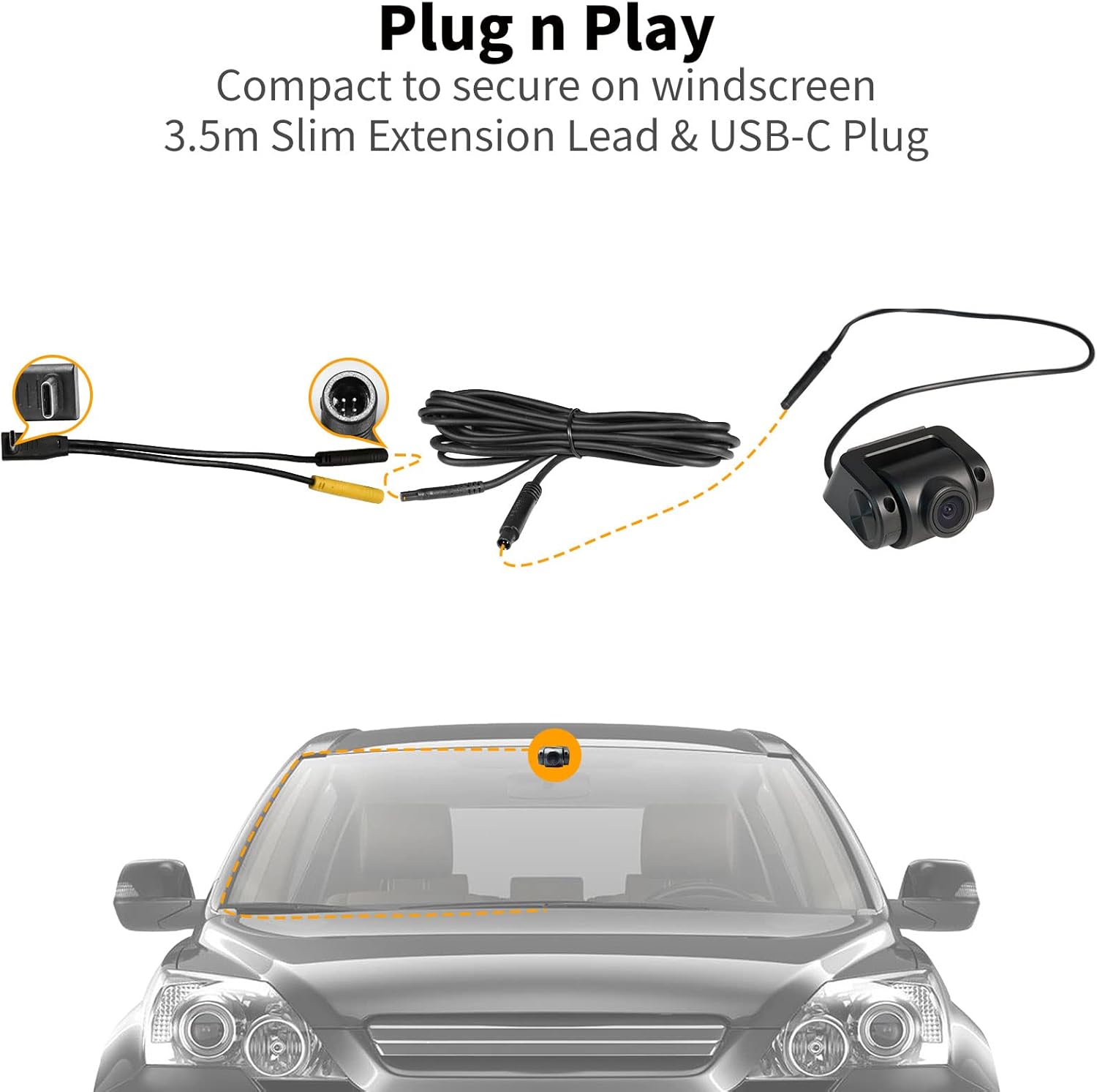
Image 2.1: 'Plug n Play' installation diagram. Illustrates the camera components and typical windshield mounting position.
3. Instruccions de funcionament
HD 1080P Display and Wide Viewangle ing
The AC-FCR01W records in HD 1080P resolution with a 150° wide viewing angle. This allows for a comprehensive view of the road, capturing details such as license plates and sidewalks. The camera automatically begins recording when the car starts (an SD card is required for recording) and saves footage as backup information.

Image 3.1: Visual representation of HD 1080P resolution and 150° wide viewing angle, demonstrating improved clarity for details like license plates.

Image 3.2: 'Auto Loop Recording' illustration. Depicts the camera automatically powering on and recording when the car starts.
Parking Monitor (24/7 Car Surveillance)
When powered continuously by an accessory like the AC-P8AC12 (sold separately), the parking monitor feature provides 24/7 surveillance. If a sudden collision or bump is detected, the P8 head unit activates within seconds, and the AC-FCR01W camera captures 20 seconds of critical video footage. This footage is protected from being overwritten, serving as a reliable eyewitness. In standby mode, the camera's power consumption is less than 10mA, minimizing battery drain.
Sensor G integrat
The integrated G-sensor automatically detects unusual changes in gravity, such as those caused by collisions. When such an event occurs, the relevant video footage is automatically saved as backup information, preventing it from being deleted by loop recording.

Image 3.3: G-Sensor and Parking Monitor features. Illustrates how the G-sensor captures crash evidence and the parking monitor provides 24-hour protection.
Strong Light Suppression (WDR)
The camera features strong light suppression technology, including Wide Dynamic Range (WDR), to manage challenging lighting conditions. This helps to prevent dazzling effects from high beams or bright sunlight, ensuring clear video capture both day and night. The loop recording time is also adjustable.

Image 3.4: Strong Light Suppression with WDR. Demonstrates anti-glare capabilities for clear viewen diferents condicions d'il·luminació.
4. Manteniment
To ensure optimal performance and longevity of your ATOTO AC-FCR01W front camera, consider the following general maintenance guidelines:
- Neteja de lents: Periodically clean the camera lens with a soft, lint-free cloth to remove dust, smudges, or debris that may affect video clarity. Avoid abrasive materials or harsh chemicals.
- Inspecció del cable: Regularly check the connection cable for any signs of wear, damage, or loose connections. Ensure it is securely routed and not pinched.
- Actualitzacions de firmware: Check the official ATOTO website or your P8 head unit's system settings for any available firmware updates for the camera or head unit, as these can improve performance and add features.
- Mitjans d'emmagatzematge: If using an SD card for recording, ensure it is a high-quality card (max 128GB recommended) and consider formatting it periodically to maintain optimal recording performance.
5. Solució De Problemes
If you encounter issues with your ATOTO AC-FCR01W front camera, please review els passos habituals següents per a la resolució de problemes:
- Sense imatge/Pantalla negra:
- Ensure the camera is correctly connected to the USB-C input on your ATOTO P8 head unit.
- Verify that your P8 head unit is compatible with the AC-FCR01W (refer to Section 1: Introduction).
- Check the cable for any damage or kinks.
- Mala qualitat d'imatge:
- Clean the camera lens thoroughly.
- Assegureu-vos que la càmera estigui ben muntada i que no vibri.
- Comproveu si hi ha obstruccions al camp de la càmera view.
- Problemes de gravació:
- Ensure an SD card is inserted and properly formatted.
- Verify the SD card is not full. Consider using a new or larger capacity card (up to 128GB).
- Check the recording settings on your P8 head unit.
- G-Sensor Not Triggering:
- Ensure the G-sensor sensitivity settings on your P8 head unit are appropriately configured.
Si aquests passos no resolen el problema, consulteu la secció d'assistència per obtenir més ajuda.
6. Especificacions
| Model | AC-FCR01W |
| Resolució de vídeo | HD 1080P |
| Viewangle ing | 150 Degrees (Real Angle of View) |
| Tecnologia de sensors òptics | CMOS |
| Mida del sensor òptic | 1/2.7 polzada |
| Tipus de connector | USB-C |
| Tecnologies de connectivitat | USB |
| Dispositius compatibles | ATOTO P8 Series Monitors |
| Tipus d'instal·lació | Dashboard Mount, Plug In |
| Voltage | 12 Volts |
| Pes de l'article | 5.3 unces |
| Dimensions del paquet | 5.94 x 4.45 x 1.93 polzades |
| Fabricant | ATOTO |
| Data de primera disponibilitat | 21 de juliol de 2022 |
7. Garantia i Suport
Informació de la garantia:
The ATOTO AC-FCR01W comes with a standard 12-month product care period, which can be extended by an additional 6 months, totaling 18 months of product care.
Atenció al client:
For any questions, technical assistance, or support inquiries, please utilize the following resources:
- Order Center: Access your order details and initiate support requests through your purchase platform's order center.
- Suport per correu electrònic: Contact ATOTO support via eproductcase or support[at]atotoglobal.
- ATOTO Store: Visit the official ATOTO store for product information and additional resources: ATOTO Store on Amazon.


