1. Introducció
This manual provides detailed instructions for the installation, operation, and maintenance of your Chieftec BE-10B-300 Small Form Factor (SFF) computer case. Please read this manual thoroughly before beginning assembly to ensure proper setup and safe usage. Keep this manual for future reference.
2. Informació de seguretat
- Always disconnect the power cord from the wall outlet before opening the computer case or performing any installation or maintenance.
- Assegureu-vos de posar a terra correctament per evitar descàrregues elèctriques.
- Handle all components with care to avoid damage from electrostatic discharge (ESD). Consider using an anti-static wrist strap.
- Keep the case away from sources of heat, direct sunlight, and moisture.
- Do not block ventilation openings to ensure adequate airflow and prevent overheating.
3. Contingut del paquet
Verifiqueu que tots els components siguin presents al paquet. Si falta algun element o està malmès, poseu-vos en contacte amb el vostre distribuïdor.
- Chieftec BE-10B-300 SFF Computer Case
- Cable d'alimentació
- Accessory Kit (screws, standoffs, cable ties, small bracket)
- Manual d'usuari (aquest document)

Figure 3.1: Included accessory kit with various screws, a power cable, and a small mounting bracket.
4. Producte acabatview
The Chieftec BE-10B-300 is a compact Small Form Factor (SFF) computer case designed for Mini ATX and Micro ATX motherboards. It features a sleek black design and includes a 300W power supply. The case supports various storage configurations and offers convenient front panel connectivity.
4.1 Extern Views

Figura 4.1: Frontal view of the Chieftec BE-10B-300 case, showcasing the optical drive bay, power button, and front I/O ports in a vertical setup.

Figura 4.2: Front inclinat view of the case, highlighting the textured front panel and accessible ports.

Figura 4.3: superior view of the case when oriented horizontally, showing the smooth top panel.
4.2 Internal Layout
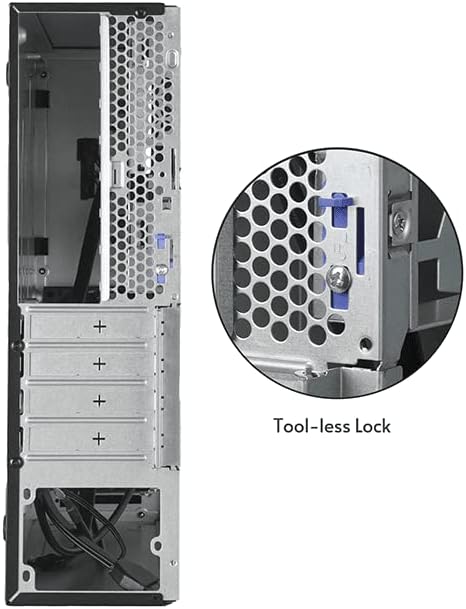
Figura 4.4: Intern view of the case, illustrating the motherboard mounting area and the pre-installed cooling fan.

Figure 4.5: Another internal view, detailing the drive bay structure and internal cabling.
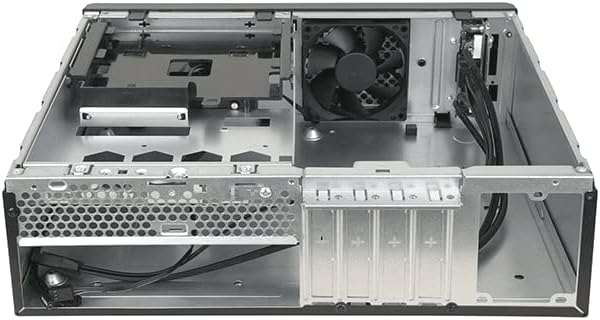
Figura 4.6: posterior view of the case, showing expansion slots and a close-up of the tool-less lock mechanism for easy component installation.
5. Guia de configuració
5.1 Preparació
- Unpack the computer case and place it on a stable, flat surface.
- Gather necessary tools: Phillips head screwdriver, anti-static wrist strap (recommended).
5.2 Obertura del cas
Locate the thumbscrews or latches on the rear of the case that secure the side panel. Remove them and carefully slide the side panel backward, then lift it off.
5.3 Instal·lació de la placa base
- Install the I/O shield provided with your motherboard into the opening at the rear of the case.
- Align your Mini ATX or Micro ATX motherboard with the pre-installed standoffs inside the case.
- Secure the motherboard using the appropriate screws from the accessory kit. Do not overtighten.
5.4 Instal·lació de la font d'alimentació
The Chieftec BE-10B-300 comes with a pre-installed 300W power supply. Ensure all power cables are routed correctly and connected to your components as needed.
5.5 Instal·lació de la unitat
The case supports 5.25" ultra-slim optical drives, 3.5" HDDs, and 2.5" SSDs. Refer to the diagram below for drive bay locations.
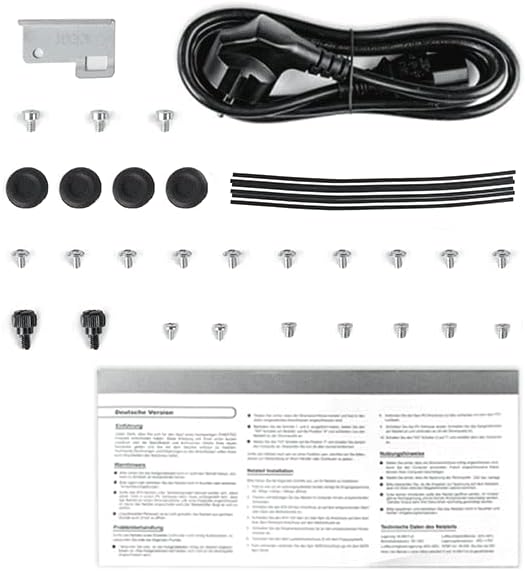
Figure 5.1: Drive bay configuration diagram, indicating mounting points for various storage devices.
- 5.25" Ultra-Slim ODD (9.5 mm): Slide the optical drive into the designated bay from the front and secure it with screws or the tool-less mechanism if available.
- 3.5" HDD / 2.5" SSD: Mount the drives into the appropriate brackets or bays as shown in Figure 5.1. Secure them with screws.
5.6 Instal·lació de la targeta d'expansió
Remove the necessary expansion slot covers from the rear of the case. Insert your expansion card (e.g., graphics card, network card) into the motherboard's PCIe slot and secure it using the tool-less lock mechanism or a screw.
5.7 Gestió de cables
Route all cables (power, data, front panel) neatly to ensure optimal airflow and a clean build. Use cable ties from the accessory kit to bundle cables.
5.8 Tancament de l'expedient
Once all components are installed and cables are managed, carefully slide the side panel back into place and secure it with the thumbscrews or latches.
6. Instruccions de funcionament
6.1 Engegada/apagada
- Connect the power cord to the power supply unit and a wall outlet.
- Press the power button located on the front panel of the case to turn on your computer.
- To turn off, use the operating system's shutdown function or press and hold the power button for several seconds.
6.2 Connexió de perifèrics
Connect your monitor, keyboard, mouse, and other peripherals to the appropriate ports on the rear I/O panel of your motherboard and the front I/O panel of the case.
7. Manteniment
7.1 Neteja
- Netegeu regularment l'exterior de la carcassa amb un drap suau iamp tela. Eviteu els netejadors abrasius.
- Periodically open the case and use compressed air to remove dust buildup from internal components, especially fans and heatsinks, to maintain optimal cooling performance.
8. Solució De Problemes
Si teniu problemes, consulteu els passos habituals següents per a la resolució de problemes:
- Sense energia: Ensure the power cord is securely connected to both the wall outlet and the power supply. Check the power switch on the power supply itself.
- Sense pantalla: Verify that your monitor is connected to the correct video output port on your graphics card or motherboard and that the monitor is powered on.
- Inestabilitat del sistema: Check all internal cable connections (power, data, motherboard headers) to ensure they are firmly seated. Verify that all components are properly installed.
- Sobreescalfament: Ensure all case fans are spinning and not obstructed. Clean any dust buildup from fans and heatsinks.
For more complex issues, consult your component manuals or seek professional assistance.
9. Especificacions
| Característica | Especificació |
|---|---|
| Número de model | BE-10B-300 |
| Marca | Chieftec |
| Tipus de cas | Small Form Factor (SFF) Desktop |
| Color | Negre |
| Material | Acer d'aliatge |
| Compatibilitat amb la placa base | Mini ATX, Micro ATX |
| Font d'alimentació | 300 W (inclòs) |
| Tipus de muntatge de la font d'alimentació | Muntatge inferior |
| Mètode de refrigeració | Aire |
| Mida del ventilador | 80 mm (8E+1 Millimeters) |
| Dimensions del producte | 10 x 2 x 2.7 polzades |
| Pes de l'article | 8.84 lliures |
| Usos recomanats | Propòsit general |
10. Garantia i Suport
10.1 Informació de la garantia
Chieftec products are manufactured to high-quality standards. For specific warranty terms and conditions, please refer to the warranty card included with your product or visit the official Chieftec weblloc web. Conserveu el comprovant de compra per a reclamacions de garantia.
10.2 Suport tècnic
If you encounter any issues that cannot be resolved using the troubleshooting guide in this manual, please contact Chieftec customer support or your retailer for assistance. Contact information can typically be found on the Chieftec weblloc web o a l'embalatge del producte.


