Introducció
This manual provides detailed instructions for the Powerwave Switch Wireless Controller. Learn how to set up, operate, maintain, and troubleshoot your controller to enhance your gaming experience on Nintendo Switch, PC, Android, and iOS devices.

Davant view of the Powerwave Switch Wireless Controller, showcasing its Star White design with blue grips and red shoulder buttons. The controller features standard button layouts including A, B, X, Y buttons, a D-pad, and dual analog sticks.
Característiques del producte
- Connectivitat sense fil Bluetooth: Enjoy seamless gaming without cables.
- 3-Speed Dual-Motor Vibration: Experience immersive feedback with adjustable vibration intensity.
- Controls de moviment: Enhance gameplay with precise motion sensing capabilities.
- Compatibilitat multiplataforma: Works wirelessly with Nintendo Switch, PC, Android, and iOS 13 and above.
- 4 Programmable Macro Buttons: Customize complex inputs and activate them with a single button press.
- Mode turbo: Enable rapid-fire commands for quick actions in games.
- 8-Colour Rotating LED Lighting Effect: Adds a vibrant visual element to your gaming setup.

Visual representation of the controller's key features, including Wireless Bluetooth, 3-Speed Dual-Motor, PC/Android/iOS13 compatibility, 8-Colour Rotating LED, and Programmable Macro Buttons.
Guia de configuració
1. Càrrega inicial
Before first use, fully charge the controller using the provided USB-C cable. Connect the cable to the controller's USB-C port and the other end to a USB power source (e.g., Nintendo Switch dock, PC, or USB wall adapter). The LED indicators will show charging status.
2. Emparellament amb Nintendo Switch
- Des del menú HOME de la Nintendo Switch, selecciona Controladors, doncs Canvia d'adherència/ordre.
- On the Powerwave controller, press and hold the Botó HOME (house icon) for 3-5 seconds until the LED indicators start flashing rapidly.
- Once paired, the corresponding player LED(s) on the controller will light up solid.
3. Pairing with PC, Android, or iOS (Bluetooth)
- Ensure Bluetooth is enabled on your device (PC, Android phone/tablet, iOS device).
- On the Powerwave controller, press and hold the Botó HOME for 3-5 seconds until the LED indicators flash rapidly.
- On your device, search for new Bluetooth devices. Select "Powerwave Controller" (or similar) from the list to pair.
- Once connected, the LED indicators on the controller will stop flashing and remain solid.
Instruccions de funcionament
Controls bàsics
The Powerwave Switch Wireless Controller features standard button layouts for intuitive gameplay. Refer to your game's specific control scheme for optimal use.
Programmable Macro Buttons (M1, M2, M3, M4)
The controller includes four programmable macro buttons on the back (M1, M2, M3, M4) for executing complex command sequences with a single press.
- Entrant al mode de programació: Manteniu premut el botó Botó de macro (usually a small button near the M buttons) until the indicator light flashes.
- Recording Macro: Press the desired M button (M1-M4) you wish to program. Then, input the sequence of buttons you want to record (e.g., A, B, X, Y, L, R, ZL, ZR, D-pad directions, analog stick movements).
- Sortida del mode de programació: Premeu el botó Botó de macro again to save the macro and exit programming mode. The indicator light will stop flashing.
- Using Macro: Simply press the programmed M button during gameplay to execute the recorded sequence.
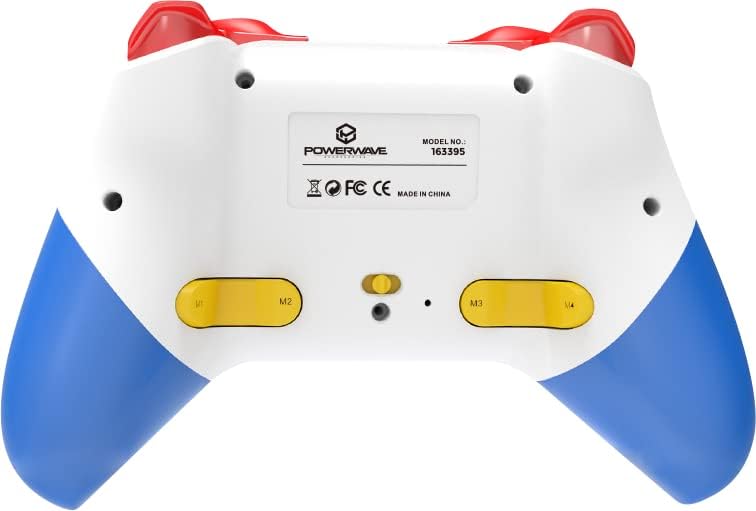
posterior view of the Powerwave Switch Wireless Controller, highlighting the M1, M2, M3, and M4 programmable macro buttons, along with the model number and regulatory markings.
Mode Turbo
Turbo mode allows a button to be pressed repeatedly as long as it is held down, providing a rapid-fire function.
- Activació de Turbo: Manteniu premut el botó Botó Turbo (usually marked 'T') and then press the desired action button (e.g., A, B, X, Y, L, R, ZL, ZR). The button will now be in Turbo mode.
- Ajust de la velocitat del turbo: Mentre sosteniu el Botó Turbo, move the Right Analog Stick Up or Down to cycle through different turbo speeds (slow, medium, fast).
- Deactivating Turbo: To remove Turbo from a specific button, press and hold the Botó Turbo and then press the same action button again. To clear all Turbo settings, press and hold the Botó Turbo durant 5 segons.
Ajust de vibració
The controller features 3-speed dual-motor vibration. To adjust vibration intensity, press and hold the Botó de vibració (if available, or a combination like Turbo + D-pad Up/Down) to cycle through intensities (Off, Low, Medium, High).
Efectes d'il·luminació LED
The 8-colour rotating LED lighting effect can be toggled or adjusted. Refer to the specific button combination for your controller model, often involving a dedicated LED button or a combination with the Turbo button.
Manteniment
- Neteja: Feu servir un drap suau i sec per netejar el controlador. Per a la brutícia persistent, fregueu lleugerament.ampNetegeu el drap amb aigua. No utilitzeu productes químics agressius ni netejadors abrasius.
- Emmagatzematge: Guardeu el controlador en un lloc fresc i sec, allunyat de la llum solar directa i de temperatures extremes.
- Cura de la bateria: Per allargar la durada de la bateria, eviteu descarregar completament el controlador amb freqüència. Carregueu-lo regularment, fins i tot si no l'utilitzeu durant períodes prolongats.
- Eviteu les gotes: Protegiu el controlador de cops físics i caigudes, que poden danyar els components interns.
Resolució de problemes
| Problema | Possible solució |
|---|---|
| El controlador no s'encén. | Ensure the controller is fully charged. Connect it to a power source and allow it to charge for at least 30 minutes before attempting to turn it on again. |
| Controller fails to pair with device. |
|
| Input lag or disconnection during gameplay. |
|
| Els botons o els joysticks analògics no responen. |
|
Especificacions
- Número de model: 163395
- Dimensions del producte: 15 x 6 x 10 cm
- Pes: 212 grams
- Connectivitat: Bluetooth sense fil
- Compatibilitat: Nintendo Switch, Nintendo Switch Lite, Nintendo Switch OLED, PC, Android, iOS 13+
- Característiques: 3-Speed Dual-Motor Vibration, Motion Controls, 4 Programmable Macro Buttons, Turbo Mode, 8-Colour Rotating LED Lighting Effect
- Unsupported Functions (Nintendo Switch): HD Rumble, NFC, IR Camera
Garantia i Suport
For warranty information and technical support, please refer to the official Powerwave weblloc web o poseu-vos en contacte amb el servei d'atenció al client. Conserveu el comprovant de compra per a qualsevol reclamació de garantia.
Powerwave Official Weblloc: www.powerwave.com.au


