Producte acabatview
The Xiaomi Vacuum-Mop 2 Ultra is an advanced robotic vacuum cleaner and mop designed to provide comprehensive floor cleaning. It features a precise Laser Distance Sensor (LDS) navigation system, powerful 4000 Pa suction, and innovative 3D obstacle avoidance technology. Equipped with a 5200 mAh battery and a self-emptying base, it offers extended cleaning sessions and convenient maintenance. This device seamlessly integrates with the Mi Home app, Alexa, and Google Assistant for smart control.

Image: The Xiaomi Vacuum-Mop 2 Ultra robot vacuum cleaner shown alongside its self-emptying base, illustrating the complete system.
Característiques principals:
- Succió potent: Equipped with a motor delivering strong and durable suction power to effectively remove dust, pet dander, dirt, and clean under furniture.
- Llarga vida útil de la bateria: Optimal 5200 mAh battery capacity, sufficient for over 240 m² in standard mode on a single charge, reducing the frequency of recharging.
- Intelligent Mopping: Three levels of water flow control with an intelligent electronic control water tank that distributes water evenly without leaks, supporting thorough floor cleaning throughout the home.
- 3D Obstacle Avoidance: Features 3D technology to prevent obstructions, detecting contours of toys, cables, and other obstacles, and slowing down in advance to avoid collisions.
- Navegació làser SUD: Laser navigation technology accurately scans the living environment and instantly maps the area for efficient cleaning paths.
- Base autobuidant: Comes with a self-emptying base for automatic dust disposal, minimizing manual intervention.
Contingut del paquet
Before setting up your Xiaomi Vacuum-Mop 2 Ultra, please ensure all components are present and undamaged. The package should contain the following items:
- 1 x Main Robot Unit
- 1 x Manual d'usuari
- 1 compartiment per a la pols
- 1 x pinzell principal
- 1 x Coberta del raspall principal
- 1 raspalls laterals
- 1 x Water Tank (with installed mop pad)
- 1 x Mop Pad (replacement)
- 1 x Charging Station (Self-Emptying Base)
- 1 x cable d'alimentació
- 1 x Side Brush (replacement)
- 1 x Eina de neteja
Guia de configuració
1. Col·locació de l'estació de càrrega
Place the charging station (self-emptying base) against a wall in an open area with good Wi-Fi signal. Ensure there is at least 0.5 meters of clear space on both sides and 1.5 meters in front of the station for the robot to dock properly.
2. Connexió d'alimentació
Connect the power cable to the charging station and plug the other end into a power outlet. Ensure the indicator light on the charging station illuminates.
3. Càrrega inicial
Place the robot vacuum onto the charging station. Ensure the charging contacts on the robot align with those on the station. The robot will automatically power on and begin charging. For first-time use, it is recommended to fully charge the robot before its initial cleaning cycle.
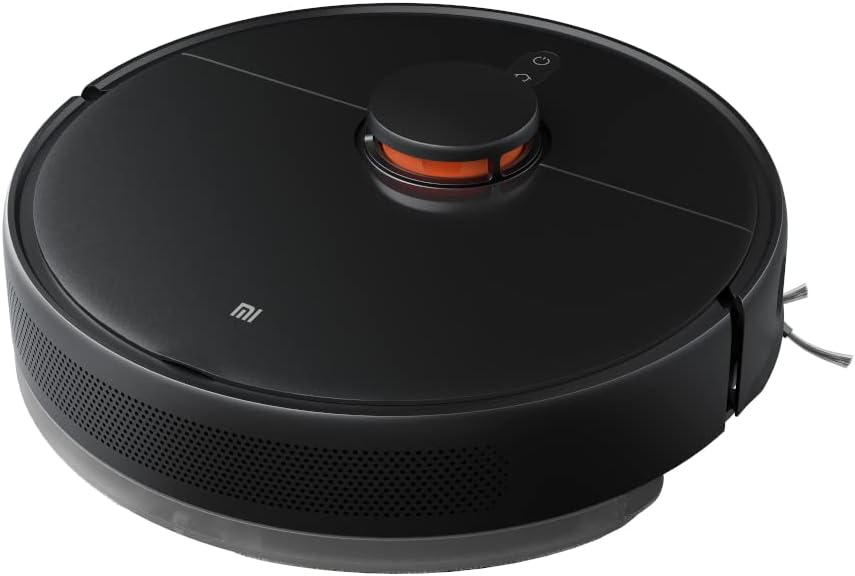
Imatge: Un angle view of the Xiaomi Vacuum-Mop 2 Ultra robot, highlighting its sleek design and top controls.
4. Connexió a l'aplicació Mi Home
- Descarrega't el La meva Casa l'aplicació des de la botiga d'aplicacions del teu telèfon intel·ligent (Google Play Store o Apple App Store).
- Obre l'aplicació i crea un compte Xiaomi o inicia la sessió si ja en tens un.
- Toqueu la icona "+" a la cantonada superior dreta per afegir un dispositiu.
- Select "Xiaomi Vacuum-Mop 2 Ultra" from the list of available devices or scan the QR code on the robot/manual.
- Follow the in-app instructions to connect the robot to your home Wi-Fi network. Ensure your phone is connected to a 2.4 GHz Wi-Fi network during setup.
- Un cop connectat, podeu controlar el robot, view maps, set cleaning schedules, and adjust settings via the app.
Instruccions de funcionament
Inici d'un cicle de neteja
- Mitjançant botons de robot: Premeu el botó Potència/Neteja button on the robot to start a general cleaning cycle. Press it again to pause. Press and hold to send the robot back to the charging station.
- A través de l'aplicació Mi Home: Open the Mi Home app, select your robot, and tap the "Clean" button. You can also select specific rooms, set no-go zones, or adjust suction power and water flow.
- Control de veu: Once connected to Amazon Alexa or Google Assistant, you can use voice commands such as "Alexa, start cleaning with [Robot Name]" or "Hey Google, tell [Robot Name] to clean."

Imatge: Vista de dalt a baix view of the Xiaomi Vacuum-Mop 2 Ultra, showing the layout of its top sensors and control buttons.
Funció de neteja
To use the mopping function, fill the water tank with clean water and attach the mop pad. Insert the water tank assembly into the robot. The robot will automatically detect the water tank and switch to vacuuming and mopping mode. Adjust water flow levels via the Mi Home app for different floor types.
Navegació i evitació d'obstacles
The robot uses LDS laser navigation to create accurate maps of your home, ensuring efficient cleaning paths. Its 3D obstacle avoidance technology helps it detect and navigate around common household items like cables, shoes, and furniture, reducing the chance of getting stuck.
Manteniment
Regular maintenance ensures optimal performance and extends the lifespan of your Xiaomi Vacuum-Mop 2 Ultra. Always power off the robot before performing any maintenance.
1. Emptying the Dust Compartment / Self-Emptying Base
- Robot Dust Compartment: Open the robot's top cover, remove the dust compartment, and empty its contents into a trash bin. Clean the filter inside the dust compartment regularly.
- Base autobuidant: The self-emptying base automatically transfers dust from the robot's dustbin to a larger dust bag within the base. Replace the dust bag in the self-emptying base when full. The app will usually notify you.
2. Neteja del raspall principal
Flip the robot over. Press the clips on the main brush cover to remove it. Lift out the main brush. Use the provided cleaning tool to remove hair and debris tangled around the brush. Reinstall the brush and cover.
3. Neteja del raspall lateral
Unscrew the side brush and remove any tangled hair or debris. Reattach the side brush. Replace the side brush if it is worn or damaged.
4. Neteja de la fregona i del dipòsit d'aigua
Remove the mop pad from the water tank and rinse it thoroughly with water. Allow it to air dry completely before reattaching. Empty any remaining water from the water tank and rinse it out. Do not use detergents in the water tank unless specifically designed for robot vacuums.
5. Neteja dels sensors i dels contactes de càrrega
Wipe the cliff sensors (located on the bottom of the robot), wall sensors, and charging contacts on both the robot and the charging station with a clean, dry cloth. This ensures proper navigation and charging.

Image: The underside of the Xiaomi Vacuum-Mop 2 Ultra, displaying the main brush, side brush, and attached mop pad, indicating areas for maintenance.
Resolució de problemes
If you encounter issues with your Xiaomi Vacuum-Mop 2 Ultra, refer to the following common problems and solutions. For more detailed error codes and solutions, consult the Mi Home app or the official Xiaomi support weblloc.
| Problema | Causa possible | Solució |
|---|---|---|
| El robot no s'encén ni carrega. | Low battery; charging contacts are dirty or misaligned; power cable not connected. | Ensure robot is properly docked. Clean charging contacts on both robot and station. Check power cable connection. |
| El robot es queda encallat sovint. | Too many obstacles; sensors are dirty; robot is on a dark-colored carpet/surface. | Clear obstacles from the cleaning path. Clean all sensors. Use no-go zones in the app for problematic areas. |
| Mal rendiment de neteja. | Dust compartment full; brushes tangled; filter clogged; suction power too low. | Empty dust compartment. Clean main and side brushes. Clean or replace filter. Increase suction power in the app. |
| La funció de fregar no funciona. | Water tank empty; mop pad not attached; water outlet clogged. | Fill water tank. Attach mop pad correctly. Check for clogs in water outlets. |
| El robot no es pot connectar a Wi-Fi. | Incorrect Wi-Fi password; robot too far from router; 5GHz network used. | Ensure correct 2.4 GHz Wi-Fi password. Move robot closer to router. Reset Wi-Fi on robot and try again. |
Especificacions
| Característica | Detall |
|---|---|
| Marca | Xiaomi |
| Nom del model | Robot Vacuum-Mop 2 Ultra |
| Número de model | CE87920 (STYTJ05ZHMHWJC) |
| Color | Negre |
| Potència d'aspiració | 4000 Pa |
| Capacitat de la bateria | 5200 mAh |
| Durada de la bateria | Up to 3 hours (or 240 m² in standard mode) |
| Sistema de navegació | Navegació làser SUD |
| Evitar els obstacles | tecnologia 3D |
| Models compatibles | Amazon Echo, Google Home |
| Tipus de controlador | Google Assistant (also Mi Home App, Alexa) |
| Dimensions del producte | 15L x 15B x 15H centimeters (Robot dimensions) |
| Tipus de filtre | Cartutx |
| Característiques especials | Self-emptying, Obstacle avoidance |
Garantia i Suport
For information regarding warranty coverage, terms, and conditions for your Xiaomi Vacuum-Mop 2 Ultra, please refer to the warranty card included in your product packaging or visit the official Xiaomi website for your region. You may also contact the retailer where you purchased the product for support.
For technical support, troubleshooting assistance beyond this manual, or to purchase replacement parts, please visit the Xiaomi official support page or contact their customer service. Keep your purchase receipt and product serial number handy when seeking support.
Vídeos oficials de productes
Based on the provided product data, there are no official product videos from the seller available for embedding in this manual. Please refer to the Mi Home app or Xiaomi's official weblloc web per a qualsevol vídeo tutorial o demostració disponible.


