
Wiko T10
WIKO T10 Smartphone User Manual
Model: T10
Introducció
This manual provides comprehensive instructions for the safe and efficient use of your WIKO T10 smartphone. Please read this manual carefully before using your device to ensure optimal performance and longevity. Keep this manual for future reference.
Informació important de seguretat
- No exposeu el dispositiu a temperatures extremes, llum solar directa ni humitat elevada.
- Use only WIKO-approved chargers and accessories.
- Eviteu deixar caure el dispositiu ni sotmetre'l a impactes forts.
- No intenteu desmuntar ni reparar el dispositiu vosaltres mateixos. Poseu-vos en contacte amb personal de servei autoritzat.
- Desfeu-vos del dispositiu i de la bateria de manera responsable d'acord amb la normativa local.
Contingut del paquet
Ensure all items are present in your WIKO T10 package:
- Smartphone WIKO T10
- Carregador
- Cable USB-Type C
- Eina expulsora de SIM
- Guia d'inici ràpid
- Informació de seguretat i garantia
Producte acabatview
Familiarize yourself with the physical components of your WIKO T10 smartphone.

Figura 1: Davant i posterior View of the WIKO T10 Smartphone. The front features a large display with a dewdrop notch, and the rear shows the camera module and WIKO branding.
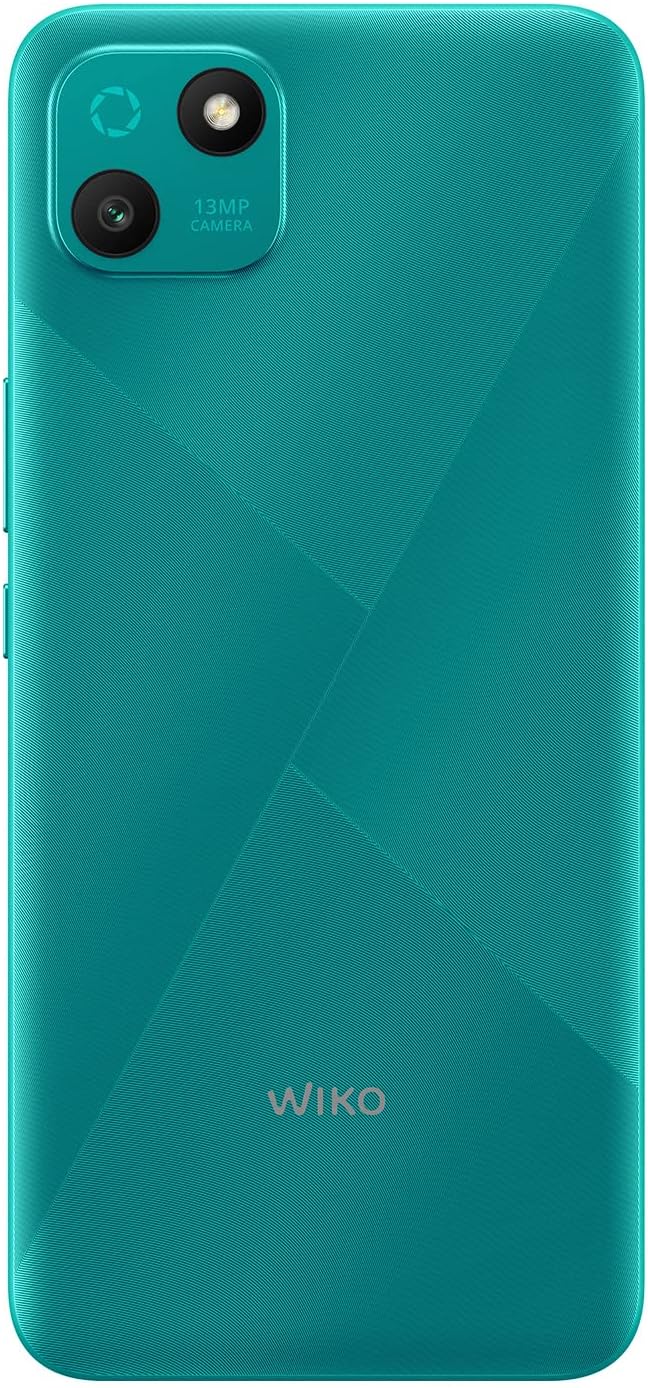
Figura 2: Part posterior detallada view of the WIKO T10, highlighting the 13MP camera module and textured back panel.

Figura 3: Side profile of the WIKO T10, illustrating its slim design and button placement.
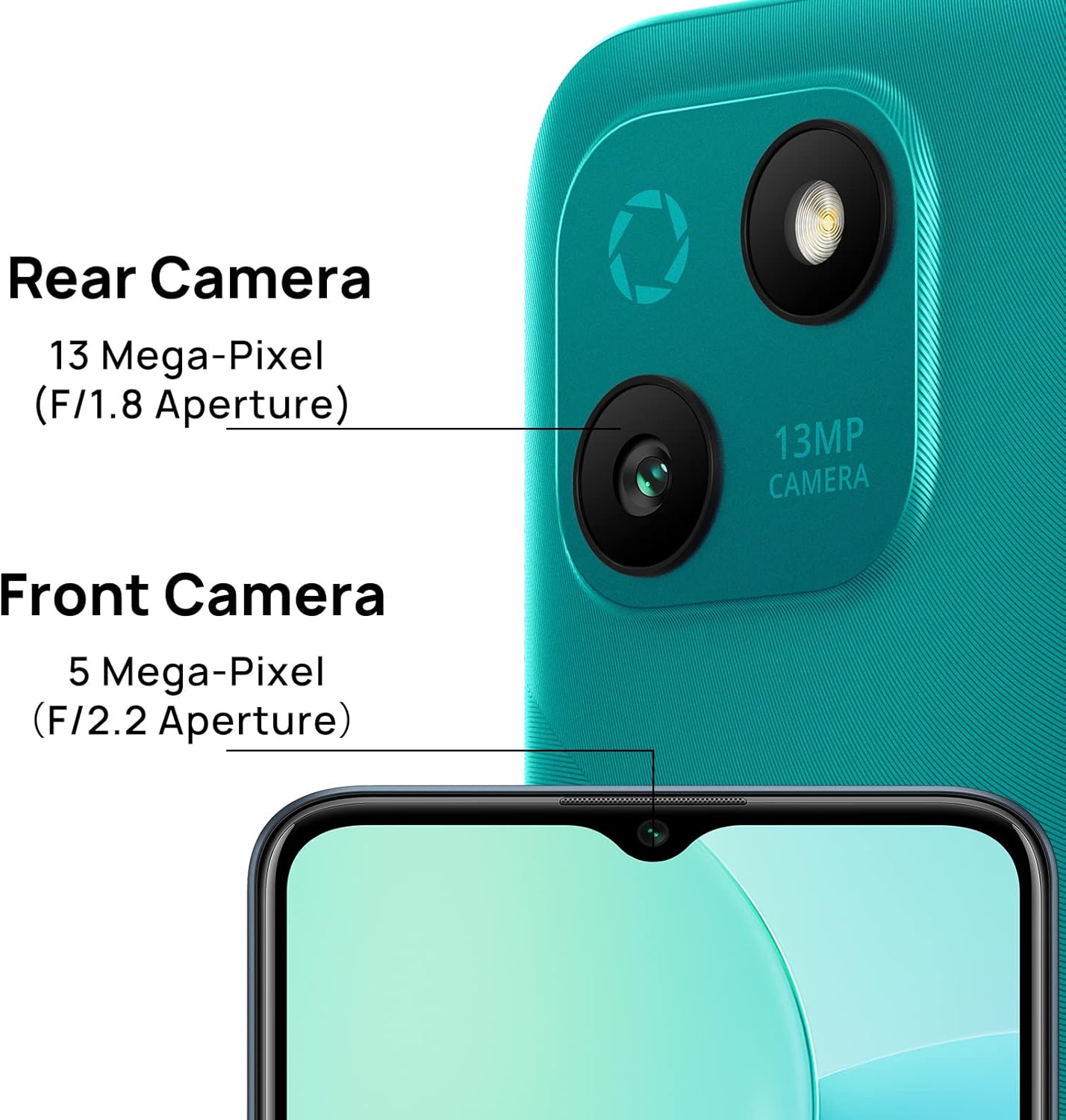
Figura 4: Camera specifications for the WIKO T10, indicating a 13 Mega-Pixel Rear Camera (F/1.8 Aperture) and a 5 Mega-Pixel Front Camera (F/2.2 Aperture).

Figura 5: The WIKO T10 features a 6.5-inch Dewdrop Display, offering an immersive visual experience with minimal bezels.
Guia de configuració
7.1 Inserció de la targeta SIM i SD
The WIKO T10 supports Dual SIM functionality. Follow these steps to insert your SIM card(s) and an optional microSD card for expanded storage:
- Localitza la safata de la targeta SIM al lateral del dispositiu.
- Introduïu l'eina d'expulsió de la SIM al forat petit que hi ha al costat de la safata i premeu suaument fins que la safata surti.
- Col·loqueu la targeta (o targetes) nano-SIM i/o la targeta microSD a les ranures designades de la safata, assegurant-vos que els contactes daurats estiguin mirant cap avall.
- Empenyeu amb cura la safata cap a dins de la ranura fins que quedi alineada amb el cos del telèfon.
7.2 Engegada i configuració inicials
To power on your WIKO T10 for the first time:
- Press and hold the Power button (usually on the right side) until the WIKO logo appears.
- Follow the on-screen prompts to select your language, connect to Wi-Fi, set up your Google account, and configure other initial settings.
7.3 Càrrega del dispositiu
Before first use, it is recommended to fully charge your WIKO T10.
- Connecteu el cable USB tipus C al port de càrrega de la part inferior del telèfon.
- Connecteu l'altre extrem del cable a l'adaptador de corrent i, a continuació, endolleu l'adaptador a una presa de corrent.
- L'indicador de càrrega apareixerà a la pantalla. Desconnecteu el carregador un cop la bateria estigui plena.
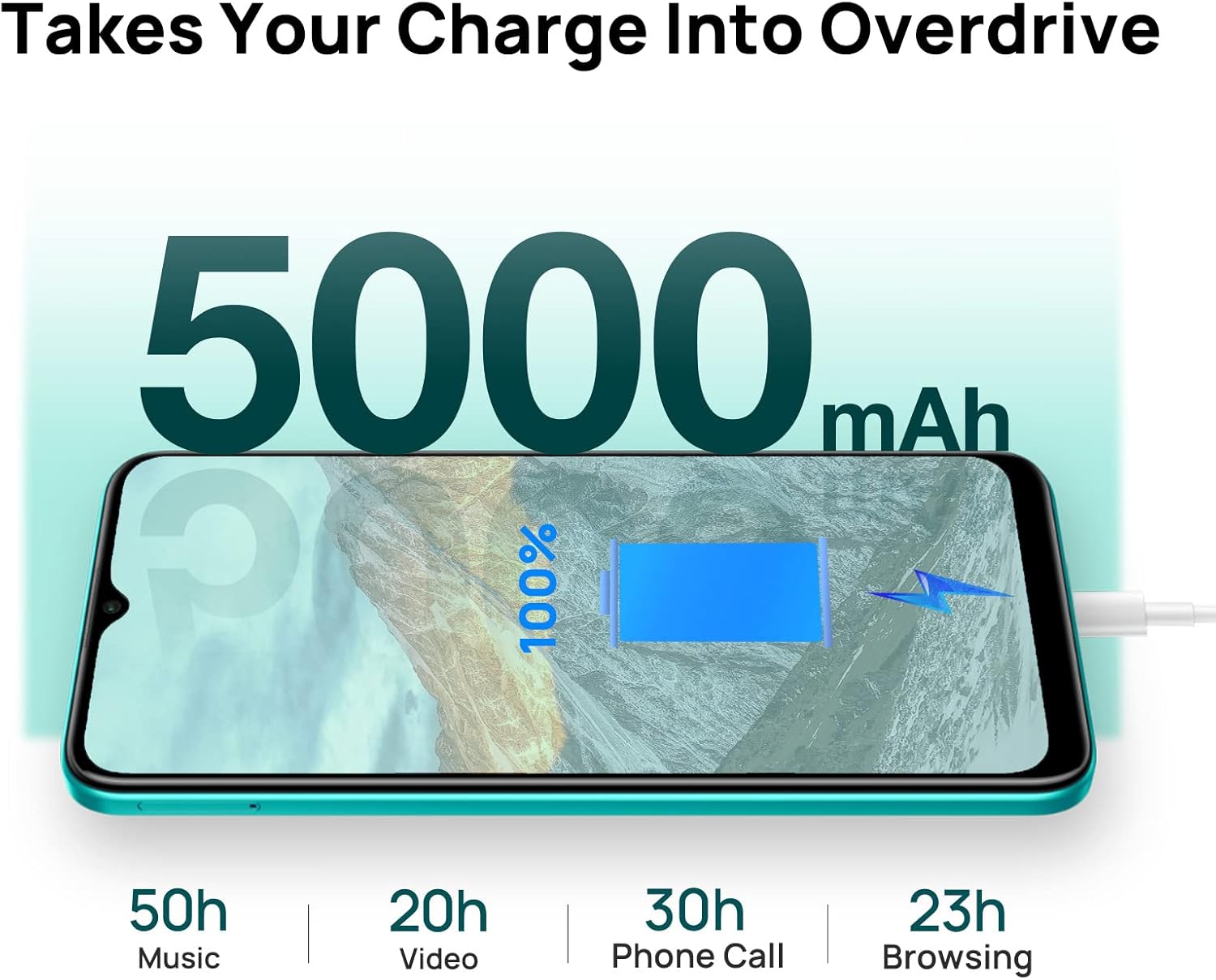
Figura 6: The WIKO T10 features a 5000mAh battery, providing extended usage times such as 50 hours of music, 20 hours of video, 30 hours of phone calls, and 23 hours of browsing on a full charge.
Operating Your WIKO T10
8.1 Navegació bàsica
Your WIKO T10 uses a capacitive touchscreen for interaction:
- Toca: To open apps, select items, or press on-screen buttons.
- Toca i mantén premut: Per accedir a menús contextuals o moure elements.
- Llisca: To scroll through lists, switch between home screens, or navigate through photos.
- Pessigar: Per ampliar o reduir les imatges i web pàgines.
8.2 Fer trucades i enviar missatges
To make a call, open the Phone app and dial the number or select a contact. To send a message, open the Messages app, start a new conversation, and type your text.
8.3 Connexió a xarxes
Your WIKO T10 supports Wi-Fi and 4G cellular networks.
- Wi-Fi: Vés a Configuració > Xarxa i Internet > Wi-Fi, activeu el Wi-Fi i seleccioneu la xarxa que vulgueu.
- Dades mòbils (4G): Vés a Configuració > Xarxa i Internet > Xarxa mòbil i assegureu-vos que les dades mòbils estiguin habilitades.
8.4 Ús de la càmera
The WIKO T10 features a 13MP rear camera and a 5MP front camera. Open the Camera app to capture photos and videos.
- Toqueu el botó de l'obturador per fer una foto.
- Canvia entre els modes foto i vídeo.
- Use the front/rear camera toggle for selfies or main shots.
8.5 Gestió de la bateria
The 5000 mAh battery provides extended usage. To optimize battery life:
- Ajusteu la brillantor de la pantalla.
- Activa el mode d'estalvi de bateria a Configuració > Bateria.
- Tanca les aplicacions que no s'utilitzen i que s'executen en segon pla.
8.6 Gestió d'emmagatzematge
Your WIKO T10 comes with 64GB of internal storage. You can expand this using a microSD card.
- To check storage usage, go to Configuració > Emmagatzematge.
- Esborra regularment la memòria cau i les innecessàries files per alliberar espai.

Figura 7: Key features of the WIKO T10, including its 5000mAh Mega Battery, 6.5" Edgeless Dewdrop Display, 13MP Rear Camera, 64GB Large Storage, and Android 11 operating system.
Manteniment
9.1 Neteja del vostre dispositiu
To keep your WIKO T10 clean and in good condition:
- Feu servir un drap suau i sense borrissol per netejar la pantalla i la carcassa.
- Eviteu utilitzar productes químics agressius, netejadors abrasius o aerosols.
- No permeteu que la humitat entri a les obertures.
9.2 Actualitzacions de programari
Comproveu regularment si hi ha actualitzacions de programari per assegurar-vos que el dispositiu tingui les funcions i els pegats de seguretat més recents. Aneu a Configuració > Sistema > Actualització del sistema.
9.3 Cura de la bateria
To prolong the life of your battery:
- Eviteu descarregar completament la bateria amb freqüència.
- No deixeu el telèfon carregant-se durant llargs períodes després que estigui ple.
- Mantingueu el dispositiu dins de les temperatures de funcionament recomanades.
Resolució de problemes
| Problema | Possible solució |
|---|---|
| El dispositiu no s'encén | Assegureu-vos que la bateria estigui carregada. Premeu i manteniu premut el botó d'engegada durant almenys 10 segons per forçar el reinici. |
| No es pot connectar a la Wi-Fi | Check if Wi-Fi is enabled. Restart your router. Forget the network and reconnect. |
| Les aplicacions són lentes o es bloquegen | Close background apps. Clear app cache. Restart the device. Ensure sufficient storage space. |
| Poca durada de la bateria | Reduce screen brightness. Disable unused features (Bluetooth, GPS). Enable Battery Saver mode. |
| No puc fer ni rebre trucades | Check SIM card insertion. Ensure mobile data is enabled. Contact your network provider. |
Especificacions
| Característica | Detall |
|---|---|
| Marca | Wiko |
| Nom del model | T10 |
| Sistema operatiu | Android 11.0 (Edició Go) |
| Mida de la pantalla | 6.5 polzades |
| Resolució | 2340 x 1080 (HD+) |
| Mida de la memòria RAM | 2 GB |
| Capacitat d'emmagatzematge | 64 GB |
| Resolució de la càmera posterior | 13 MP |
| Resolució de la càmera frontal | 5 MP |
| Capacitat de la bateria | 5000 mAh (polímer de liti) |
| Tecnologia cel·lular | 4G |
| Connectivitat | Cellular, USB Type C |
| Característiques especials | Integrated GPS, Dual SIM |
| Color | Verd maragda |
Garantia i Suport
For warranty information and customer support, please refer to the warranty card included in your product package or visit the official WIKO weblloc web. Conserveu el comprovant de compra per a reclamacions de garantia.
For further assistance, you may contact WIKO customer service through their official channels.
Ask a question about this manual
Ask about setup, troubleshooting, compatibility, parts, safety, or missing instructions. Manuals+ will review the question and use this page’s manual context to help answer it.