1. Introducció
This manual provides detailed instructions for the installation, operation, and maintenance of your Fractal Design Define 7 Nano Black Solid Mini ITX PC Case. Please read this manual thoroughly before beginning assembly to ensure proper installation and to maximize the performance and longevity of your system.
The Define 7 Nano is a compact Mini ITX case designed for silent operation and flexible component support, offering a balance of size and functionality for small form factor builds.

Figura 1: Part frontal view of the Fractal Design Define 7 Nano Black Solid Mini ITX PC Case.
2. Informació de seguretat
Observeu les següents precaucions de seguretat durant la instal·lació i el funcionament:
- Desconnecteu sempre l'alimentació de la presa de corrent abans d'instal·lar o treure qualsevol component.
- Porteu una polsera antiestàtica per evitar danys per descàrrega electrostàtica (ESD) als components sensibles.
- Handle components carefully to avoid physical damage.
- Assegureu-vos que hi hagi una ventilació adequada al voltant de la carcassa de l'ordinador per evitar el sobreescalfament.
- Mantingueu la carcassa allunyada de líquids i d'humitat excessiva.
- No intenteu modificar l'estructura de la carcassa, ja que això podria anul·lar la garantia i suposar riscos per a la seguretat.
3. Contingut del paquet
Verifiqueu que tots els components siguin presents al paquet:
- Fractal Design Define 7 Nano PC Case
- Accessory Box (screws, zip ties, standoffs, cleaning cloth)
- Manual d'usuari (aquest document)
- Pre-installed fans (Dynamic X2 GP-12/GP-14, quantity may vary)

Figura 2: Explotat view showing the various removable components of the Define 7 Nano case.
4. Configuració i instal·lació de components
4.1. Preparació
- Desempaquetar la caixa: Traieu amb cura la caixa del seu embalatge.
- Traieu els panells laterals: The side panels are secured with captive thumbscrews. Loosen the thumbscrews and slide the panels backward to remove them.
- Remove Top Panel (Optional): The top panel can be removed for easier access during installation or for enhanced airflow. Press the release button at the rear of the top panel and lift it off.
- Remove Front Panel (Optional): The front panel can be carefully pulled off from the bottom for access to front fan mounts and dust filters.
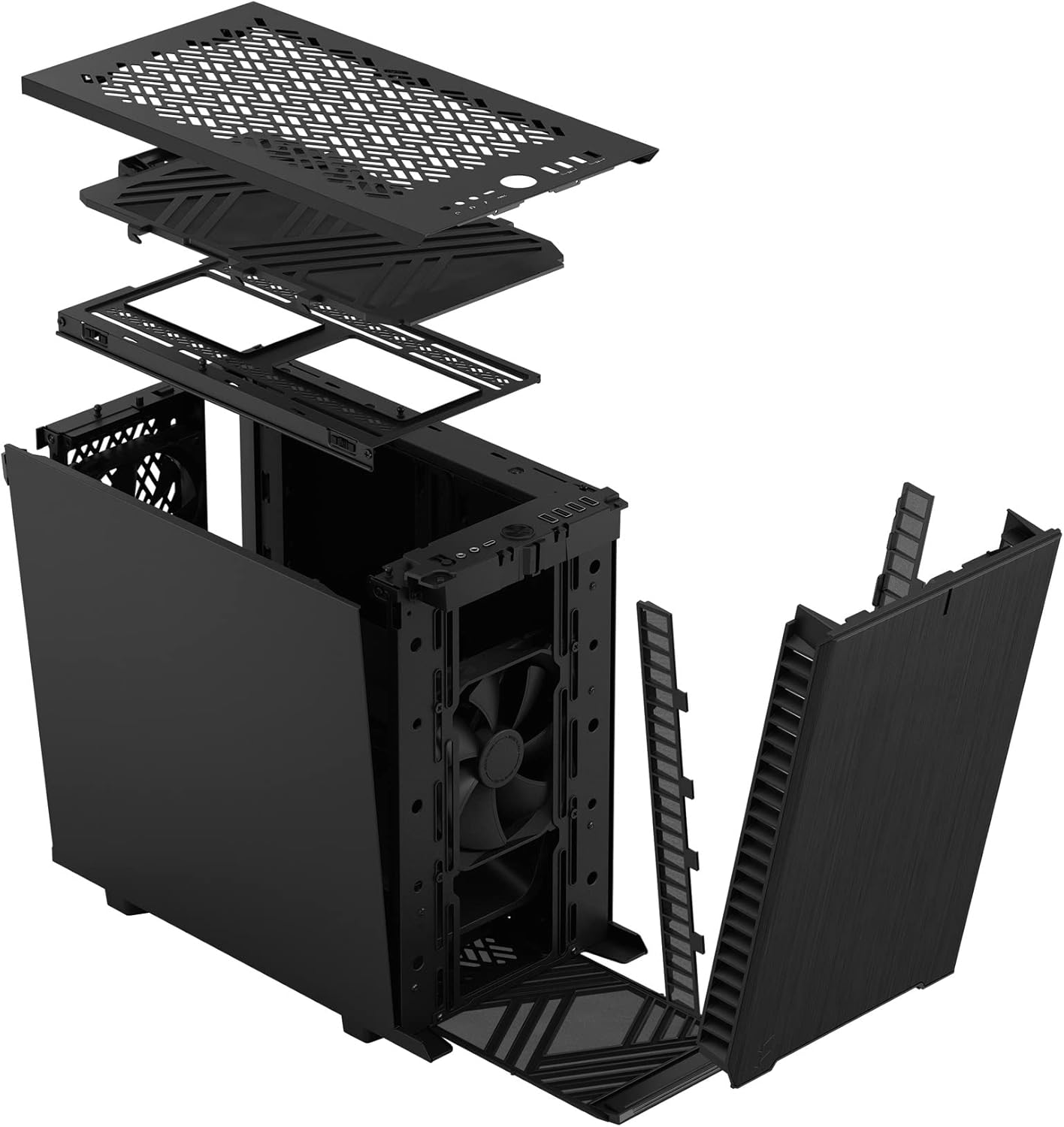
Figura 3: Explotat view illustrating the removal process for the front and top panels.
4.2. Instal·lació de la placa base
The Define 7 Nano supports Mini ITX motherboards.
- Instal·leu l'escut d'E/S: If your motherboard requires an I/O shield, install it into the rear opening of the case before mounting the motherboard.
- Posició de la placa base: Align your Mini ITX motherboard with the pre-installed standoffs inside the case.
- Placa base segura: Use the provided screws from the accessory box to secure the motherboard to the standoffs.
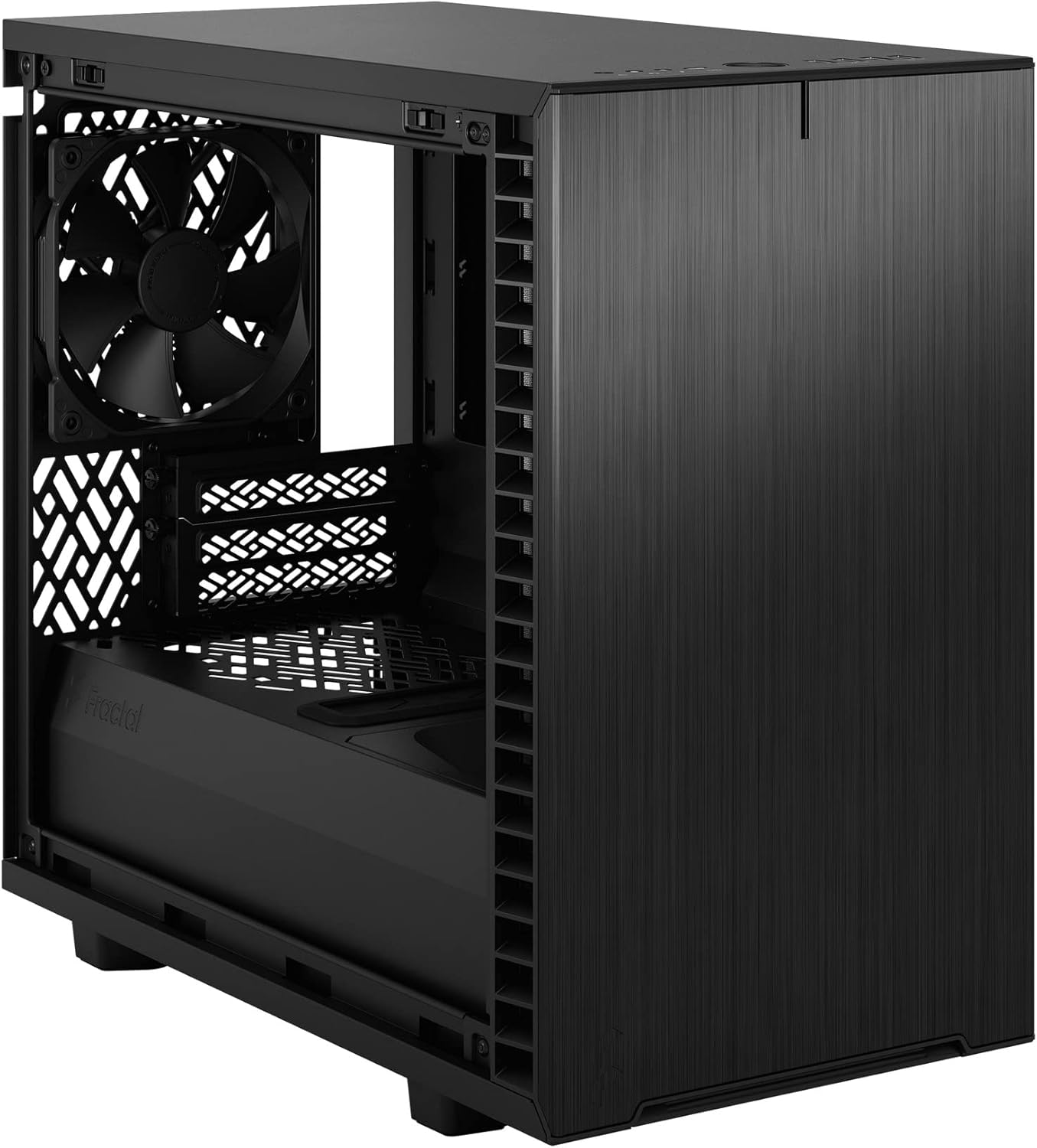
Figura 4: Interior view of the case, highlighting the motherboard mounting area and fan locations.
4.3. Instal·lació de la font d'alimentació (PSU)
The Define 7 Nano supports ATX PSUs.
- Mount PSU Bracket: Attach the PSU mounting bracket to your power supply using the screws provided with the PSU.
- Slide PSU into Case: Slide the PSU with the attached bracket into the rear of the case.
- Font d'alimentació segura: Secure the PSU bracket to the case using the thumbscrews.
4.4. Instal·lació de la unitat d'emmagatzematge
The case supports 2.5" SSDs and 3.5" HDDs.
- Unitats de 2.5": Mount 2.5" drives to the dedicated SSD brackets located behind the motherboard tray or on the PSU shroud. Secure with screws.
- Unitats de 3.5": Install 3.5" drives into the drive cage located beneath the PSU shroud. Secure with screws.
4.5. Instal·lació de la targeta gràfica (GPU)
- Traieu les cobertes de les ranures PCIe: Traieu les cobertes de les ranures PCIe necessàries de la part posterior de la carcassa.
- Inserir GPU: Carefully insert your graphics card into the primary PCIe slot on the motherboard.
- GPU segura: Secure the graphics card to the case using the thumbscrews or standard screws.
4.6. Cooling System Installation (Fans/Radiators)
The Define 7 Nano offers flexible cooling options.
- Ventiladors frontals: Up to two 120/140mm fans or a 240/280mm radiator can be installed at the front.
- Fans principals: Up to two 120/140mm fans or a 240mm radiator can be installed at the top (requires removing the solid top panel and installing the ventilated top panel).
- Ventilador posterior: One 120mm fan can be installed at the rear.
- Bottom Fan: One 120mm fan can be installed at the bottom.
Assegureu-vos que els ventiladors estiguin orientats correctament per a un flux d'aire òptim (d'entrada o sortida).
4.7. Gestió de cables
The case features routing channels and Velcro straps behind the motherboard tray for organized cable management.
- Cables de ruta: Pass power and data cables through the rubber grommets to the back of the motherboard tray.
- Cables segurs: Use the pre-installed Velcro straps and included zip ties to bundle and secure cables.

Figura 5: Interior posterior view demonstrating the cable management system with Velcro straps.
4.8. Connexions del panell frontal
Connect the front panel cables to the corresponding headers on your motherboard:
- Power Button (PWR SW)
- Reset Button (RESET SW)
- Power LED (PWR LED)
- HDD Activity LED (HDD LED)
- Capçalera USB 3.0
- USB Type-C Header (if applicable)
- Capçalera d'àudio HD
Refer to your motherboard manual for exact header locations.
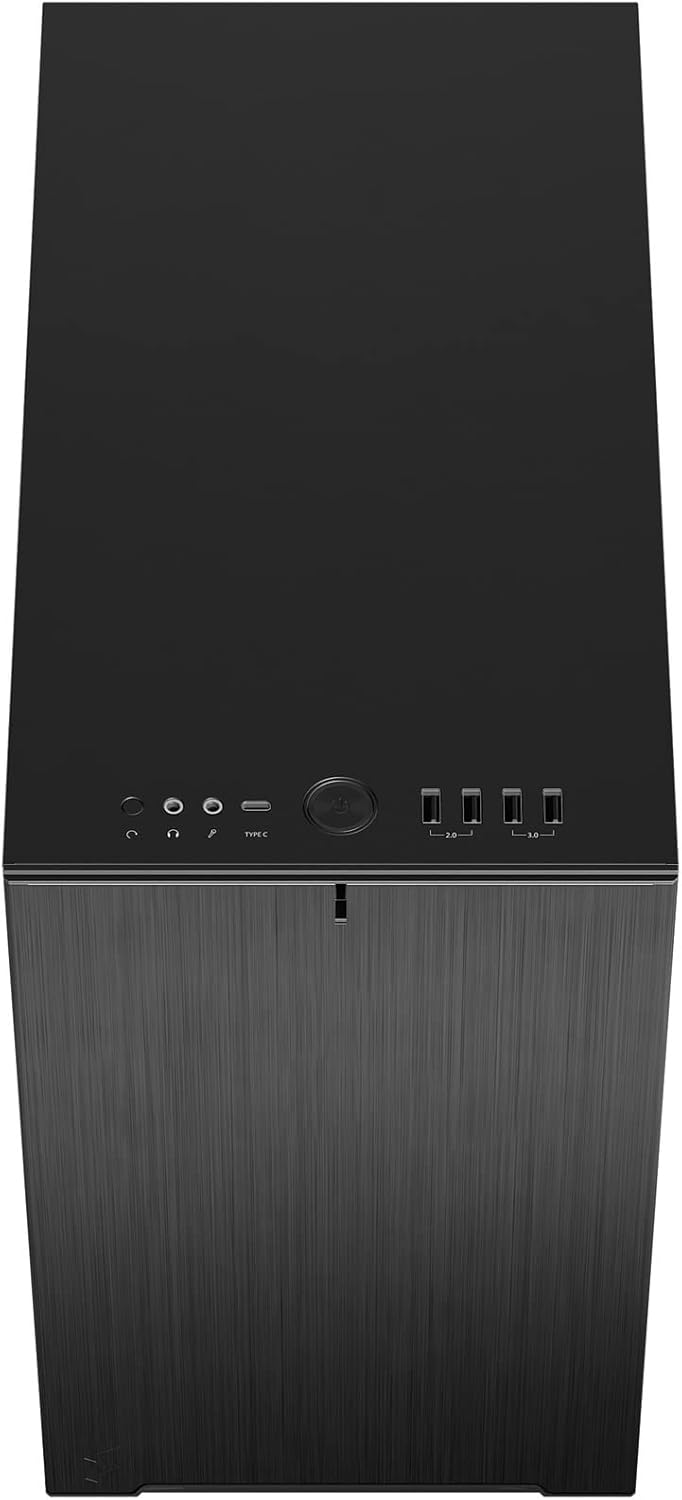
Figura 6: Part superior frontal view displaying the front I/O panel with USB ports, audio jacks, and power button.
5. Instruccions de funcionament
5.1. Encès / apagat
- Encès: Press the power button located on the front I/O panel.
- Apagar: Initiate a shutdown from your operating system. Alternatively, press and hold the power button for 5 seconds for a forced shutdown.
5.2. Using Front Panel Ports
El panell d'E/S frontal proporciona un accés convenient a:
- Ports USB 3.0: Per a la transferència de dades d'alta velocitat amb dispositius compatibles.
- Port USB tipus C: For modern devices requiring a Type-C connection.
- Preses d'àudio: Per connectar auriculars i micròfons.
6. Manteniment
Un manteniment regular ajuda a garantir un rendiment òptim i una llarga vida útil dels components del teu PC.
6.1. Neteja del filtre de pols
The Define 7 Nano is equipped with easily removable dust filters to prevent dust buildup inside the case.
- Filtre frontal: Can be accessed by removing the front panel.
- Filtre superior: Located beneath the ventilated top panel (if installed).
- Filtre inferior: Slides out from the front of the case.
Clean filters regularly (e.g., monthly) by rinsing them with water and allowing them to dry completely, or by using a soft brush or compressed air.
6.2. Neteja general
- Utilitzeu un suau, damp cloth to wipe down the exterior surfaces of the case.
- Eviteu utilitzar productes químics o materials abrasius que puguin danyar l'acabat.
- For interior cleaning, use compressed air to remove dust from components. Ensure the system is powered off and unplugged.
7. Solució De Problemes
Aquesta secció tracta problemes comuns que podeu trobar.
7.1. Sense alimentació / El sistema no s'inicia
- Comproveu les connexions d'alimentació: Ensure the PSU is properly connected to the wall outlet and the power switch on the PSU is in the 'ON' position. Verify all internal power cables (24-pin ATX, 8-pin CPU, PCIe, SATA) are securely connected.
- Capçaleres del panell frontal: Double-check that the power button header (PWR SW) is correctly connected to the motherboard.
- Motherboard/CPU: Assegureu-vos que la CPU i la RAM estiguin correctament instal·lades.
7.2. Excessive Noise
- Soroll del ventilador: Check if any fan cables are obstructing fan blades. Ensure fans are securely mounted. Consider adjusting fan speeds in your motherboard's BIOS/UEFI or operating system.
- Vibració: Ensure all components (PSU, drives, GPU) are securely fastened to prevent rattling.
7.3. Sobreescalfament
- Flux d'aire: Verify that fans are oriented correctly (intake/exhaust) and that there is adequate airflow.
- Filtres de pols: Clean dust filters regularly to prevent restricted airflow.
- Pasta tèrmica: Ensure CPU cooler has proper thermal paste application.
8. Especificacions
| Característica | Especificació |
|---|---|
| Nom del model | Define 7 Nano |
| Número de model | FD-C-DEF7N-01 |
| Tipus de cas | Mini-torre |
| Compatibilitat amb la placa base | Mini ITX |
| Dimensions (L x A x A) | Aprox. 18.74 x 11.38 x 17.91 polzades (paquet) |
| Pes | Aprox. 18.37 lliures |
| Material | Alumini |
| Color | Negre sòlid |
| Ports d'E / S frontals | 5x USB 3.0, Audio In/Out, Power Button |
| Drive Bays | 2.5" SSD, 3.5" HDD (specific quantities vary by configuration) |
| Mètode de refrigeració | Aire |
| Ventiladors preinstal·lats | Dynamic X2 GP-12 (rear), Dynamic X2 GP-14 (front) |
9. Garantia i Suport
Fractal Design products are manufactured to the highest quality standards and come with a limited warranty. For detailed warranty information, please refer to the official Fractal Design weblloc web o la targeta de garantia inclosa amb el producte.
For technical support, troubleshooting assistance, or to inquire about replacement parts, please visit the official Fractal Design support page:
www.fractal-design.com/support/
Please have your product model number (FD-C-DEF7N-01) and proof of purchase ready when contacting support.


