1. Introducció
This manual provides essential information for the safe and proper use of your Ovsuqu Raycus 30W Fiber Laser Engraver, Model FL-30W. Please read this manual thoroughly before operating the machine to ensure optimal performance and user safety. This device is designed for precision marking and engraving on various materials, including metals and certain non-metals.
2. Informació de seguretat
WARNING: This product contains a Class 2 laser. Direct exposure to the laser beam may cause eye injury. Always wear appropriate laser safety goggles during operation.
- Classe làser: Class 2, with an output power of 0.874mW.
- FDA Accession Number: 2420799-000.
- Always wear certified laser safety goggles that protect against 1064 nm wavelength light.
- Never look directly into the laser beam or at reflections from shiny surfaces.
- Ensure the work area is clear of flammable materials.
- Mantingueu els nens i el personal no autoritzat allunyats de la màquina en funcionament.
- Operate the machine in a well-ventilated area to dissipate fumes generated during engraving.
- Assegureu-vos la correcta connexió a terra de l'equip.
3. Producte acabatview
The Ovsuqu Raycus 30W Fiber Laser Engraver is a compact and powerful machine designed for precise material marking. Familiarize yourself with its main components:

Figura 3.1: En general view of the Ovsuqu Raycus 30W Fiber Laser Engraver. This image displays the complete laser marking machine, highlighting its compact design suitable for desktop use.

Figura 3.2: Davant view with labeled components. Key parts include the Galvo head (1), Field lens (2), Working table (3), Control switch (4), and the internal Laser source (5).
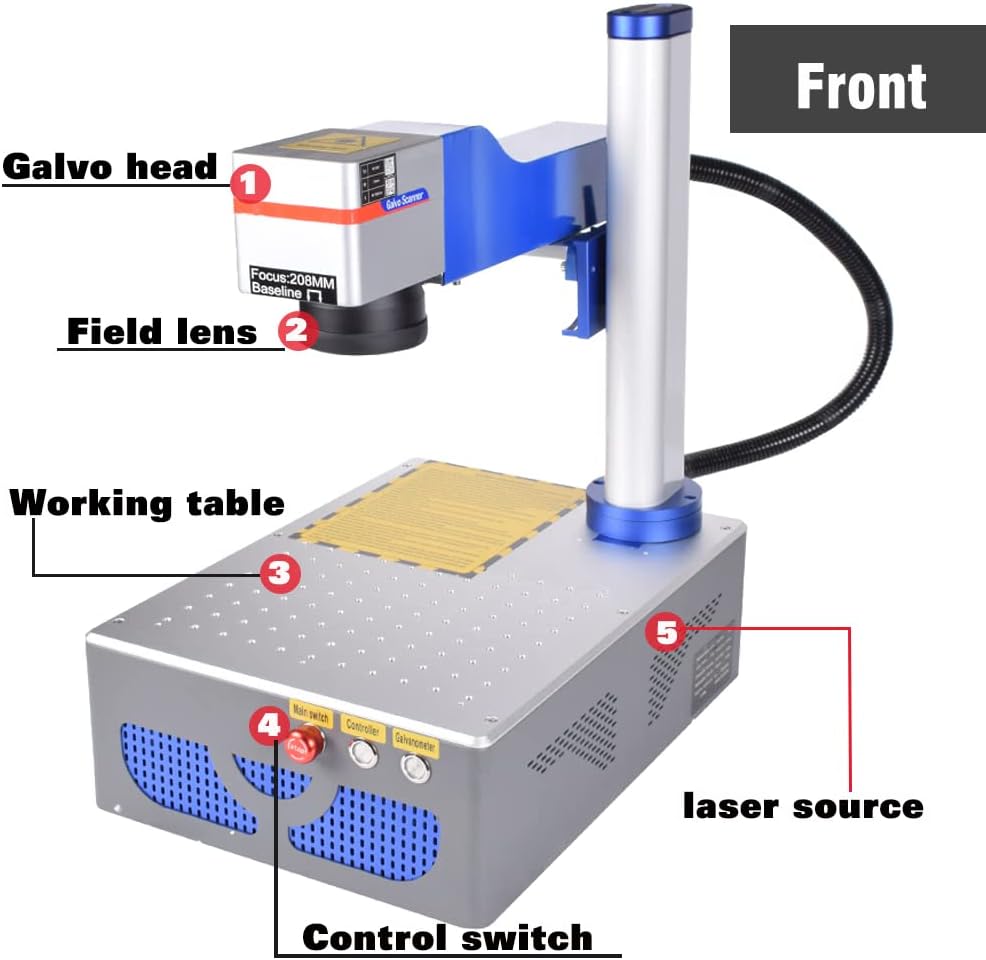
Figura 3.3: Enrere view with labeled ports. This view shows the Laser source protect cable (6), Lifting handle (7), Cooling fan (8), PC-USB port, Pedal Port, Power Socket, and External Ground connection.
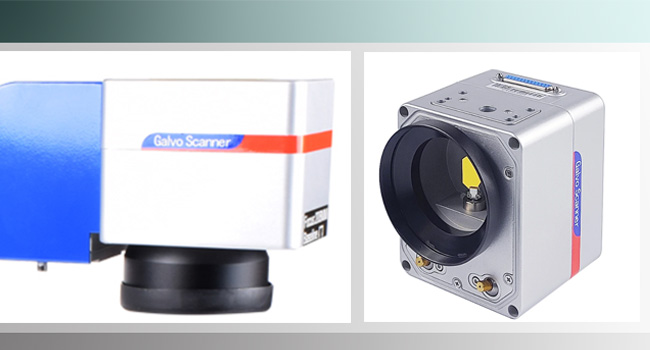
Figura 3.4: Close-up of the Galvo Scanner Head. This component directs the laser beam with high precision across the working area.
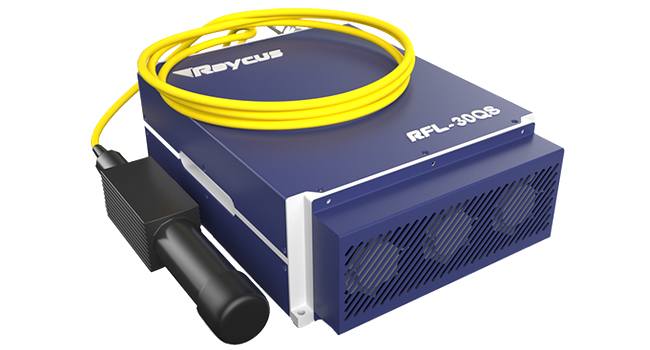
Figura 3.5: Raycus RFL-30QS Fiber Laser Source. This is the core component generating the laser beam, known for its reliability and performance.
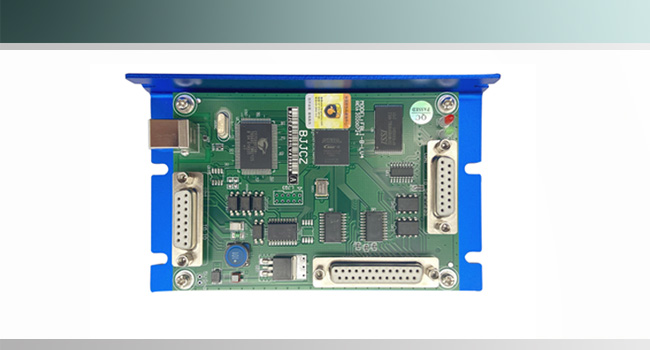
Figura 3.6: BJJCZ Control Board. This board manages the laser's operations and interfaces with the control software.
4. Configuració
4.1 Desembalatge i inspecció
Upon receiving your laser engraver, carefully unpack it. The machine is typically shipped in a protective wooden crate with styrofoam padding. Inspect all components for any signs of damage during transit. Report any damage immediately to the supplier.
4.2 Components inclosos
Verifiqueu que tots els elements siguin presents al paquet:

Figura 4.1: Included accessories. This image shows the various cables, tools, safety glasses, and other items provided with the laser engraver.
- Ovsuqu Raycus 30W Fiber Laser Marking Machine
- Software & Manual (on U Disk)
- Ulleres de seguretat làser
- Interruptor de peu
- Cable d'alimentació
- Cable USB
- Focal Length Ruler
- Fil de terra
- Mounting Hardware (e.g., hex bolts)
4.3 Muntatge
- Carefully attach the Galvo head assembly to the main unit using the provided hex bolts. Typically, this involves securing about 6 bolts.
- Connect the laser source protect cable to its designated port.
- Connect the USB cable from the machine's PC-USB port to your computer.
- Plug the foot switch into the Pedal Port.
- Connect the power cable to the Power Socket and then to a grounded electrical outlet.
- Attach the external ground wire to the designated terminal on the machine and to a reliable ground source.
4.4 Instal·lació del programari
The included U Disk contains the necessary drivers and software (EZCAD). Install these programs on your computer. The machine is also compatible with LightBurn software for Galvo lasers, which may require separate purchase and setup. Refer to the software documentation on the U Disk for detailed installation instructions.
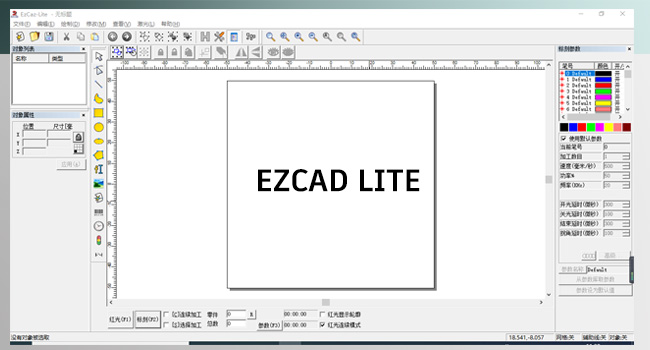
Figura 4.2: EZCAD Lite Software Interface. This is the primary software used to control the laser engraver.
5. Funcionament
5.1 Initial Power-Up and Focus Adjustment
- Ensure all connections are secure and you are wearing safety goggles.
- Turn on the main power switch on the machine.
- Launch the EZCAD software on your computer.
- Place the focal length ruler on your material. Adjust the lifting handle (7 in Figure 3.3) until the laser's red guide light (if equipped) converges into a single, sharp point on the material surface, indicating correct focus.
5.2 Software Usage (EZCAD/LightBurn)
Use the installed software to design or import your engraving patterns. The software allows you to control laser parameters such as power, speed, frequency, and scan area. Refer to the software's dedicated manual for detailed instructions on creating and executing engraving jobs.
5.3 Compatibilitat de materials i aplicacions
The Ovsuqu Raycus 30W Fiber Laser Engraver is suitable for a wide range of materials and applications:
- Metalls: Gold, Silver, Aluminum, Stainless Steel, Brass, Copper, Alloy Steel, Carbon Steel. Applications include metal surface processing, peeling coatings, aluminum black marking, and black/color marking on stainless steel.
- Non-metals: Nylon, light button, ABS, PVC, PES. Suitable for excellent marking effects on plastics and other sensitive materials.
The machine is ideal for large area engraving and applications in the semi-conductor and electronics industries.
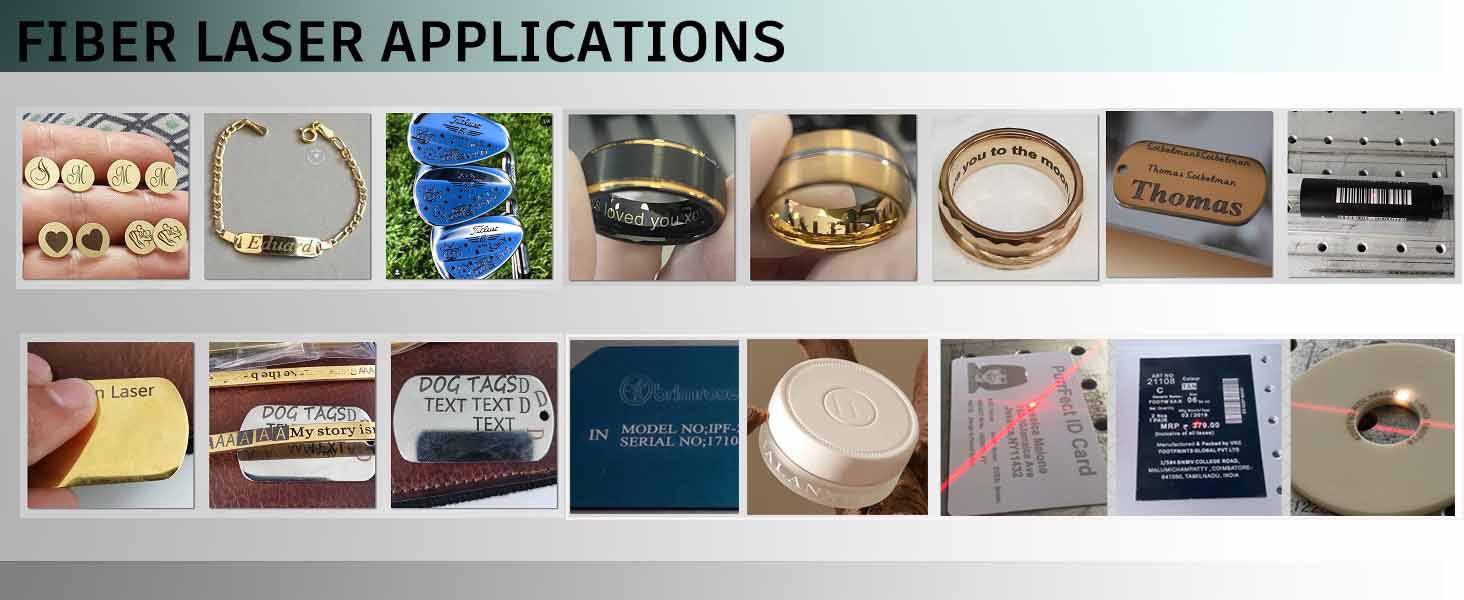
Figura 5.1: Examples of Fiber Laser Applications. This image showcases various items marked or engraved by a fiber laser, including jewelry, metal tags, and plastic components.
6. Manteniment
Un manteniment regular garanteix la longevitat i el rendiment òptim del vostre gravador làser.
- Neteja: Keep the working table and the exterior of the machine clean. Use a soft, dry cloth.
- Cura de les lents: The field lens is a critical component. Clean it gently with a lens cleaning solution and a lint-free cloth specifically designed for optical components. Avoid touching the lens surface with bare hands.
- Ventiladors de refrigeració: Periodically check and clean the cooling fans (8 in Figure 3.3) to ensure proper airflow and prevent overheating.
- Connexions: Regularly inspect all cables and connections for wear or looseness.
- Actualitzacions de programari: Keep your EZCAD or LightBurn software updated to the latest version for improved features and stability.
7. Solució De Problemes
This section addresses common issues you might encounter. For more complex problems, refer to the software manual or contact customer support.
- Sense sortida làser: Check if the machine is powered on, the emergency stop button is disengaged, and all cables (power, USB) are securely connected. Verify laser parameters in the software.
- Mala qualitat del gravat: Ensure the laser is properly focused on the material. Adjust laser power, speed, and frequency settings in the software. Clean the field lens if necessary.
- Problemes de connexió de programari: Reinstall USB drivers from the U Disk. Try a different USB port or cable. Restart both the machine and the computer.
- La màquina no respon: Check the emergency stop button. Ensure the main switch is on. Restart the machine.
8. Especificacions
| Característica | Especificació |
|---|---|
| Marca | Ovsuqu |
| Model | FL-30W |
| Font làser | Raycus 30W Fiber Laser |
| Classe làser | Class 2 (0.874mW Output Power) |
| FDA Accession Number | 2420799-000 |
| Longitud d'ona central | 1064 nm |
| Repetition Frequency Range | 40-60 kHz |
| Maximum Single Pulse Energy | 0.75 mJ |
| Interval d'ajust de potència | 10-100% |
| Àrea de treball | 200 x 200 mm |
| Junta de Control | BJJCZ Original |
| Compatibilitat de programari | EZCAD (included), LightBurn (compatible) |
| Vida útil estimada | 100,000 hores |
| Materials | Metals (Gold, Silver, Aluminum, Stainless Steel, Brass, Copper, etc.), Non-metals (Nylon, ABS, PVC, PES, etc.) |
9. Garantia i Suport
The Ovsuqu Raycus 30W Fiber Laser Engraver comes with a 2 any de garantia. For technical assistance, troubleshooting beyond this manual, or warranty claims, please contact your vendor or the manufacturer's customer support. Ensure you have your model number (FL-30W) and purchase details available when seeking support.


