1. Introducció
The Anyeast AT005 Barcode Scanner is a versatile, wearable mini/ring 2D 1D QR code reader designed for various applications including POS systems, inventory management, libraries, and more. It offers multiple connection options and advanced decoding capabilities to enhance work efficiency.

Figure 1.1: Anyeast AT005 Barcode Scanner in use, worn on a finger.
2. Guia de configuració
2.1 Contingut del paquet
Si us plau, verifiqueu que tots els elements siguin presents al vostre paquet:
- Anyeast AT005 Barcode Scanner
- Cable de càrrega USB
- Receptor sense fil 2.4G
- Manual d'usuari
2.2 Càrrega de l'escàner
Before first use, fully charge the scanner. Connect the USB charging cable to the scanner's charging port and a power source. A full charge takes approximately 1 hour and provides up to 8 hours of continuous scanning time.

Figure 2.1: The scanner features a 360mAh battery, offering 8 hours of scanning time and 4 weeks of standby time with a 1-hour charge.
2.3 Mètodes de connexió
The Anyeast AT005 scanner supports three connection modes: 2.4G Wireless, Bluetooth, and USB Wired. It is compatible with Windows XP/7/8/10, Mac OS, iOS, Linux, Unix, and Android systems.
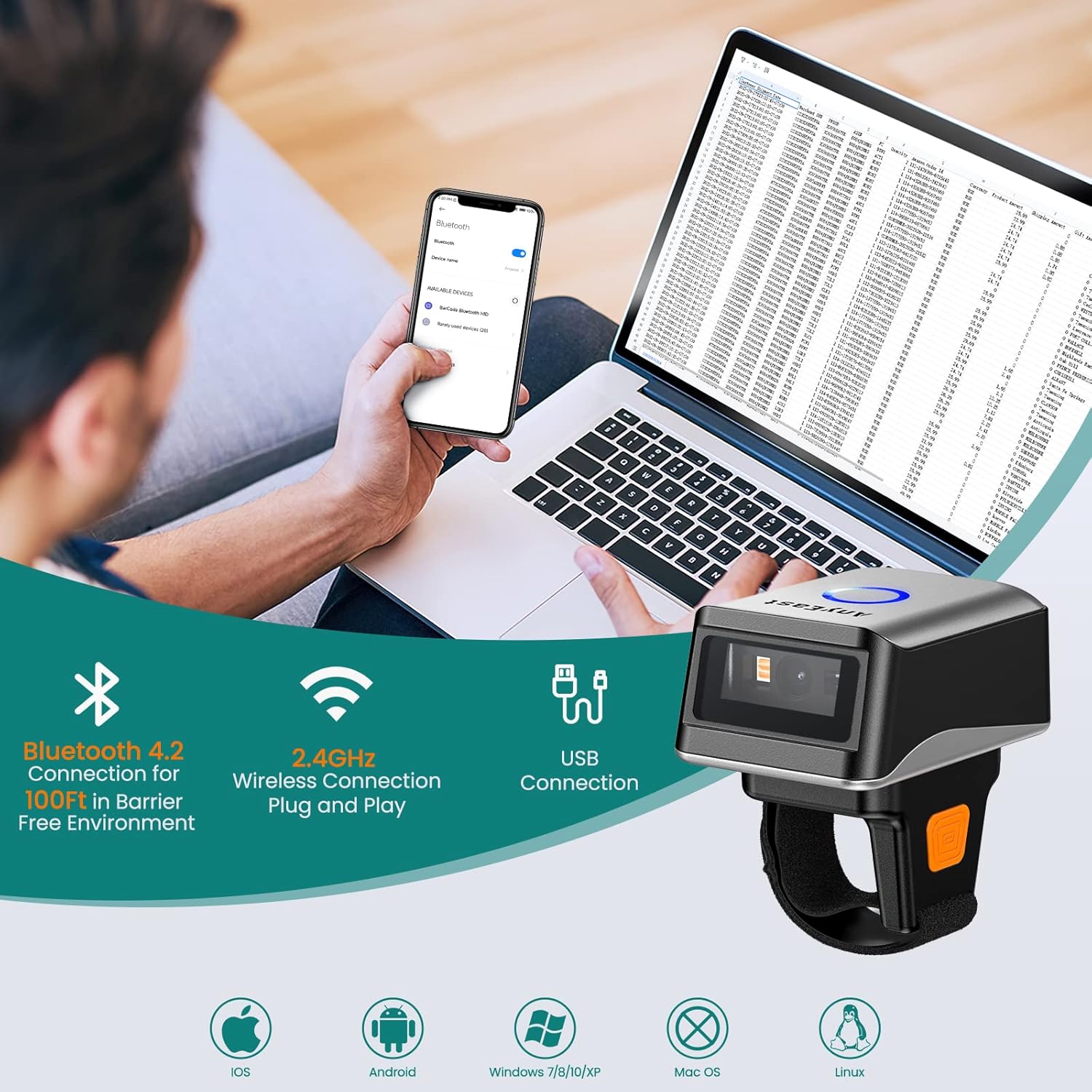
Figure 2.2: The scanner offers versatile connectivity options for various devices.
2.3.1 Mode sense fil 2.4G
Plug the 2.4G wireless receiver into your device's USB port. The scanner will automatically pair. This mode offers a stable connection up to 100 feet in a barrier-free environment.
2.3.2 Mode Bluetooth
To connect via Bluetooth, ensure Bluetooth is enabled on your device. Scan the Bluetooth pairing barcode in the user manual. Then, search for 'BarCode scanner HID' in your device's Bluetooth settings and pair. This mode is ideal for mobile devices like smartphones and tablets.
2.3.3 Mode per cable USB
Connect the scanner directly to your device using the provided USB cable. This mode offers a plug-and-play experience, ideal for stable, direct connections to PCs or POS systems.
Video 2.1: Demonstrates the three connection methods (2.4G Wireless, Bluetooth, USB Wired) for the Anyeast Barcode Scanner.
3. Instruccions de funcionament
3.1 Modes d'escaneig
The scanner offers three distinct scanning modes to suit various operational needs:
- Key Trigger Scanning: Press the scan button to activate the laser and scan a barcode.
- Auto-Sensing Scanning: L'escàner detecta automàticament un codi de barres al seu camp de view and scans it without requiring a button press.
- Escaneig continu: The scanner continuously emits the laser, scanning any barcode that passes through its beam.

Figure 3.1: Visual representation of the three available scanning modes.
3.2 Modes de càrrega
Choose between instant data upload or storage for later transfer:
- Mode de càrrega instantània: Barcodes are transmitted to your connected device immediately after scanning.
- Mode d'emmagatzematge: The scanner can store up to 20,000 barcode data entries internally. Data can be uploaded to your device at a later time by scanning a specific command barcode in the manual.

Figure 3.2: The two data upload modes: instant transfer or internal storage.
Video 3.1: Demonstrates the three scanning modes and the storage mode functionality of the AT005 scanner.
3.3 Capacitats de descodificació
The Anyeast AT005 features an advanced CMOS sensor capable of accurately decoding a wide range of 1D and 2D barcodes, even those that are colorful, fuzzy, damaged, reflective, or smudged. Supported barcode types include:
- Codis de barres 1D: Code 128, Code39, EAN, UPC, ISBN, etc.
- Codis de barres 2D: QR Code, Micro QR Code, Data Matrix, PDF417.

Figure 3.3: The scanner's super decoding ability for various barcode types.
3.4 Custom Prefix/Suffix
You can customize the scanner's output by adding or hiding custom prefixes or suffixes to the scanned data. Refer to the specific barcodes in your user manual to configure these settings.
Video 3.2: Guide on how to add or hide custom prefixes and suffixes to scanned barcode data.
3.5 Sound and Vibration Settings
The scanner offers selectable feedback options including mute, vibrate, and adjustable volume levels (low, medium, high) to suit your working environment. These settings can be configured by scanning specific barcodes found in the user manual.
Video 3.3: Demonstrates the vibration setting and wide applicability of the AT005 scanner.
4. Manteniment
To ensure the longevity and optimal performance of your Anyeast AT005 Barcode Scanner, follow these maintenance guidelines:
- Neteja: Feu servir un drap suau i sec per netejar l'exterior de l'escàner. Per a la finestra d'escaneig, feu servir un drap sense borrissol lleugerament humit.ampNetegeu amb un netejador suau i no abrasiu. Eviteu productes químics agressius o materials abrasius.
- Emmagatzematge: Store the scanner in a cool, dry place away from direct sunlight, extreme temperatures, and corrosive materials.
- Cura de la bateria: If storing for an extended period, ensure the battery is partially charged (around 50%) to prevent deep discharge. Recharge periodically if not in use.
- Eviteu les gotes: While durable, avoid dropping the scanner to prevent internal damage.
5. Solució De Problemes
If you encounter issues with your Anyeast AT005 Barcode Scanner, refer to the following common problems and solutions:
| Problema | Causa possible | Solució |
|---|---|---|
| L'escàner no s'encén | Bateria baixa; interruptor apagat | Charge the scanner; Ensure power switch is in the ON position. |
| Sense transmissió de dades | Not paired; Out of range; Incorrect mode | Re-pair the scanner; Move closer to the device; Ensure correct connection mode (2.4G, Bluetooth, or USB) is selected. |
| No es poden escanejar codis de barres | Barcode damaged/unreadable; Incorrect barcode type; Scanning window dirty | Try scanning a different barcode; Verify barcode type is supported; Clean the scanning window. |
| Data not appearing correctly | Incorrect prefix/suffix settings; Keyboard language mismatch | Reset prefix/suffix settings using manual barcodes; Ensure host device keyboard language matches scanner settings. |
For further assistance, please refer to the detailed troubleshooting section in your physical user manual or contact Anyeast customer support.
6. Especificacions
| Característica | Detall |
|---|---|
| Número de model | AT005 |
| Dimensions del producte | 4.96 x 4.33 x 1.81 polzades |
| Pes de l'article | 4.6 unces |
| Bateries | Necessites 1 piles AAA. (inclòs) |
| Tecnologia de connectivitat | Bluetooth, 2.4G sense fil, USB per cable |
| Dispositius compatibles | Smartphone, Tablet, Laptop, PC, POS |
| Font d'alimentació | Battery-Power or Plug and Play |
| Fabricant | Anyeast |
| Capacitat de descodificació | 1D (Code 128, Code39, EAN, UPC, ISBN), 2D (QR Code, Micro QR Code, Data Matrix, PDF417) |
| Capacitat d'emmagatzematge | Up to 20,000 barcode data entries |
7. Garantia i Suport
Anyeast provides a Garantia de devolució de 30 dies i a 2 anys de garantia for the AT005 Barcode Scanner. For warranty claims, technical support, or any inquiries, please contact Anyeast customer service through the contact information provided in your product packaging or on the official Anyeast weblloc.


