
1. Introducció
Gràcies per triar el suport portàtil per a telèfon amb altaveu Bluetooth JTEMAN. Aquest dispositiu versàtil combina un suport estable per a telèfon amb un altaveu Bluetooth d'alta qualitat, oferint comoditat per al consum multimèdia, les videotrucades i la reproducció d'àudio. Aquest manual us guiarà durant la configuració, el funcionament i el manteniment del vostre nou dispositiu.

Figura 1: Suport portàtil per a telèfon JTEMAN amb altaveu Bluetooth (blanc)
2. Contingut del paquet
Marqueu la casella per als elements següents:
- Suport per a telèfon amb altaveu Bluetooth
- Manual d'usuari
- Cable de carregador USB-A a tipus C (1)
3. Producte acabatview
El JTEMAN L9 està dissenyat per a un ús multifuncional, ja que serveix com a suport per a telèfon i com a altaveu Bluetooth. Presenta un disseny ajustable i plegable per a la portabilitat i una òptima impressió. viewangles d'ajust.
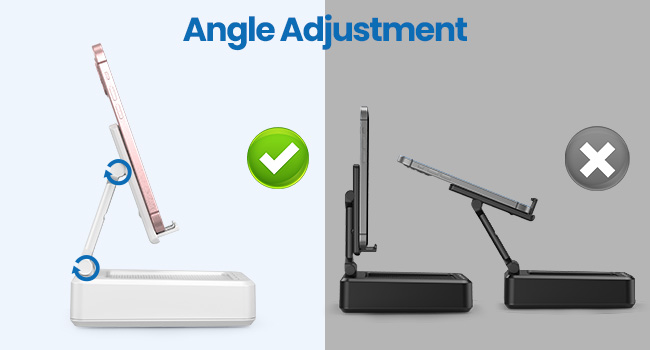
Figura 2: Dimensions i controls del producte
Característiques principals:
- Funcionalitat 2 en 1: Combina un suport per a telèfon amb un altaveu Bluetooth.
- Àmplia compatibilitat: Admet la majoria de telèfons intel·ligents, tauletes i lectors electrònics de 4 a 13 polzades amb Bluetooth.
- Ajustable i plegable: Múltiples viewangles d'inclinació i un disseny compacte i portàtil.
- Estable i antilliscant: Compta amb coixinets de silicona antilliscants per a la protecció i l'estabilitat del dispositiu.
- Micròfon integrat: Permet trucades de mans lliures nítides.

Figura 3: Funcions integrades
4. Configuració
4.1 Càrrega del dispositiu
- Connecteu el cable de càrrega USB-A a tipus C proporcionat al port de càrrega del lateral del JTEMAN L9.
- Connecteu l'altre extrem del cable a un adaptador de corrent USB compatible (no inclòs).
- El llum indicador de càrrega es mostrarà vermell durant la càrrega i es tornarà verd quan estigui completament carregat. Una càrrega completa triga aproximadament 4 hores.
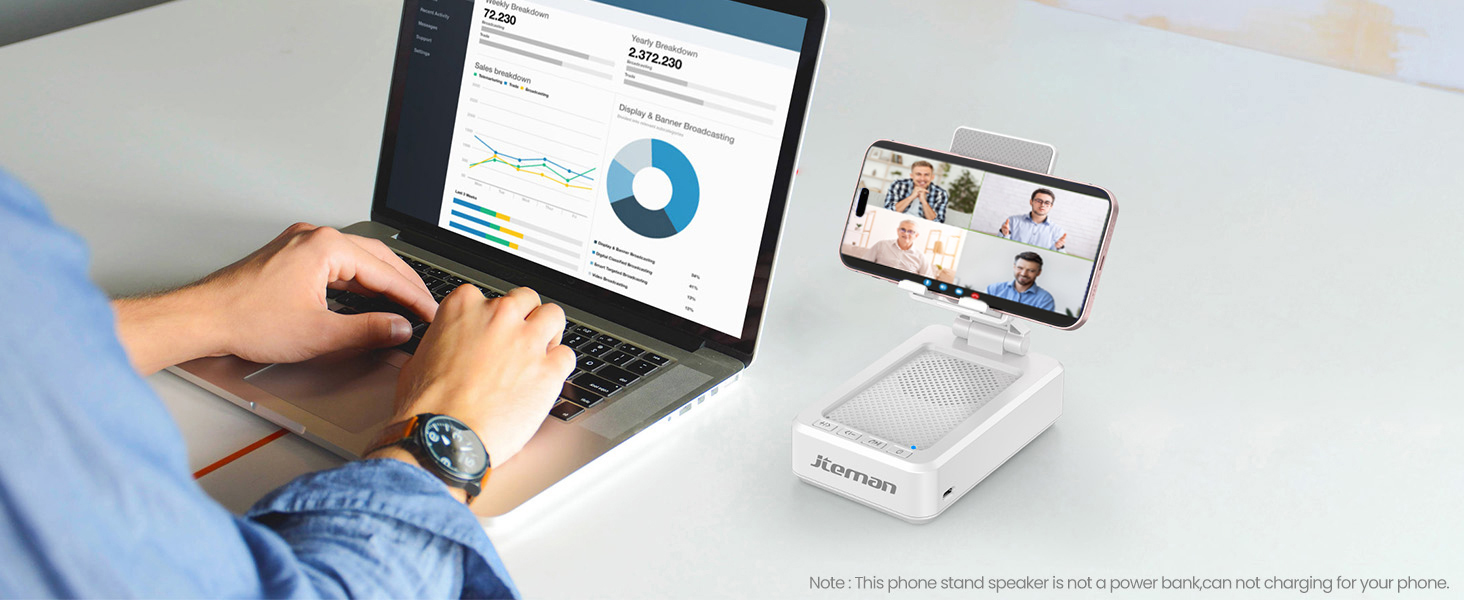
Figura 4: Càrrega del JTEMAN L9
4.2 Vinculació Bluetooth
- Premeu i manteniu premut el botó d'engegada del JTEMAN L9 fins que sentiu un missatge audible que indica que està encès i en mode d'emparellament Bluetooth. L'indicador lluminós Bluetooth parpellejarà.
- Al teu telèfon intel·ligent, tauleta o lector electrònic, vés a la configuració de Bluetooth.
- Cerca dispositius disponibles i seleccioneu "JTEMAN L9" de la llista.
- Un cop connectat, sentireu un to de confirmació i l'indicador lluminós de Bluetooth romandrà fix.
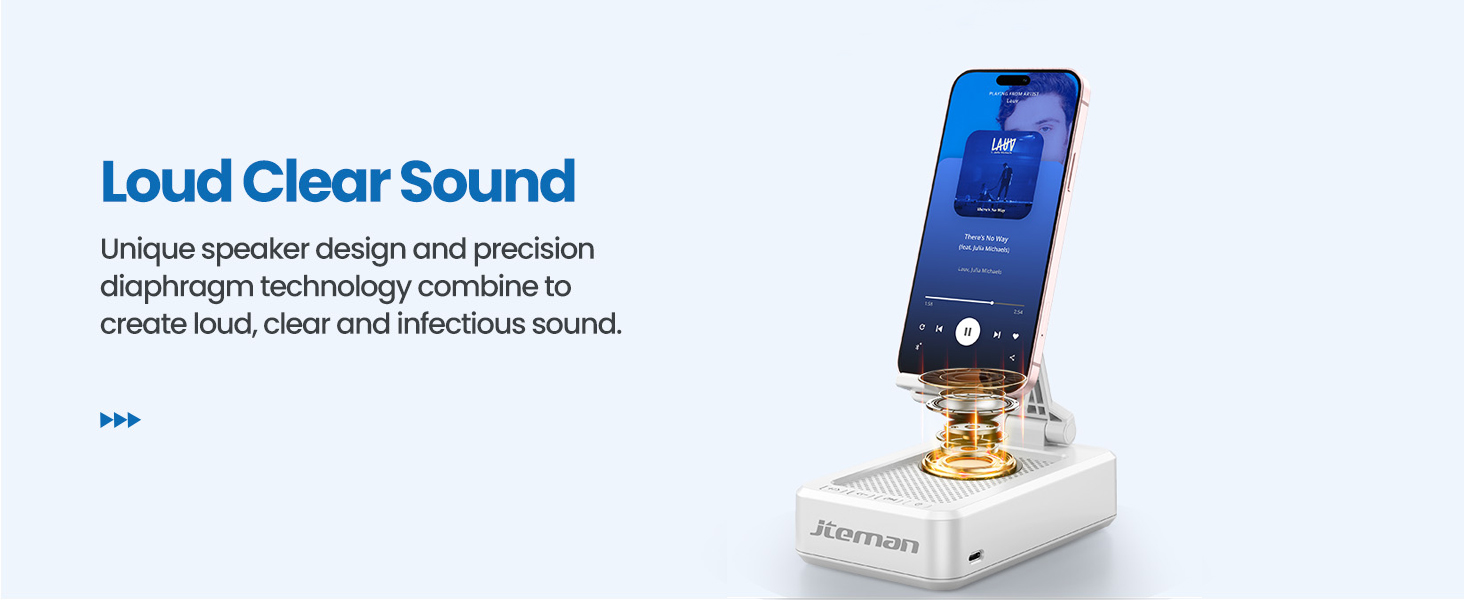
Figura 5: Connexió Bluetooth fàcil
5. Instruccions de funcionament
5.1 Ús com a suport per a telèfon/tauleta
- Estireu suaument el braç del suport del telèfon des de la seva posició plegada.
- Ajusteu l'angle del suport al vostre gust viewposició d'inclinació. El suport està dissenyat per ser estable en diversos angles.
- Col·loca el teu telèfon intel·ligent, tauleta o lector electrònic al suport. Les coixinets de silicona antilliscants subjectaran el dispositiu.
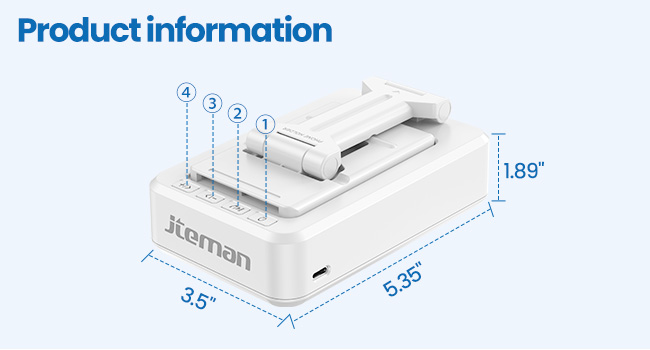
Figura 6: Ajust de l'angle per a una visió òptima Viewing
5.2 Ús de l'altaveu Bluetooth
Un cop emparellat amb el dispositiu, l'àudio es reproduirà automàticament a través de l'altaveu JTEMAN L9.
- Reproduir/pausa: Premeu el botó Reprodueix/Pausa de l'altaveu per controlar la reproducció multimèdia.
- Control de volum: Feu servir els botons de volum (+/-) de l'altaveu per ajustar el nivell d'àudio.
- Navegació per pista: Feu servir els botons de salt (<< / >>) per anar a la pista anterior o següent.
- Trucades mans lliures: El micròfon integrat permet una comunicació clara amb les mans lliures. Premeu el botó de la icona del telèfon per respondre o finalitzar trucades.

Figura 7: Sortida de so alt i clar
5.3 Portabilitat
Quan no s'utilitza, el braç del suport del telèfon es pot plegar cap avall, cosa que fa que el dispositiu sigui compacte i fàcil de transportar a la bossa.

Figura 8: Disseny plegable i portàtil
5.4 Vídeos oficials de productes
Vídeo 1: Demostra la qualitat del so i l'emparellament instantani del JTEMAN L9.
Vídeo 2: Mostra la potència i la versatilitat de l'altaveu i el suport JTEMAN L9.
Vídeo 3: Destaca el disseny compacte, el so clar i la base antilliscant del JTEMAN L9.
6. Manteniment
- Mantingueu el dispositiu net netejant-lo amb un drap suau i sec.
- Eviteu exposar el dispositiu a temperatures extremes, humitat o llum solar directa.
- No utilitzeu netejadors abrasius ni dissolvents.
7. Solució De Problemes
| Problema | Causa possible | Solució |
|---|---|---|
| El dispositiu no s'encén | Bateria baixa | Carregueu el dispositiu amb el cable USB-C proporcionat. |
| No es pot emparellar per Bluetooth | Bluetooth no habilitat al dispositiu d'origen; dispositiu massa lluny; ja està emparellat amb un altre dispositiu | Assegureu-vos que el Bluetooth estigui activat i dins del rang (aproximadament 10 m). Desconnecteu-vos d'altres dispositius. |
| Sense so ni volum baix | Volum massa baix a l'altaveu o al dispositiu font; no està connectat correctament | Augmenta el volum en tots dos dispositius. Torna a emparellar la connexió Bluetooth. |
| Salt/interrupció d'àudio | Interferència; dispositiu massa lluny; bateria baixa | Apropa't al dispositiu font. Assegura't que no hi hagi obstacles. Carrega el dispositiu. |
8. Especificacions
| Característica | Detall |
|---|---|
| Dimensions del producte | 5.35 x 3.5 x 1.89 polzades |
| Pes de l'article | 11.5 unces |
| Número de model de l'article | L9 |
| Marca | JTEMAN |
| Color | Blanc |
| Factor de forma | Suport per a telèfon amb altaveu |
| Dispositius compatibles | Telèfon mòbil, tauleta |
| Models de telèfon compatibles | iPhone, Samsung, iPad mini, Samsung Tab, Google Nexus, Kindle |
| Capacitat de la bateria | 1800 mAh (aproximadament 8-10 hores de reproducció a volum mitjà) |
9. Garantia i Suport
Els productes JTEMAN es fabriquen amb estàndards d'alta qualitat. Per a qualsevol problema o necessitat d'assistència, consulteu la informació de contacte proporcionada amb la vostra compra o visiteu el lloc web oficial de JTEMAN. weblloc web. Conserveu el comprovant de compra per a reclamacions de garantia.
